
wheelfun de35bfff-238b-43ed-83ab-3f5de34df1e9
LDRC 1/18 Rx7 RC Racing Car Instruction Manual
Model: LD1802 | Brand: wheelfun
1. Introduction
Thank you for purchasing the LDRC 1/18 Rx7 RC Racing Car. This high-performance remote-controlled vehicle is designed for an authentic drifting experience, featuring a rear-wheel drive (RWD) system and a built-in gyroscope for enhanced control. Please read this manual thoroughly before operating your RC car to ensure safe and optimal performance.
2. What's in the Box
Carefully unpack all components and ensure everything listed below is present:
- 1 x LDRC 1/18 Rx7 RC Racing Car (White)
- 1 x 2.4G 3-Channel Remote Control
- 1 x Charger
- 1 x USB Cable
- Additional accessories (e.g., screwdriver, spare parts as included)

Image: Contents of the LDRC 1/18 Rx7 RC Racing Car package, including the car, remote, battery, and charging accessories.

Image: A complete view of all items included in the box, such as the car, remote, charger, USB cable, and small tools.
3. Key Features
- Premium Mini Drift Design: Incorporates a sophisticated multi-link design for enhanced stability and control during drifting maneuvers.
- 1:18 Scale Model: Replicates the appearance of a real car at a 1:18 scale, ensuring an authentic visual experience.
- Built-In Gyroscope Assistance System: Equipped with a gyroscope system to assist with stability and control, making it easier to perform precise drifts.
- 2.4G 3-Channel Remote Control: Controlled by a 2.4GHz 3-channel remote for reliable and interference-free operation.
- Full-Proportional Throttle and Steering: Provides full-proportional linear control over both throttle and steering, allowing for nuanced and realistic handling.
- Metal Drive Shaft: Features a durable metal drive shaft for reliable and efficient power transmission.
4. Setup
4.1 Charging the Battery
- Connect the battery to the provided charger.
- Plug the charger into a suitable USB power source.
- The indicator light on the charger will show the charging status (refer to charger instructions for specific light indications).
- Once fully charged, disconnect the battery from the charger.
4.2 Installing Batteries
For the RC Car:
- Locate the battery compartment on the underside of the car.
- Open the battery compartment cover.
- Insert the fully charged battery, ensuring correct polarity.
- Close the battery compartment cover securely.

Image: Close-up view of the battery compartment located on the underside of the RC car, showing where to insert the battery.
For the Remote Control:
- Open the battery compartment on the back of the remote control.
- Insert the required batteries (usually AA or AAA, refer to remote markings), observing polarity.
- Close the battery compartment cover.
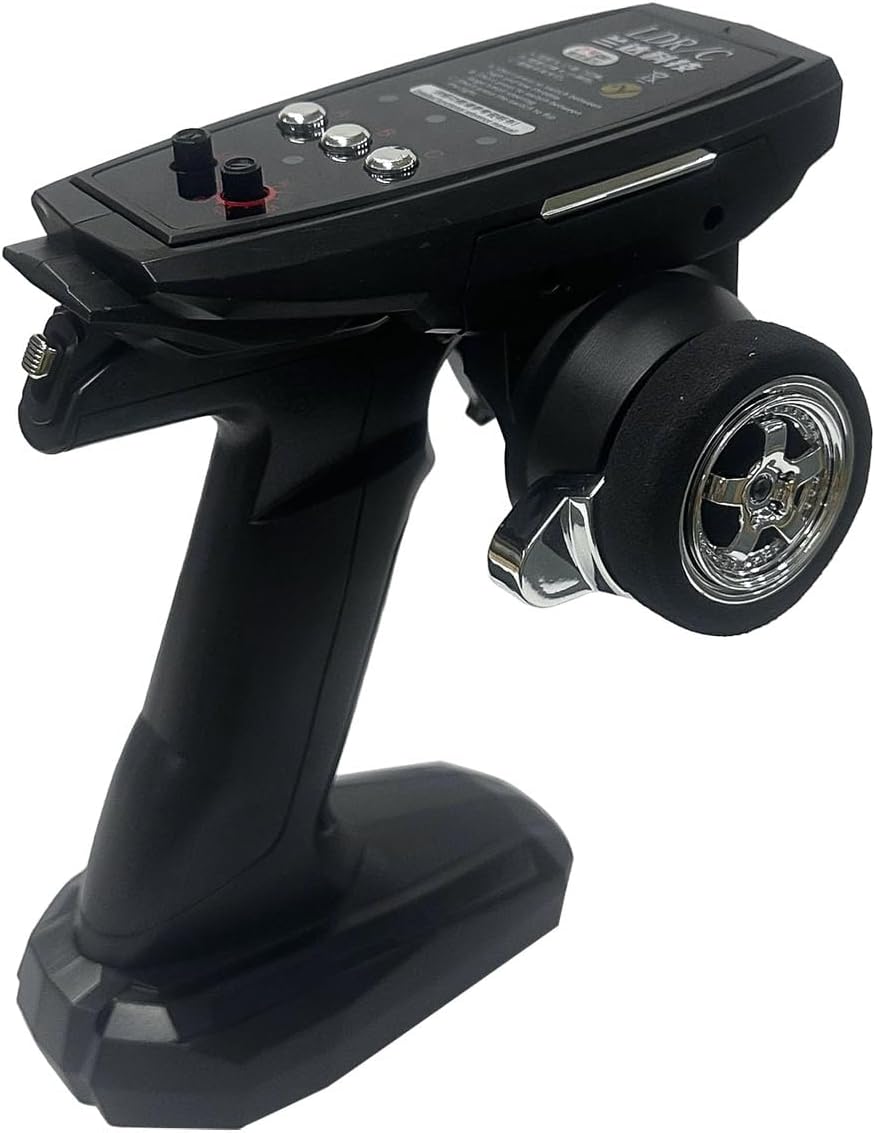
Image: The 2.4G 3-channel remote control used to operate the LDRC 1/18 Rx7 RC Racing Car.
4.3 Pairing the Remote Control
- Turn on the RC car using the power switch.
- Turn on the remote control.
- The car and remote should automatically pair. If not, refer to the specific pairing instructions on the remote control or car manual for a binding button/process.
5. Operating Instructions
5.1 Basic Controls
- Throttle: Use the trigger on the remote control to accelerate forward or reverse. Pull the trigger for forward motion, push for reverse.
- Steering: Use the steering wheel on the remote control to turn the car left or right.
- Trim Adjustments: If the car does not drive straight, use the steering trim dial on the remote to fine-tune the steering alignment.
5.2 Drifting Techniques
The LDRC 1/18 Rx7 is designed for RWD drifting. The built-in gyroscope assistance system helps maintain stability during slides. Practice in an open area to master control:
- Initiate a drift by turning sharply while applying throttle.
- Counter-steer (turn the steering wheel in the opposite direction of the turn) to maintain the slide.
- Adjust throttle input to control the speed and angle of the drift.

Image: The LDRC 1/18 Rx7 RC car executing a controlled drift on a miniature track, showcasing its RWD capabilities.
Video: Demonstration of the LDRC 1/18 Rx7 RC Racing Car performing various drift maneuvers on a track.
Video: Footage of the wheelfun LDRC 1/18 Rx7 RC Racing Car showcasing its RWD gyroscope drift capabilities.
5.3 Light System Operation
The RC car is equipped with a functional light system, including headlights and taillights. These lights typically activate automatically when the car is powered on or can be controlled via a dedicated button on the remote, if available. The pop-up headlights add to the realistic appearance.

Image: Detailed view of the RC car's front, highlighting the illuminated pop-up headlights and lower fog lights.
Video: A short clip demonstrating the functional pop-up headlights and other lighting features of the RC car.
6. Maintenance
Regular maintenance will extend the life and performance of your RC car.
- Cleaning: After each use, especially outdoors, gently wipe down the car with a soft, dry cloth to remove dust and debris. Avoid water or harsh chemicals.
- Battery Care: Always fully charge the battery before storage if not used for an extended period. Do not overcharge or completely drain the battery. Store in a cool, dry place.
- Component Check: Periodically inspect the wheels, metal drive shaft, and suspension components for any signs of wear or damage. Ensure all screws are tight.
- Storage: Store the RC car and remote in a dry, cool environment away from direct sunlight and extreme temperatures.

Image: The underside of the RC car, showing the chassis, suspension, and drive shaft components for inspection and maintenance.

Image: An exploded diagram illustrating the internal components of the RC car, including the motor, servo, and independent suspension.
7. Troubleshooting
If you encounter issues with your LDRC 1/18 Rx7 RC Racing Car, please refer to the following common problems and solutions:
| Problem | Possible Cause | Solution |
|---|---|---|
| Car does not turn on | Low or uncharged battery; Loose battery connection; Power switch off | Charge battery; Reconnect battery securely; Turn on power switch |
| Remote not responding | Remote batteries low; Not paired; Interference | Replace remote batteries; Re-pair remote and car; Move to an area with less interference |
| Poor drifting performance | Gyroscope setting; Surface type; Worn tires | Adjust gyroscope sensitivity (if applicable); Use on smooth, low-grip surfaces; Replace worn drift tires |
| Lights not working | Loose wiring; Damaged LED; Power issue | Check connections; Contact support if damaged; Ensure car battery is charged |
If the problem persists after trying these solutions, please contact customer support.
8. Specifications
- Product Dimensions: 12 x 6.8 x 6.4 inches
- Item Weight: 1.76 pounds
- Scale: 1:18
- Drive System: Rear-Wheel Drive (RWD)
- Control System: 2.4G 3-Channel Wireless Control
- Special Features: Built-in Gyroscope Assistance System, Full-Proportional Throttle and Steering, Metal Drive Shaft, Light System
- Model Number: de35bfff-238b-43ed-83ab-3f5de34df1e9
- Manufacturer: wheelfun

Image: Front perspective of the LDRC 1/18 Rx7 RC Racing Car, highlighting its detailed 1:18 scale design.

Image: Rear perspective of the LDRC 1/18 Rx7 RC Racing Car, showing the taillights and exhaust details.
9. Warranty and Support
This product comes with a standard manufacturer's warranty. For detailed warranty information, please refer to the warranty card included in your package or visit the official wheelfun website. If you require technical assistance, replacement parts, or have any questions not covered in this manual, please contact wheelfun customer support through their official channels or the retailer where you purchased the product.
Typical return policy duration is 30 days from purchase.
Ask a question about this manual
Ask about setup, troubleshooting, compatibility, parts, safety, or missing instructions. Manuals+ will review the question and use this page’s manual context to help answer it.