
Introduction
Thank you for choosing the Growell HS02 Hydroponics Growing System Kit. This manual provides essential information for setting up, operating, and maintaining your indoor garden. This system allows you to cultivate herbs, vegetables, fruits, and flowers indoors with ease, utilizing advanced hydroponic technology for efficient growth.
Video: Growell Indoor Garden - Grow effortlessly all year round. This video provides a general overview of the Growell hydroponics system and its benefits.
Safety Information
- Always ensure the power adapter is connected to a suitable power outlet (100-120V, 60Hz).
- Do not immerse the main unit or electrical components in water.
- Keep out of reach of children to prevent accidental interference with settings or electrical hazards.
- Use only the provided power adapter and components.
- Avoid direct contact with LED grow lights for extended periods.
Package Contents
Your Growell Hydroponics Growing System Kit includes the following items:
- Hydroponic System x1
- Hole Cover x9
- Plastic Hat x17
- Tag x17
- Sticker x17
- Basket x17
- Sponge x17
- Tweezer x1
- Rubber Stopper x1
- Nutrient Solution A+B
- A+B Nutrient Solution Refill Pack
- Adapter x1
- User Manual x1

Image: All components included in the Growell Hydroponics Growing System Kit, laid out on a surface. This includes the main unit, light panel, plant baskets, sponges, nutrient solutions, and tools.
Setup
- Assemble the System: Insert the adjustable light pole into the base unit. Attach the LED grow light panel to the top of the pole. Ensure all connections are secure.
- Prepare Seed Pods: Place a sponge into each plant basket. Soak the sponges in water for 5 minutes before placing seeds. Insert your desired seeds into the center hole of each sponge.
- Place Seed Pods: Insert the prepared plant baskets into the designated holes on the planter panel. If not all pods are used, cover empty holes with the provided hole covers to prevent algae growth and water evaporation.
- Add Water and Nutrients: Open the water inlet cap on the planter panel. Fill the 10L water tank with fresh water up to the 'Max' line indicated by the water viewing window. Add the appropriate amount of Nutrient Solution A and B as per the instructions on the bottles (typically 5ml of A and 5ml of B per liter of water).
- Connect Power: Plug the power adapter into the system's power port and then into a wall outlet.
- Initial Settings: Press the Power button on the control panel to turn on the system. The default light cycle is 16 hours on and 8 hours off.
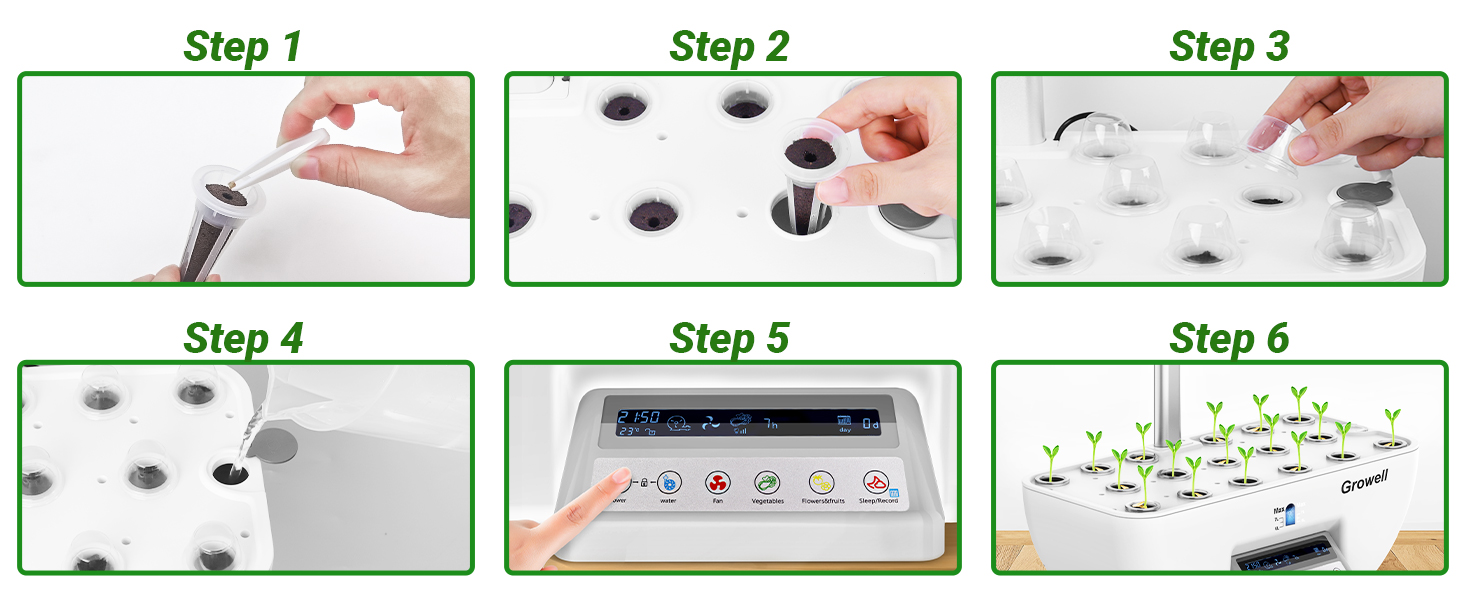
Image: A visual guide showing six steps for setting up the hydroponics system, from placing seeds in sponges to powering on the unit.
Operating Instructions
The Growell Hydroponics System features a user-friendly control panel with a large 5.4-inch screen for easy operation.

Image: Close-up of the multifunctional touch control console, showing buttons for Power, Water, Fan, Vegetables, Flowers & Fruits, and Sleep/Record, along with a digital display.
- Power Button: Press to turn the system ON/OFF. Hold for 3 seconds to enter time setting mode.
- Child Lock: Press the lock icon to activate/deactivate child lock, preventing accidental changes to settings.
- Water Pump: The intelligent water pump operates on a 30-minute cycle (30 mins ON, 30 mins OFF) to ensure optimal water circulation and oxygenation. Press the 'Water' button to manually activate/deactivate the pump.
- Fans: Two built-in fans mimic natural air currents. Press the 'Fan' button to adjust fan speed (three speeds available).
- Light Modes:
- Vegetable Mode: Provides white and blue light, beneficial for leafy greens.
- Flower & Fruit Mode: Provides pink and red light, promoting germination, flowering, and fruiting.
- Height Adjustment: The light pole is adjustable from 7.6 to 23.8 inches. Loosen the knobs on the pole to raise or lower the light panel as your plants grow.
- Sleep/Record: Press to activate sleep mode (lights off). Hold for 3 seconds to view the planting days record.
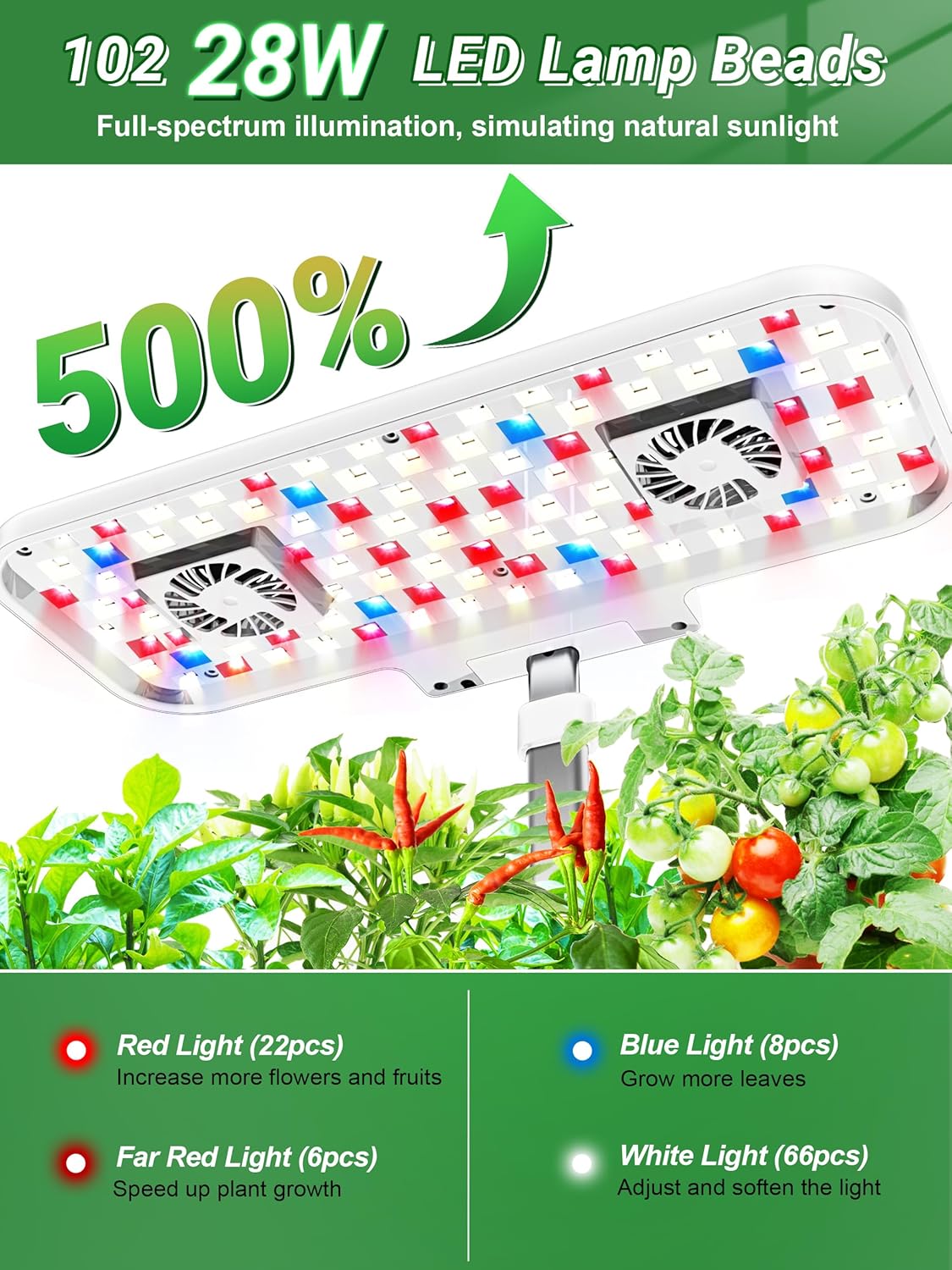
Image: The LED grow light panel with 102 28W full-spectrum lights (red, blue, white, far-red) and two integrated fans.
Maintenance
- Water Level: Regularly check the water viewing window to ensure the water level is between 6L and 7L. Refill with fresh water as needed.
- Nutrient Solution: Replenish nutrient solutions every 2-3 weeks, or as indicated by plant growth. Follow the dosage instructions on the nutrient bottles.
- Cleaning: Periodically clean the water tank and pump to prevent algae buildup. Disconnect power before cleaning.
Troubleshooting
- Plants not growing: Ensure correct light mode is selected, nutrient levels are adequate, and sponges are moist. Check that the water pump is circulating.
- Pump not circulating: Verify the pump cord is securely plugged into the unit. Check for any obstructions in the pump or water circulation system.
- Control panel unresponsive: Ensure the unit is powered on. If child lock is active, deactivate it. If issues persist, unplug and replug the power adapter.
Specifications
| Material | Plastic (Food Grade ABS) & Stainless Steel |
| Color | White & Grey |
| LED Grow Lights | 102 28W Full-Spectrum (White, Red, Blue, Far-Red) |
| Water Tank Capacity | 10 Liters |
| Fans | 2 Built-in, Three-speed Adjustable |
| Light Pole Height | Adjustable 7.6-23.8 inches |
| Planting Pods | 17 |
| Voltage/Frequency | 100-120 Volts, 60 Hertz |
| Product Dimensions | 9.45"D x 17.7"W x 29.92"H |
| Item Weight | 7.09 pounds |
Warranty and Support
Your Growell Hydroponics Growing System Kit is covered by a manufacturer's warranty. Please refer to the product packaging or contact Growell customer support for specific warranty details and assistance. For any questions, troubleshooting, or support needs, please reach out to our dedicated customer service team.

