
1. Introduction
The BodyPedia Body Composition Scale is an advanced bioimpedance analysis (BIA) device designed to provide comprehensive insights into your body's composition. Utilizing Direct Segmental Multi-Frequency Bioelectrical Impedance Analysis (DSM-MFBIA) with 8 electrodes and 3 frequencies, it offers precise measurements of over 40 body data points, including weight, muscle mass, body fat, and segmental analysis. This manual provides essential information for safe and effective use of your BodyPedia scale.

Image 1.1: BodyPedia Body Composition Scale with its accompanying mobile application interface.
2. Safety Information
Please read all safety instructions before using the device. Failure to follow these instructions may result in inaccurate readings or personal injury.
- Do not use this device if you have a pacemaker or other implanted medical electronic device.
- Do not use this device if you are pregnant.
- Keep the scale on a stable, flat, and hard surface during use to ensure accuracy and prevent tipping.
- Do not step on the scale with wet feet or if the scale surface is wet, as this may cause slipping.
- Consult a healthcare professional for interpretation of your body composition data and before making any health-related decisions. This device is for informational purposes and not intended to diagnose, treat, cure, or prevent any disease or health condition.
- Keep out of reach of children.
3. Package Contents
Verify that all items are present in the package:
- BodyPedia Body Composition Scale (Main Unit)
- Handheld Electrodes with Retractable Cable
- User Manual (this document)
4. Setup
4.1 Initial Placement
Place the BodyPedia scale on a hard, flat, and stable surface. Avoid carpets or uneven flooring, as this can affect measurement accuracy.
4.2 Connecting Handheld Electrodes
The handheld electrodes are connected via a retractable cable. Gently pull the cable from the side of the scale to extend it. Ensure the connection is secure before use.
4.3 App Download and Pairing
- Download the 'BodyPedia' app from your device's app store (available for iOS and Android).
- Create a user profile within the app.
- Enable Bluetooth on your smartphone.
- Open the BodyPedia app and follow the on-screen instructions to pair your scale. The app will guide you through the process of connecting to the device.
- Ensure the scale is powered on (by stepping on it briefly) to make it discoverable for pairing.
5. Operating Instructions
5.1 Taking a Measurement
- Ensure your feet are bare and clean.
- Step onto the scale, placing your feet on the designated electrode areas.
- Hold the handheld electrodes with bare hands, ensuring firm contact with all four hand electrodes.
- Stand still and maintain a natural posture until the measurement is complete. The scale display will show your weight, and the app will provide detailed body composition data.
- The scale's extra-large ITO coated surface accommodates various foot sizes, ensuring higher conductivity for accurate results.

Image 5.1: The extra-large ITO coated surface of the BodyPedia scale for enhanced conductivity.
5.2 Understanding the Display and App Sync
The scale's integrated display will show your weight. For all other body composition data, refer to the BodyPedia app. Measurements are automatically synchronized with your paired BodyPedia App and can also be integrated with Apple Health for comprehensive health tracking.
5.3 User Management
The BodyPedia app supports unlimited user profiles, making it suitable for families and multiple users. The device features automatic user recognition once profiles are set up in the app.

Image 5.2: User-friendly features of the BodyPedia scale, including Apple Health sync and unlimited user management.
6. Key Features
6.1 Advanced DSM-BIA Technology with 3 Frequencies
The BodyPedia scale employs Direct Segmental Multi-Frequency Bioelectrical Impedance Analysis (DSM-MFBIA) using three distinct frequencies (low, medium, high). This advanced technology measures both intracellular and extracellular fluids, providing highly accurate and precise body composition measurements validated against gold-standard methods.

Image 6.1: Comparison of BodyPedia's 3-frequency measurement technology against other scales.

Image 6.2: Visual representation of BodyPedia's 8-electrode, 3-frequency measurement system.
6.2 Segmental Muscle/Fat Analysis & 3D Body Modeling
With its 8-electrode system (4 foot electrodes, 4 hand electrodes), the BodyPedia scale provides detailed segmental analysis of muscle and fat distribution across your body (legs, torso, arms). The 3D body modeling technology allows for precise measurement of body circumferences such as chest, waist, hip, arms, thighs, and neck, aiding in targeted physical performance improvement.

Image 6.3: Visualize your body in 3D with detailed body measurements and segmental analysis.
6.3 40+ Body Data Points
The BodyPedia scale provides a comprehensive report of over 40 body composition data points, including but not limited to:
- Weight, Percent Body Fat, BMI, Bone Mineral, Total Body Water
- Protein, Visceral Fat, Minerals, Muscle Mass, Skeletal Muscles, Fat Mass
- Waist-Hip Ratio, Moisture Rate, Score, Body Shape, Fat-Free Mass, Fatty Liver
- Ideal Weight, Weight Control, Fat Control, Muscle Control, Edema Evaluation, Upper Balance, Lower Balance
- Segmental Analysis: Lean Analysis (Upper-Lower, Right Arm, Left Arm, Trunk, Right Leg, Left Leg), Fat Analysis (Trunk, Right Arm, Left Arm, Right Leg, Left Leg)
- Circumferences: Chest, Waist, Hip, Neck, Arm, Thigh

Image 6.4: A comprehensive list of over 40 body composition data points provided by BodyPedia.
6.4 Sleek Design with Hidden Handles
The scale features a minimalist design with hidden, retractable handles, ensuring easy storage and portability. The design prevents cable tangles and maintains a clean aesthetic.
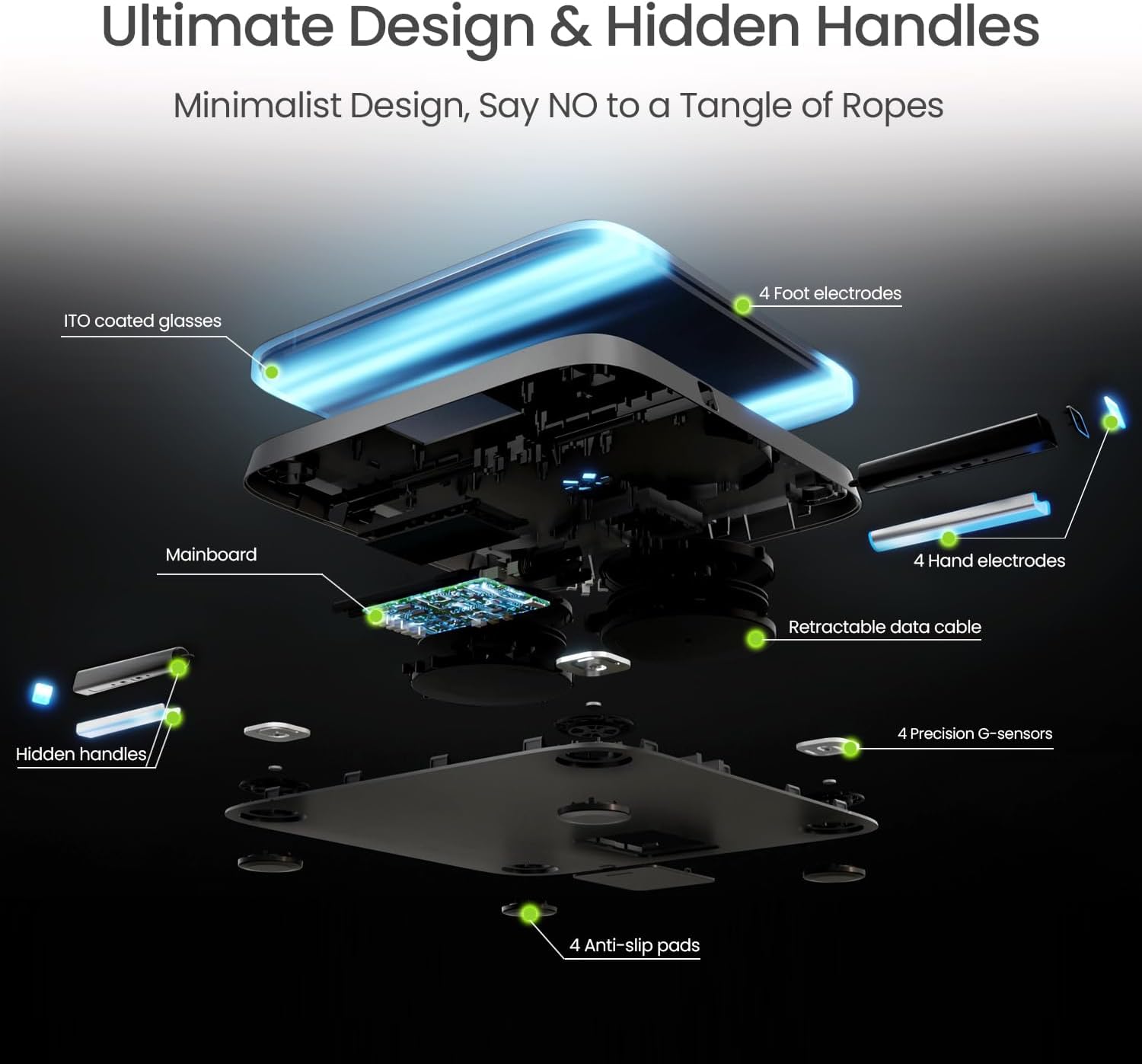
Image 6.5: Internal components and the hidden handle design of the BodyPedia scale.
7. Maintenance
7.1 Cleaning
Wipe the scale surface with a soft, damp cloth. Do not use abrasive cleaners or immerse the device in water. Ensure the scale is dry before storage or next use.
7.2 Storage
Store the scale in a cool, dry place. Retract the handheld cable fully before storing to prevent damage.
8. Troubleshooting
8.1 No Reading / Inaccurate Reading
- Ensure the scale is on a hard, flat surface.
- Make sure your feet and hands are bare and making full contact with all electrodes.
- Check if the handheld cable is securely connected.
- Ensure the scale is clean and free of debris.
8.2 App Not Syncing Data
- Verify Bluetooth is enabled on your smartphone.
- Ensure the BodyPedia app is open and running during the measurement.
- Try restarting the app and your phone's Bluetooth.
- If issues persist, unpair and re-pair the device within the app settings.
9. Specifications
| Product Dimensions | 12.4 x 12.4 x 1.3 inches |
| Item Weight | 6.39 Pounds |
| Item Model Number | BP-B02 |
| Manufacturer | BodyPedia |
| ASIN | B0D79FL8QV |
| Brand | BodyPedia |
| Color | Black |
| Display Type | Touchscreen |
| Form Factor | Handheld |
| Weigh Scale Type | Counter Scale |
10. Warranty and Support
BodyPedia products are manufactured to high-quality standards. For specific warranty information and customer support, please refer to the warranty card included with your product or visit the official BodyPedia website. You may also contact the seller directly for assistance.


