
1. Introduction and Overview
The ARREGUI CI30P is an invisible security door lock designed to enhance the security of your premises. Its unique design allows it to be installed on the interior side of the door, making it undetectable from the outside. This lock functions as a secondary security measure, complementing your existing conventional door lock.
This manual provides detailed instructions for the installation, operation, maintenance, and troubleshooting of your ARREGUI CI30P Invisible Security Door Lock. Please read it carefully before use to ensure proper functionality and safety.
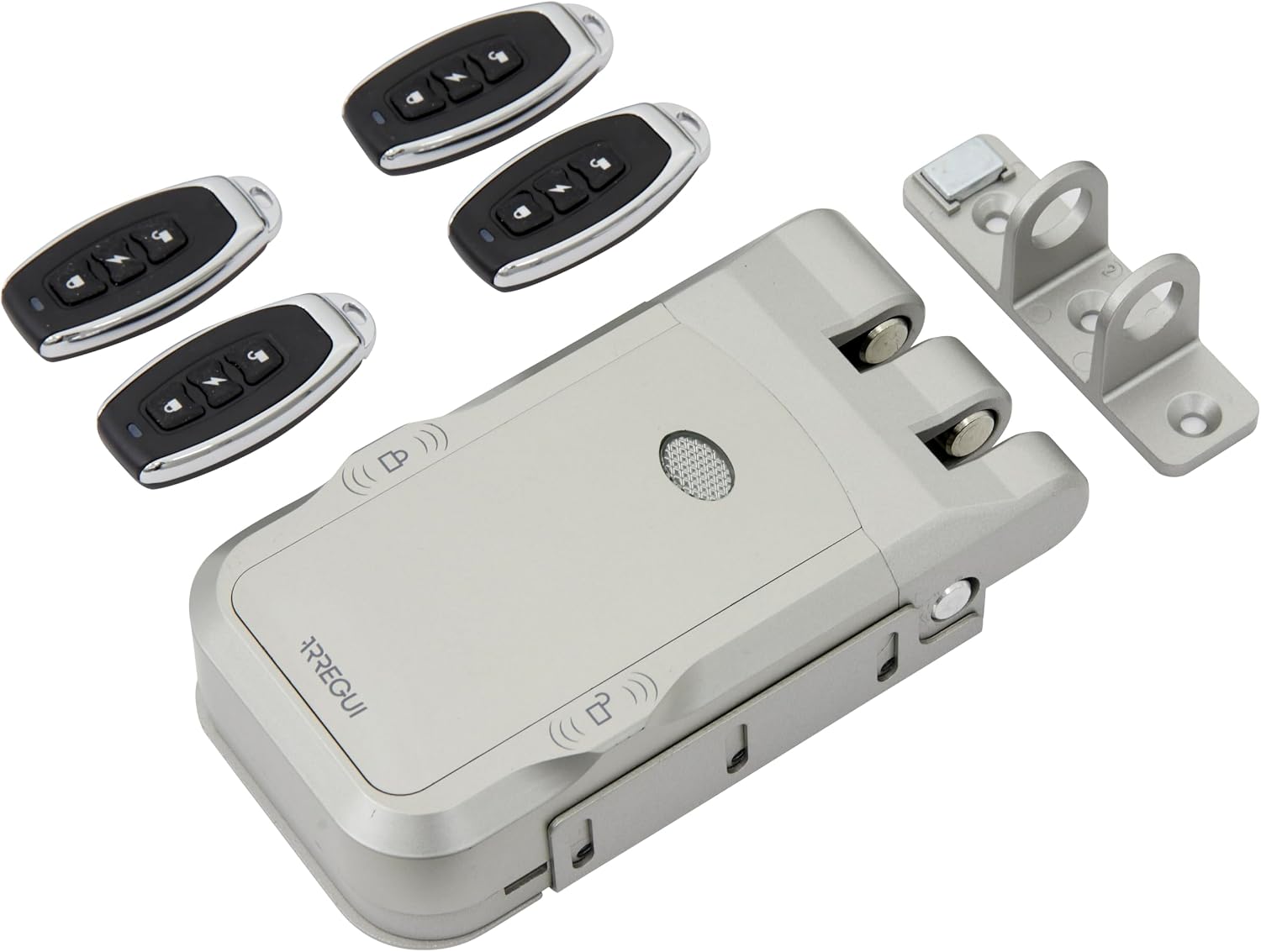
Image 1.1: ARREGUI CI30P Invisible Security Door Lock components, including the main lock unit, four remote controls, and the mounting bracket.
2. Setup and Installation
The ARREGUI CI30P lock is designed for straightforward installation without the need for complex wiring. It is suitable for both wooden and metal doors.
2.1 Included Components
- 1 x ARREGUI CI30P Invisible Security Door Lock Unit
- 4 x Remote Controls
- 1 x Mounting Plate
- 1 x Locker (Strike Plate)
- Fixing Screws
- 4 x AA 1.5V Alkaline Batteries
- User Manual (this document)
2.2 Installation Steps
- Prepare the Door Surface: Ensure the interior surface of your door where the lock will be mounted is clean and flat.
- Position the Mounting Plate: Determine the desired height for the lock. The lock should be placed on the interior side of the door, away from the conventional lock, to maximize its "invisible" security feature. Mark the screw holes for the mounting plate.
- Attach the Mounting Plate: Securely fasten the mounting plate to the door using the provided fixing screws.
- Install the Lock Unit: Slide the ARREGUI CI30P lock unit onto the mounted plate. Ensure it clicks into place securely.
- Install the Locker (Strike Plate): With the door closed, align the locker (strike plate) with the lock's bolt mechanism on the door frame. Mark and secure the locker with the remaining fixing screws.
- Insert Batteries: Open the battery compartment on the lock unit and insert the 4 AA 1.5V alkaline batteries, observing correct polarity.
- Test Functionality: After installation, test the lock's operation using the manual buttons and a remote control to ensure it locks and unlocks smoothly.

Image 2.1: Example of the ARREGUI CI30P lock installed on the interior side of a door.
3. Operating Instructions
3.1 Opening and Closing the Lock
The ARREGUI CI30P lock offers multiple methods for opening and closing:
- Manual Operation: The lock unit features dedicated buttons for manual opening and closing. These are located directly on the lock body.
- Remote Control: Use one of the provided remote controls to operate the lock. Press the designated button on the remote to lock or unlock the door.

Image 3.1: The four remote controls included with the ARREGUI CI30P lock.
3.2 Automatic Closing Feature
The lock can be configured for automatic closing. When this feature is enabled, the lock will automatically engage after the door is closed. The lock will emit a beep, and after approximately 4 seconds, it will close. If this feature is active, remember that you will need a remote control to open the lock from the outside.
3.3 Remote Control Management
The ARREGUI CI30P comes with 4 remote controls. In the event of loss or theft of a remote control, they can be reprogrammed. Additional remote controls can be purchased separately, with support for up to 10 controls per lock.
Refer to the specific reprogramming instructions in the full user manual for detailed steps on adding or removing remote controls.
4. Maintenance
4.1 Battery Replacement
The lock is powered by 4 AA 1.5V alkaline batteries. When the batteries are running low, the lock will emit an audible and visual warning. It is crucial to replace the batteries promptly when these warnings occur to ensure continuous operation.
To replace batteries:
- Locate the battery compartment on the lock unit.
- Open the compartment cover.
- Remove the old batteries and dispose of them responsibly.
- Insert 4 new AA 1.5V alkaline batteries, ensuring correct polarity (+/-).
- Close the battery compartment cover.
4.2 Emergency Power
In case of completely depleted batteries, the lock features a micro USB port for emergency power. Connect a standard micro USB cable to this port and a power source (e.g., power bank) to temporarily power the lock and open it.
4.3 General Care
Keep the lock unit clean and free from dust and debris. Avoid using abrasive cleaners or solvents, which can damage the finish or internal components. Periodically check that all mounting screws are tight.
5. Troubleshooting
This section addresses common issues you might encounter with your ARREGUI CI30P lock.
- Lock does not respond to remote control:
- Check the batteries in the remote control and replace if necessary.
- Check the batteries in the main lock unit and replace if necessary.
- Ensure you are within the effective range of the remote control.
- Reprogram the remote control if it has lost its pairing.
- Lock does not open/close manually:
- Ensure there are no obstructions preventing the bolt from moving freely.
- Check the battery level of the main lock unit.
- Low battery warning:
- Replace the 4 AA 1.5V alkaline batteries in the main lock unit immediately.
- If batteries are completely dead, use the micro USB port for emergency power to open the lock.
- Emergency Opening:
- The lock has an emergency release system for manual operation.
- If the main motor fails, a backup motor can be activated by pressing the middle button on the remote control to open the lock.
If you encounter issues not covered here or require further assistance, please contact ARREGUI Technical Assistance Service.
6. Specifications
| Brand | ARREGUI |
| Model Name | CI30P |
| Lock Type | Electronic Lock |
| Special Feature | Anti-theft |
| Material | Alloy Steel |
| Dimensions (L x W x H) | 1.42 x 6.5 x 3.43 inches (3.6 x 16.5 x 8.7 cm) |
| Weight | 1.32 pounds (0.6 Kilograms) |
| Power Source | 4 x AA 1.5V Alkaline Batteries |
| Controller Type | Remote Control |
| Max Remote Controls | Up to 10 (4 included) |
| Included Components | Lock, 4 remote controls, mounting plate, locker, fixing screws, 4 AA batteries, user manual |

Image 6.1: Dimensional diagram of the ARREGUI CI30P lock and its components.
7. Warranty and Support
ARREGUI is committed to providing quality products and customer satisfaction. For any incidents, questions, or needs arising from the use of your ARREGUI CI30P Invisible Security Door Lock, please contact the official ARREGUI Technical Assistance Service.
Contact information for technical assistance can typically be found on the ARREGUI official website or through the retailer where the product was purchased.


