
Introduction
The Nutale Air Tag is a Bluetooth item finder designed to help you locate your personal belongings using Apple's Find My app. It offers global tracking capabilities, left-behind alerts, and robust privacy features, making it an ideal solution for keeping track of keys, luggage, backpacks, and more.
This device is compatible exclusively with Apple iOS devices and leverages the extensive Find My network for location services.
Setup Guide
Follow these steps to set up your Nutale Air Tag with your Apple device:
- System Requirement: Ensure your iPhone system version is iOS 14.5 or later. For sharing features, iOS 17 or above is required.
- Enable Permissions: Allow the Find My App to use Notifications, Location, and Bluetooth. Also, allow Find My App to use WLAN & Cellular Data for optimal performance.
- Power On: Long press the button on your Nutale Air Tag for 5 seconds to turn on the device.
- Open Find My App: On your Apple device, open the pre-installed "Find My" app.
- Add Item: Tap on "Items" at the bottom of the screen, then tap "Add Item".
- Select Other Supported Item: Choose "Other Supported Item" from the options.
- Link to Apple ID: Follow the on-screen prompts to link the Nutale Air Tag to your Apple ID.
- Finish: Once linked, the device will appear in your "Items" list, and you can begin tracking.
Important Note: If you do not see an "Items" option in your Find My App, please update your iOS system to the latest version.

Image: Visual guide showing the 5-step process to add the Nutale Air Tag to the Apple Find My app, from opening the app to linking the device.
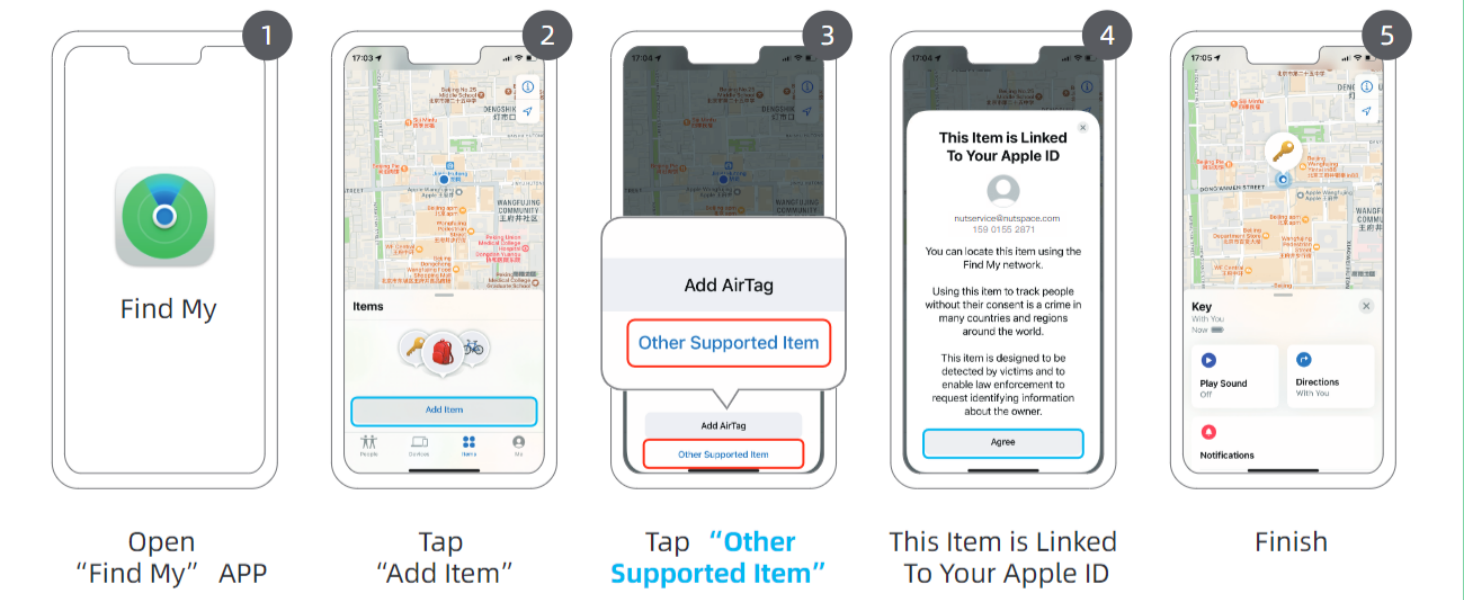
Image: A detailed visual breakdown of the setup process, illustrating each step within the Find My app interface.

Image: An important tip highlighting the requirement for iOS system upgrade to 18.0.1 (or later) to bind the Nutale Air Tags.
Video: Official Nutale video demonstrating how to use the Nutale Air Key Finder Tag with iOS Find My App for long-distance and nearby item location.
Operating Instructions
Global Tracking and Location
The Nutale Air Tag utilizes Apple's Find My network for global positioning. Even if your item is out of Bluetooth range, its location can be updated by any nearby Apple device within the network. You can view the last known location on a map within the Find My app.

Image: The Nutale Air Tag shown alongside an iPhone displaying the Find My app interface, highlighting features like privacy, replaceable battery, and global precision search.

Image: A hand holding a Nutale Air Tag and an iPhone, illustrating the global positioning capability and compatibility with Apple Find My.
Finding Nearby Items (Sound Alerts)
When your Nutale Air Tag is within Bluetooth range (approximately 20 to 50 meters), you can use the Find My app to play a sound on the tag to help you locate it quickly. The tag can ring loudly up to 100dB.
- Open the Find My app.
- Select your Nutale Air Tag from the "Items" list.
- Tap "Play Sound" to activate the audible alert.

Image: A Nutale Air Tag placed on a wooden tray with keys, visually representing its ability to ring loudly for easy location.
Left-Behind Alerts and Notifications
Receive instant notifications on your Apple device if you leave your Nutale Air Tag behind. This feature helps prevent loss by alerting you when the tag disconnects from your device's Bluetooth range.

Image: A Nutale Air Tag attached to a backpack, demonstrating its use for tracking luggage and other items.
Privacy and Security
Your location data is private and secure. The Nutale Air Tag does not store location information. Only you can access the item's location through your Find My app. Neither Apple nor Nutale can access this data. The device supports Lost Mode and other advanced security features, ensuring encrypted location data and protection against unauthorized access.
Sharing Features (iOS 17+)
For users with iOS 17 or above, the Nutale Air Tag supports sharing features, allowing you to share the item's location with family or friends for collaborative tracking.
Maintenance
Battery Replacement
The Nutale Air Tag uses a replaceable CR2032 battery, which typically lasts over a year. To replace the battery:
- Locate the small groove on the side of the Nutale Air Tag.
- Use a coin or a similar flat tool to gently twist and open the casing.
- Remove the old CR2032 battery.
- Insert a new CR2032 battery with the positive (+) side facing up.
- Align the two halves of the casing and press firmly until it clicks securely into place.
Note: Dispose of used batteries responsibly according to local regulations.
Troubleshooting
- Device Not Appearing in Find My App:
- Ensure your iOS device is updated to iOS 14.5 or later (iOS 17+ for sharing features).
- Verify that the Nutale Air Tag is powered on (long press button for 5 seconds).
- Check if "Items" option is available in Find My App. If not, update iOS.
- Make sure Bluetooth is enabled on your Apple device.
- Try resetting the Nutale Air Tag by removing and reinserting the battery.
- Inaccurate Location:
- Location accuracy depends on the density of Apple devices in the Find My network. In isolated areas, updates may be less frequent.
- Ensure Find My App has location permissions enabled.
- Sound Alert Not Working:
- Ensure the Nutale Air Tag is within Bluetooth range of your Apple device.
- Check the battery level of the Nutale Air Tag.
Specifications
| Model Number | F11XC |
| Product Dimensions | 1.5"L x 1.5"W x 0.28"Th (38mm x 38mm x 7mm) |
| Item Weight | 0.317 ounces |
| Connectivity | Bluetooth |
| Battery Type | CR2032 (included) |
| Battery Life | Approximately 1 year |
| Material | Acrylonitrile Butadiene Styrene (ABS) |
| Compatibility | Apple iOS devices only (iOS 14.5+ required, iOS 17+ for sharing) |

Image: A visual representation of the Nutale Air Tag's size and thickness, indicating dimensions of 38mm x 38mm x 7mm.
Warranty and Support
Nutale provides a lifetime free tracking service with no additional fees for this product. For further assistance or warranty inquiries, please contact Nutale customer support through the retailer where the product was purchased or visit the official Nutale website.
Manufacturer: Nutale
