
Introduction
Thank you for choosing the BirdDock Smart Bird Feeder with 1296P HD Camera. This device allows you to observe wild birds up close, capture high-definition videos, and utilize AI recognition for species identification. This manual provides essential information for the proper setup, operation, and maintenance of your smart bird feeder.
Package Contents
Please verify that all items are present in your package:
- BirdDock Smart Bird Feeder housing (blue)
- 1296P HD Camera module
- Solar Panel
- USB Charging Cable
- Mounting Bracket
- Hose Clamps (for pole mounting)
- Flexible Mounting Strap
- Screwdriver with Screws and Wall Anchors
- User Manual (this document)
Setup Instructions
1. Camera Installation and Initial Charge
Carefully insert the camera module into its designated slot within the bird feeder housing. Ensure the protective film is removed from the camera lens. Before first use, fully charge the camera's built-in 6400mAh battery using the provided USB cable. The solar panel will maintain the charge once installed outdoors.
2. App Download and Wi-Fi Connection
Download the BirdDock application from your smartphone's app store. Follow the in-app instructions to connect the smart bird feeder to your home 2.4GHz Wi-Fi network. The device does not support 5GHz Wi-Fi. A fast connection typically takes 5-10 seconds.

Image: The BirdDock app facilitates a fast Wi-Fi connection to the smart bird feeder, enabling remote access and control.
3. Mounting the Feeder
Choose a suitable location for your bird feeder, ensuring the solar panel receives ample direct sunlight. The feeder can be mounted to a wall using the provided screws and anchors, or to a post using the hose clamps. The flexible mounting strap offers additional securing options. Ensure the mounting surface is sturdy enough to support the feeder's weight when filled with seed.
4. Filling Bird Seed
Open the top lid of the feeder and fill the transparent food container with your preferred bird seed. The large capacity reduces the frequency of refills.
Operating Instructions
1. Live Bird Watching and Notifications
Once connected to Wi-Fi, open the BirdDock app on your smartphone to view live footage from the camera. The integrated PIR sensor detects bird activity, triggering instant notifications to your phone when birds arrive at the feeder.
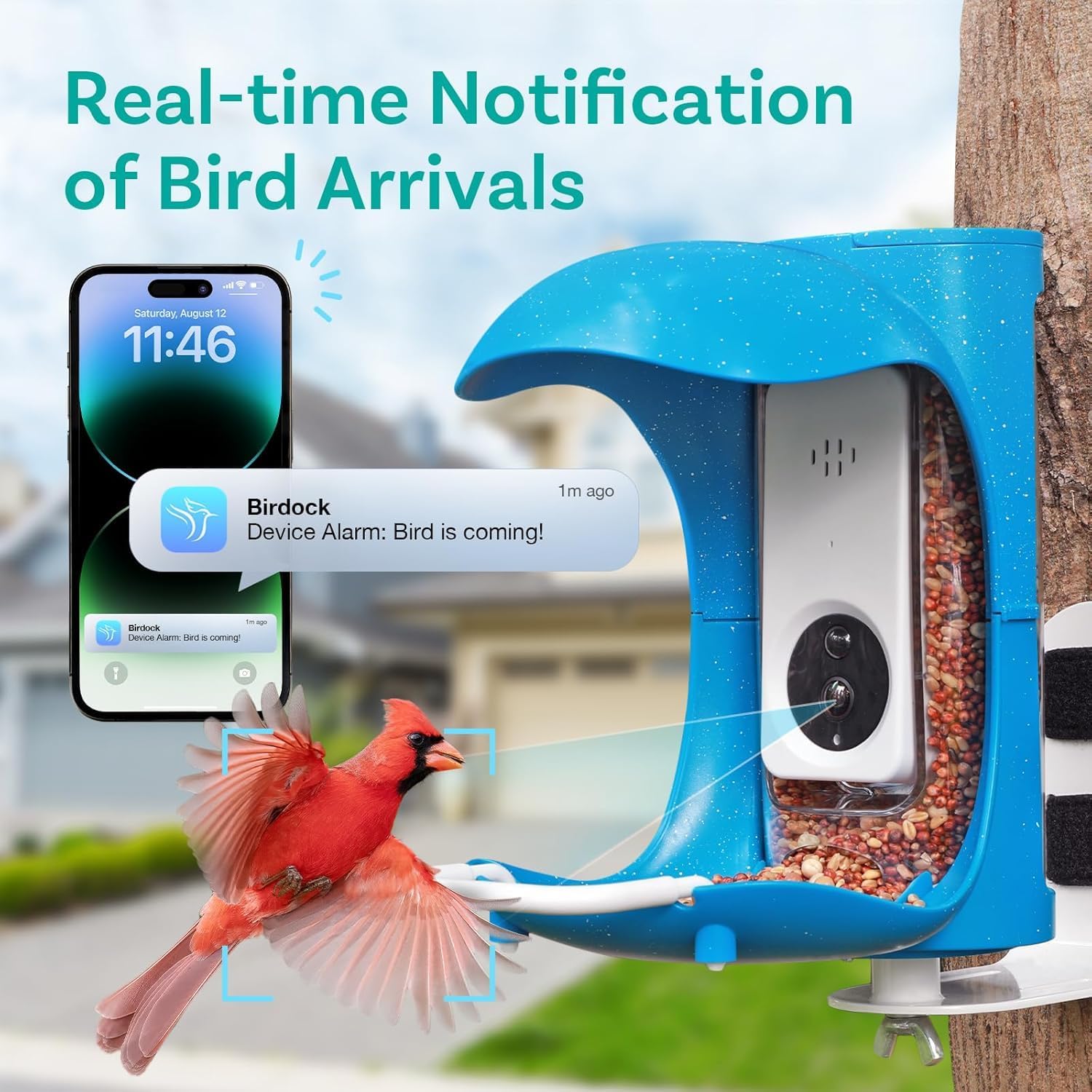
Image: Receive instant notifications on your smartphone when birds approach the feeder, allowing for real-time observation.
2. AI Bird Recognition
The camera features built-in AI bird recognition. When birds are detected, the system can identify different species using its extensive database of over 10,000 bird species. This information is accessible through the app and can help you provide appropriate feed for visiting birds.

Image: The BirdDock app's AI recognition feature identifies bird species with high accuracy, providing detailed information.
3. Video Recording and Storage
The camera automatically records videos when bird activity is detected. These videos can be saved to an SD card (not included) or to cloud storage (subscription may be required). You can review recorded moments through the app.
4. Sharing Moments
The BirdDock app allows you to easily share captured videos and images of birdlife with family and friends.

Image: The BirdDock app enables users to share captivating moments of birdlife with others.
Maintenance
1. Cleaning the Feeder
Regularly clean the bird feeder to prevent the spread of disease among birds and to ensure optimal camera performance. The feeder is designed for easy cleaning. Disassemble the components as needed and wash with mild soap and water. Rinse thoroughly and allow to dry completely before reassembly.
2. Refilling Bird Seed
Monitor the seed level in the transparent container and refill as necessary. The large capacity reduces the frequency of refills.
3. Solar Panel Care
Ensure the solar panel remains free of dirt, dust, and debris to maximize charging efficiency. Periodically wipe the panel with a soft, damp cloth.
4. Preventing Food Spoilage
The feeder features multiple drain ports at the bottom of the trough to prevent water accumulation and food spoilage. Ensure these ports remain clear.
Troubleshooting
1. Device Not Connecting to Wi-Fi
- Ensure your Wi-Fi network is 2.4GHz. The device does not support 5GHz networks.
- Check that the feeder is within range of your Wi-Fi router (up to 100m in open areas).
- Restart your router and the bird feeder, then attempt to reconnect.
- Verify correct Wi-Fi password entry in the app.
2. No Notifications Received
- Check your smartphone's notification settings for the BirdDock app to ensure they are enabled.
- Verify that the camera's motion detection settings are active in the app.
- Ensure the camera has sufficient battery charge.
3. Poor Video Quality or Night Vision
- Clean the camera lens to remove any dirt or smudges.
- Ensure there are no obstructions blocking the camera's view.
- For night vision, ensure there are no reflective surfaces close to the camera that could cause glare.
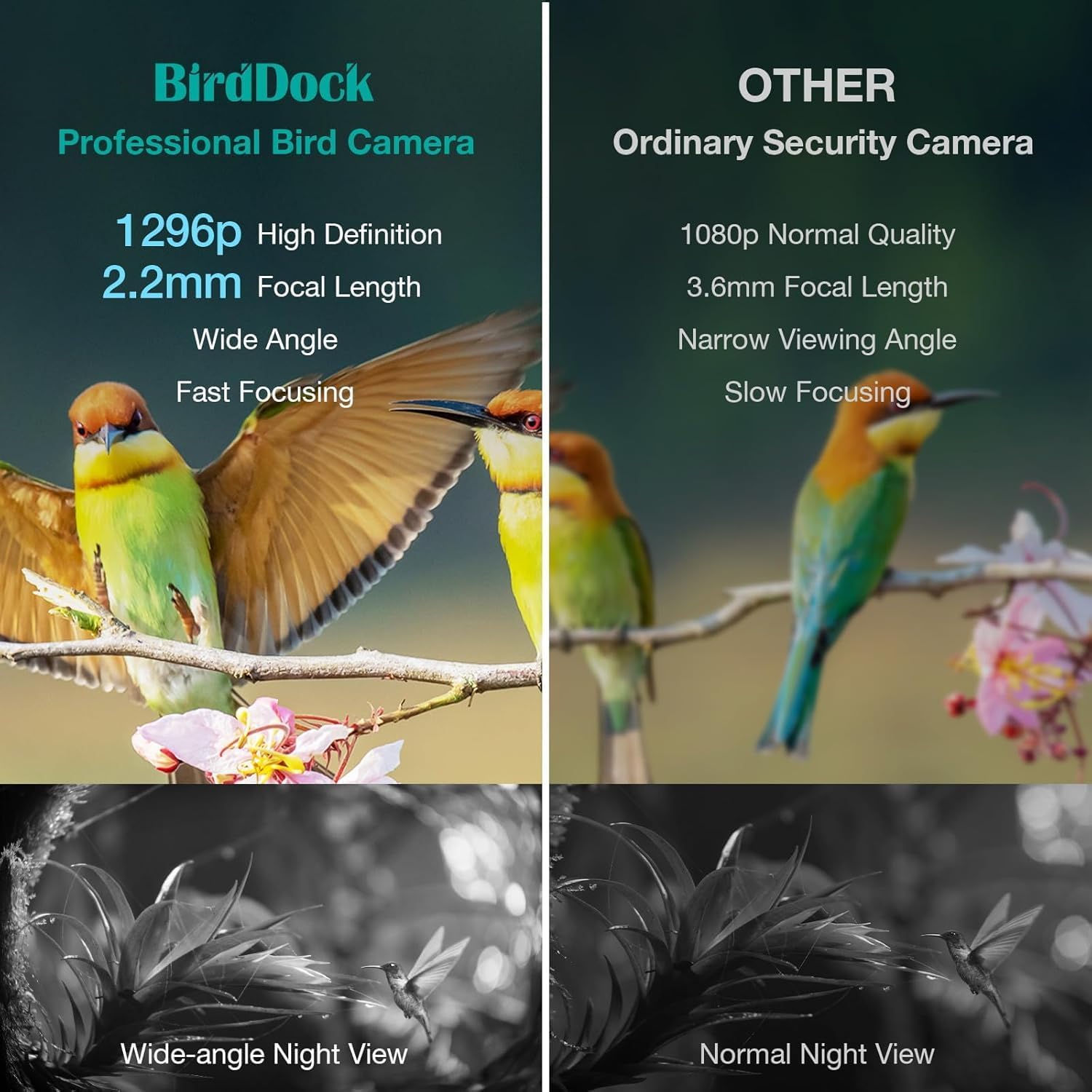
Image: The BirdDock camera offers superior 1296p HD resolution and wide-angle night vision compared to standard security cameras.
4. Battery Not Charging
- Ensure the solar panel is clean and exposed to direct sunlight for several hours daily.
- Check the connection between the solar panel and the camera.
- If the issue persists, try charging the camera directly via USB.
Specifications
| Brand | BirdDock |
| Model Number | 003 |
| Product Dimensions | 9.84"L x 7.44"W x 9.11"H |
| Item Weight | 4.71 pounds |
| Material | Plastic |
| Color | Blue Feeder Solar Panel |
| Power Source | Solar Powered |
| Special Feature | Long Lasting, Weatherproof (IP65 rated) |
| Mounting Type | Tabletop Mount (with included accessories for wall/post) |
| Batteries | 2 Lithium Ion batteries required (included) |
| Wi-Fi Connectivity | 2.4GHz HZ WiFi only |
Warranty and Support
BirdDock provides a worry-free 30-day return policy and a 3-year warranty for this product. For any queries or assistance, please refer to the comprehensive user-friendly manual or contact our round-the-clock customer support. Contact information can be found on the BirdDock official website or through your purchase platform.