
Mova HMH10A
Contents
MOVA K20 Wet and Dry Vacuum Cleaner User Manual
Model: HMH10A
1. Introduction
Thank you for choosing the MOVA K20 Wet and Dry Vacuum Cleaner. This manual provides essential information for the safe and efficient use, maintenance, and troubleshooting of your new appliance. Please read this manual thoroughly before first use and keep it for future reference.
2. Product Overview
Key Features
- Wet and Dry Cleaning: Adapts suction power based on dirt level, using humidified brushes to prevent water stains.
- Dual-Edge Cleaning: Designed to clean along baseboards and into tight corners, leaving only a 6mm gap on each side.
- Long Runtime: Up to 30 minutes of operation, covering effectively up to 200 m².
- Lightweight Design: Weighs less than 4 kg for easy portability between floors.
- Automatic Brush Self-Cleaning: Brush rotates clockwise and counter-clockwise for thorough cleaning, with a comb-tooth scraper to remove tangled hair.
- Voice Prompts: Provides real-time operational guidance and alerts.
Components
The MOVA K20 package includes the following components:
- Main Body
- Handle
- Charging Station
- Power Adapter
- Cleaning Brush
- Accessory Kit
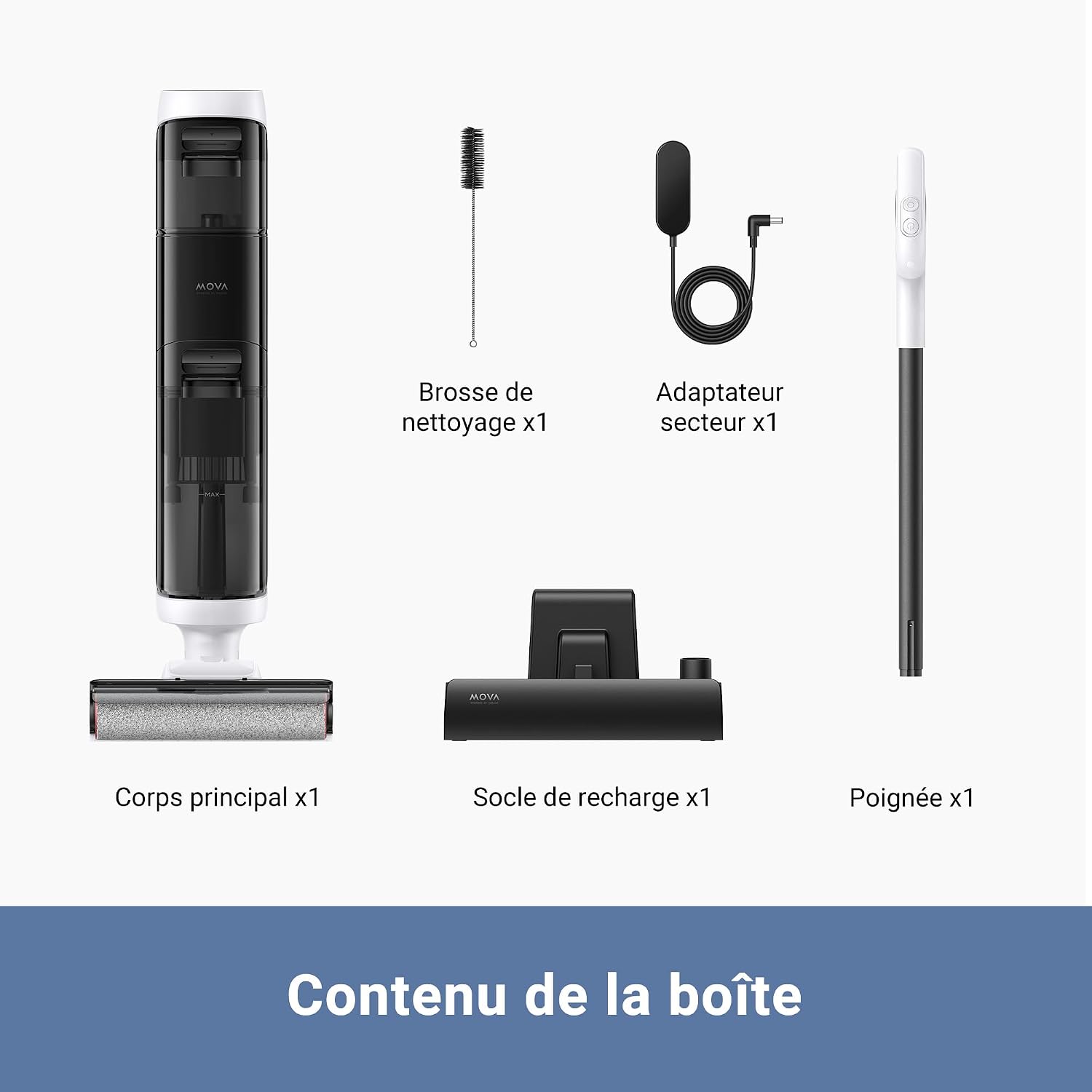
Image: All components included in the MOVA K20 package, including the main body, handle, charging station, power adapter, and cleaning brush.

Image: The MOVA K20 Wet and Dry Vacuum Cleaner in its upright position, showcasing its sleek design and integrated water tanks.
3. Setup
3.1 Assembly
- Insert the handle into the main body until it clicks securely into place.
- Place the charging station on a flat, stable surface near a power outlet.
- Connect the power adapter to the charging station and plug it into the wall outlet.
3.2 Initial Charging
Before first use, fully charge the MOVA K20. Place the assembled vacuum cleaner onto the charging station. The indicator lights will show the charging status. A full charge typically takes several hours.
3.3 Filling the Clean Water Tank
Locate the clean water tank (600ml capacity) on the main body. Open the tank cap and fill it with clean tap water. For optimal cleaning, you may add a small amount of non-foaming floor cleaning solution specifically designed for wet vacuums. Do not overfill. Close the cap securely.
4. Operation
4.1 Powering On and Mode Selection
Press the power button to turn on the MOVA K20. The vacuum offers three cleaning modes:
- Auto Mode: Automatically adjusts suction power based on the detected dirt level.
- Turbo Mode: Provides maximum suction for stubborn stains and heavy dirt.
- Suction Mode: Functions as a dry vacuum, ideal for picking up liquids without washing.
Switch between modes using the mode selection button on the handle.

Image: The MOVA K20 demonstrating its ability to clean both solid and liquid messes, with indicators for Auto, Turbo, and Suction modes.
4.2 Cleaning Performance
The K20 is designed for effective wet and dry cleaning. Its self-propulsion feature makes it easy to maneuver across floors. The dual-edge design ensures thorough cleaning even in tight spaces.

Image: The MOVA K20 cleaning close to a baseboard, highlighting its 6mm edge cleaning capability.
4.3 Battery Life and Coverage
With a fully charged battery, the MOVA K20 provides up to 30 minutes of continuous cleaning, sufficient to cover an area of approximately 200 square meters. The 7 x 2600mAh battery ensures consistent power throughout your cleaning session.

Image: A user cleaning with the MOVA K20 in a living room setting, illustrating its long battery life and coverage area.
4.4 Voice Prompts
The MOVA K20 features intelligent voice prompts to guide you during operation. These prompts will inform you about the current cleaning mode, battery status, and when to empty the dirty water tank or refill the clean water tank.

Image: The MOVA K20 in use, with speech bubbles indicating examples of voice prompts like "Suction Mode" and "Low battery. Please recharge."
5. Maintenance
5.1 Automatic Brush Self-Cleaning
After each use, place the MOVA K20 back on its charging station. Press the self-clean button to activate the automatic brush cleaning cycle. The brush will rotate in both clockwise and counter-clockwise directions, and water will flush through to clean the roller. The integrated comb-tooth scraper helps remove tangled hair and debris from the brush.
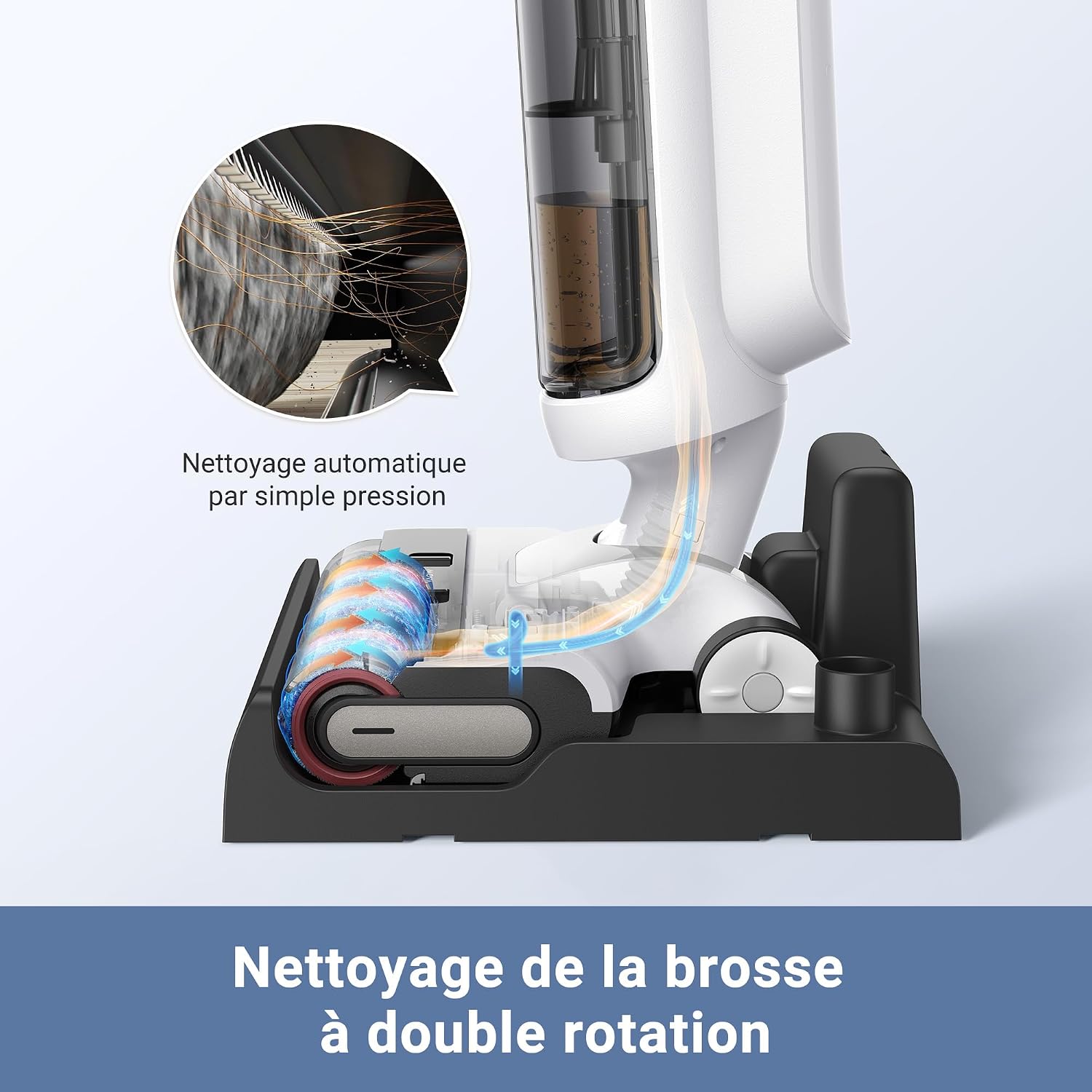
Image: A cutaway view of the MOVA K20's base, showing the dual-rotation brush self-cleaning mechanism and water flow.
5.2 Emptying the Dirty Water Tank
The dirty water tank (500ml capacity) should be emptied after each cleaning session. Detach the tank from the main body, open the lid, and dispose of the dirty water. Rinse the tank thoroughly with clean water to prevent odors and residue buildup. Ensure the tank is dry before reattaching it.
5.3 Cleaning the Roller Brush and Filter
Even with automatic self-cleaning, it is recommended to periodically remove the roller brush and rinse it under running water. Use the provided cleaning brush to remove any stubborn debris or hair. The washable filter should also be rinsed regularly and allowed to air dry completely before reinstallation to maintain optimal suction performance.
6. Troubleshooting
| Problem | Possible Cause | Solution |
|---|---|---|
| Vacuum does not turn on | Low battery; Not properly charged | Ensure the unit is fully charged on the charging station. Check power adapter connection. |
| No water dispensed / Brush not wet | Clean water tank empty; Tank not installed correctly; Water nozzle blocked | Refill clean water tank. Reinstall tank securely. Check for blockages in water nozzles and clean if necessary. |
| Poor suction / Leaves streaks | Dirty water tank full; Filter clogged; Roller brush tangled/dirty | Empty and clean dirty water tank. Clean or replace filter. Clean roller brush, removing any tangled hair. |
| Unpleasant odor | Dirty water tank not cleaned; Roller brush not dried properly | Thoroughly clean the dirty water tank and roller brush. Ensure all components are completely dry before storage. |
| Water leaking | Water tanks not sealed properly; Damaged tank/seal | Ensure both clean and dirty water tanks are securely closed and correctly installed. Inspect seals for damage. |
7. Specifications
| Specification | Value |
|---|---|
| Brand | Mova |
| Model Number | HMH10A |
| Color | White |
| Product Dimensions (L x W x H) | 26.8 x 25 x 111 cm |
| Item Weight | 4 Kilograms |
| Clean Water Tank Capacity | 600 Milliliters |
| Dirty Water Tank Capacity | 500 Milliliters |
| Power | 200 Watts |
| Voltage | 25.2 Volts |
| Noise Level | 76 dB |
| Runtime | 30 minutes |
| Special Features | Portable, Wet/Dry, Cordless, Washable Filter, Bagless |
| Battery Type | 1 Lithium-ion (included) |
| Filter Type | Fabric |
| Surface Recommendation | All floors |
| Power Source | Battery Powered |
8. Warranty and Support
Information regarding product warranty and customer support is not available in the provided data. Please refer to the product packaging or the manufacturer's official website for warranty details and contact information for support.
Ask a question about this manual
Ask about setup, troubleshooting, compatibility, parts, safety, or missing instructions. Manuals+ will review the question and use this page’s manual context to help answer it.