
Introduction
The HOTO Mini Electric Screwdriver is a versatile and precise tool designed for intricate repair tasks and hobby projects. It combines manual and electric modes, offering dual torque settings and a comprehensive set of 25 S2 steel bits. Its ergonomic design and integrated LED light enhance user experience and precision.
Key features include:
- 25 ultra-precise S2 steel screwdriver bits (up to 60HRC hardness).
- Dual operating modes: manual and electric.
- Ultimate magnetic storage box for easy bit organization and access.
- 170 RPM motor with two torque settings (0.05/0.2N.M) for precise control.
- Integrated 360° ring LED light for illuminated workspace.
- Comfort grip with anti-slip coating for reduced fatigue.
Product Overview & Components
Your HOTO Mini Electric Screwdriver set includes the following components:
- HOTO Mini Electric Screwdriver
- Magnetic Storage Case
- 25 S2 Steel Precision Bits
- USB-C Charging Cable

Figure 1: HOTO Mini Electric Screwdriver with its magnetic storage case and 25 precision bits.
Setup
Charging the Screwdriver
Before first use, fully charge the screwdriver. The device charges via a USB-C port located at the end of the handle. A small LED indicator will show charging status.
Video 1: Demonstration of the HOTO Mini Electric Screwdriver's features, including its USB-C charging port.
Installing Screwdriver Bits
The screwdriver uses a magnetic holder for quick and easy bit changes. Simply select the desired bit from the magnetic storage case and insert it firmly into the screwdriver's tip. The magnetic connection will secure the bit in place.
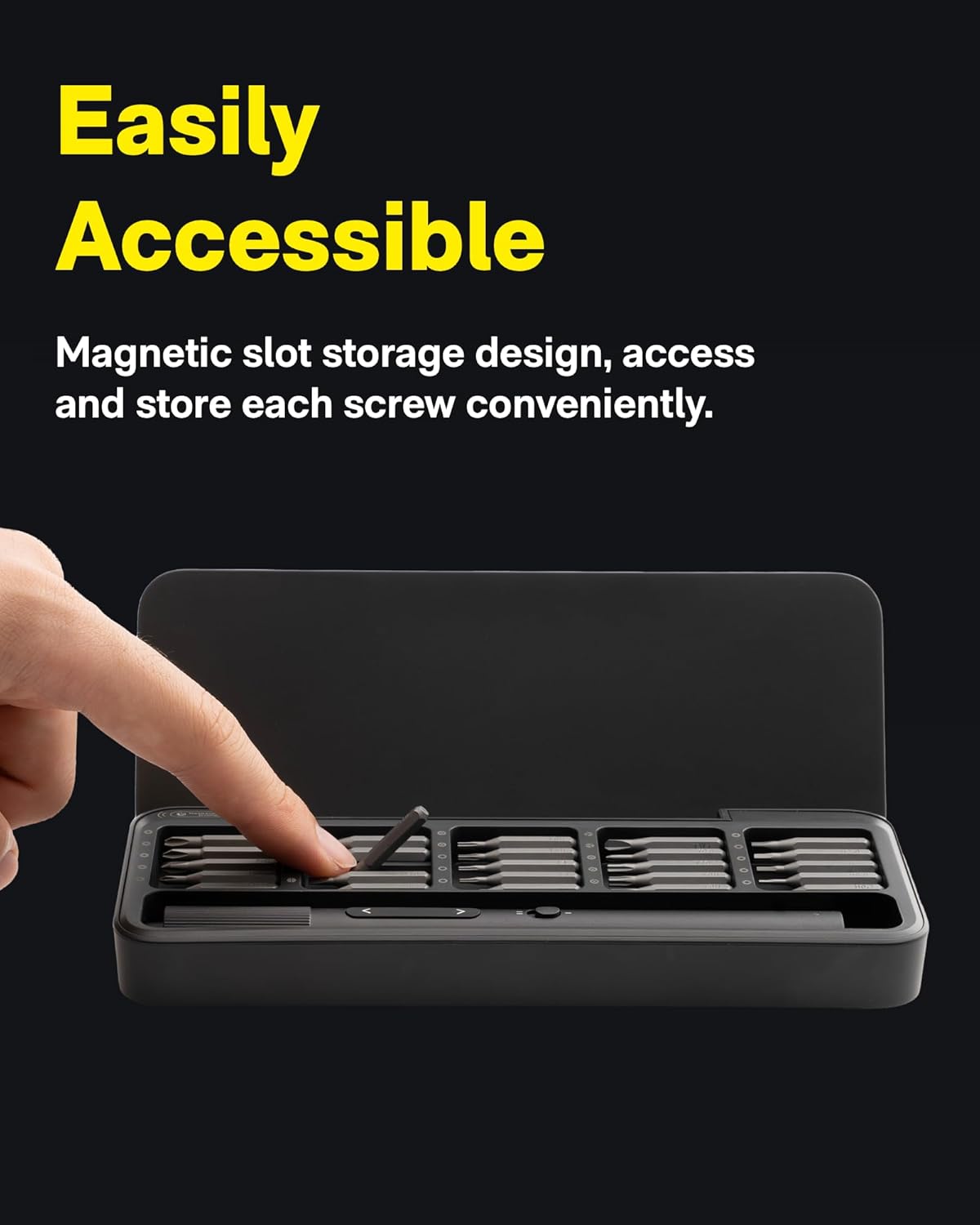
Figure 2: The magnetic storage case allows for easy access and secure storage of all 25 precision bits.
Operating Instructions
Power On/Off and Operation
To operate the screwdriver, press the forward (>) or reverse (<) button. The screwdriver will activate and the ring LED light will illuminate the working area. Release the button to stop operation.
Adjusting Torque Settings
The HOTO Mini Electric Screwdriver features two torque settings: 0.05N.M for delicate tasks and 0.2N.M for more demanding applications. Use the dedicated switch on the side of the screwdriver to toggle between these settings, indicated by the 'I' and 'II' markings.

Figure 3: The screwdriver offers dual torque settings for precise control during various tasks.
Shadowless LED Light
The integrated 360° ring LED light automatically turns on when the screwdriver is in operation, providing shadowless illumination for clear visibility of your work area, especially useful for small components.

Figure 4: The 360° ring LED light ensures optimal visibility for precision work.
Typical Usage Scenarios
This precision screwdriver is ideal for a wide range of tasks, including:
- Repairing eyeglasses and sunglasses.
- Working on small electronics like smartphones, laptops, and cameras.
- Assembling or disassembling small models and toys.
- Other precision engineering and DIY projects.
Video 2: An overview of the HOTO Electric Precision Screwdriver, demonstrating its use in various repair and assembly tasks.
Maintenance
Cleaning and Storage
Keep the screwdriver and bits clean by wiping them with a dry, soft cloth after each use. Store all components in the provided magnetic storage case to prevent loss and protect them from dust and damage. The magnetic slots ensure bits remain securely in place.
Bit Magnetization
The storage case includes a built-in magnetizer. If a bit loses its magnetic properties over time, simply place it in the designated magnetizer area on the case for a few seconds to re-magnetize it. This ensures screws adhere to the bit for easier handling.
Figure 5: The integrated magnetizer ensures your bits remain magnetized for optimal performance.
Troubleshooting
| Problem | Possible Cause | Solution |
|---|---|---|
| Screwdriver not turning on. | Low battery. | Charge the screwdriver using the provided USB-C cable. |
| Screwdriver feels too weak. | Incorrect torque setting. | Switch to the higher torque setting (0.2N.M). |
| Bits not holding screws. | Bits are demagnetized. | Use the built-in magnetizer on the storage case to re-magnetize the bits. |
| Screwdriver stops unexpectedly. | Overload protection activated. | Release the button, wait a few seconds, and try again with less pressure or a higher torque setting. |
Specifications
| Feature | Detail |
|---|---|
| Brand | HOTO |
| Model Name | QWLSA001 |
| Item Weight | 12.6 ounces |
| Package Dimensions | 12.91 x 2.91 x 1.14 inches |
| Material | Alloy Steel |
| Head Style | Phillips, Torx, Hex, Tri-wing |
| RPM | 170 RPM |
| Torque Settings | 0.05 N·m / 0.2 N·m |
| Battery Type | 1 Lithium Ion battery (included) |
| Special Features | LED Light, Ergonomic, Adjustable Torque, Magnetic Tip, Interchangeable Bit |
Warranty & Support
For detailed warranty information and customer support, please refer to the official HOTO website or contact their customer service directly. Keep your purchase receipt for warranty claims.