
MOOER SD10i
Contents
MOOER SD10i 10W Practice Guitar Amplifier Combo User Manual
Model: SD10i | Brand: MOOER
1. Introduction
Thank you for purchasing the MOOER SD10i 10W Practice Guitar Amplifier Combo. This intelligent amplifier is designed to provide a versatile and portable practice solution for guitarists, featuring a wide range of effects, amp models, and smart app integration. Please read this manual thoroughly to ensure proper use and to maximize your experience with the SD10i.

Figure 1: MOOER SD10i Amplifier with iAmp App Interface
2. Setup and Connections
2.1 Unboxing and Initial Inspection
Carefully remove all components from the packaging. Verify that all items are present and undamaged. Retain the packaging for future transport or storage.
2.2 Powering On
The SD10i features a built-in 3000 mAh rechargeable battery. Before first use, it is recommended to fully charge the amplifier. Connect the supplied USB-C cable to the 'Charge/OTG Record' port on the amplifier and to a compatible USB power adapter (not included). The power indicator LED will show charging status.
2.3 Connecting Your Instrument
Plug your guitar or other instrument into the 6.35mm 'Input' jack on the amplifier using a standard instrument cable.
2.4 Headphone Output
For silent practice, connect headphones to the 3.5mm 'Output' jack.
2.5 Bluetooth Connection
The SD10i supports Dual Bluetooth 5.0. You can connect your mobile phone to the amp for music playback or to connect to the iAmp app. To pair, ensure Bluetooth is enabled on your device and select 'MOOER SD10i' from the available devices.

Figure 2: Connectivity Diagram for SD10i
3. Operation
3.1 Controls Overview
The SD10i features intuitive controls on its top panel. These include knobs for adjusting instrument volume, background audio volume, and a switch for cycling through 4 presets in the current bank. Power and Charge/OTG Record functions are also accessible.

Figure 3: SD10i Top Panel Controls
3.2 Amp Models and Effects
The SD10i offers a wide selection of 52 amp models and a total of 109 effects, including 4 dynamics, 19 overdrive, 15 modulation, 6 delay, and 5 reverb types. These can be customized and accessed via the iAmp app.

Figure 4: Versatile Customized Sound Effects via iAmp App
3.3 iAmp App Integration
For full control and customization of the amplifier's features, download and connect to the MOOER iAmp app. The app allows you to fine-tune effects, manage presets, and access practice aids.
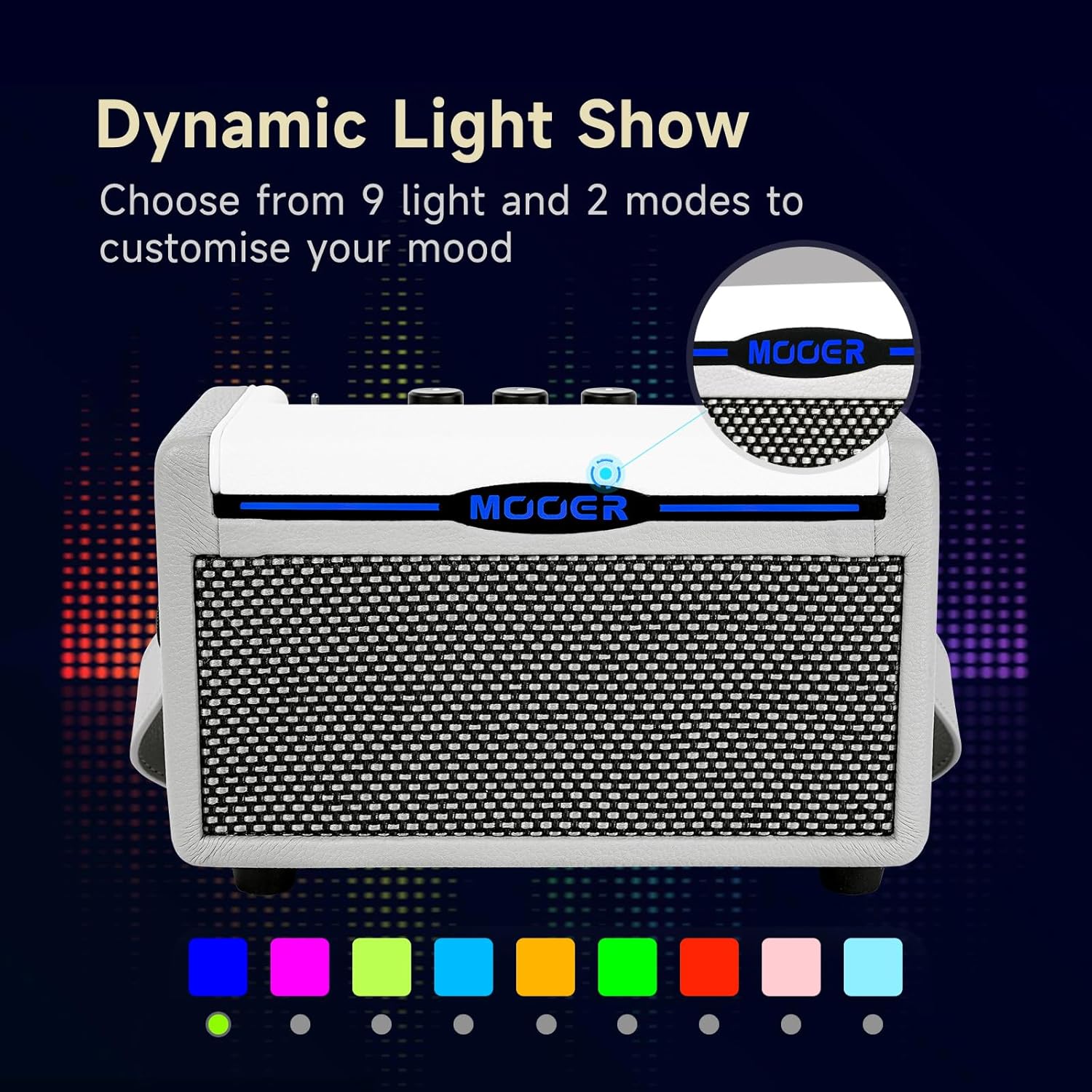
Figure 5: iAmp App with Effects in Use
3.4 Practice Aids
The SD10i includes a variety of practice aids: a tuner, 80-second looper, 40 drum machine rhythms with tempo setting, and 10 metronomes. These features are accessible through the iAmp app.
3.5 LED Light Show
The integrated LED light strip supports 9 custom color selections. You can choose between breathing or constant light modes via the iAmp app to match your mood or music.
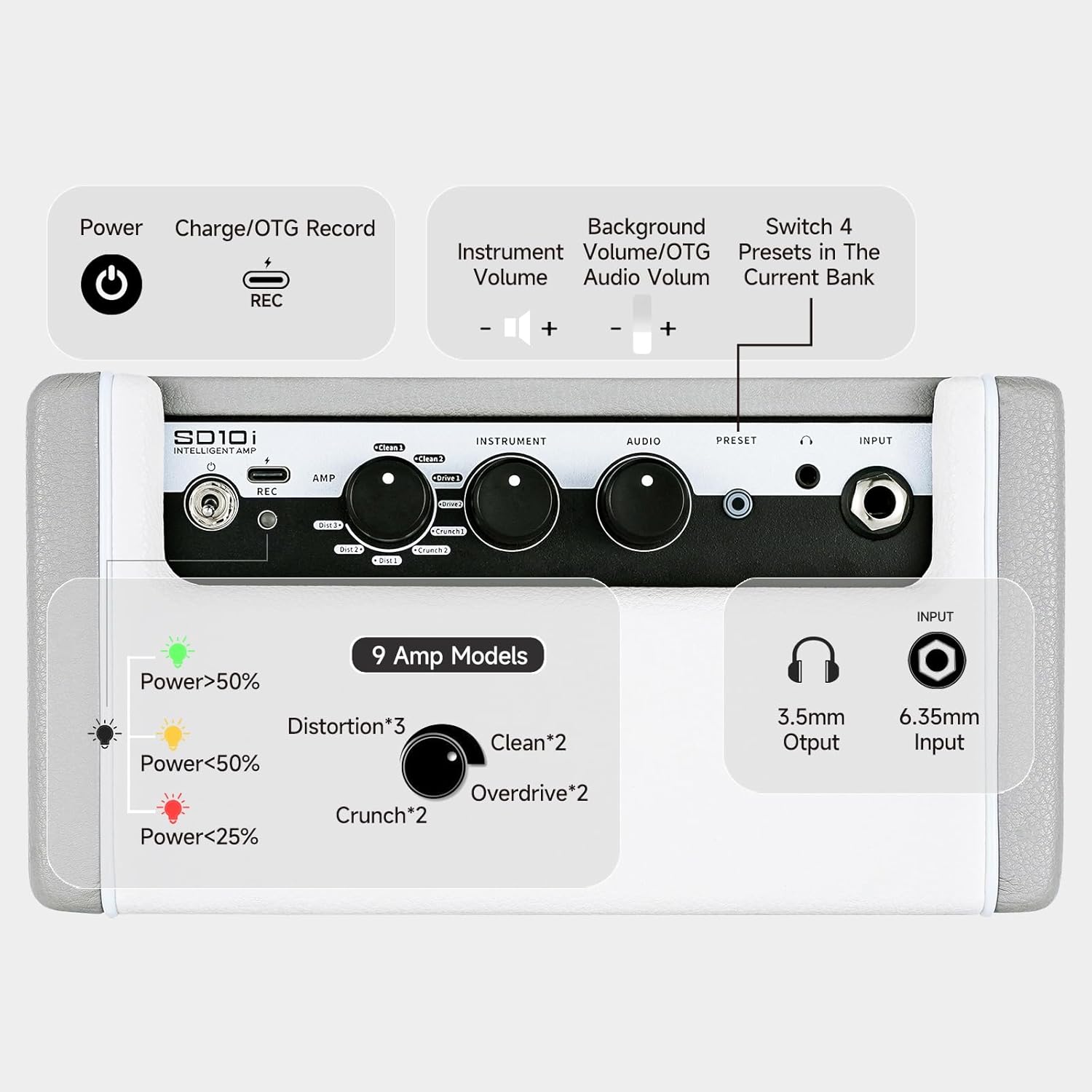
Figure 6: Dynamic LED Light Show
3.6 OTG Recording
The USB-C port supports fast charging and can also be directly connected to a phone for OTG (On-The-Go) sound and picture synchronization recording.
3.7 Wireless Footswitch Support
The amplifier supports wireless footswitch control via the MOOER F4 wireless footswitch (sold separately).
4. Maintenance
4.1 Cleaning
To clean the amplifier, use a soft, dry cloth. Do not use liquid cleaners or abrasive materials, as they may damage the finish or internal components.
4.2 Battery Care
To prolong battery life, avoid fully discharging the battery frequently. Charge the amplifier regularly, especially if it will not be used for an extended period. The 3000 mAh battery supports more than 5 hours of continuous use.

Figure 7: Portability and Battery Life
4.3 Storage
Store the amplifier in a cool, dry place away from direct sunlight and extreme temperatures. If storing for a long time, ensure the battery is partially charged (around 50%) to prevent degradation.
5. Troubleshooting
| Problem | Possible Cause | Solution |
|---|---|---|
| No sound from amplifier | Volume too low; Instrument cable not connected properly; Amplifier not powered on; Headphone connected. | Increase instrument volume; Check cable connections; Ensure amplifier is powered on and charged; Disconnect headphones if using main speakers. |
| Bluetooth connection issues | Bluetooth not enabled on device; Amplifier not in pairing mode; Interference. | Ensure Bluetooth is on and search for 'MOOER SD10i'; Restart both devices; Move closer to the amplifier. |
| App not connecting to amplifier | Bluetooth not connected; App version outdated; Amplifier firmware outdated. | Ensure Bluetooth is connected; Update iAmp app to the latest version; Check MOOER website for firmware updates. |
| Short battery life | Battery not fully charged; High volume usage; Old battery. | Fully charge the battery before use; Reduce volume; Consider battery replacement if issues persist after prolonged use. |
6. Specifications
- Output Power: 10W Stereo Sound (two four-inch speakers)
- Battery: 3000 mAh Lithium Ion (included)
- Battery Life: >5 hours
- Connectivity: Dual Bluetooth 5.0, 6.35mm Jack Input, 3.5mm Jack Output, USB-C (Charge/OTG Record)
- Effects: 6 effect types, 109 total effects (52 Amp Simulate, 4 Dynamics, 19 Overdrive, 15 Modulation, 6 Delay, 5 Reverb)
- Practice Aids: Tuner, 80-second Looper, 40 Drum Machine Rhythms, 10 Metronomes
- LED Light: 9 colors custom selection, breathing or constant light mode
- Dimensions: 4.53 x 8.66 x 5.31 inches (11.5 x 22 x 13.5 cm)
- Weight: 5.06 pounds (2.3 kg)
- Compatible Devices: Guitar
- Wireless Footswitch Support: MOOER F4 (sold separately)
7. Warranty and Support
For warranty information and customer support, please refer to the official MOOER website or contact your local distributor. Keep your purchase receipt as proof of purchase for warranty claims.
Official MOOER Website: www.mooeraudio.com
Ask a question about this manual
Ask about setup, troubleshooting, compatibility, parts, safety, or missing instructions. Manuals+ will review the question and use this page’s manual context to help answer it.