Introduction
The Vtopek CP35 is a 2-in-1 wireless adapter designed to convert your car's existing wired CarPlay or Android Auto system into a wireless one. This device allows for seamless integration of your smartphone's features, such as navigation, music playback, and voice assistant, directly onto your car's display without the need for cables. Enjoy a more convenient and clutter-free driving experience.
Product Overview

The image above illustrates the Vtopek Wireless CarPlay Android Auto Adapter in use, showcasing both CarPlay and Android Auto interfaces on a car's display. A smartphone is shown displaying the respective app icons, demonstrating the adapter's dual functionality. The adapter itself is compact and black, designed to blend seamlessly into your car's interior.

This image highlights the advantage of the Vtopek wireless adapter by comparing its compact size and clean installation when plugged into a car's USB port, against the clutter of traditional wired connections. The dimensions of the adapter are provided, shown next to two Euro coins for a clear size reference, emphasizing its portable and slim design.
Setup Instructions
- Plug In: Connect the wireless adapter to your car's USB port.
- Activate & Pair: On your smartphone, activate both Bluetooth and Wi-Fi. Search for the adapter's Bluetooth name (e.g., "SmartBox-xxx" or "AIBox-xxx") and pair with it.
- Confirm Connection: Follow the prompts on your phone and car display to allow and use CarPlay or Android Auto. The first connection typically takes 5-10 seconds.

The diagram above visually guides you through the simple three-step setup process. It shows plugging the adapter into the car's USB port, activating Wi-Fi and pairing Bluetooth on your phone, and finally confirming the CarPlay or Android Auto connection on your phone's screen. After the initial setup, the adapter will automatically reconnect within approximately 5 seconds when you start your car.
Operating Instructions
Once connected, the Vtopek CP35 adapter enables full wireless functionality of CarPlay and Android Auto. You can access various features of your smartphone directly through your car's infotainment system.
- Navigation: Use your preferred navigation apps like Google Maps or Apple Maps.
- Music Playback: Stream music from apps such as Spotify, Apple Music, or YouTube Music.
- Voice Assistant: Utilize Siri or Google Assistant for hands-free control, including making calls, sending messages, and controlling media.
- Phone Calls: Make and receive calls directly through the car's system.
The adapter maintains the original control methods of your car, allowing you to interact with CarPlay or Android Auto using:
- OEM Control Knob: Use your car's built-in rotary controller.
- Touchscreen Controls: Interact directly with the car's display if it is a touchscreen.
- Steering Wheel Controls: Manage audio, calls, and voice assistant functions from your steering wheel.

This image demonstrates a driver interacting with the car's infotainment system, utilizing Google Assistant for tasks such as navigation, playing music, and making calls. It visually confirms that the adapter allows for the retention of original car controls, including the OEM control knob, touchscreen, and steering wheel controls, for a familiar user experience.
Compatibility
The Vtopek CP35 adapter is designed for cars equipped with factory-wired CarPlay or Android Auto. It supports approximately 98% of vehicles manufactured in 2016 and later that feature these wired systems.
- Smartphone Compatibility: Compatible with iOS 10 and above, and Android 11 and above.
Before purchasing, please ensure your car model has factory wired CarPlay/Android Auto and that your mobile phone model is compatible.

The compatibility chart displays various iPhone and Android phone models, alongside logos of numerous car manufacturers, illustrating the Vtopek wireless adapter's broad support for over 800 car models that come with factory-wired CarPlay or Android Auto.

For detailed compatibility information, you can scan the QR codes provided in the image to check if your specific car model supports CarPlay or Android Auto. You can also visit the official compatibility lists:
- Apple CarPlay: Available Models
- Android Auto: Compatibility Vehicles
Connection Types
The Vtopek CP35 adapter offers flexible connection options to suit various car setups:
- Direct USB Plug: The adapter can be plugged directly into a standard USB-A port.
- USB-A to USB-A Extension Cable: Included for use in tight spaces or for extended reach.
- USB-A to USB-C Cable: Included for car radios equipped with USB-C ports.
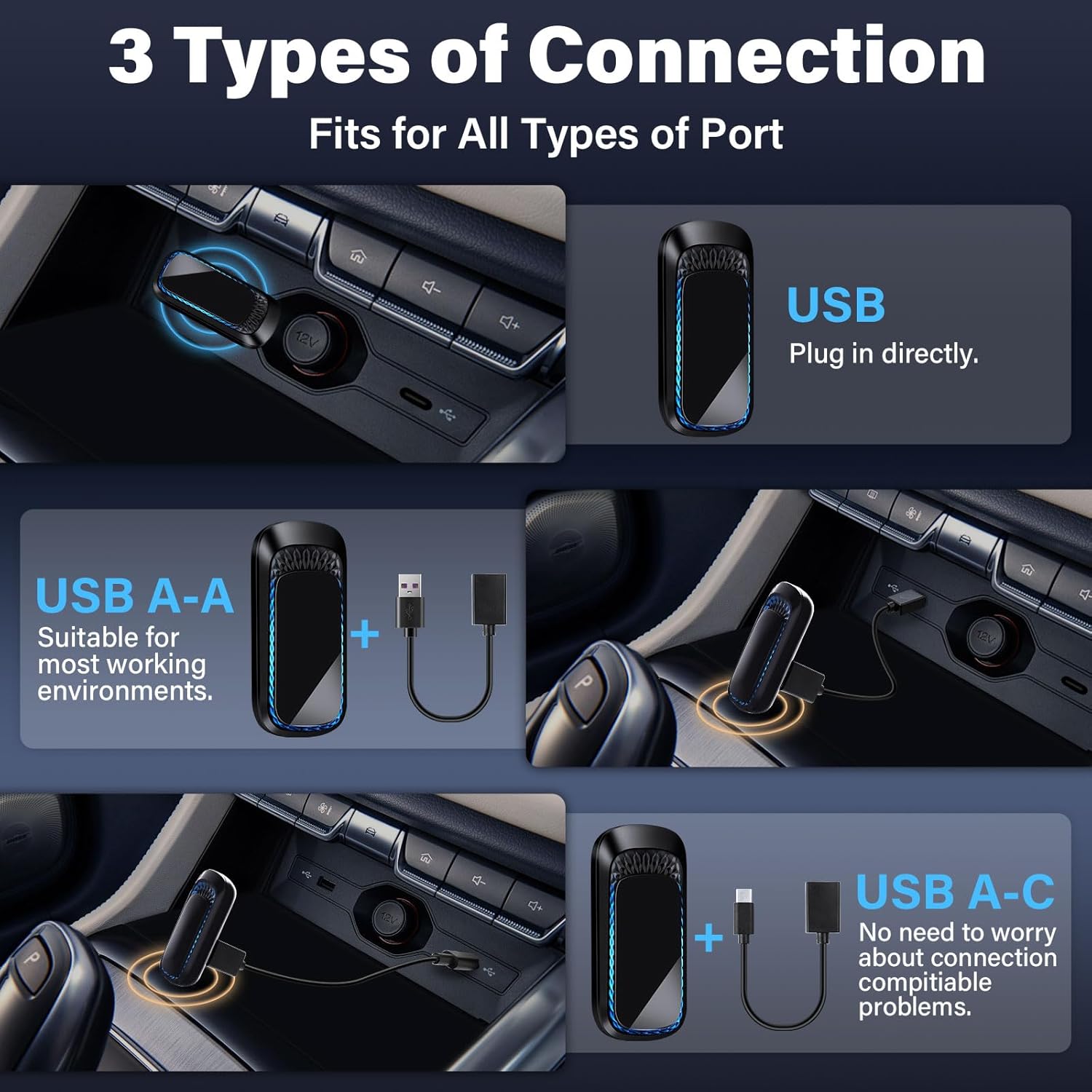
This image illustrates the three different ways to connect the Vtopek wireless adapter to your car. It shows the adapter plugging directly into a USB port, using a USB-A to USB-A extension cable for more versatile placement, and connecting via a USB-A to USB-C cable for compatibility with modern USB-C ports in vehicles.
Additional Features
RGB LED Ambient Light
The adapter features a creative design with a 7-color RGB LED ambient light. This allows you to customize the lighting to match your car's interior or your personal preference.

The image displays the Vtopek wireless adapter's aesthetic feature: a 7-color RGB LED ambient light. Various color options are shown, highlighting the ability to switch between them to enhance your car's interior ambiance. A stylized blue wireframe car is also depicted, suggesting modern technology integration.
What's in the Box
- 1 x Wireless CarPlay Adapter (CP35)
- 1 x USB-to-Type-C Cable
- 1 x USB-to-USB-A Cable
- 1 x Instruction Manual

This image displays the complete contents of the Vtopek Wireless CarPlay Adapter package. It includes the main wireless adapter unit, a USB-to-Type-C cable, a USB-to-USB-A cable, and the instruction manual, ensuring you have all necessary components for installation and use.
Maintenance
To ensure the longevity and optimal performance of your Vtopek CP35 adapter, follow these simple maintenance guidelines:
- Keep the device clean and dry. Avoid exposure to liquids or excessive moisture.
- Do not expose the adapter to extreme temperatures.
- Handle the device with care to prevent physical damage.
- Disconnect the adapter from the USB port when not in use for extended periods.
Troubleshooting
If you encounter issues with your Vtopek CP35 adapter, consider the following troubleshooting steps:
- No Connection: Ensure the adapter is securely plugged into the car's USB port. Verify that your phone's Bluetooth and Wi-Fi are enabled. Try restarting both your phone and the car's infotainment system.
- Intermittent Connection: Check for any obstructions or interference near the adapter. Ensure your phone is within close proximity to the adapter.
- Audio Issues: Confirm that your car's audio input is set to the correct source (e.g., CarPlay/Android Auto). Adjust volume levels on both your phone and car system.
- Compatibility Concerns: Double-check your car and phone models against the compatibility requirements (iOS 10+/Android 11+, factory-wired CarPlay/Android Auto).
- Firmware Update: Check the manufacturer's website for any available firmware updates for the adapter, as these can resolve known issues.
If problems persist, please contact Vtopek customer support for assistance.
Specifications
| Feature | Detail |
|---|---|
| Brand | Vtopek |
| Model Number | CP35 |
| Color | Black |
| Connectivity Technology | Bluetooth, Wi-Fi |
| Wireless Communication Standard | Bluetooth |
| Hardware Interface | Bluetooth 5 |
| Compatible Devices | Smartphone |
| Power Source | Corded Electric (via USB) |
| Product Dimensions | 5.3L x 2.5W x 1H centimeters |
| Media Type | Wireless Audio |
| Operating System Compatibility | iOS 10+, Android 11+ |
| Car Compatibility | Vehicles with factory wired CarPlay/Android Auto (2016+) |
Warranty and Support
The Vtopek CP35 Wireless CarPlay Android Auto Adapter comes with comprehensive support to ensure your satisfaction.
- Warranty: Enjoy a 24-month worry-free after-sales service.
- Technical Support: Lifetime technical support is provided.
- Customer Service: Professional customer service is available to assist you with any inquiries or issues.

This image outlines the support services offered, including professional customer service, a 1-year warranty (note: product feature bullets state 24 months, which is used in the text), and an email address for direct contact. For any support needs, please reach out to our team.
Contact Email: jenny@jansite.cn


