1. Introduction
This manual provides comprehensive instructions for the proper use, setup, and maintenance of your ATN X-Sight 5 LRF 5-25x Day/Night Scope Bundle. This bundle includes the advanced digital hunting scope and a durable Quick Detach Mount. Please read this manual thoroughly before operating the device to ensure optimal performance and safety.
2. Product Overview
The ATN X-Sight 5 LRF 5-25x Day/Night Scope is an advanced digital optic designed for both day and night use, featuring a 4K image sensor. It integrates a laser rangefinder and a ballistic calculator for enhanced accuracy. The included Quick Detach Mount facilitates easy attachment and removal from firearms.
2.1 Key Features
- Ultra HD 4K Sensor: Provides high-resolution visuals for clear observation in various lighting conditions.
- Integrated Laser Rangefinder (LRF): Enables precise distance measurement to targets.
- Advanced Ballistic Calculator: Compensates for environmental factors to improve shot accuracy.
- Recoil Activated Video (RAV): Automatically records video footage before and after a shot.
- 4K Video Recording: Captures high-quality video of your observations and shots.
- Durable Construction: Made from hardened aluminum alloy for increased durability.
- Quick Detach Mount: Allows for rapid attachment and detachment from firearms while maintaining zero.
2.2 Components
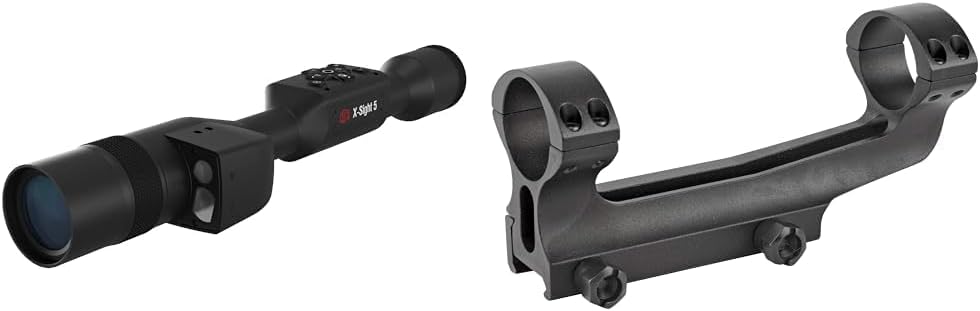
Figure 2.2.1: The ATN X-Sight 5 LRF Day/Night Scope shown alongside the Quick Detach Mount. This image displays both primary components of the bundle.

Figure 2.2.2: A detailed view of the ATN X-Sight 5 LRF Day/Night Scope. This image highlights the main body of the scope, including the objective lens and the integrated laser rangefinder module.

Figure 2.2.3: The Quick Detach Mount designed for 30mm scope tubes. This image shows the robust construction and the quick-release levers of the mount.

Figure 2.2.4: The Quick Detach Mount disassembled, showing the mounting screws. This image illustrates the components required for securing the scope to the mount.
3. Setup
3.1 Attaching the Scope to the Quick Detach Mount
- Ensure the Quick Detach Mount is clean and free of debris.
- Loosen the ring screws on the Quick Detach Mount sufficiently to allow the scope to be placed into the rings.
- Carefully place the ATN X-Sight 5 LRF scope into the mount rings, ensuring the scope is oriented correctly (controls facing upwards).
- Align the scope for proper eye relief and reticle level.
- Tighten the ring screws evenly and gradually, alternating between screws, until the scope is securely held without overtightening. Refer to the mount's specific torque specifications if available.
3.2 Mounting the Scope Assembly to a Firearm
- Ensure the firearm is unloaded and pointed in a safe direction.
- Open the quick-release levers on the Quick Detach Mount.
- Place the mount onto the firearm's Picatinny or Weaver rail.
- Position the mount to achieve desired eye relief.
- Close the quick-release levers firmly. Adjust the tension of the levers if necessary to ensure a secure fit without excessive force.
- Perform initial zeroing of the scope according to the ATN X-Sight 5 LRF user manual (not included in this bundle manual).
4. Operating Instructions
The ATN X-Sight 5 LRF offers advanced digital functionalities. For detailed operation of all menu settings and features, please refer to the full ATN X-Sight 5 LRF user manual.
4.1 Powering On/Off
- To power on, press and hold the power button (typically located on the control panel) until the display illuminates.
- To power off, press and hold the power button until the shutdown prompt appears, then confirm.
4.2 Day and Night Modes
The scope automatically adjusts or can be manually switched between day and night vision modes. In night mode, the device utilizes its advanced sensor to provide clear images in low-light conditions.
4.3 Using the Laser Rangefinder (LRF)
Activate the LRF function through the scope's menu or a dedicated button. Aim the reticle at the target and activate the rangefinder to obtain precise distance measurements, which are displayed on the screen.
4.4 Ballistic Calculator
Input your ammunition and environmental data into the ballistic calculator via the scope's interface. The system will then provide real-time adjustments to your point of aim to compensate for bullet drop, wind, and other factors.
4.5 Recoil Activated Video (RAV) and 4K Recording
The RAV feature automatically records video when recoil is detected, capturing the moments before and after a shot. You can also manually initiate 4K video recording at any time.
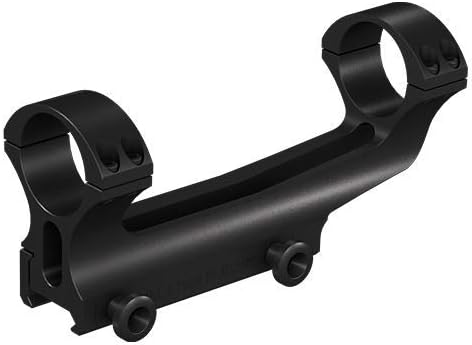
Figure 4.5.1: An example of Recoil Activated Video (RAV) capturing a high-speed event in slow motion. This feature records critical moments around a shot.

Figure 4.5.2: A visual representation of video recorded in Ultra HD 4K resolution. The ATN X-Sight 5 LRF captures high-quality footage for review and sharing.
5. Maintenance
5.1 Cleaning the Optics
- Use a soft, lint-free cloth or lens brush to remove dust and loose particles from the lenses.
- For smudges or fingerprints, apply a small amount of lens cleaning solution to a microfiber cloth and gently wipe the lens surface.
- Avoid using abrasive materials or harsh chemicals, as these can damage the lens coatings.
5.2 General Care
- Store the scope in a protective case when not in use to prevent scratches and impacts.
- Keep the device away from extreme temperatures and high humidity.
- Regularly inspect the Quick Detach Mount for any signs of wear or damage, especially the quick-release levers and screws.
- Ensure all screws on the mount are appropriately tightened to maintain stability.
6. Troubleshooting
This section addresses common issues you might encounter. For more complex problems, please contact ATN customer support.
6.1 No Power / Display Not Illuminating
- Ensure the battery is fully charged.
- Verify that the battery is correctly inserted.
- Attempt a hard reset by holding the power button for an extended period (e.g., 15-20 seconds).
6.2 Image Appears Blurry or Unclear
- Adjust the focus ring on the objective lens.
- Clean the objective and eyepiece lenses as described in the Maintenance section.
- Ensure the diopter adjustment for your eye is correctly set.
6.3 Quick Detach Mount Not Holding Zero
- Check that the quick-release levers are fully engaged and properly tensioned.
- Verify that the scope rings are securely tightened to the scope body.
- Inspect the firearm's rail for any damage or inconsistencies.
7. Specifications
The following table outlines the key specifications for the ATN X-Sight 5 LRF 5-25x Day/Night Scope and its Quick Detach Mount.
| Feature | Detail |
|---|---|
| Brand | ATN |
| Model Name | X-Sight 5 LRF |
| Magnification | 5-25x |
| Sensor | Ultra HD 4K |
| Night Vision | Yes |
| Laser Rangefinder | Integrated |
| Ballistic Calculator | Integrated |
| Video Recording | 4K, Recoil Activated Video (RAV) |
| Material | Hardened Aluminum Alloy |
| Mounting Type | Quick Detach Mount (30mm Tube) |
| Compatible Devices | Rifle |
| Color | Black |
| Reticle Type | BDC |
8. Warranty and Support
For information regarding the product warranty, please refer to the official ATN website or the warranty card included with your purchase. For technical support, service, or inquiries, please contact ATN customer service directly.
ATN Official Website: www.atncorp.com