
Garwarm GARWARM-19.6-IN-CAGED-CEILING-400a12862e
Garwarm 20" Caged Ceiling Fan with Light User Manual
Model: GARWARM-19.6-IN-CAGED-CEILING-400a12862e
Brand: Garwarm
1. Product Overview
This manual provides detailed instructions for the installation, operation, and maintenance of your Garwarm 20" Caged Ceiling Fan with Light. This flush mount bladeless fandelier is designed for small low-profile spaces such as bedrooms, kitchens, and dining rooms, offering both illumination and air circulation.

Figure 1.1: Garwarm 20" Caged Ceiling Fan with Light (White Gold)
The fan features a unique caged design with a white and gold painted finish and lacelike pattern, blending farmhouse and modern aesthetics. It includes a powerful copper motor for quiet operation and comes with a remote control for convenient adjustments.

Figure 1.2: Key components and design elements of the ceiling fan.
2. Safety Information
Please read and understand all instructions before beginning installation. Failure to follow these instructions may result in electric shock, fire, or personal injury.
- Ensure the power is turned off at the circuit breaker before installation or maintenance.
- All wiring must be in accordance with national and local electrical codes. If you are unfamiliar with wiring, consult a qualified electrician.
- The mounting structure must be capable of supporting the weight of the fan.
- Do not bend the fan blades during installation or cleaning.
- This product is designed for indoor use only.
- Requires 4 x E26 base bulbs (not included), MAX 60W. Do not exceed the maximum wattage.
3. Package Contents
Verify that all components are present and undamaged before proceeding with installation.
- Caged Ceiling Fan Unit
- Remote Control
- Mounting Hardware Kit
- Instruction Manual
Note: E26 base bulbs are not included and must be purchased separately.
4. Specifications
| Feature | Detail |
|---|---|
| Brand | Garwarm |
| Model Number | GARWARM-19.6-IN-CAGED-CEILING-400a12862e |
| Dimensions | 20"L x 20"W x 7.48"H (51cm Dia, 19cm Height) |
| Ceiling Canopy Dimensions | 7.08" Dia x 3.34" Height (18cm Dia, 8.5cm Height) |
| Material | Metal |
| Color | White Gold |
| Light Source Type | Requires 4 x E26 base bulbs (not included) |
| Max Wattage (per bulb) | 60W |
| Fan Motor Power | 15W |
| Voltage | 110 Volts (AC) |
| Control Method | Remote Control, APP Control |
| Special Features | 6 Wind Speed Levels, 1/2/4/8H Timer, Reversible Motor, Quiet Operation |
| Installation Type | Flush Mount |
| Indoor/Outdoor Usage | Indoor Only |
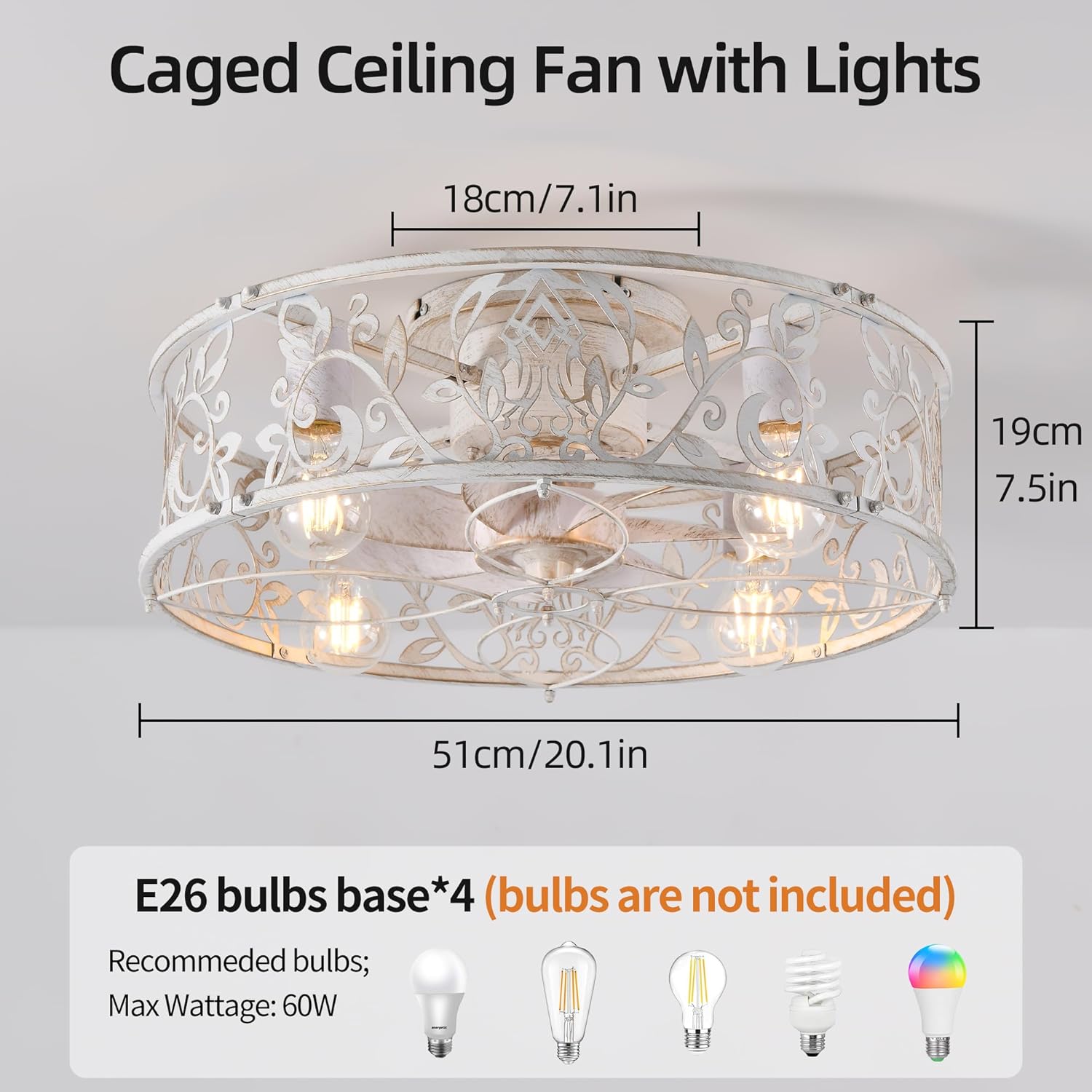
Figure 4.1: Product dimensions and bulb requirements.
5. Setup and Installation
Installation of this ceiling fan requires some assembly. Please follow the detailed steps provided in the included instruction manual. For visual guidance, you can scan the QR code on the manual to watch the installation video.
5.1 Remote Control Setup
The remote control requires proper setup for optimal functionality. Ensure batteries are inserted correctly (not included).

Figure 5.1: Remote control holder installation steps.
6. Operating Instructions
Your Garwarm ceiling fan can be operated using the included remote control or a compatible mobile application. Fan and lighting functions can be controlled separately.
6.1 Remote Control Functions
- Fan On/Off: Turn the fan on or off.
- Light On/Off: Turn the light on or off.
- Fan Speed: Select from 6 wind speed levels (Gentle breeze, Natural wind, Strong wind).
- Timer Settings: Set the fan to turn off automatically after 1, 2, 4, or 8 hours.
- Reversible Motor: Switch between forward (summer mode) and reverse (winter mode) rotation.
Note: This model is not infinitely dimmable via remote or app. Dimming functionality depends on the type of bulbs installed.

Figure 6.1: Remote control and app interface for fan operation.
6.2 Airflow Modes (Reversible Motor)
- Summer Mode (Counter-clockwise): Creates a downward airflow, providing a cooling effect.
- Winter Mode (Clockwise): Switches the fan to the clockwise direction, distributing warm air collected near the ceiling evenly throughout the room.

Figure 6.2: Summer and Winter airflow modes.
6.3 Quiet Operation
The fan's motor is designed for ultra-quiet operation, typically operating at less than 30dB, making it suitable for bedrooms and other quiet spaces.

Figure 6.3: Quiet operation for undisturbed sleep.
7. Maintenance
Regular maintenance ensures the longevity and optimal performance of your ceiling fan.
7.1 Cleaning Fan Blades
The fan blades are monolithic and designed for easy removal and cleaning. They can be cleaned periodically to maintain airflow efficiency and appearance.

Figure 7.1: Cleaning the removable fan blades.
- Always turn off power at the circuit breaker before cleaning.
- Use a soft, damp cloth to wipe down the fan blades and exterior surfaces.
- Avoid using harsh chemicals or abrasive cleaners, as they may damage the finish.
- Ensure all parts are dry before restoring power.
8. Troubleshooting
If you encounter issues with your Garwarm ceiling fan, refer to the following common troubleshooting steps:
| Problem | Possible Cause | Solution |
|---|---|---|
| Fan does not operate | No power, loose wiring, remote control issue. | Check circuit breaker. Ensure all wiring connections are secure. Replace remote control batteries. |
| Light does not turn on | Bulbs not installed, faulty bulbs, loose wiring. | Install E26 bulbs. Test with new bulbs. Check light wiring connections. |
| Fan makes unusual noise | Loose screws, unbalanced blades. | Ensure all mounting screws are tightened. Check fan blades for proper seating and balance. |
| Remote control not responding | Low batteries, signal interference, remote not paired. | Replace remote batteries. Ensure no obstructions between remote and fan. Refer to manual for remote pairing instructions if applicable. |
If the problem persists after attempting these solutions, please contact Garwarm customer support.
9. Warranty and Support
Garwarm provides 2 years of after-sales service for this product, backed by a manufacturer warranty. For warranty claims, technical assistance, or any other inquiries, please contact Garwarm customer support through the retailer where the product was purchased or visit the official Garwarm website.
For more information and support, you may visit the Garwarm Store on Amazon.
Ask a question about this manual
Ask about setup, troubleshooting, compatibility, parts, safety, or missing instructions. Manuals+ will review the question and use this page’s manual context to help answer it.