
Introduction
Welcome to your new UMAY P9 Foldable Treadmill. This manual provides essential information for the safe assembly, operation, and maintenance of your fitness equipment. Please read it thoroughly before first use to ensure proper function and safety. Keep this manual for future reference.
Important Safety Information
Before beginning any exercise program, consult your physician. It is crucial to understand and follow all safety precautions to prevent injury and ensure the longevity of your equipment.
- Always place the treadmill on a flat, stable surface with at least 2 meters of clear space behind it and 0.5 meters on each side.
- Ensure the safety key is properly attached to the console and your clothing before starting the treadmill. The treadmill will stop immediately if the safety key is disengaged.
- Do not allow children or pets near the treadmill while it is in operation.
- Wear appropriate athletic footwear and clothing. Avoid loose clothing that could get caught in moving parts.
- Do not step on or off the treadmill while the belt is moving. Always start and stop the treadmill at a low speed.
- The maximum user weight for this treadmill is 136 KG. Do not exceed this limit.
- Unplug the treadmill from the power outlet when not in use, before cleaning, or before performing any maintenance.
- If you experience dizziness, chest pain, or any other abnormal symptoms, stop your workout immediately and consult a physician.
Package Contents
Please verify that all components are present in the package:
- UMAY P9 Foldable Treadmill (main unit)
- Safety Key
- Power Cord
- Lubricant
- User Manual
- Tool Kit
Product Overview
The UMAY P9 Treadmill is designed for efficient and comfortable home workouts, featuring a powerful brushless motor, advanced shock absorption, and smart connectivity.

This image displays the UMAY P9 treadmill in two states: unfolded with a user running, and folded vertically for compact storage. It highlights the main console, handlebars, and running deck.
Key Features:
- Brushless Motor: Equipped with an upgraded brushless motor for quiet operation (under 45dB) and extended lifespan (over 3500 hours).
- Triple Shock Absorption: Features a 7-layer composite running belt combined with 8 integrated high-performance shock absorbers and 2 external honeycomb damping pads to reduce impact on joints.
- Smart Bluetooth APP: Connects to a dedicated app for real-time data monitoring, professional coaching, personalized training plans, and social sharing.
- Preset Programs: Includes 12 pre-designed workout programs and 3 countdown modes for varied training.
- Foldable Design: Easily folds for compact storage, ideal for home environments with limited space.
- Integrated Display: Clear console display showing speed, time, distance, calories, and heart rate.

This image shows a user running on the treadmill with an overlay indicating the silicone shock absorption points beneath the running deck, designed to reduce impact on joints.

An exploded view of the UMAY 3.0 HP brushless motor, emphasizing its quiet operation (under 45dB) and long lifespan (over 3500 hours) compared to brushed motors.
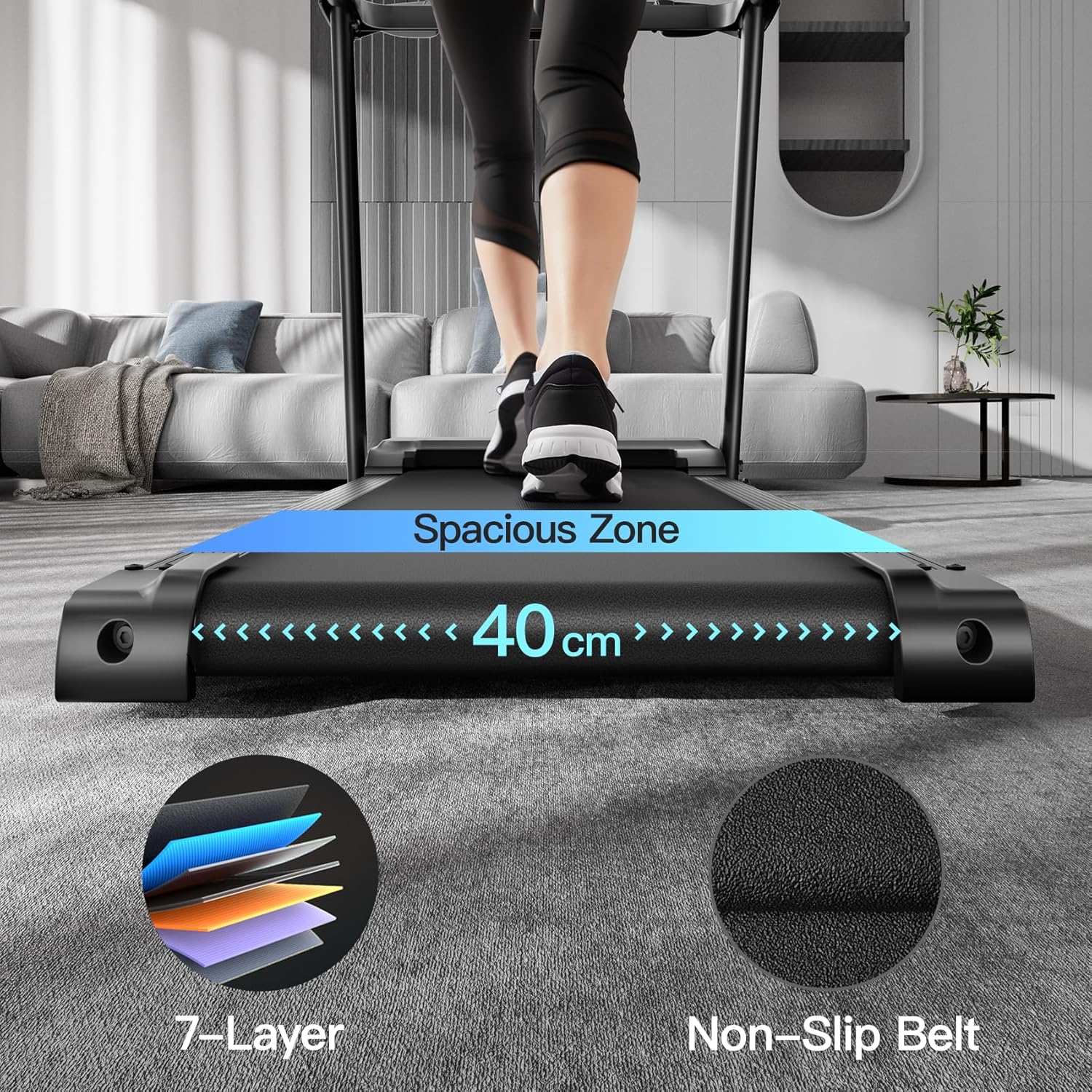
This image focuses on the running surface, indicating a spacious 40 cm width and illustrating the multi-layered construction of the running belt for durability and comfort.
Setup Instructions
1. Unfolding the Treadmill
- Place the treadmill on a flat, stable surface.
- Carefully lift the running deck until it locks into the unfolded position. Ensure all locking mechanisms are securely engaged.
- Adjust the console and handlebars to your desired position, if applicable, and tighten any securing knobs.
2. Placement
Ensure there is adequate clear space around the treadmill for safe operation, as specified in the safety information section.
3. Power Connection
Connect the power cord to the treadmill's power inlet, then plug the other end into a grounded electrical outlet. Ensure the power switch is in the 'OFF' position before plugging in.
Operating Instructions
1. Power On/Off
- To power on, flip the main power switch located near the power cord inlet to the 'ON' position. The console display will illuminate.
- To power off, flip the main power switch to the 'OFF' position and unplug the treadmill.
2. Attaching the Safety Key
Before starting any workout, attach the safety key clip to your clothing and insert the magnetic end into the designated slot on the console. The treadmill will not operate without the safety key in place.
3. Starting a Workout
- Step onto the treadmill, placing your feet on the side rails.
- Press the 'START' button on the console. The belt will begin to move at a low speed after a short countdown.
- Carefully step onto the moving belt and begin walking.
4. Adjusting Speed
- Use the '+' and '-' buttons on the console or handlebars to increase or decrease the speed incrementally.
- Utilize the quick speed buttons (e.g., 5 KM/H, 10 KM/H, 14 KM/H) for rapid adjustments.

This image illustrates the treadmill's speed capabilities, categorizing 5 KM/H as walking, 10 KM/H as jogging, and 14 KM/H as running, providing a visual reference for users.
5. Stopping a Workout
- Press the 'STOP' button on the console or handlebars to gradually bring the belt to a halt.
- Alternatively, pulling the safety key will immediately stop the treadmill for emergency situations.
6. Heart Rate Monitoring
To monitor your heart rate, firmly grasp the heart rate sensors located on the handlebars with both hands. Your heart rate will be displayed on the console after a few seconds.
Workout Programs and Modes
The UMAY P9 Treadmill offers a variety of programs to enhance your workout experience:
- 12 Preset Programs: These are pre-designed workout routines with varying speed profiles to challenge you. Select a program using the 'PROGRAM' button on the console.
- 3 Countdown Modes: Set a target for your workout based on time, distance, or calories burned. The treadmill will count down from your set target.
Bluetooth App Connectivity
Enhance your training with the treadmill's smart app connectivity:
1. Connecting to the App
- Download the recommended fitness app (refer to the console or product packaging for app name) from your device's app store.
- Ensure Bluetooth is enabled on your smartphone or tablet.
- Open the app and follow the on-screen instructions to search for and pair with your UMAY P9 Treadmill.
2. App Features
Once connected, the app provides:
- Real-time monitoring of your workout data, including heart rate, speed, distance, and calories.
- Access to professional coaching guidance and personalized training plans.
- The ability to track your progress and share your achievements.
Maintenance
Regular maintenance ensures optimal performance and extends the life of your treadmill.
1. Cleaning
- After each use, wipe down the console and other surfaces with a soft, damp cloth to remove sweat and dust.
- Do not use abrasive cleaners or solvents, as these can damage the treadmill's finish.
2. Lubrication
The running belt requires periodic lubrication to reduce friction and wear. Refer to the included lubricant instructions for proper application frequency and method. Typically, this is every few months depending on usage.
3. Belt Adjustment
Periodically check the running belt for proper tension and alignment. If the belt feels loose, slips, or drifts to one side, consult the troubleshooting section or contact customer support for adjustment instructions.
Troubleshooting
If you encounter any issues with your treadmill, refer to the following common problems and solutions:
- Treadmill Not Starting:
Ensure the power cord is securely plugged into a grounded outlet and the treadmill. Check that the main power switch is 'ON'. Verify that the safety key is correctly inserted into the console. - Unusual Noise During Operation:
Check for any loose parts or foreign objects under the running belt. Ensure the running belt is properly lubricated. If the noise persists, discontinue use and contact customer support. - Inaccurate Heart Rate Readings:
Ensure your hands are firmly and completely gripping both heart rate sensors on the handlebars. Make sure the sensors are clean. Factors like dry skin or excessive movement can affect accuracy. - Running Belt Slipping or Sticking:
The running belt may require lubrication or adjustment. Refer to the maintenance section for lubrication instructions. If slipping continues, the belt tension may need adjustment by a qualified technician.
For issues not listed here or if problems persist, please contact UMAY customer support.
Technical Specifications
Detailed specifications for the UMAY P9 Foldable Treadmill:
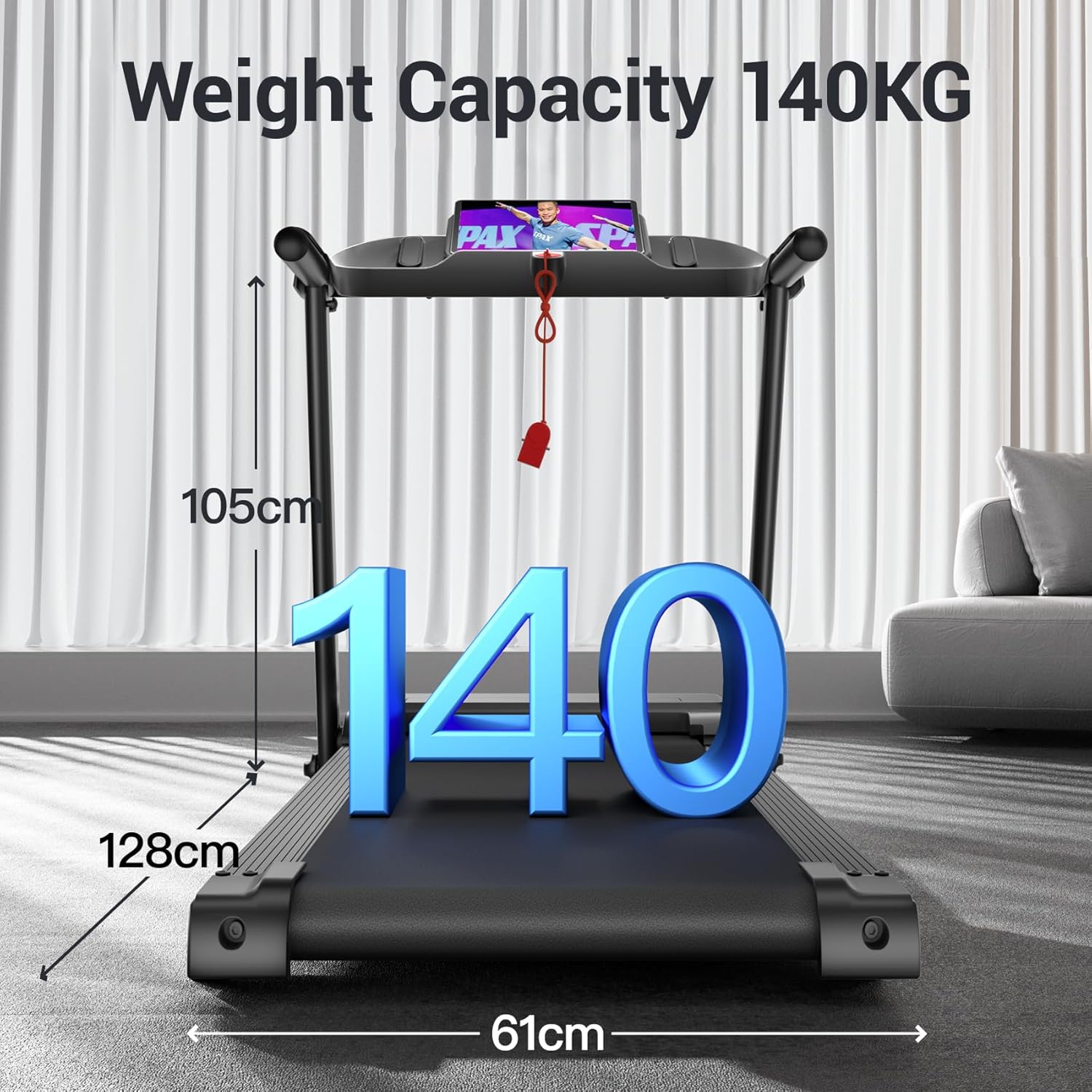
This image visually represents the treadmill's robust build, highlighting its maximum user weight capacity of 136 KG. It also shows key dimensions: 128cm length, 61cm width, and 105cm height.
| Brand | UMAY |
| Model Number | P9 |
| Color | Black |
| Material | Alloy Steel |
| Motor Horsepower | 3 HP |
| Speed Range | 1 - 14 KM/H |
| Running Belt Dimensions | 103 x 40 cm |
| Max User Weight | 136 KG |
| Folded Dimensions (L x W x H) | 125 x 60 x 110 cm |
| Unfolded Dimensions (L x W x H) | 129 x 61 x 110 cm |
| Item Weight | 25 KG |
| Number of Programs | 12 Preset Programs + 3 Countdown Modes |
| Special Features | Shock absorption, Wheels for transport, Bluetooth connectivity, Foldable design, Heart rate monitor |
Warranty and Support
For warranty information, technical assistance, or to order replacement parts, please contact your retailer or the UMAY customer service department. Refer to your purchase documentation for specific contact details and warranty terms applicable to your region.


