
1. Product Overview
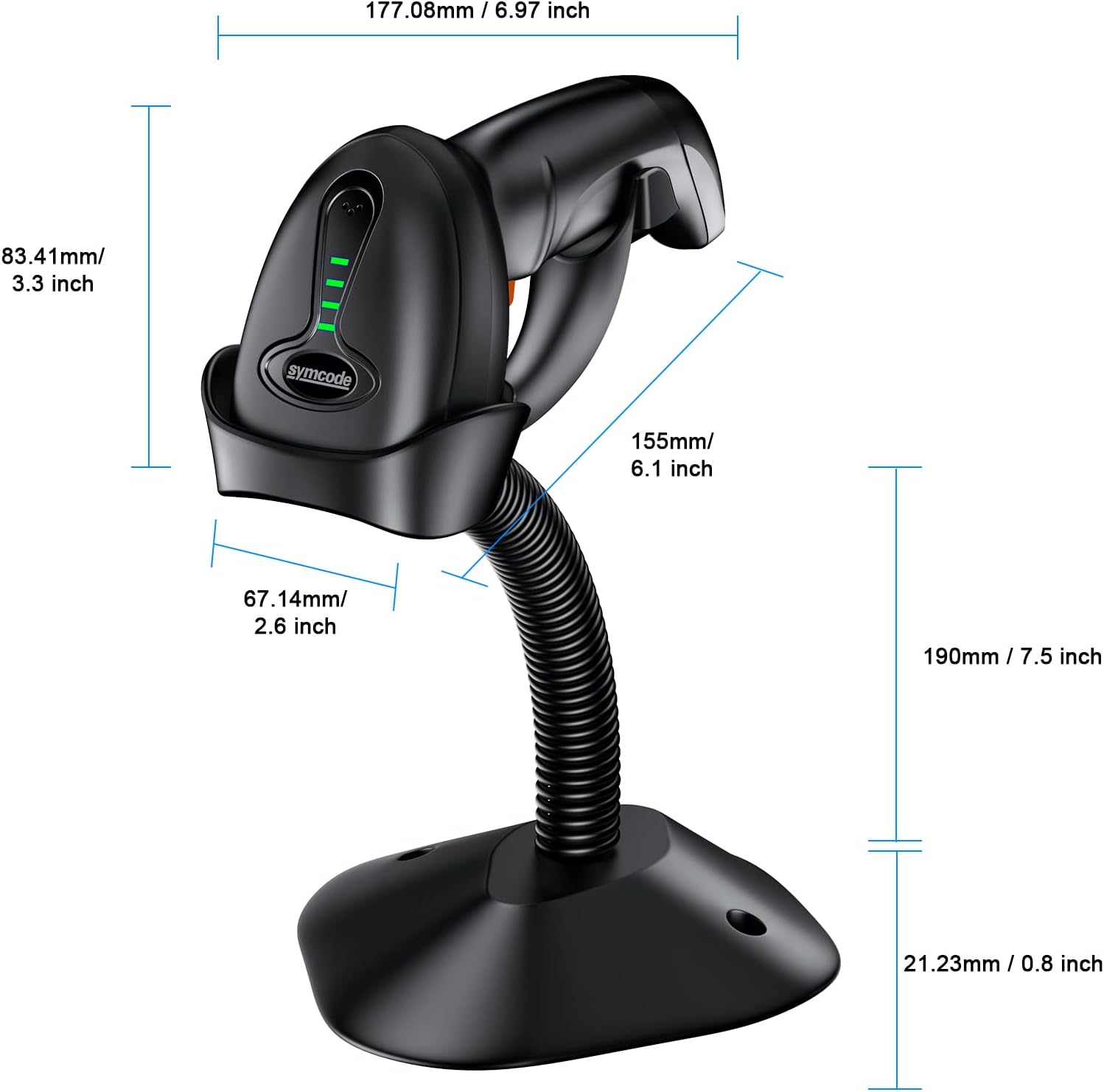
The Symcode MJ-4590 is an upgraded wireless 2D barcode scanner designed for efficient and accurate data capture. It features an auto-sensing stand, multiple connectivity options (Bluetooth, 2.4G wireless, USB wired), and a battery level indicator for enhanced usability. This scanner is suitable for various business applications, including inventory management and point-of-sale systems.
The device supports a wide range of 1D and 2D barcode types, including UPC/EAN, QR Code, Data Matrix, and PDF417. With over 180 configuration options, users can customize settings such as adding prefixes/suffixes or deleting characters.
2. Package Contents
- Barcode Scanner (Model: MJ-4590)
- Charging Cord
- User Manual
- Auto-Sensing Stand
3. Setup and Connectivity
3.1 Bluetooth Connection
To connect the scanner via Bluetooth:
- Turn on the scanner.
- Long press the trigger for 8-10 seconds to activate Bluetooth pairing mode. The indicator light will flash.
- On your phone or compatible device, go to Bluetooth settings.
- Search for the scanner device (e.g., 'EY-039HD') and select it to connect.
3.2 2.4G Wireless Connection
For 2.4G wireless connectivity:
- Scan the '2.4G Wireless Pairing Mode' barcode from the user manual.
- Scan the 'Match the Receiver' barcode from the user manual.
- Insert the USB dongle into your computer's USB port. The scanner will automatically connect.
3.3 USB Wired Connection
To use the scanner in wired mode:
- Connect the USB cable from the scanner to your computer.
- The scanner will function as a wired device, transmitting data directly.
4. Operating Instructions
4.1 Scanning Modes
- One-to-one Mode: One scanner transmits barcodes to a single USB receiver.
- More-to-one Mode: Multiple scanners can transmit barcodes to a single USB receiver, ideal for environments with several users.

4.2 Data Upload Modes
- Instant Upload Mode: Data is synchronously uploaded to your computer as barcodes are scanned.
- Offline Storage Mode: Barcodes are stored internally in the scanner (up to 100,000 codes) and can be uploaded to a computer later.

4.3 Auto-Sensing Stand
When placed on its stand, the scanner can automatically sense and scan barcodes without manual trigger presses, enhancing hands-free operation.
4.4 Battery Level Indicator
The scanner features a unique battery indicator light that displays the remaining battery level, preventing unexpected power loss during operation.

5. Features
- Advanced Scanning Technology: CMOS optical imaging technology with a 32-bit CPU for super decoding ability, scanning up to 300 times per second.
- Wide Compatibility: Compatible with Windows 11/10/8/7/XP, Mac OS, iOS, Android, and Linux operating systems. Works with software like Quickbook, Word, Excel, and Novell.
- Long Battery Life: Equipped with an 1800mAh high-capacity rechargeable battery, providing up to 30 hours of continuous scanning and 720 hours of standby time. Charging time is approximately 2.5 hours.
- Durable Design: Anti-shock construction designed to withstand drops from up to 2.5 meters.
- Customizable Settings: Over 180 configuration options available, including automatic sensing, hiding barcode characters, adding prefix/suffix, and volume adjustment.


6. Maintenance
- Cleaning: Use a soft, dry cloth to clean the scanner's exterior. Avoid abrasive cleaners or solvents.
- Battery Care: Charge the battery fully before first use. For long-term storage, charge the battery to about 50% and store in a cool, dry place. Recharge every 3-6 months to maintain battery health.
- Storage: Store the scanner in a safe environment, away from extreme temperatures, humidity, and direct sunlight.
7. Troubleshooting
- Scanner Not Connecting: Ensure the scanner is fully charged and within range of the receiver/device. Re-attempt pairing steps for Bluetooth or 2.4G wireless. For wired connection, check the USB cable.
- Scanning Issues: Ensure the barcode is clean and not damaged. Adjust the distance and angle of the scanner to the barcode. Check if the correct barcode types are enabled in the scanner's configuration.
- No Data Transmission: Verify successful connection. Check software settings on your computer/device to ensure it's ready to receive input from the scanner.
- Battery Draining Quickly: Ensure the scanner is not left in continuous scanning mode unnecessarily. Check battery health and consider a full charge cycle.
8. Specifications
| Feature | Specification |
|---|---|
| Model | MJ-4590 |
| Input Voltage | DC5V±0.25v |
| Current (Work) | 25 mA |
| Current (Instantaneous) | 95 mA |
| Decoding Speed | 100 times / sec |
| Wireless Range | 40m (unobstructed) |
| Charging Time | 2.5 Hours |
| Battery Life (Continuous) | 30 Hours |
| Battery Life (Standby) | 720 Hours |
| Battery Type | Lithium Polymer (1 included) |
| Connectivity | Bluetooth, 2.4G Wireless, USB Cable |
| Compatible Devices | Desktop, Laptop, Smartphone, Tablet |
| Supported Barcodes | 1D: UPC/EAN, Code 39, Code 128, Codabar, Interleaved 2 of 5, Code 93, MSI, Code 11, RSS variants, Chinese 2 of 5. 2D: PDF417, QR-code, Data Matrix, Aztec, Hanxin. |
| Dimensions (Parcel) | 19.1 x 14.7 x 10.6 cm |
| Weight (Parcel) | 520 g |
9. Warranty and Support
Symcode aims to provide quality products and customer satisfaction. For any support needs, please contact:
- WhatsApp: 86 13410733354
- Email: karl@mjcode.com
Our policy is 100% satisfaction guaranteed, regardless of purchase date.