
1. Introduction
The KU XIU X55 Ultra is a foldable 3-in-1 wireless charging station designed to efficiently charge your Samsung phone, Galaxy Watch, and Galaxy Buds simultaneously. Its compact and portable design makes it ideal for both home and travel use, helping to reduce cable clutter and maintain an organized space. This manual provides essential information for setting up, operating, and maintaining your charging station.
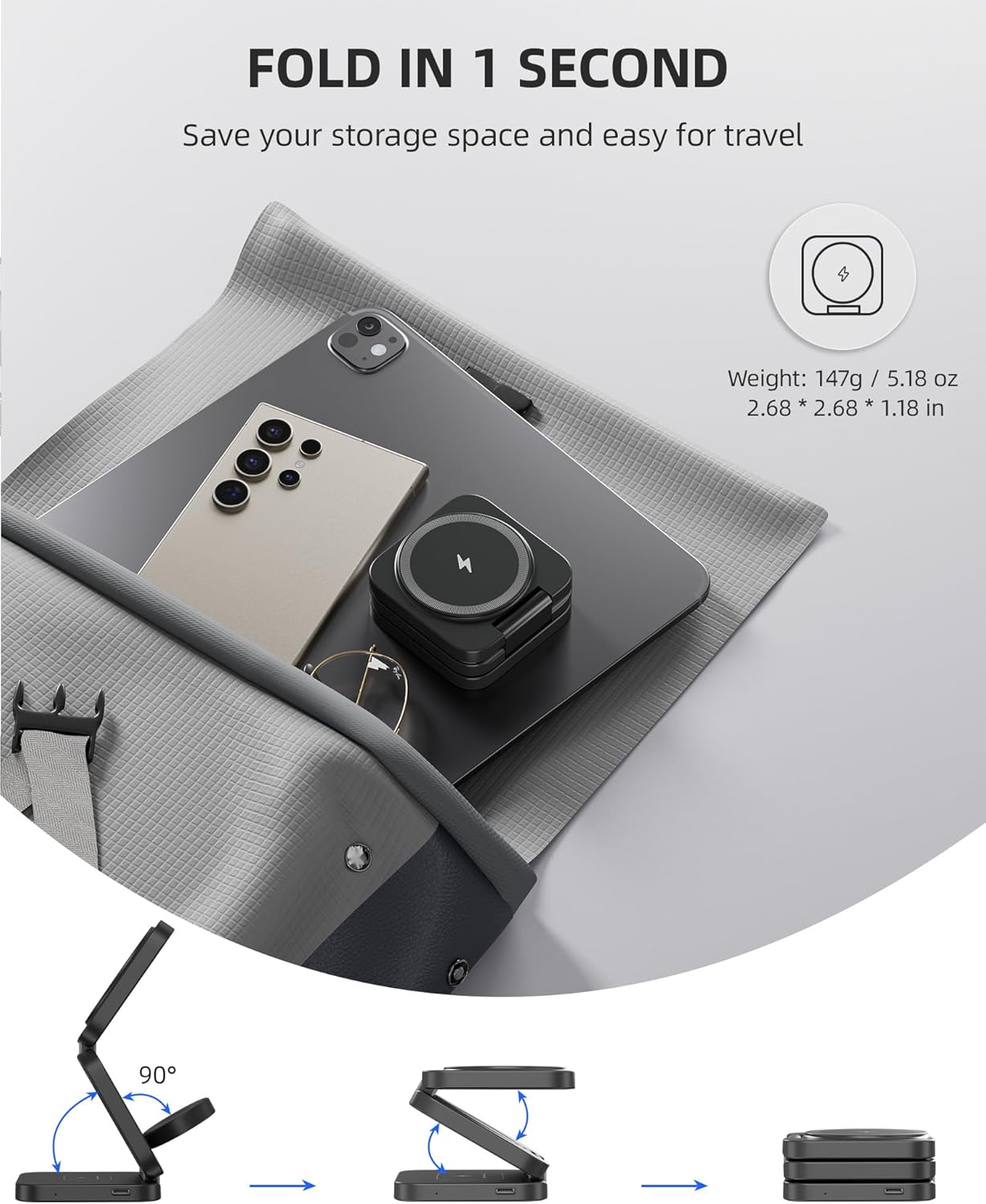
Image: The KU XIU X55 Ultra charging station in use, simultaneously charging a smartphone, smartwatch, and wireless earbuds.
2. What's in the Box
Please verify that all items are present in the package:
- 1 x X55 Ultra 3-in-1 Foldable Wireless Charger
- 1 x 20W Fast Charging Adapter
- 1 x Travel Storage Bag
- 1 x USB-C to USB-C Cable
- 1 x User Manual
- 2 x Magnetic Suction Rings (for non-magnetic compatible phones)

Image: All components included in the KU XIU X55 Ultra package: the foldable charger, 20W adapter, USB-C cable, travel bag, and two magnetic rings.
3. Setup Instructions
- Unfold the Charger: Gently unfold the charging station to your desired configuration (flat or upright stand). The hinges are designed for flexible positioning.
- Connect Power: Insert one end of the provided USB-C to USB-C cable into the charging station's USB-C port. Connect the other end of the cable to the included 20W Fast Charging Adapter. Plug the adapter into a wall outlet.
- Magnetic Ring Application (if needed): If your Samsung phone does not have built-in magnetic charging capabilities or a magnetic case, use one of the included magnetic suction rings. Clean the back of your phone or phone case, then carefully align and attach the magnetic ring to the center of the phone's wireless charging coil area. Ensure proper alignment for optimal charging and to prevent overheating.

Image: The KU XIU X55 Ultra charging station set up in an upright stand position, charging a smartphone, smartwatch, and earbuds.
Image: A visual guide demonstrating how to apply the magnetic ring to a Samsung phone for magnetic charging compatibility.
4. Operating Instructions
The KU XIU X55 Ultra allows for simultaneous wireless charging of up to three compatible devices.
- Charging a Phone: Place your wireless charging compatible phone on the designated phone charging area. For magnetic charging, ensure your phone has a magnetic case or the included magnetic ring is properly applied. The phone can be charged horizontally when the station is folded flat, or vertically when used as a stand.
- Charging a Galaxy Watch: Place your Samsung Galaxy Watch on the dedicated watch charging pad. Ensure the watch is centered on the pad for effective charging.
- Charging Earbuds: Place your wireless charging compatible earbuds (e.g., Galaxy Buds series) on the designated earbud charging area.
The charging station will automatically detect and begin charging your devices. An LED indicator may illuminate to confirm charging status (refer to product packaging for specific LED behavior).

Image: A 'Before and After' comparison showing how the KU XIU X55 Ultra reduces cable clutter on a desk.
Video: A demonstration of the KU XIU X55 Ultra 3-in-1 Pocket Wireless Charging Station for Samsung Devices, showcasing its foldable design and charging capabilities.
5. Compatibility
The KU XIU X55 Ultra is primarily designed for Samsung devices but also supports other Qi-enabled devices.
- Watch Charging Area: Only for Samsung Galaxy Watch Ultra/7/6/6 Classic/5/5 Pro/4/4 Classic/3/Active 1/2. Not compatible with Apple Watch or other brand watches.
- Phone Charging Area: Supports all wireless charging phones, including Samsung Galaxy Z (Flip/Fold6/5/4/3/2), Galaxy S (S24/S23/S22/S21/S20 Ultra/+/FE/Edge Series), and Galaxy Note (Note 20/10/9/8/7/6/5 Series). Also compatible with iPhone 17/16/15/14/13/12 series for magnetic stand-up charging.
- Earbud Charging Area: Supports Galaxy Buds3 Pro/3/FE/Live and AirPods Pro 3/Pro 2/Pro/4 with ANC/3rd/2nd with Wireless Charging Case.

Image: A comprehensive chart detailing the compatibility of the KU XIU X55 Ultra with various Samsung Galaxy phones, watches, and earbuds, as well as iPhone models.
6. Safety Features
The KU XIU X55 Ultra is equipped with integrated smart chips to ensure a safe charging experience for your devices.
- Over-Temperature Protection: Prevents the charger and your devices from overheating.
- Over-Voltage Protection: Safeguards against damage from excessive voltage input.
- Over-Current Protection: Protects devices from harmful current levels.
- Foreign Object Detection (FOD): Detects metallic objects on the charging surface that could interfere with charging or cause heat, preventing potential hazards.
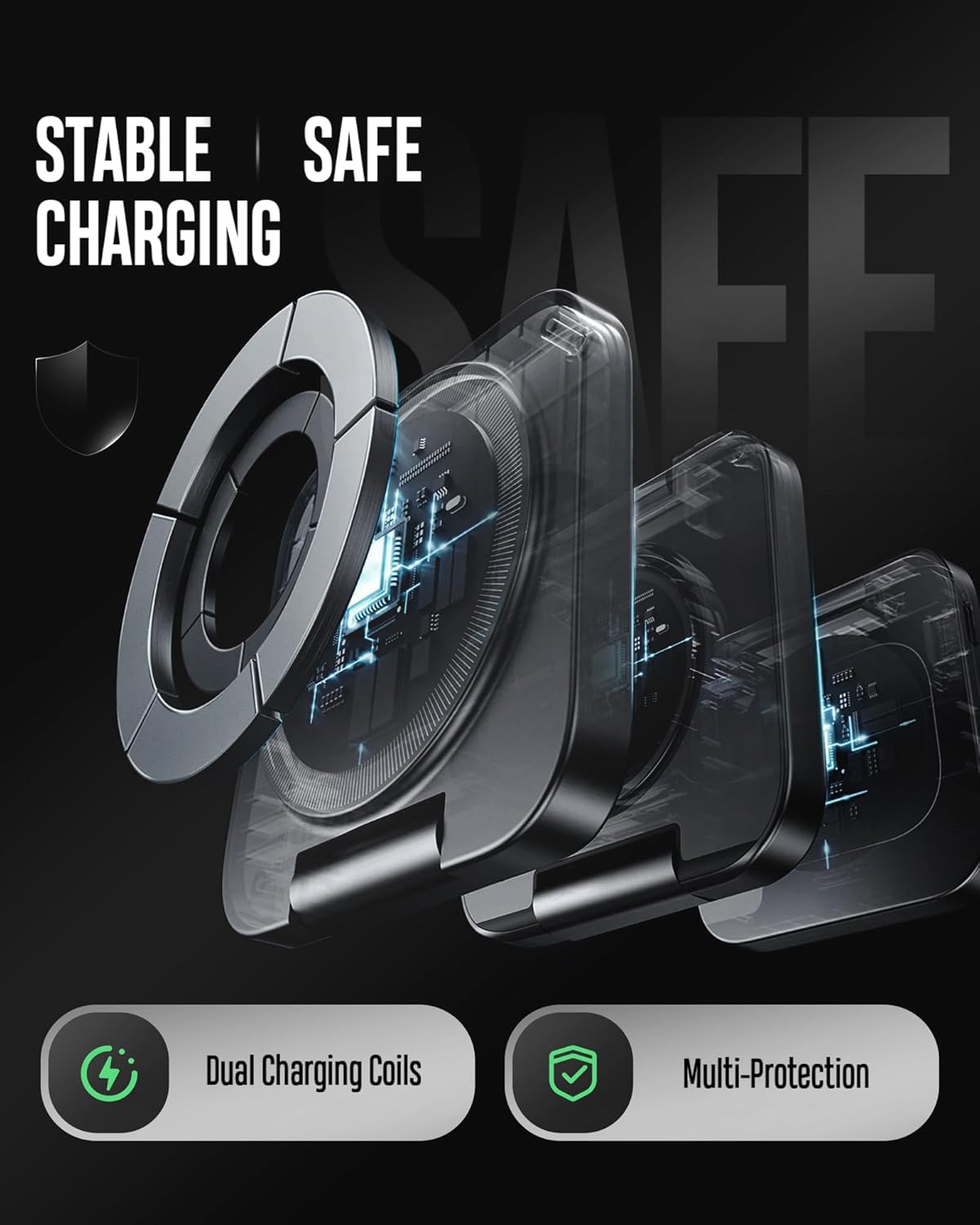
Image: A diagram highlighting the stable and safe charging mechanisms, including dual charging coils and multi-protection features.
7. Maintenance
To ensure the longevity and optimal performance of your charging station, follow these maintenance guidelines:
- Cleaning: Disconnect the charger from the power source before cleaning. Use a soft, dry cloth to wipe the surface. Avoid using harsh chemicals, abrasive cleaners, or excessive moisture.
- Storage: When not in use, especially during travel, fold the charger into its compact form and store it in the provided travel bag to protect it from dust and scratches.
- Avoid Liquids: Keep the charging station away from water and other liquids. If it comes into contact with liquid, disconnect it immediately and allow it to dry completely before reuse.
- Handle with Care: Avoid dropping the device or subjecting it to strong impacts, which could damage internal components.
8. Troubleshooting
If you encounter issues with your KU XIU X55 Ultra, please refer to the following common solutions:
- Device Not Charging:
- Ensure the charging station is properly connected to the 20W adapter and a working power outlet.
- Verify that your device is placed correctly on the charging pad, centered over the charging coil.
- Remove any thick phone cases (especially non-magnetic ones) that might interfere with wireless charging.
- Check for foreign objects (e.g., metal, credit cards) between your device and the charging pad.
- Confirm your device is wireless charging compatible.
- Slow Charging:
- Ensure you are using the included 20W Fast Charging Adapter and USB-C cable. Using a lower-wattage adapter may result in slower charging.
- Make sure your device is properly aligned on the charging pad.
- Close unnecessary background applications on your phone to reduce power consumption during charging.
- Overheating:
- Slight warmth during wireless charging is normal. However, if your device or the charger becomes excessively hot, remove the device immediately.
- Ensure proper alignment of the magnetic ring (if used) on your phone. Misalignment can cause increased heat.
- Remove any thick or poorly ventilated phone cases.
- Avoid charging in direct sunlight or hot environments.
- Magnetic Charging Not Working (Samsung Phones):
- Samsung phones do not support magnetic charging by default. You must use a magnetic case or apply the included magnetic ring to enable this feature.
- Ensure the magnetic ring is correctly positioned over the phone's wireless charging coil.
9. Specifications
| Feature | Detail |
|---|---|
| Model Number | X55 Ultra |
| Brand | KU XIU |
| Connectivity Technology | Wireless |
| Connector Type | USB Type C |
| Input Voltage | 5 Volts |
| Amperage | 3 A |
| Wattage | 15 Watts (Max output for phone) |
| Output Current | 3 A |
| Output Voltage | 3 V |
| Item Weight | 147 g (0.32 lb) |
| Form Factor | Foldable |
| Material | Plastic |
| Special Features | Foldable, Portable Travel Design, Wireless Fast Charging, Safe Charging, Magnetic for iPhone 12-17 Series |
10. Warranty and Support
The KU XIU X55 Ultra Foldable 3-in-1 Wireless Charging Station comes with a 1 Year Warranty from the date of purchase.
For warranty claims, technical support, or any inquiries regarding your product, please contact KU XIU customer service through the retailer where you purchased the product or visit the official KU XIU website for support contact information.
Please retain your proof of purchase for warranty validation.