
1. Introduction
Thank you for choosing the GOOJODOQ Magsafe Power Bank. This portable power bank is designed to provide convenient and fast charging for your compatible devices, featuring both magnetic wireless charging and wired charging capabilities. Please read this manual carefully before use to ensure proper operation and to maximize the product's lifespan.
2. Important Safety Information
- Do not expose the power bank to extreme temperatures, direct sunlight, or humid environments.
- Avoid dropping, disassembling, or attempting to repair the device yourself.
- Keep away from heat sources and flammable materials.
- Use only certified charging cables and adapters.
- This device contains a Lithium Ion battery. Dispose of it responsibly according to local regulations.
- During charging, it is normal for the power bank to generate some heat. If it becomes excessively hot, discontinue use and contact support.
3. Package Contents
Please check the package for the following items:
- GOOJODOQ Magsafe Power Bank (Model: AD4008)
- USB-C Charging Cable
- User Manual
4. Product Overview
Familiarize yourself with the features and components of your GOOJODOQ Magsafe Power Bank.

Figure 1: Multiple Charging Options and Ports
The power bank features various ports for versatile charging:
- Type-C Output/Input Port: For charging the power bank or charging compatible devices.
- Lighting Output: For charging Apple devices.
- Micro USB Input: For charging the power bank.
- USB Output: For charging various USB-powered devices.

Figure 2: LED Digital Display
The integrated LED digital display shows the remaining battery percentage of the power bank, allowing you to monitor its charge level accurately.

Figure 3: Super-Strong Magnetic Adsorption
The power bank utilizes strong magnetic adsorption for secure attachment and efficient wireless charging with compatible devices.
5. Setup
5.1 Initial Charging of the Power Bank
Before first use, fully charge your GOOJODOQ Magsafe Power Bank. Connect the provided USB-C cable to the power bank's Type-C input port and the other end to a suitable USB wall adapter (not included). The LED display will show the charging progress and indicate 100% when fully charged.
6. Operating Instructions
6.1 Wireless Charging
The power bank supports magnetic wireless fast charging up to 15W (compatible with iPhone 12 series and above).

Figure 4: Wireless and Wired Charging
- Ensure your device is compatible with Magsafe or magnetic wireless charging.
- Align your compatible phone (e.g., iPhone 12/13/14/15/16 series) with the magnetic charging area on the power bank. The magnets will securely attach the phone.
- Wireless charging will begin automatically.
Note on Phone Cases:
- For optimal magnetic adsorption and wireless charging, use the power bank with magnetic phone cases or without a case.
- Ordinary or very thick phone cases may affect magnetic attachment and charging efficiency.
6.2 Wired Charging
The power bank offers multiple wired output options, including 22.5W Max USB PD and 20W USB-C output, and Lighting output.
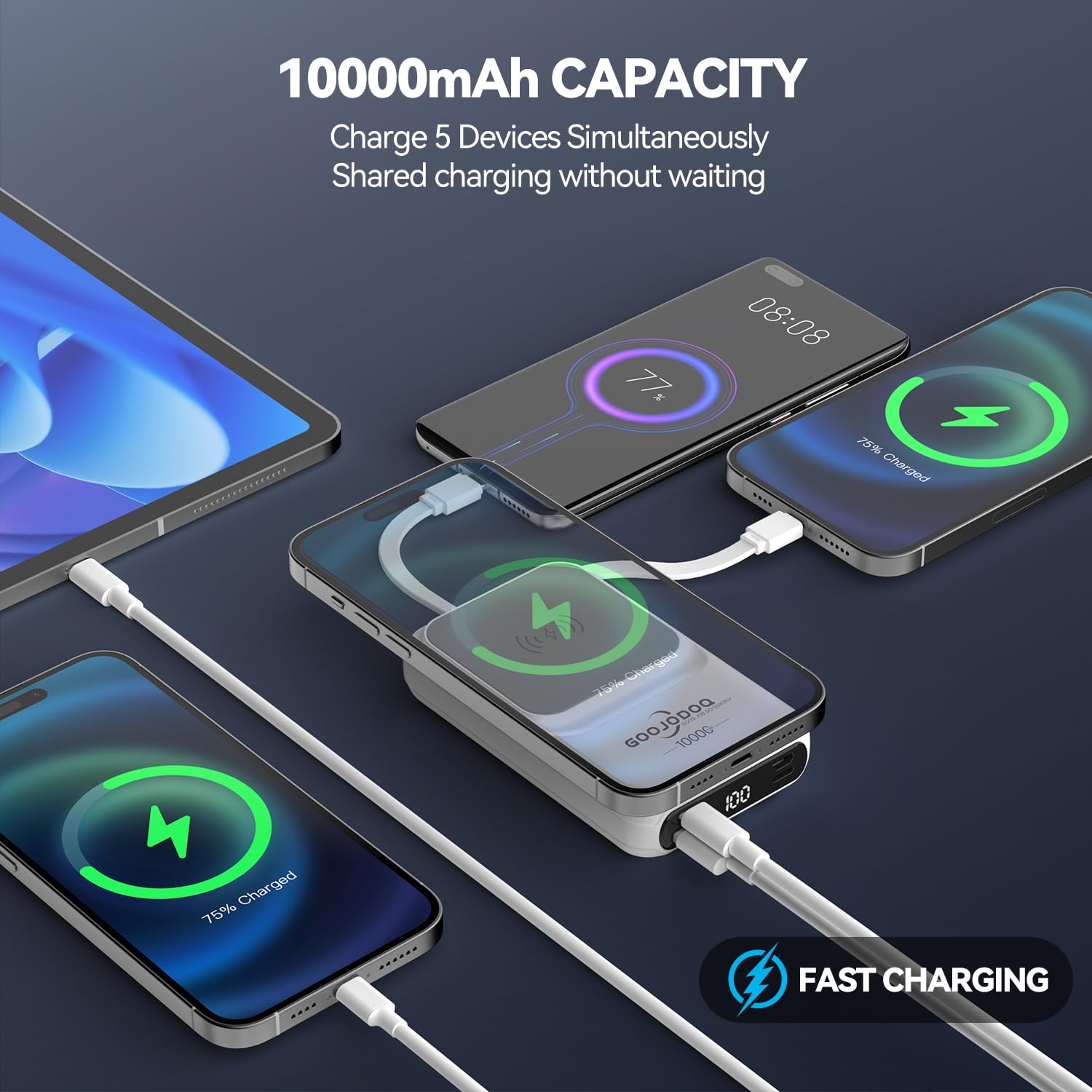
Figure 5: Charging Multiple Devices
- Connect your device to the appropriate output port (USB, Type-C, or Lighting) on the power bank using a compatible charging cable.
- Charging will begin automatically. The power bank can charge up to 5 devices simultaneously (wireless + wired).
Compatibility:
- Wireless charging is designed for iPhone 12/13/14/15/16 series and some Android models.
- Wired charging via data cable supports a variety of other Android and Apple phone models.
6.3 Charging the Power Bank
To recharge the power bank, use the Micro USB input or the Type-C input/output port. Connect the power bank to a power source using a suitable cable and adapter.
7. Specifications
| Feature | Detail |
|---|---|
| Model Number | AD4008 |
| Battery Capacity | 10000 Milliamp Hours (mAh) |
| Wireless Charging Output | 7.5W, 10W, 15W Max |
| Wired Output (USB PD) | 22.5W Max |
| Wired Output (USB-C) | 20W Max |
| Input Ports | Micro USB, USB Type C |
| Output Ports | USB, USB Type C, Lighting |
| Special Features | Built-in Cable, Digital Display, Fast Charging, Pocket Size, Wireless Charging |
| Dimensions | 14.9 x 9.3 x 3.4 cm |
| Item Weight | 204 g |
| Battery Type | Lithium Ion (included) |
8. Troubleshooting
8.1 Common Issues and Solutions
- Q: Is it possible to use wireless charging with a phone case?
A: This magnetic power bank is only compatible with magnetic phone cases or without a case. Other ordinary or very thick phone cases may affect magnetic adsorption and charging. - Q: How long does it take for the power bank to be fully charged?
A: The charging time for the power bank depends on the input power source. Using a fast-charging adapter will reduce the charging time. - Q: How long does it take to fully charge my phone?
A: The charging speed for your phone depends on its supported input power. The power bank offers wireless charging up to 15W and wired charging up to 22.5W. - Q: Does it only support iPhone 12/13/14/15/16 series? Can it charge other phones?
A: Wireless charging is optimized for iPhone 12/13/14/15/16 series and also supports some Android models. Other phones that do not support wireless charging can be charged using the appropriate data cable connected to the power bank's wired output ports. - Q: Why does the portable charger get hot when charging?
A: During the charging process, it is normal for the power bank to release heat. This heat is typically within a controllable range. Ensure the device is used in a well-ventilated area and kept away from direct heat sources. If it becomes excessively hot, discontinue use.
9. Maintenance
- Clean the power bank with a soft, dry cloth. Do not use harsh chemicals or abrasive cleaners.
- Store the power bank in a cool, dry place when not in use.
- Avoid prolonged exposure to moisture or extreme temperatures.
- If storing for an extended period, charge the power bank to approximately 50% every three months to maintain battery health.
10. Warranty and Support
Your GOOJODOQ Magsafe Power Bank comes with a standard manufacturer's warranty. For detailed warranty information, please refer to the warranty card included in your package or contact GOOJODOQ customer support. If you encounter any issues or have questions, please reach out to our customer service team for assistance.
Manufacturer: GOOJODOQ
Contact: maisifang_yd@163.com