
1. Introduction
Thank you for choosing the GOOJODOQ Magsafe Power Bank AD4008. This manual provides essential information for the safe and efficient use of your new power bank. Please read it thoroughly before operation and retain it for future reference.
This 10000mAh wireless power bank features 20W magnetic wireless fast charging and 22.5W wired output, compatible with various smartphones and tablets.
2. Product Overview
2.1 Key Features
- 10000mAh High Capacity: Provides multiple charges for compatible devices.
- Magnetic Wireless Charging: Supports 7.5W, 10W, and 15W Max wireless charging for Magsafe-compatible iPhones.
- Fast Wired Charging: Offers 22.5W Max USB Power Delivery (PD) and 20W USB-C output.
- Multiple Charging Options: Features built-in Type-C and Lightning cables, a USB output port, and a Type-C input/output port.
- LED Digital Display: Clearly shows the remaining battery percentage.
- Compact and Portable: Designed for easy carrying during travel or outdoor activities.
- Reliable Security: Built-in protection against overcharge, overdischarge, short circuit, and high temperature.
2.2 Package Contents
- GOOJODOQ Magsafe Power Bank AD4008
- USB-C Charging Cable
- User Manual (this document)
2.3 Product Diagram

Image: Overview of the power bank's various input and output ports, including Type-C Output, Lighting Output, Micro USB Input, USB Input, USB Output, and Type-C Output/Input Port.
3. Setup
3.1 Initial Charging of the Power Bank
- Connect the provided USB-C cable to the power bank's Type-C input/output port.
- Plug the other end of the USB-C cable into a compatible USB wall adapter (not included).
- The LED digital display will show the charging progress. Charge the power bank fully before first use.
Alternatively, you can use the Micro USB Input or Lighting Input ports to charge the power bank.

Image: The power bank's LED digital display indicating a full 100% charge, demonstrating its clear battery status indicator.
4. Operating Instructions
4.1 Charging Devices Wirelessly (Magsafe)
- Ensure your device is Magsafe compatible (iPhone 12 series and above).
- Align the back of your iPhone with the magnetic charging area on the power bank. The magnets will snap into place.
- The power bank will automatically begin wireless charging.
- For optimal magnetic adsorption and charging efficiency, use a Magsafe-compatible phone case or no case at all. Thick or non-magnetic cases may affect performance.
4.2 Charging Devices Wired
The power bank offers multiple wired charging options:
- Using Built-in Cables: Connect your device directly using the integrated Type-C or Lightning cables.
- Using USB Output Port: Connect your device's charging cable to the standard USB output port.
- Using Type-C Output/Input Port: Connect your device's USB-C charging cable to this port for fast charging.
The power bank can charge up to 5 devices simultaneously using a combination of wireless and wired connections.

Image: Illustration showing an iPhone wirelessly charging on the power bank and another iPhone connected via a wired cable, highlighting both fast charging methods.

Image: The power bank connected to and wirelessly charging multiple smartphones and a tablet, demonstrating its 10000mAh capacity and ability to charge up to 5 devices.
5. Maintenance
- Cleaning: Wipe the power bank with a soft, dry cloth. Do not use harsh chemicals or abrasive cleaners.
- Storage: Store the power bank in a cool, dry place away from direct sunlight and extreme temperatures.
- Avoid Moisture: Do not expose the power bank to water or high humidity.
- Charging Cables: Use only the original USB-C cable or certified cables for charging the power bank and your devices.
- Battery Health: For optimal battery life, fully charge and discharge the power bank at least once every three months if not in regular use.
6. Troubleshooting
6.1 Power Bank Not Charging
- Ensure the charging cable is securely connected to both the power bank and the wall adapter.
- Verify that the wall adapter is functioning correctly and the power outlet has power.
- Try using a different charging cable or wall adapter.
6.2 Device Not Charging
- Wireless Charging:
- Ensure your device is Magsafe compatible and properly aligned with the power bank's magnetic area.
- Remove any non-Magsafe compatible or excessively thick phone cases.
- Wired Charging:
- Check that the charging cable is securely connected to both the power bank and your device.
- Try using a different charging cable or a different output port on the power bank.
- Ensure the power bank has sufficient charge, as indicated by the LED display.
6.3 Slow Charging
- Verify that your device supports fast charging and that you are using a compatible cable.
- Ensure the power bank itself is fully charged.
6.4 Overheating During Charging
It is normal for the power bank to generate some heat during charging or discharging. However, if it becomes excessively hot, discontinue use and allow it to cool down. Ensure the power bank is not covered and is in a well-ventilated area. Avoid using it near other heat sources.

Image: The power bank magnetically attached to the back of an iPhone, illustrating the strong magnetic adsorption feature for secure wireless charging.
7. Specifications
| Brand | GOOJODOQ |
| Model Name/Number | AD4008 |
| Battery Capacity | 10000 mAh |
| Battery Cell Type | Lithium Ion |
| Wireless Charging Output | 7.5W, 10W, 15W Max |
| Wired Output | 22.5W Max USB PD, 20W USB-C output |
| Input Ports | Micro USB, USB Input, Type-C Input/Output, Lighting Input (as per diagram) |
| Output Ports | Type-C Output, Lighting Output, USB Output, Type-C Output/Input |
| Connector Type | Micro USB, USB Type C |
| Dimensions (L x W x Th) | 11.3L x 6.9W x 2.4Th Centimeters |
| Weight | 204 Grams |
| Compatible Devices | iPhone 12, 13, 14, 15, 16 series, Type C smartphones, Tablets |
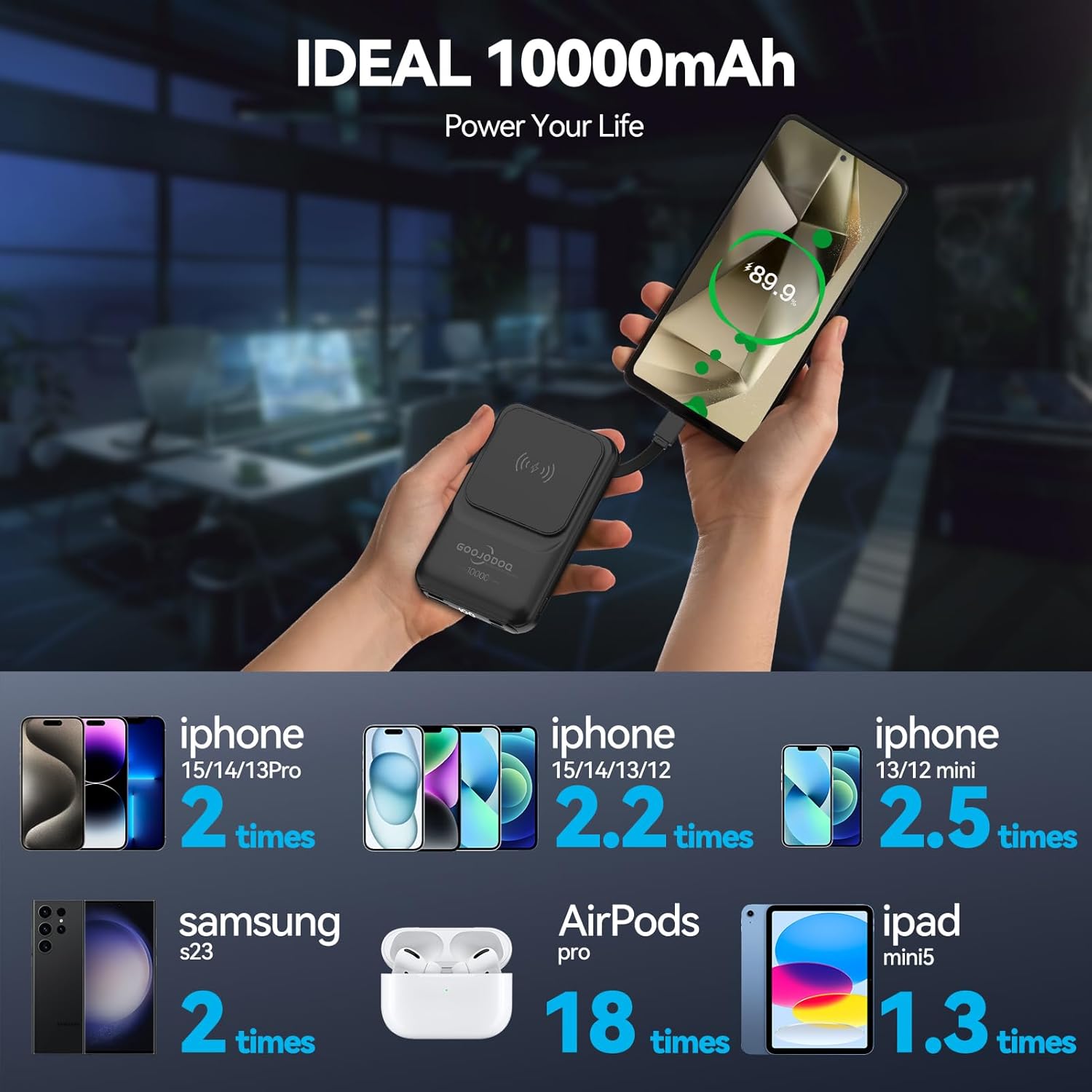
Image: An infographic detailing how many times the 10000mAh power bank can charge different devices, such as iPhones, Samsung S23, AirPods Pro, and iPad mini5.
8. Warranty Information
This GOOJODOQ Magsafe Power Bank AD4008 comes with a 1-year manufacturer warranty. This warranty is non-transferable and is valid for 1 year from the original date of purchase. Please retain your proof of purchase for warranty claims.
9. Support Information
For technical support or warranty inquiries, please contact:
- Manufacturer Contact: maisifang_yd@163.com
- Importer Contact (VALUECART PRIVATE LIMITED): arun@valuecart.in - 9901545456