
1. Product Overview
The Aiwa AWS10BTB is a versatile portable Bluetooth speaker designed for robust audio performance and outdoor use. It features Bluetooth connectivity for wireless audio streaming, True Wireless Stereo (TWS) technology for pairing two speakers for an immersive stereo experience, and IPX5 water resistance, making it suitable for various environments, including poolside or outdoor adventures.
Equipped with a powerful 30W output, a long-lasting 1800mAh rechargeable battery providing up to 10 hours of playback at 50% volume, and convenient USB-C charging. Additional features include USB input for direct music playback, an integrated FM radio tuner, and dynamic RGB lighting to enhance your listening experience. The speaker also supports hands-free calling.
Package Contents
- Aiwa AWS10BTB Portable Bluetooth Speaker
- USB-C Charging Cable
- User Manual (this document)
Product Diagram

Figure 1.1: Angled view of the Aiwa AWS10BTB speaker, highlighting the top control panel and integrated carrying handle.

Figure 1.2: Rear view of the Aiwa AWS10BTB speaker, illustrating the USB, DC 5V (charging), and AUX input ports.
2. Safety Information
Please read all safety warnings and instructions carefully before using this product to ensure safe operation and prevent damage.
- Do not expose the speaker to extreme temperatures or direct sunlight for prolonged periods.
- While the speaker is IPX5 water-resistant, do not submerge it in water. IPX5 protects against low-pressure water jets from any direction.
- Do not disassemble, repair, or modify the speaker. This will void the warranty and may cause electric shock or fire.
- Use only the provided charging cable or a certified USB-C cable for charging.
- Keep the speaker away from medical devices, as its magnetic components may interfere with pacemakers or other medical equipment.
- Dispose of the battery and speaker responsibly according to local regulations. Do not dispose of batteries in fire.
3. Setup
3.1 Charging the Speaker
Before first use, fully charge the speaker. A full charge takes approximately 2.5 hours.
- Locate the USB-C charging port on the rear of the speaker (refer to Figure 1.2).
- Connect the provided USB-C cable to the speaker's charging port.
- Connect the other end of the USB-C cable to a compatible USB power adapter (not included) or a computer's USB port.
- The LED indicator will show charging status (e.g., red for charging, off or green for fully charged, depending on model specifics).
3.2 Powering On/Off
To power on the speaker, press and hold the Power button (⏻) located on the top panel until you hear an audible prompt or see the LED indicators light up.
To power off the speaker, press and hold the Power button (⏻) again until the speaker powers down.
4. Operation
4.1 Bluetooth Pairing
The speaker will automatically enter Bluetooth pairing mode when powered on for the first time or if no device is connected.
- Ensure the speaker is powered on and in Bluetooth pairing mode (LED indicator will flash blue).
- On your smartphone or tablet, enable Bluetooth and search for available devices.
- Select "Aiwa AWS10BTB" from the list of devices.
- Once connected, the LED indicator will turn solid blue, and you will hear a confirmation sound.
- The speaker will automatically reconnect to the last paired device when in range.
4.2 True Wireless Stereo (TWS) Pairing
TWS allows you to pair two Aiwa AWS10BTB speakers together for a true stereo sound experience.
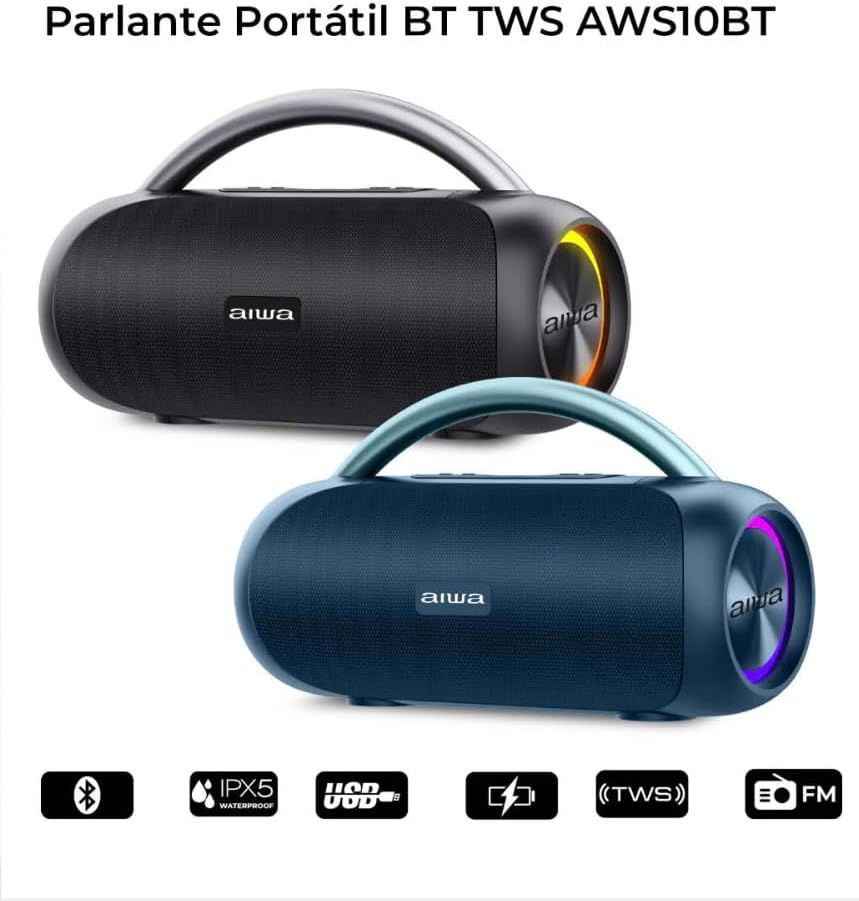
Figure 4.1: Two Aiwa AWS10BTB speakers demonstrating the True Wireless Stereo (TWS) capability.
- Ensure both Aiwa AWS10BTB speakers are powered on and not connected to any Bluetooth device.
- On one of the speakers (this will be the primary speaker), press and hold the TWS button (often indicated by two interlocking circles or a similar icon) for a few seconds.
- The speakers will search for each other and automatically pair. You will hear a confirmation sound when TWS pairing is successful.
- Once paired, the primary speaker's LED will flash blue, indicating it's ready to connect to your device. The secondary speaker's LED will remain solid blue.
- Now, connect your smartphone or tablet to the primary speaker via Bluetooth as described in Section 4.1.
Note: TWS pairing only works between two identical Aiwa AWS10BTB speakers.
4.3 USB Playback
The speaker supports music playback directly from a USB flash drive.
- Insert a USB flash drive containing MP3 audio files into the USB port on the rear of the speaker (refer to Figure 1.2).
- The speaker will automatically switch to USB mode and begin playing music.
- Use the playback controls on the speaker to manage your music.
4.4 Auxiliary Input (AUX)
Connect external audio devices using the 3.5mm AUX input.
- Connect a 3.5mm audio cable (not included) from your audio device's headphone jack to the AUX port on the rear of the speaker (refer to Figure 1.2).
- The speaker will automatically switch to AUX mode.
- Control playback and volume from your connected audio device.
4.5 FM Radio Tuner
The speaker includes an integrated FM radio tuner.
- Press the Mode button (often labeled 'M') to switch to FM Radio mode.
- Press the Play/Pause button (▶‖) to auto-scan and save available radio stations.
- Use the Previous (-) and Next (+) buttons to navigate between saved stations.
4.6 Controlling Playback and Volume
The top panel of the speaker features touch controls for media playback and volume adjustment.
- Play/Pause (▶‖): Press to play or pause audio.
- Volume Up (+): Short press to increase volume. Long press for next track.
- Volume Down (-): Short press to decrease volume. Long press for previous track.
- Mode (M): Press to switch between Bluetooth, USB, AUX, and FM Radio modes.
4.7 RGB Lighting Control
The speaker features dynamic RGB lighting on its sides.

Figure 4.2: Side view of the Aiwa AWS10BTB speaker showcasing its vibrant RGB lighting feature.
Press the Light button (often indicated by a lightbulb icon) to cycle through different lighting modes or to turn the lights off.
4.8 Hands-Free Calling
When connected to a smartphone via Bluetooth, the speaker can be used for hands-free calls.
- Answer Call: Press the Play/Pause button (▶‖) once to answer an incoming call.
- End Call: Press the Play/Pause button (▶‖) once during a call to end it.
- Reject Call: Press and hold the Play/Pause button (▶‖) to reject an incoming call.
5. Maintenance
5.1 Cleaning
- Always power off the speaker before cleaning.
- Use a soft, damp cloth to wipe the exterior of the speaker.
- Do not use harsh chemicals, cleaning solvents, or strong detergents.
- Ensure all ports are dry before charging or connecting other devices.
5.2 Storage
- Store the speaker in a cool, dry place away from direct sunlight and extreme temperatures.
- If storing for an extended period, charge the battery to approximately 50% every few months to prolong battery life.
6. Troubleshooting
| Problem | Possible Cause | Solution |
|---|---|---|
| Speaker does not turn on. | Low battery. | Charge the speaker fully. |
| No Bluetooth connection. | Speaker not in pairing mode; device Bluetooth off; too far from speaker. | Ensure speaker is in pairing mode. Turn device Bluetooth on/off. Move device closer to speaker. Forget device on phone and re-pair. |
| No sound. | Volume too low; incorrect mode selected; audio source issue. | Increase speaker and device volume. Press Mode button to select correct input. Check audio source. |
| TWS pairing fails. | Speakers too far apart; one speaker already connected to a device. | Ensure speakers are close to each other. Disconnect any Bluetooth devices from both speakers before TWS pairing. |
| Poor FM radio reception. | Weak signal; environmental interference. | Relocate the speaker to an area with better reception. |
7. Specifications
| Model Name | AWS10BTB |
| Brand | Aiwa |
| Connectivity Technology | Bluetooth, Auxiliary |
| Wireless Communication | Bluetooth |
| Speaker Type | Woofer |
| Max Speaker Output Power | 30 Watts |
| Frequency Response | 80 Hz - 16 kHz |
| Impedance | 4 Ohm |
| Power Source | Battery |
| Battery Capacity | 1800 mAh |
| Average Battery Life | Up to 10 Hours (at 50% volume) |
| Charging Time | Approx. 2.5 Hours |
| Waterproof Rating | IPX5 |
| Material | Plastic |
| Color | Black |
| Product Dimensions (D x W x H) | 14 x 36 x 18 cm |
| Control Method | Touch |
| Special Features | Stereo Pairing (TWS), Lightweight, LED Light (RGB), Portable, Hands-Free Calling, FM Radio |
8. Warranty and Support
8.1 Limited Warranty
This Aiwa AWS10BTB speaker comes with a limited warranty. Please refer to the warranty card included in your package for specific terms, conditions, and duration of coverage. The warranty typically covers manufacturing defects and malfunctions under normal use.
Note: Damage caused by misuse, accidents, unauthorized repairs, or failure to follow instructions in this manual is not covered by the warranty.
8.2 Customer Support
For technical assistance, warranty claims, or general inquiries, please contact Aiwa customer support through their official website or the contact information provided on your warranty card.
Please have your product model number (AWS10BTB) and purchase details ready when contacting support.


