
HADEN 75150
Haden 700 Watt 0.7 Cubic Foot Microwave Oven User Manual
Model: 75150 - Ivory / Chrome
Introduction
This user manual provides essential information for the safe and efficient operation of your Haden 700 Watt 0.7 Cubic Foot Microwave Oven. Please read all instructions carefully before use and retain this manual for future reference.
The Haden microwave oven is designed for heating, cooking, and defrosting various food items. Its compact size and digital controls offer convenience for small kitchens, dorm rooms, or office spaces.
Important Safety Instructions
WARNING: To reduce the risk of fire, electric shock, injury to persons, or exposure to excessive microwave energy, observe the following basic precautions:
- Read all instructions before using the appliance.
- Do not operate the oven if it has a damaged cord or plug, if it is not working properly, or if it has been damaged or dropped.
- Do not heat liquids or other foods in sealed containers since they are liable to explode.
- Do not attempt to service or repair this appliance yourself. Contact qualified service personnel for examination, repair, or adjustment.
- Ensure proper ventilation around the appliance.
- This appliance is intended for household use only.
Product Components
Your Haden Microwave Oven includes the following components:
- Microwave Oven Unit
- Glass Turntable
- Rotating Ring
- User Guide (this manual)

Setup and Installation
- Unpacking: Carefully remove the microwave oven and all packing materials from the carton. Check the oven for any damage, such as dents or a broken door. Do not operate the oven if it is damaged.
- Placement: Place the microwave oven on a flat, stable surface that can support its weight. Ensure there is adequate ventilation space around the unit: at least 4 inches (10 cm) of clearance on the top, back, and sides. Do not block air vents.
- Turntable Assembly:
- Place the rotating ring inside the microwave cavity.
- Position the glass turntable securely on top of the rotating ring. Ensure it sits properly in the center support.
- Power Connection: Plug the microwave oven into a grounded 120V AC, 60Hz power outlet. Do not use extension cords or adapters.

Operating Instructions
Control Panel Overview

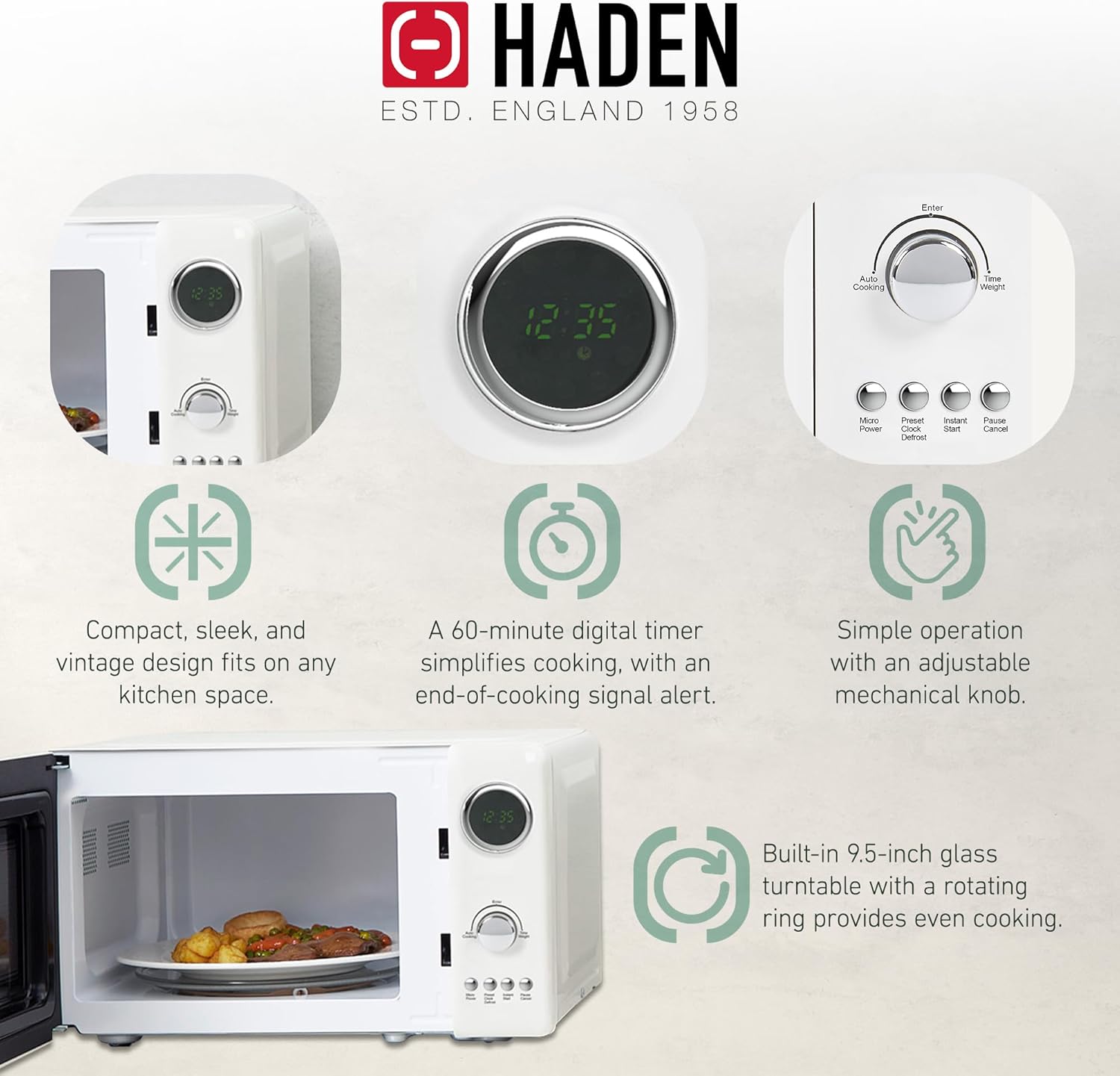
- Digital Display: Shows time, cooking settings, and indicators.
- Rotary Knob: Used to adjust cooking time, weight, or select menu options.
- Micro Power Button: Selects microwave power levels (5 levels available).
- Preset/Clock/Defrost Button: Sets clock, accesses preset cooking menus, or selects defrost functions.
- Instant Start Button: Starts cooking immediately at full power for 30 seconds per press.
- Pause/Cancel Button: Stops cooking, clears settings, or pauses operation.
Basic Microwave Cooking
- Place food in a microwave-safe container on the glass turntable.
- Close the oven door securely.
- Press the "Micro Power" button repeatedly to select the desired power level (P100 for 100% power, P80 for 80%, etc.).
- Turn the rotary knob to set the cooking time.
- Press "Instant Start" to begin cooking.
Defrosting Food
The microwave offers auto defrost functions based on weight.
- Place the frozen food on the turntable.
- Press the "Preset/Clock/Defrost" button once to enter defrost mode.
- Turn the rotary knob to select the weight of the food. The oven will automatically calculate the defrosting time.
- Press "Instant Start" to begin defrosting.
Setting the Clock
- In standby mode, press the "Preset/Clock/Defrost" button twice.
- Turn the rotary knob to set the hour.
- Press "Instant Start" to confirm the hour.
- Turn the rotary knob to set the minutes.
- Press "Instant Start" to confirm the minutes. The clock is now set.
Child Lock Function
To activate the child lock, press and hold the "Pause/Cancel" button for 3 seconds. The display will show "LOCK". To deactivate, press and hold the "Pause/Cancel" button again for 3 seconds.
Care and Maintenance
- Cleaning the Oven Cavity: Wipe the inside of the oven with a damp cloth after each use. For stubborn stains, use a mild detergent. Do not use abrasive cleaners or scouring pads.
- Cleaning the Turntable and Ring: The glass turntable and rotating ring can be washed in warm soapy water or in the dishwasher. Ensure they are completely dry before placing them back in the oven.
- Cleaning the Exterior: Wipe the exterior surfaces with a soft, damp cloth. Avoid getting water into the ventilation openings.
- Odor Removal: To remove odors from the oven, combine a cup of water with the juice and peel of one lemon in a microwave-safe bowl. Microwave on high for 5 minutes. Wipe the interior with a soft cloth.
- Power Cord: Regularly inspect the power cord for any signs of damage. If damaged, it must be replaced by a qualified service professional.
Troubleshooting Guide
| Problem | Possible Cause | Solution |
|---|---|---|
| Oven does not start | Power cord not securely plugged in. Door not closed properly. Fuse blown or circuit breaker tripped. | Ensure plug is firmly in outlet. Close door firmly. Check household fuse/circuit breaker. |
| Food not heating | Door not closed properly. Cooking time not set. Power level too low. | Close door firmly. Set appropriate cooking time. Increase power level. |
| Turntable not rotating | Turntable or rotating ring not positioned correctly. Food too large or heavy. | Reposition turntable and ring. Use smaller dish or reduce food quantity. |
| Display shows "LOCK" | Child lock is activated. | Press and hold "Pause/Cancel" button for 3 seconds to deactivate. |
| Unusual noise during operation | Turntable or rotating ring rubbing. Foreign object inside. | Check turntable and ring for proper placement. Ensure no foreign objects are present. |
If the problem persists after attempting these solutions, please contact Haden customer support.
Product Specifications
- Brand: HADEN
- Model: 75150
- Color: Ivory / Chrome
- Capacity: 0.7 Cubic Feet (20 Liters)
- Wattage: 700 Watts
- Voltage: 120 Volts
- Product Dimensions (D x W x H): 13.5 x 17.5 x 10 inches
- Item Weight: 21.8 pounds
- Installation Type: Countertop
- Special Features: Turntable, Digital Controls, Defrost, Instant Start, Child Lock
- Material: Glass, Stainless Steel
Warranty and Support
This Haden microwave oven typically comes with a 1-year limited warranty from the date of purchase. Please refer to your purchase documentation for specific warranty terms and conditions.
For technical support, warranty claims, or service inquiries, please contact Haden customer service. Contact information can usually be found on the manufacturer's website or in the original packaging.
Online Resources: For additional support and product information, visit the official Haden website: HADEN Official Store
Related documents75150


Ask a question about this manual
Ask about setup, troubleshooting, compatibility, parts, safety, or missing instructions. Manuals+ will review the question and use this page’s manual context to help answer it.