
KOSPET TANK S2
Contents
KOSPET Tank S2 Smart Watch User Manual
Model: TANK S2
Introduction
The KOSPET Tank S2 Smart Watch is a rugged and versatile fitness tracker designed for both men and women. It features built-in GPS, 5ATM waterproofing, and comprehensive health monitoring capabilities, including pressure, altitude, and compass functions. With its vibrant 1.32" AMOLED display and AI voice assistant, the Tank S2 offers a seamless and intuitive user experience for all your outdoor adventures and daily activities.

Image: The KOSPET Tank S2 Smart Watch in black, showcasing its rugged design and the product packaging highlighting key features.
What's in the Box
Upon opening your KOSPET Tank S2 Smart Watch package, you should find the following items:
- 1 x KOSPET Tank S2 Smart Watch
- 1 x Charging Cable
- 1 x User Manual
- 1 x Tempered Film
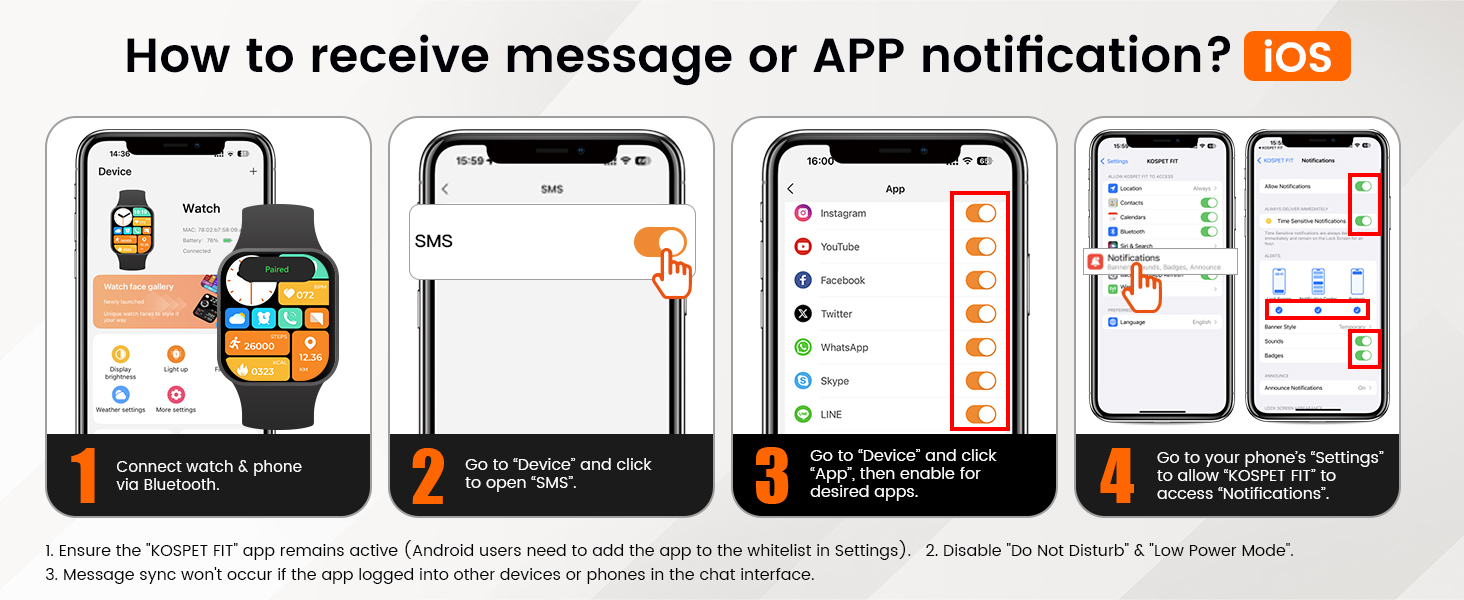
Image: Diagram illustrating the contents of the KOSPET Tank S2 Smart Watch package, including the watch, charger, user manual, and tempered film.
Setup
1. Initial Charging
Before first use, fully charge your KOSPET Tank S2 Smart Watch. Connect the magnetic charging cable to the charging points on the back of the watch and plug the USB end into a compatible power adapter (not included) or a computer USB port. The watch display will indicate charging status.
2. App Download and Pairing
To unlock the full potential of your KOSPET Tank S2, download the KOSPET FIT app on your smartphone. The app is compatible with both Android and iOS devices.
- Download the 'KOSPET FIT' app from Google Play Store or Apple App Store.
- Turn on your phone's Bluetooth.
- Go to 'Device' in the app and click 'Add a new device'.
- Click 'Pair' in the pop-up window of the watch and app to complete the pairing process.

Image: Visual guide demonstrating the five steps to connect the KOSPET Tank S2 Smart Watch to a smartphone via the KOSPET FIT app, including Bluetooth pairing.
3. Notification Setup
To receive messages and app notifications on your watch, follow these steps within the KOSPET FIT app:
For iOS Devices:
- Connect watch & phone via Bluetooth.
- Go to "Device" and click to open "SMS".
- Go to "Device" and click "App", then enable for desired apps.
- Go to your phone's "Settings" to allow "KOSPET FIT" to access "Notifications".
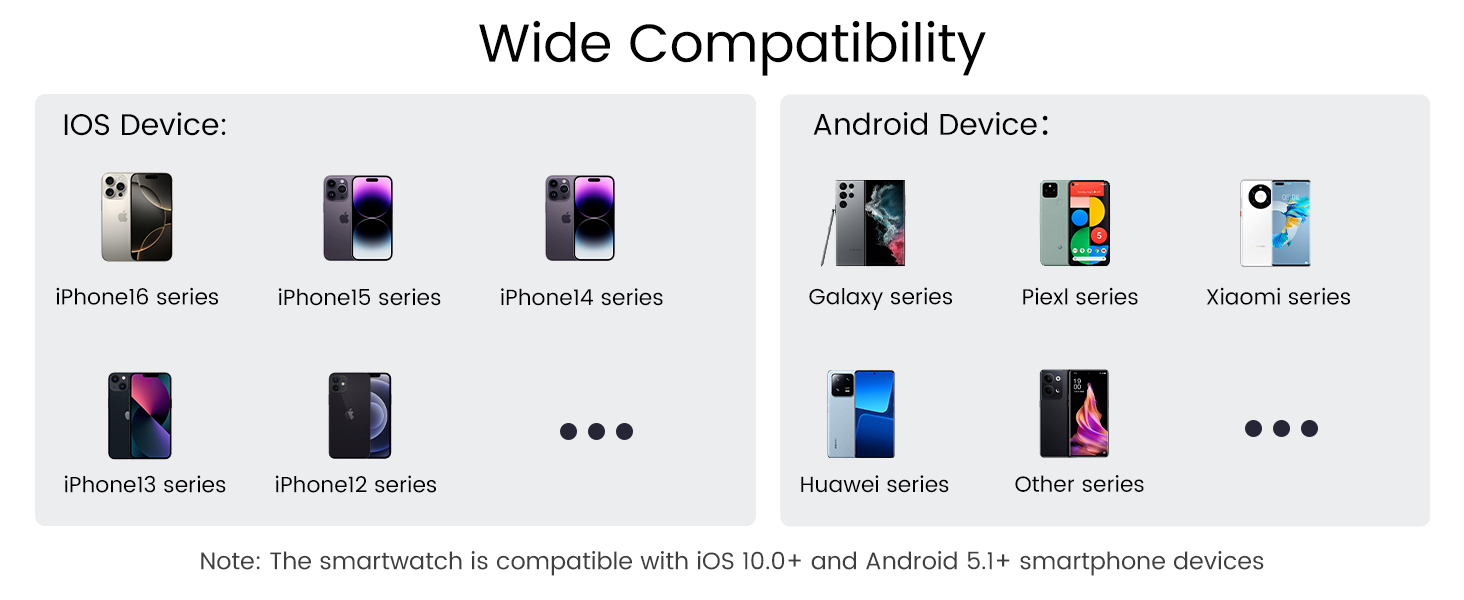
Image: Step-by-step instructions for iOS users to enable message and app notifications on the KOSPET Tank S2 Smart Watch.
For Android Devices:
- Connect watch & phone via Bluetooth.
- Go to "Device" and click to open "SMS Reminder".
- Go to "Device" and click the NOTE to allow "KOSPET FIT" to access "Notifications".
- Go to "App Reminder", then enable for desired apps.
Note: Ensure the "KOSPET FIT" app remains active. Android users may need to add the app to the whitelist in Settings. Disable "Do Not Disturb" & "Low Power Mode". Message sync won't occur if the app is logged into other devices or phones in the chat interface.

Image: Step-by-step instructions for Android users to enable message and app notifications on the KOSPET Tank S2 Smart Watch.
Operating Your KOSPET Tank S2
1.32" AMOLED Display
The KOSPET Tank S2 features a vibrant 1.32-inch AMOLED display with a 60Hz high refresh rate and a maximum brightness of 1,000 nits, protected by Corning Gorilla Glass. It supports an always-on mode for quick glances at the time and essential information.

Image: Close-up view of the KOSPET Tank S2's 1.32-inch AMOLED display, highlighting its 16 million colors, 499 PPI, 466x466 resolution, and 1000 nit peak brightness.

Image: A visual emphasizing the 1.32" HD AMOLED display of the KOSPET Tank S2, noting its 60Hz refresh rate, 1000 nits brightness, and Corning Gorilla Glass protection.
You can customize your watch face to display various data metrics such as date, air pressure, steps, and more.

Image: A user interacting with the KOSPET Tank S2, showcasing the DIY watch face options that allow selection of displayed data metrics like calories, heart rate, stress, weather, altitude, and compass.
Built-in GPS & Outdoor Sensors
The Tank S2 features built-in GPS that works with 6 Satellite Positioning Systems (L1 and L5 signals) for accurate activity route tracking and planned route returns. Your activity data can be shared through the KOSPET FIT App.

Image: A KOSPET Tank S2 Smart Watch displaying a recorded workout route on its screen, with a smartphone showing a map of the same route, set against a mountain hiking background.

Image: A detailed graphic explaining the KOSPET Tank S2's built-in GPS and its support for 6 Satellite Positioning Systems, including L1 and L5 signals, for reliable coverage. A note clarifies that the smartwatch tracks activity paths but does not offer navigation or mapping capabilities.
It also includes an internal compass, altitude pressurization, and altimeter sensors to display your current location altitude and barometric pressure, making it ideal for outdoor activities.

Image: Three watch faces of the KOSPET Tank S2 displaying readings for Compass (magnetic north, accurate readings), Altitude (real-time altitude with graph), and Air Pressure (current barometric pressure with trend graph), designed for outdoor use.

Image: A graphic highlighting the KOSPET Tank S2's industry-leading Compass and Barometric Altimeter, designed for outdoor sports to help users maintain spatial awareness in challenging surroundings.
Sports Modes & Smart Recognition
The Tank S2 offers 176 sports modes covering a wide range of activities, including yoga, swimming, surfing, skiing, rock climbing, and badminton. It also features an exclusive smart recognition mode for walking, running, cycling, and elliptical training, automatically detecting and monitoring your exercise without manual activation.

Image: A KOSPET Tank S2 Smart Watch displaying "Outdoor run" with a goal met percentage, surrounded by icons representing various sports modes, emphasizing its 170+ sport modes and 6 smart recognition sports.

Image: A graphic illustrating the KOSPET Tank S2's 170+ sports modes and 6 smart recognition features, showing the watch displaying heart rate, calories, and duration during an outdoor run, with icons for various recognized sports.
You can set daily goals for calories, distance, and steps via the KOSPET FIT App. The watch provides real-time reminders and medals to motivate you.

Image: A visual demonstrating how to set daily targets for calories, distance, and steps on the KOSPET Tank S2 via the KOSPET FIT App, showing the watch's progress rings and detailed activity data.
Waterproof Capabilities
With a seamless PC unibody design, the Tank S2 is 5ATM dynamic waterproof and IP69K static waterproof, allowing it to be immersed in up to 50 meters of water. This makes it suitable for swimming, diving, and surfing. It also includes a unique professional SWOLF swimming mode for detailed data recording and analysis.

Image: A KOSPET Tank S2 Smart Watch displaying "Open water swim" with a goal met percentage, with icons indicating its suitability for snorkeling, swimming, rain, and handwashing, set against an underwater swimming scene.
Video: An official product video from Kospet Direct showcasing the KOSPET TANK S2 Smart Watch, highlighting its features and durability, including its waterproof capabilities.
Multifunctional Features
The Tank S2 offers practical features such as Bluetooth calling, AI Voice control, remote photography, music control, alarm, sedentary reminder, weather forecast, and SOS functions.

Image: A composite image illustrating the KOSPET Tank S2's multifunctional capabilities, including answering/making calls, smart voice assistant interaction (e.g., weather, music), and instant message reminders from various social media apps.
Health Monitoring
The Tank S2 provides 24-hour monitoring for sleep, heart rate, blood oxygen, and stress levels. It also includes a dedicated women's health tracking feature for menstrual cycles.

Image: A KOSPET Tank S2 Smart Watch displaying sleep stages and duration, with a smartphone showing detailed sleep analysis, highlighting the watch's women's health, blood oxygen, heart rate, and sleep monitoring features.

Image: A graphic illustrating the KOSPET Tank S2's 3 all-round basic health monitoring features: heart rate, blood oxygen, and stress levels, which can be measured with one tap. A note clarifies that this product is not a medical device and health monitoring capabilities are not a substitute for medical devices.

Image: A graphic detailing the KOSPET Tank S2's intelligent sleep monitoring, showing how it tracks both naps and nightly sleep, and allows users to schedule bedtime and set sleep goals to improve sleep habits and quality.
Battery Life
The KOSPET Tank S2 is designed for long-lasting battery performance, with up to 52 days in standby mode. Battery life varies based on usage and settings.

Image: A graphic illustrating the extended battery life of the KOSPET Tank S2, showing usage durations for AOD Mode (3 Days), Heavy Usage (8 Days), Typical Usage (15 Days), and Standby Mode (50 Days), with a note about variations based on settings and conditions.
Compatibility
The KOSPET Tank S2 Smart Watch is compatible with iOS 10.0+ and Android 5.1+ smartphone devices.

Image: A graphic displaying the wide compatibility of the KOSPET Tank S2 Smart Watch with various iPhone series (iPhone 16, 15, 14, 13, 12) and Android devices (Galaxy, Pixel, Xiaomi, Huawei, and other series), noting compatibility with iOS 10.0+ and Android 5.1+.
Maintenance
To ensure the longevity and optimal performance of your KOSPET Tank S2 Smart Watch, follow these maintenance guidelines:
- Cleaning: Regularly wipe the watch screen and strap with a soft, damp cloth. For stubborn dirt, use a mild soap solution and rinse thoroughly. Ensure the watch is completely dry before charging or prolonged use.
- Charging: Use only the provided charging cable. Avoid using damaged cables or chargers. Ensure the charging contacts on the watch and cable are clean and dry before connecting.
- Storage: When not in use for extended periods, store the watch in a cool, dry place away from direct sunlight and extreme temperatures.
- Water Exposure: While the watch is waterproof, avoid exposing it to hot water, steam, or high-pressure water jets, as this can compromise its seals. Rinse the watch with fresh water after exposure to saltwater or chlorinated water.
- Avoid Chemicals: Do not expose the watch to strong chemicals, solvents, or detergents, as these can damage the materials and finish.
- Screen Protection: Apply the provided tempered film to protect the screen from scratches. Avoid sharp objects coming into contact with the display.
Troubleshooting
If you encounter any issues with your KOSPET Tank S2 Smart Watch, refer to the following common troubleshooting tips:
- Watch Not Turning On: Ensure the watch is fully charged. Connect it to the charger and wait a few minutes before attempting to power it on again.
- Connectivity Issues (Bluetooth):
- Ensure Bluetooth is enabled on your smartphone.
- Make sure the watch is within the Bluetooth range of your phone.
- Restart both your watch and smartphone.
- Try unpairing and re-pairing the watch through the KOSPET FIT app.
- Notifications Not Appearing:
- Verify that notification permissions are granted for the KOSPET FIT app in your phone's settings (refer to Setup section).
- Check if "Do Not Disturb" or "Low Power Mode" is active on your phone or watch.
- Ensure the KOSPET FIT app is running in the background.
- Inaccurate Step Counting:
- Ensure your personal data (height, weight, stride length) is accurately entered in the KOSPET FIT app.
- Wear the watch snugly on your wrist.
- While the watch provides good step tracking, minor variations can occur. For highly precise measurements, consider professional-grade equipment.
- GPS Signal Acquisition Slow:
- Ensure you are in an open outdoor area with a clear view of the sky.
- Wait for the GPS signal to lock before starting your activity. This may take 10-30 seconds.
- Health Data Discrepancies (Heart Rate, SpO2, Blood Pressure):
- Ensure the watch is worn correctly and snugly on your wrist.
- Remain still during measurements.
- Note that the watch is not a medical device. For specific or critical measurements, always consult a healthcare professional.
Specifications
| Feature | Detail |
|---|---|
| Model Name | S2-Black |
| Brand | KOSPET |
| Screen Size | 1.32 inches |
| Display Type | AMOLED |
| Shape | Round |
| GPS | Built-in GPS (6 Satellite Positioning Systems) |
| Waterproof Rating | 5ATM & IP69K |
| Battery Cell Composition | Lithium Polymer |
| Connectivity Technology | Bluetooth |
| Operating System Compatibility | Compatible for Android (5.1+) and iOS (10.0+) |
| Special Features | Activity Tracker, Always On Display, Alarm Clock, Voice Control, Weather Forecast, Phone Call, Compass, Altimeter, Barometer |
| Item Weight | 7.8 ounces |
| Product Dimensions | 7.87 x 3.54 x 0.7 inches |
| Manufacturer | KOSPET |
| Country of Origin | China |
Warranty and Support
For warranty information, technical support, or any inquiries regarding your KOSPET Tank S2 Smart Watch, please refer to the official KOSPET website or contact their customer service directly. Details can typically be found in the packaging or on the manufacturer's website.
KOSPET is committed to providing quality products and support to its users worldwide.
Ask a question about this manual
Ask about setup, troubleshooting, compatibility, parts, safety, or missing instructions. Manuals+ will review the question and use this page’s manual context to help answer it.