1. Introduction
The SKYRC NC1600 is an advanced AA/AAA battery charger designed for NiMH/NiCD rechargeable batteries. It features four independent charging slots, allowing for simultaneous charging, discharging, or refreshing of 1 to 4 batteries in any combination. Powered conveniently via USB, this charger provides individual battery status monitoring and an easy-to-read LCD display for optimal control and information.
2. Safety Information
- Use only with NiMH or NiCD rechargeable batteries. Do not attempt to charge alkaline, lithium, or other battery types.
- Ensure correct battery polarity (+/-) when inserting batteries into the charger slots.
- Do not expose the charger to water, moisture, or extreme temperatures.
- Avoid operating the charger in direct sunlight or near heat sources.
- Keep the charger away from children and pets.
- Do not disassemble or modify the charger. Refer all servicing to qualified personnel.
- Unplug the charger from the power source when not in use or before cleaning.
- Monitor batteries during charging, especially if they become excessively hot.
3. Package Contents
Please check the package contents upon unboxing:
- 1 x SKYRC NC1600 AA/AAA Battery Charger
- 1 x USB Cable
- 1 x User Manual
4. Product Overview
The SKYRC NC1600 charger features a compact design with four independent battery slots and an intuitive LCD display. Below are key components and their functions.
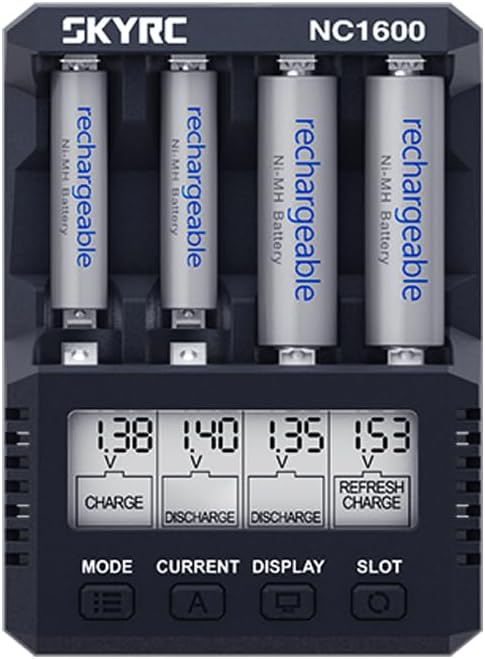
Figure 4.1: Front view of the SKYRC NC1600 charger with batteries. The LCD screen displays individual battery status, including voltage and mode.
4.1. Components
- Battery Slots (1-4): Independent slots for AA or AAA NiMH/NiCD batteries.
- LCD Display: Shows real-time information for each battery, including voltage, current, capacity, and operating mode.
- MODE Button: Selects the operating mode (CHARGE, DISCHARGE, REFRESH).
- CURRENT Button: Adjusts the charge/discharge current.
- DISPLAY Button: Toggles through different display parameters on the LCD.
- SLOT Button: Selects individual battery slots for specific settings.
- USB-C Input Port: For connecting the charger to a 5V USB power source.
4.2. LCD Display Overview
The LCD provides critical information for each battery. Understanding the display is essential for proper operation.

Figure 4.2: Detailed view of the LCD display, showing current settings and mode indicators for each slot.
- Voltage (V): Displays the current voltage of the battery.
- Current (mA): Shows the charging or discharging current.
- Capacity (mAh): Indicates the accumulated capacity during charge or discharge.
- Time (h:mm): Displays the elapsed time for the current operation.
- Mode Indicator: Icons or text indicating CHARGE, DISCHARGE, or REFRESH.
5. Setup
- Connect Power: Connect the provided USB cable to the USB-C input port on the charger. Plug the other end into a compatible USB power adapter (5V/2.1A or 5V/3A recommended), smartphone charger, or power bank. The LCD display will illuminate.
- Insert Batteries: Carefully insert 1 to 4 AA or AAA NiMH/NiCD batteries into the independent slots. Ensure the correct polarity (+ and -) is observed. The charger will automatically detect the battery type and display initial information.
- Initial Check: The charger will perform a brief self-check and display the current voltage of the inserted batteries.
6. Operating Modes
The SKYRC NC1600 offers three primary operating modes: CHARGE, DISCHARGE, and REFRESH. You can select the mode for each individual slot.
6.1. CHARGE Mode
This mode is used to charge NiMH/NiCD batteries. The charger automatically detects the battery and applies the appropriate charging current.
- Insert batteries into the slots.
- Press the SLOT button to select the desired battery slot.
- Press the MODE button repeatedly until "CHARGE" is displayed.
- Press the CURRENT button to adjust the charging current.
- When powered by a 5V/2.1A adapter: 1600mA/slot for 2 batteries; 1000mA/slot for 4 batteries.
- The charger will automatically adjust current based on the number of batteries inserted and power input.
- Charging will begin automatically after a few seconds of inactivity or by pressing the MODE button again to confirm. The LCD will show charging progress.
- Charging stops automatically when the battery is full.
6.2. DISCHARGE Mode
This mode discharges batteries to a set voltage before automatically switching to charge mode. This helps to reduce memory effect in NiCD batteries and can be used to determine actual battery capacity.
- Insert batteries.
- Press SLOT to select.
- Press MODE until "DISCHARGE" is displayed.
- Press CURRENT to set the discharge current (100-700mA).
- Confirm the setting. The charger will discharge the battery and then automatically proceed to charge it.
6.3. REFRESH Mode
The REFRESH mode cycles the battery through discharge and charge cycles multiple times to optimize its capacity and performance, especially for older or underperforming batteries.
- Insert batteries.
- Press SLOT to select.
- Press MODE until "REFRESH" is displayed.
- Press CURRENT to set the desired current for the refresh cycles.
- Confirm the setting. The charger will begin the refresh process. This process can take several hours depending on battery condition and selected current.
7. Specifications
| Feature | Specification |
|---|---|
| Model Number | SK-100191 (Internal Item NO.) |
| USB Input Power | 5V/3A/2.1A |
| Operation Modes | CHARGE, DISCHARGE, REFRESH |
| Charge Current (2 batteries) | 1600mA/slot (with 5V/2.1A adapter) |
| Charge Current (4 batteries) | 1000mA/slot (with 5V/2.1A adapter) |
| Discharge Current | 100-700mA |
| Trickle Current | 30-70mA |
| Operating Temperature | 0-40℃ (32-104°F) |
| Dimensions (L x W x H) | 108 x 79 x 32.9 mm (4.25 x 3.11 x 1.30 inches) |
| Net Weight | 114g (4.02 ounces) |
| Compatible Battery Types | NiMH/NiCD (AA, AAA) |
8. Troubleshooting
- Charger Not Powering On: Ensure the USB cable is securely connected to both the charger and a functional USB power source (5V/2.1A or higher recommended). Try a different USB port or adapter.
- Battery Not Detected: Ensure batteries are inserted with correct polarity. Check if the battery is severely over-discharged or damaged. The charger may not detect batteries with extremely low voltage or high internal resistance.
- Batteries Getting Hot During Charge: Some warmth is normal during charging. However, excessive heat may indicate an issue. Ensure the charging current is appropriate for the battery's capacity. If you set a very low charge current, the charger might miss the termination point, leading to overcharging and heat. Conversely, a very high current can also cause excessive heat. Ensure proper ventilation around the charger.
- Inaccurate Capacity Readings (DISCHARGE/REFRESH): Ensure batteries are fully discharged before starting a capacity test. For best results, perform a REFRESH cycle. Repeatedly inserting and removing batteries during a cycle can disrupt readings.
- Difficulty Inserting/Removing Batteries: Due to the compact design, batteries are closely spaced. Insert the negative terminal first, then gently push down the positive end. When removing, pull from the positive end first.
- Charger Displaying Error: Refer to the specific error code (if any) displayed on the LCD. Common errors relate to battery type, short circuit, or damaged battery. Remove the battery and re-insert, or try a different battery.
9. Maintenance
- Cleaning: Use a soft, dry cloth to wipe the charger's surface. Do not use abrasive cleaners or solvents. Ensure no dust or debris accumulates in the battery slots.
- Storage: Store the charger in a cool, dry place away from direct sunlight and moisture when not in use.
- Battery Care: For optimal battery life, avoid fully discharging NiMH batteries frequently. Store batteries with some charge.
10. Warranty and Support
For warranty information and technical support, please refer to the documentation provided with your purchase or visit the official SKYRC website. Keep your proof of purchase for warranty claims.


