
1. Introduction
Thank you for choosing the Tribesigns 78.7 Inch Extra Long Computer Desk. This manual provides essential information for the safe assembly, proper use, and maintenance of your new desk. Please read these instructions carefully before beginning assembly and retain them for future reference.
This desk is designed to provide a spacious and stable workstation for home or office use, accommodating up to two individuals simultaneously. Its robust construction ensures durability and functionality for various tasks, including gaming, working, and writing.
2. Safety Information
To ensure safety and stability, please adhere to the following guidelines:
- Distribute weight evenly across the desk surface.
- Use the adjustable foot pads to level the desk on uneven surfaces, preventing wobbling.
- The desk is designed to support a maximum weight capacity of 200 lbs (90.7 kg). Do not exceed this limit.
- Always ensure the desk is stable and all connections are secure before placing items on it or using it.
- Keep small parts away from children during assembly to prevent choking hazards.
3. Package Contents
Before assembly, verify that all components and tools are present. The package includes:
- Desktop panels (2 sections)
- Metal frame components (legs, support beams)
- Adjustable foot pads
- Assembly hardware (screws, bolts, plastic retaining nuts)
- Assembly tools (Allen wrenches)
- Assembly Guide
If any parts are missing or damaged, please contact Tribesigns customer support for assistance.
4. Assembly Instructions (Setup)
Assembly typically requires two people for optimal ease and safety. While basic tools are included, a cordless driver with appropriate bits can expedite the process. Please wear appropriate footwear during assembly.
- Unpack and Identify Parts: Carefully unpack all components. Lay them out on a clean, soft surface to prevent scratches. Identify each part by comparing it with the provided parts list in the assembly guide. Note that some parts may not be explicitly labeled; refer to the diagrams for identification.
- Assemble the Frame: Attach the metal support beams to the legs using the provided hardware. Ensure all connections are finger-tight at this stage.
- Attach Desktop Panels: The desktop consists of two panels. Carefully align these panels and attach them to the assembled metal frame. It is crucial to align the pre-drilled holes precisely to avoid gaps or uneven surfaces. Secure the panels using the screws and plastic retaining nuts. Ensure the plastic retaining nuts are not stripped during insertion.
- Tighten All Connections: Once all components are in place, systematically tighten all screws and bolts. Do not overtighten.
- Install Adjustable Foot Pads: Screw the adjustable foot pads into the bottom of each leg.
- Level the Desk: Place the desk in its desired location. Adjust the foot pads by rotating them until the desk is stable and level on the floor. This will prevent wobbling.
Important Note: Pay close attention to the alignment when joining the two desktop boards. Meticulous alignment is essential to achieve a seamless surface.
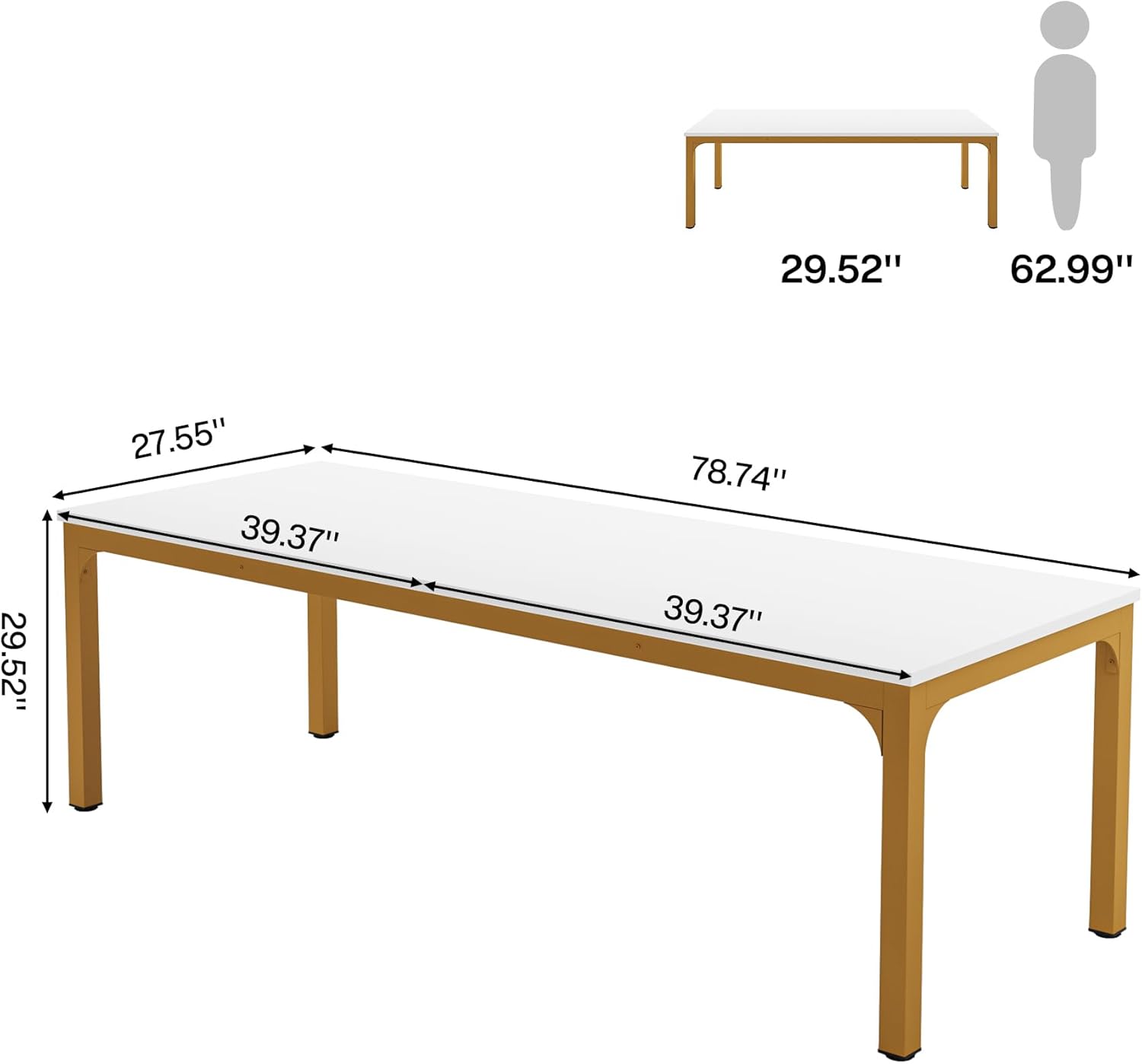
Figure 1: Desk Dimensions (78.74"W x 27.55"D x 29.52"H)

Figure 2: High-Quality Desktop and Adjustable Foot Pad Detail
5. Operating (Usage)
The Tribesigns 78.7 Inch Extra Long Computer Desk offers a versatile and spacious work area for various needs.
- Spacious Work Area: The 78.7"W x 27.5"D desktop provides ample space to accommodate laptops, multiple monitors, keyboards, mice, phones, books, files, and other office essentials.
- Two-Person Workstation: Designed to comfortably accommodate two individuals, allowing for collaborative work or independent setups side-by-side without interference.
- Versatile Use: Suitable for various room types including bedrooms, living rooms, home offices, and study rooms. Ideal for gaming, working, and writing tasks.

Figure 3: Two-Person Workstation Setup

Figure 4: Single Workstation Setup
6. Maintenance
Proper care will extend the life and appearance of your Tribesigns desk.
- Cleaning: The desktop is waterproof and scratch-resistant. For routine cleaning, wipe dirty stains easily with a soft, damp cloth. Avoid abrasive cleaners or harsh chemicals that could damage the finish.
- Spills: Promptly wipe up any spills to prevent potential damage, although the desktop is designed to resist moisture.
- Inspection: Periodically check all screws and bolts to ensure they remain tight. Retighten if necessary to maintain stability.
- Protection: While the desk is durable, consider using coasters for drinks and protective pads under heavy or sharp objects to further preserve the surface.
7. Troubleshooting
If you encounter any issues with your desk, refer to the following common problems and solutions:
- Desk is Wobbly:
- Ensure all assembly screws and bolts are securely tightened.
- Adjust the foot pads on each leg to compensate for uneven flooring until the desk is stable.
- Desktop Panels Do Not Align Evenly:
- This issue often arises during initial assembly. Carefully loosen the screws connecting the desktop panels to the frame. Realign the panels to ensure the pre-drilled holes match perfectly, then retighten all screws.
- Ensure the plastic retaining nuts are fully seated and not stripped.
- Missing or Damaged Parts:
- Refer to the "Package Contents" section and the assembly guide. If parts are missing or damaged upon arrival, contact Tribesigns customer support immediately for replacements.
8. Specifications
| Feature | Detail |
|---|---|
| Brand | Tribesigns |
| Model Number | AMZYS0060CD |
| Product Dimensions (D x W x H) | 27.55"D x 78.74"W x 29.52"H |
| Item Weight | 63 Pounds (28.58 kg) |
| Maximum Weight Recommendation | 200 Pounds (90.7 kg) |
| Color | White+gold |
| Style | Modern |
| Top Material Type | Engineered Wood (MDF Board) |
| Tabletop Thickness | 0.59 Inches |
| Base Material | Metal (Powder Coated Iron Pipes) |
| Special Feature | Easy Assemble, Adjustable Foot Pads |
| Recommended Number of People for Assembly | 2 |
| Included Components | Assembly Guide, All Assembly Tools |
| Room Type | Bedroom, Living Room, Office, Study Room |
| Recommended Uses For Product | Gaming, Working, Writing |
9. Warranty and Support
This Tribesigns product comes with a Limited Warranty. For specific details regarding warranty coverage and duration, please refer to the warranty information included with your purchase or contact Tribesigns customer service.
For any questions, concerns, or assistance with assembly, missing parts, or product issues, please contact Tribesigns customer support. You can typically find contact information on the packaging, the included assembly guide, or by visiting the official Tribesigns store page online.
Visit the Tribesigns Store for more information and support.