Introduction
This manual provides detailed instructions for the safe and efficient use of your HBN CP-U201D 24-Hour Mechanical Outdoor Timer Outlet. Please read all instructions carefully before installation and operation. Retain this manual for future reference.
Safety Warnings
- Always ensure the timer is unplugged before making any adjustments or connecting/disconnecting devices.
- Do not immerse the timer in water.
- For optimal waterproofing, mount the timer vertically at least 2 feet above the ground.
- Do not exceed the electrical ratings: 125V, 60Hz, 15A, 1875W Resistive, 1/2HP.
- Keep children away from the timer and connected devices.
- Ensure the connected appliances are in good working condition and switched to the "ON" position if they have their own power switch.
Product Overview
The HBN CP-U201D is a durable, weatherproof mechanical timer designed for outdoor use. It features two grounded outlets and a 24-hour dial with 30-minute interval pins for precise scheduling of your electrical devices.

Image: Two HBN CP-U201D outdoor timer outlets, showcasing the main unit with its flexible cord and two grounded outlets.
Key Features
- 24-Hour Mechanical Timer: Provides 24 ON/OFF options within a 24-hour period. Each pin represents a 30-minute interval.
- Durable & Weatherproof: Constructed to withstand dust, wear, sunlight, rain, snow, and wind.
- Dual Grounded Outlets: Allows control of two devices simultaneously.
- Transparent Waterproof Cover: Protects the dial and allows for easy visualization of timed tasks.
- Flexible Cord & Right-Angle Plug: Designed for convenient placement and connection.
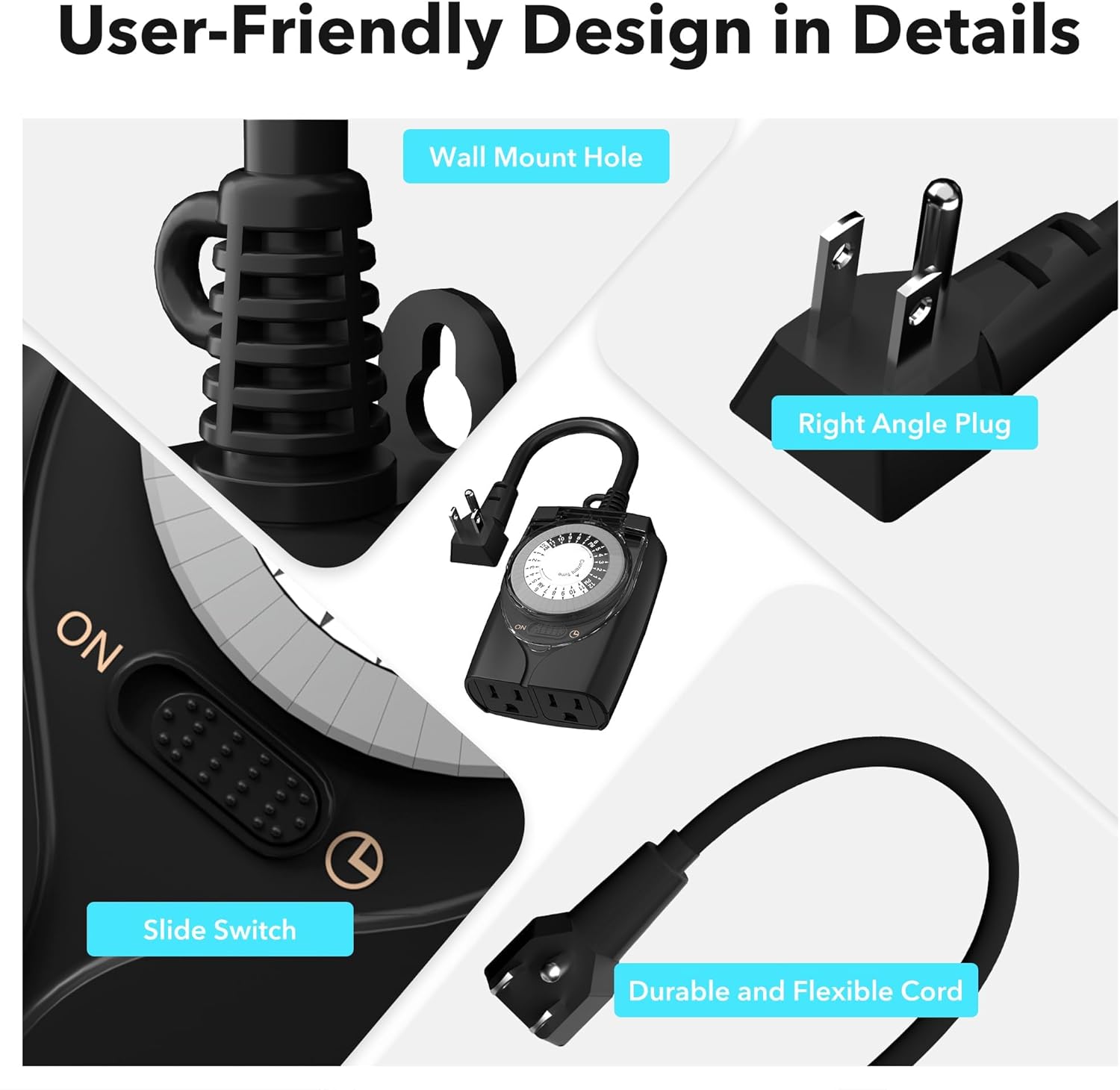
Image: Close-up showing the user-friendly design features of the HBN CP-U201D, including the wall mount hole, right-angle plug, slide switch, and durable flexible cord.
Video: HBN Waterproof 24 Hour Mechanical Outdoor Outlet Timer. This video provides a visual overview of the timer's features and capabilities.
Setup and Installation
- Mounting: For optimal waterproofing and longevity, mount the timer vertically at least 2 feet above the ground. Use the integrated wall mount hole for secure installation.
- Plug In: Connect the timer's plug into a standard 15A, 125V grounded outdoor electrical outlet.
- Connect Devices: Plug your outdoor devices (e.g., string lights, pool pump) into the two grounded outlets on the timer. Ensure these devices are switched to their "ON" position if they have an independent power switch.

Image: The HBN CP-U201D timer mounted vertically on a wall, with icons indicating its waterproof, snowproof, windproof, and sunproof features. A text overlay specifies mounting at least 2 feet above ground for optimal waterproofing.
Operating Instructions
The timer features a rotating dial with pins that control the ON/OFF cycles. Each pin represents a 30-minute interval.
- Set Current Time:
- Rotate the entire dial clockwise until the "Current Time" arrow aligns with the actual current time. The dial is marked with AM (white section) and PM (black section).
- Set ON/OFF Times:
- To turn ON: Push down the pins corresponding to the desired ON period.
- To turn OFF: Leave the pins up for the desired OFF period.
- Each pin pushed down activates the connected devices for that 30-minute interval.
- Select Operating Mode:
- Locate the slide switch on the front of the timer.
- Slide the switch to the right (Timer icon) for programmed operation.
- Slide the switch to the left (ON icon) for continuous power (bypassing the timer settings).

Image: A four-panel graphic illustrating how to set the timer: 1. Pull all pins up. 2. Rotate dial clockwise to set current time. 3. Press down on time pins for ON periods. 4. Set the slide switch to the timer position.

Image: Close-up of the timer dial showing pins. Text indicates "Pins up: OFF" and "Pins down: ON", with a 30-minute interval icon.
Maintenance
- Keep the timer clean and free from debris. Wipe with a damp cloth if necessary.
- Ensure the transparent cover is securely closed to maintain waterproofing.
- Regularly check the cord and plug for any signs of damage. Discontinue use if damage is found.
- Store in a dry, cool place when not in use for extended periods.
Troubleshooting
If you encounter issues with your HBN CP-U201D timer, please refer to the common problems and solutions below. For further assistance, contact customer support.
Video: HBN Outdoor Timer Outlet Troubleshooting Guide. This video provides visual instructions for resolving common operational issues with the timer.
Common Problems and Solutions:
| Problem | Possible Cause | Solution |
|---|---|---|
| Appliances do not turn on as programmed. |
|
|
| Appliances turn on before or after scheduled time. |
|
|
| Pins cannot be pushed down or are bent. |
|
|
| Timer makes noise or does not power on. |
|
|
Specifications
| Attribute | Value |
|---|---|
| Brand | HBN |
| Model Number | CP-U201D |
| Color | Black |
| Material | Plastic |
| Voltage | 125 Volts |
| Frequency | 60Hz |
| Current Rating | 15A |
| Resistive Wattage | 1875W |
| Motor Rating | 1/2HP |
| Number of Settings | 24 (30-minute intervals) |
| Product Dimensions | 4.33 x 5.98 x 4.26 inches |
| Item Weight | 1.04 pounds |
Warranty and Support
Your HBN CP-U201D Outdoor Timer Outlet comes with 1 year of coverage. Additionally, HBN provides lifetime technical support for this product.
Should you require assistance, have questions, or need to report an issue, please do not hesitate to reach out to our dedicated USA customer service team. We are here to help!
Contact Information: Please refer to the product packaging or the official HBN website for the most current customer service contact details.


