
Introduction
The WACACO Exagram Pro is a versatile and compact digital coffee scale designed for precision in various brewing methods, including espresso and pour-over. It features a built-in timer, multiple weighing modes, and a rechargeable battery, making it an essential tool for coffee enthusiasts.
What's in the Box
- Exagram Pro scale
- Silicone pad
- Protective box
- Instruction manual

Setup
Unboxing and Initial Inspection
Carefully remove all components from the packaging. Inspect the scale and accessories for any signs of damage. Ensure all listed items are present.
Charging the Scale
The Exagram Pro features a built-in 700mAh lithium-ion battery. Before first use, or when the battery indicator is low, charge the scale using the provided Type-C USB cable. A full charge provides up to 24 hours of use.
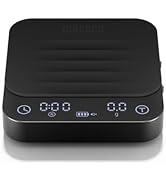
Power On/Off and Unit Selection
To power on the scale, slide the physical power switch located on the side. The display will illuminate. To power off, slide the switch to the 'OFF' position. The scale also has a 5-minute standby mode for automatic shutdown to conserve battery life. Press the unit button to cycle through available units: grams (g), ounces (oz), and milliliters (ml).
Operating Modes
Normal Weighing Mode
In normal mode, the scale functions as a standard digital scale. Place items on the weighing platform to measure their weight. Use the 'Tare' button to zero out the weight of containers.

Espresso Mode
Espresso mode is designed for precise espresso shot preparation. It features an auto-timer that starts automatically when liquid begins to flow into the cup, and an auto-tare function to zero the cup's weight.
- Place the scale on a stable surface.
- Switch the mode selector to 'E' for Espresso mode.
- Place your espresso cup on the scale. The scale will auto-tare.
- Begin brewing your espresso. The timer will start automatically when the first drops hit the cup.
- Monitor the weight and time to achieve your desired espresso ratio.

Pour-over Mode
The pour-over mode includes an exclusive ratio program to help achieve the ideal coffee-to-water ratio. It also features auto-detection for starting the timer.
- Place the scale on a stable surface.
- Switch the mode selector to 'P' for Pour-over mode.
- Place your pour-over setup (e.g., server and dripper) on the scale and press 'Tare'.
- Add your ground coffee to the dripper and press 'Tare' again.
- Begin pouring hot water. The timer will start automatically, and the scale will guide you through the pouring stages based on the programmed ratio.

Maintenance
Cleaning
The Exagram Pro is designed with a splash-proof surface. To clean, wipe the scale with a soft, damp cloth. Do not immerse the scale in water or use abrasive cleaners. The included silicone pad can be removed and washed separately.
Battery Care
To prolong battery life, ensure the scale is fully charged before extended periods of non-use. The physical power-off switch helps prevent accidental activation and battery drain. If the scale will not be used for a long time, store it with a partial charge (around 50%).
Troubleshooting
- Inaccurate Readings: Ensure the scale is placed on a flat, stable surface. Avoid placing it near vibrating machinery or in drafty areas. Recalibrate if necessary (refer to specific calibration instructions in the full manual, if provided).
- Charging Issues: If the scale does not charge, try a different Type-C USB cable and power adapter. Ensure the cable is securely connected to both the scale and the power source. The battery indicator should light up when charging.
- Display Not Responding: If the display is unresponsive, try turning the scale off and on again using the physical switch. If the issue persists, ensure the battery is charged.
- Silicone Pad Slipping: The silicone pad is designed for surface protection and to prevent slipping. If it slides excessively, ensure both the scale surface and the pad are clean and dry.
Specifications
| Feature | Specification |
|---|---|
| Brand | WACACO |
| Model | Exagram Pro |
| Color | Black |
| Display Type | LED |
| Weighing Range | 0.1g to 2kg |
| Readout Accuracy | ± 0.1g |
| Units | Gram, Ounce, Milliliter |
| Battery | 700mAh Lithium-Ion (rechargeable via Type-C USB) |
| Auto Power Off | After 5 minutes of inactivity |
| Item Weight | 5.5 ounces (approx. 155g) |
| Dimensions | Approx. 3.0 x 4.9 x 0.9 inches (77 x 124 x 24 mm) |
| Material | Plastic |
Warranty and Support
For warranty information and customer support, please refer to the documentation included with your product or visit the official WACACO website. Keep your purchase receipt for warranty claims.