1. Introduction
This manual provides detailed instructions for the installation, operation, and maintenance of your Geloo Marine Stereo MP3 Player AM/FM Radio Receiver, model B-B258. Please read this manual thoroughly before using the product to ensure proper function and longevity. This device is designed for marine environments and other outdoor applications, offering robust performance and versatile media playback options.
2. Product Features
- IPX5 Waterproof Design: Engineered to withstand splashes and moisture, making it suitable for marine and outdoor use.
- Bluetooth 5.0 Connectivity: Allows wireless audio streaming from compatible devices such as smartphones and tablets with a stable signal.
- AM/FM Radio Tuner: Supports FM frequencies from 87.5-108 MHz and AM frequencies from 522-1620 kHz, with automatic search and manual tuning.
- USB Port: For direct playback of MP3 and WMA audio files from USB storage devices.
- Auxiliary Input: Provides a wired connection for external audio sources.
- High Power Output: Features 4 x 40W output for clear and powerful audio.
- Durable Construction: Built with a solid aluminum casing and IP66 salt fog protection for extended durability in harsh environments.
- Clear LCD Display: High-definition digital LCD display for easy viewing of time, channel, and song information, even in bright sunlight.
- Sealed Silicone Buttons: Translucent laser-engraved buttons designed for waterproof performance and resistance to wear and aging.
- Versatile Application: Ideal for boats, yachts, motorcycles, cars, ATVs, golf carts, RVs, and other recreational vehicles.
- Note: This unit does not include a CD mechanism.
3. Package Contents
Upon unpacking, please verify that all items listed below are present and in good condition:
- Geloo Marine Stereo MP3 Player Unit
- Wiring Harness
- External Microphone (if included with your model)
- User Manual (this document)
- Mounting Hardware (screws, brackets)

Figure 3.1: Image showing the Geloo Marine Stereo unit, its retail box, wiring harness, external microphone, and the user manual, illustrating the typical contents of the product package.
4. Installation and Wiring
Proper installation is crucial for the performance and durability of your marine stereo. It is recommended to have this unit installed by a qualified professional.
4.1 Wiring Diagram
Refer to the wiring diagram below for correct connections. Ensure all connections are secure and properly insulated to prevent short circuits and water damage.

Figure 4.1: Detailed wiring diagram for the Geloo Marine Stereo, showing connections for power (GND, +12V DC, ACC), antenna (ANT), and speaker outputs (FRONT L+, FRONT L-, FRONT R+, FRONT R-, REAR L+, REAR L-, REAR R+, REAR R-). Also visible are the back of the stereo unit and two microphones.
- Yellow (GND): Ground connection.
- Red (+12V DC): Constant 12V power supply.
- Orange (ACC): Accessory power, typically connected to ignition.
- Blue (ANT): Antenna power output.
- Speaker Wires: Connect to your marine speakers, ensuring correct polarity for optimal sound.
4.2 Mounting the Unit
The unit is designed for flush mounting. Ensure there is sufficient space behind the mounting surface for the unit and wiring. Use the provided mounting hardware to secure the stereo.
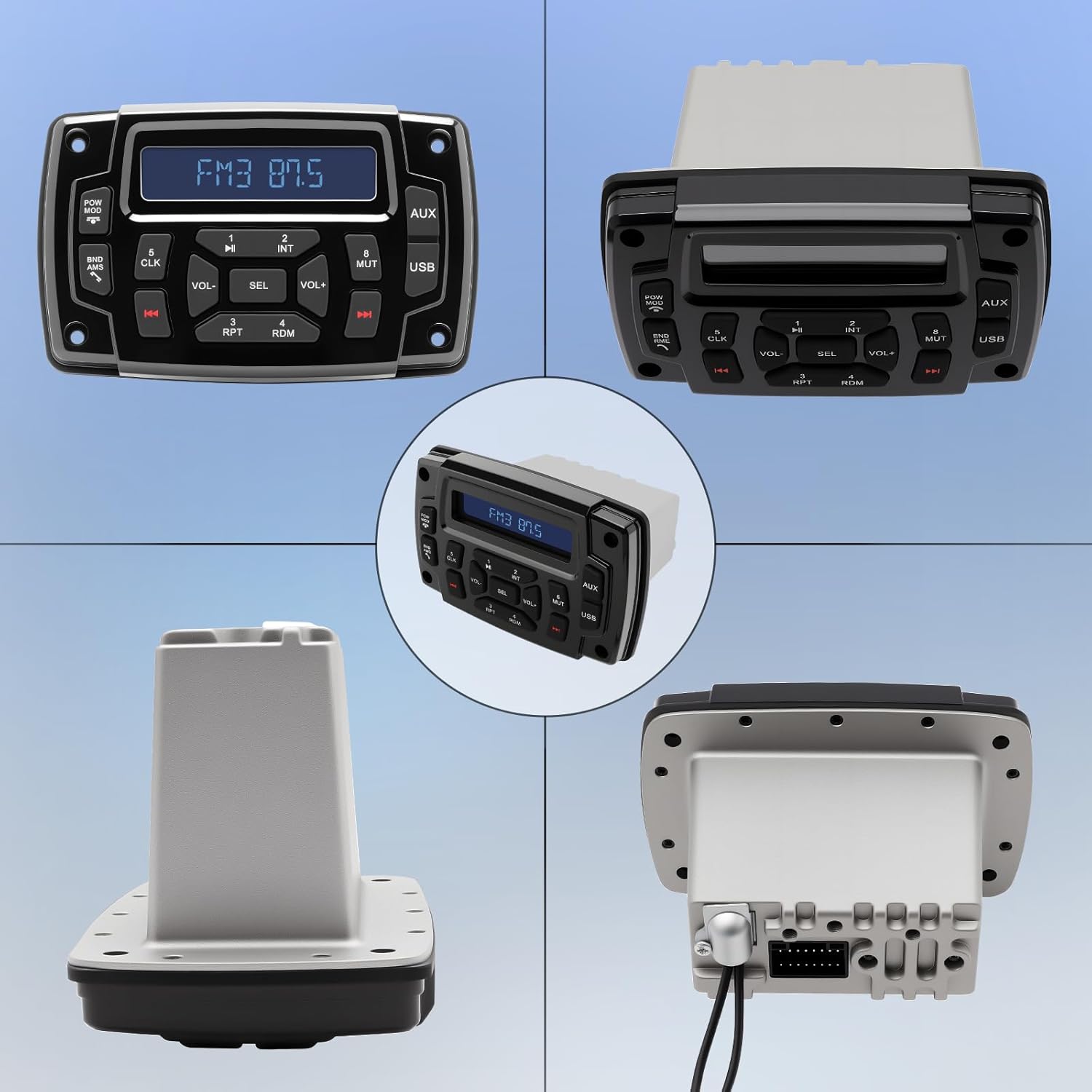
Figure 4.2: Four different views of the Geloo Marine Stereo unit: front, side, back with connectors, and a perspective view, providing a comprehensive look at its physical design and dimensions for installation planning.
4.3 Application Examples
The Geloo Marine Stereo is suitable for a wide range of vehicles and environments, as shown in the examples below.

Figure 4.3: A collage demonstrating the versatility of the Geloo Marine Stereo, showing it installed in the dashboards of a boat, a classic car, a motorcycle, and a modern utility vehicle, highlighting its broad compatibility.
5. Operating Instructions
Familiarize yourself with the control panel and its functions for optimal use.

Figure 5.1: Front view of the Geloo Marine Stereo control panel, displaying the LCD screen and various buttons including POW MOD, BND AMS, VOL-, SEL, VOL+, MUTE, AUX, USB, and numbered preset/function buttons, with water droplets on the surface.
5.1 Basic Controls
- POW MOD (Power/Mode): Press to turn the unit on or off. Press repeatedly to cycle through available modes (FM, AM, Bluetooth, USB, AUX).
- VOL- / VOL+ (Volume): Adjusts the audio output level.
- SEL (Select/Menu): Press to enter menu options or confirm selections.
- MUTE: Mutes or unmutes the audio output.
- BND AMS (Band/Auto Store): In radio mode, press to switch between FM/AM bands. Press and hold to automatically scan and store strong stations.
- CLK (Clock): Press to display the clock. Press and hold to enter clock setting mode.
- Skip/Track Buttons (◀◀ / ▶▶): In media playback modes (USB, Bluetooth), use to skip tracks. In radio mode, use to tune frequencies.
- Numbered Buttons (1-8): Function as radio station presets or specific media playback controls (e.g., 1/▶▶ Play/Pause, 2/INT Intro Scan, 3/RPT Repeat, 4/RDM Random).
5.2 Radio Operation (AM/FM)
- Press POW MOD to select FM or AM mode.
- Press BND AMS to switch between available bands (e.g., FM1, FM2, FM3, AM1, AM2).
- Use the ◀◀ / ▶▶ buttons for manual tuning. Press and hold for automatic seek tuning.
- To store a station, tune to the desired frequency, then press and hold one of the numbered preset buttons (1-6) until you hear a beep.
- To recall a stored station, simply press the corresponding numbered preset button.
5.3 Bluetooth Audio Streaming
The unit supports Bluetooth 5.0 for wireless audio playback.

Figure 5.2: The Geloo Marine Stereo installed in a boat dashboard, with a smartphone wirelessly connected via Bluetooth 5.0, demonstrating audio streaming capabilities. Musical notes are depicted around the stereo and phone.
- Press POW MOD to select Bluetooth mode. The display will show "BT" or a similar indicator.
- On your mobile device, enable Bluetooth and search for available devices.
- Select "Geloo B-B258" (or similar name) from the list to pair. A confirmation tone will sound upon successful pairing.
- Once paired, you can play music from your device. Use the ◀◀ / ▶▶ buttons on the stereo to skip tracks, and VOL- / VOL+ to adjust volume.
5.4 USB Playback
- Insert a USB flash drive containing MP3/WMA audio files into the USB port.
- The unit will automatically switch to USB mode or you may need to select it using POW MOD.
- Playback will begin automatically. Use ◀◀ / ▶▶ to navigate tracks.
- Use buttons like 3/RPT for repeat playback (e.g., repeat current track, repeat all) and 4/RDM for random playback.
5.5 Auxiliary Input (AUX)
- Connect your external audio device (e.g., MP3 player, smartphone) to the AUX input port using a 3.5mm audio cable.
- Press POW MOD to select AUX mode.
- Audio from your external device will now play through the stereo. Control playback from your external device.
5.6 Clock Setting
- Press and hold the CLK button until the hour digits start flashing.
- Use VOL- / VOL+ to adjust the hour.
- Press CLK again to move to the minute digits.
- Use VOL- / VOL+ to adjust the minutes.
- Press CLK once more to confirm and exit clock setting mode.
6. Maintenance
The Geloo Marine Stereo is designed for durability in harsh environments, featuring an IPX5 waterproof rating and salt fog protection.

Figure 6.1: The Geloo Marine Stereo unit partially submerged in water, with water splashing around it, visually demonstrating its IPX5 waterproof capability.
- Cleaning: Use a soft, damp cloth to clean the unit. Avoid abrasive cleaners or solvents that could damage the surface or seals.
- Water Exposure: While IPX5 rated, avoid prolonged submersion or high-pressure water jets directly on the unit. Ensure USB and AUX port covers are securely closed when not in use to maintain water resistance.
- Connections: Periodically check all wiring connections for corrosion or looseness, especially in marine environments.
7. Troubleshooting
If you encounter issues with your Geloo Marine Stereo, refer to the following common problems and solutions:
| Problem | Possible Cause | Solution |
|---|---|---|
| No power | Blown fuse, incorrect wiring, loose power connection. | Check the fuse, verify power and ground connections, ensure wiring is correct. |
| No sound | Volume too low, speakers disconnected, incorrect input mode. | Increase volume, check speaker connections, ensure correct input mode (FM, BT, USB, AUX) is selected. |
| Bluetooth not connecting | Device not in pairing mode, stereo not in Bluetooth mode, interference. | Ensure stereo is in Bluetooth mode, put your device in pairing mode, try restarting both devices. |
| Poor radio reception | Antenna not connected, weak signal area, interference. | Check antenna connection, try repositioning the antenna, move to an area with better signal. |
| USB playback issues | Unsupported file format, corrupted USB drive, drive too large. | Ensure files are MP3/WMA, try a different USB drive, check drive format (FAT32 recommended). |
If the problem persists after attempting these solutions, please contact customer support.
8. Specifications
| Feature | Specification |
|---|---|
| Brand | Geloo |
| Model Number | B-B258 |
| Color | Black |
| Connectivity Technology | Bluetooth (BT 5.0), USB |
| Special Features | AM/FM Tuner, IPX5 Waterproof |
| Compatible Devices | Smartphone, Tablet, Portable Media Player, Marine Radio, Stereo |
| Audio Output Mode | Stereo |
| Controller Type | Rotary Dial (Volume), Push Buttons |
| Power Output | 4 x 40W |
| FM Frequency Range | 87.5-108 MHz |
| AM Frequency Range | 522-1620 kHz |
9. Warranty and Support
For warranty information and customer support, please refer to the documentation provided with your purchase or contact the retailer. Keep your proof of purchase for any warranty claims.