
EDJO MK835 Ergo
EDJO MK835 Ergo Wireless Keyboard and Mouse Combo User Manual
Model: MK835 Ergo
Brand: EDJO
Introduction
Thank you for choosing the EDJO MK835 Ergo Wireless Keyboard and Mouse Combo. This manual provides detailed instructions for setting up, operating, and maintaining your new ergonomic input devices. Designed for comfort and efficiency, this combo aims to enhance your productivity across multiple platforms.
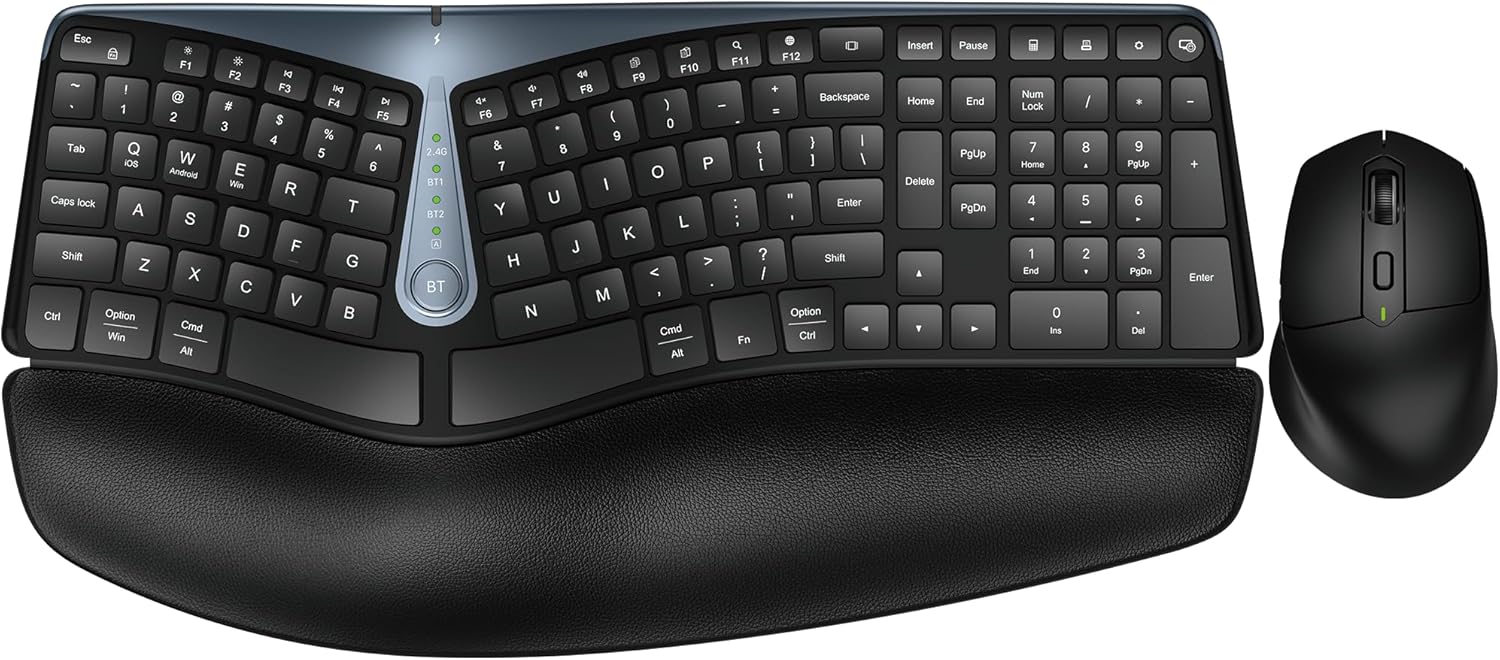
The EDJO MK835 Ergo Wireless Keyboard and Mouse Combo, featuring a split ergonomic keyboard with a cushioned palm rest and a sculpted wireless mouse.
Setup
Connecting Your Devices
The MK835 combo supports both Bluetooth and 2.4G USB connections, allowing you to connect up to three devices simultaneously and switch between them easily.
2.4G USB Connection:
- Locate the USB receiver, typically stored in the mouse's battery compartment.
- Plug the USB receiver into an available USB port on your computer or device.
- Turn on both the keyboard and mouse using their respective ON/OFF switches. The devices should automatically connect to the 2.4G mode.
Bluetooth Connection:
The keyboard and mouse each have two Bluetooth channels (BT1 and BT2).
- Turn on the keyboard/mouse.
- Press the 'Mode Switch Button' on the keyboard (labeled 'BT') or the corresponding button on the mouse to select either BT1 or BT2. The indicator light for the selected Bluetooth channel will blink.
- On your device (computer, tablet, or phone), go to Bluetooth settings and search for 'MK835 Keyboard' or 'MK835 Mouse'.
- Select the device to pair. Once paired, the indicator light will become solid.
- Repeat for the second Bluetooth channel if connecting to another device.
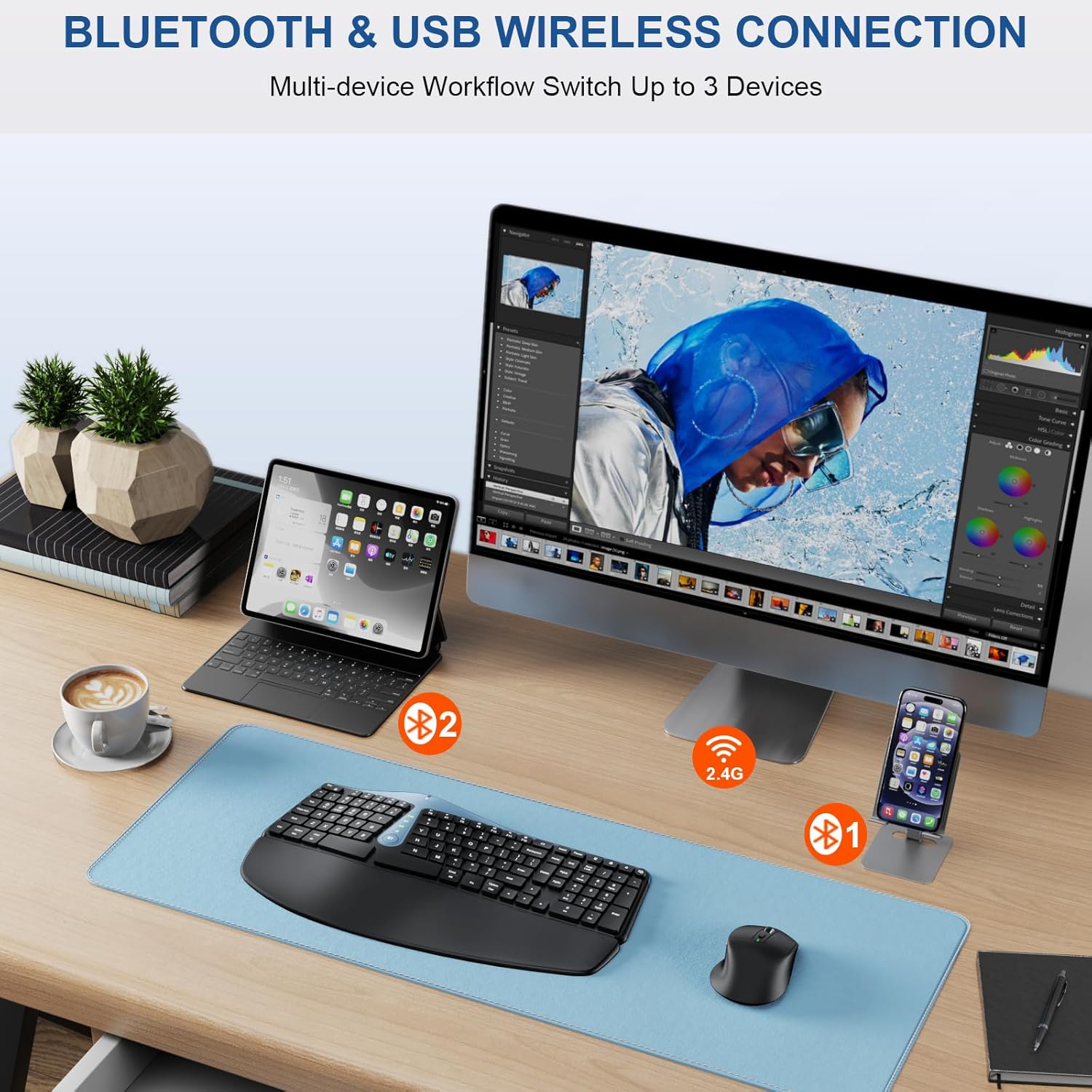
Illustration of multi-device connectivity, showing the keyboard and mouse connected to a monitor, tablet, and smartphone via 2.4G and Bluetooth.

Close-up of the keyboard's mode switch button and indicator lights for 2.4G, Bluetooth 1, and Bluetooth 2 modes.

Underside view of the mouse showing the ON/OFF switch and indicator lights for 2.4G, Bluetooth 1, and Bluetooth 2 connections.
Initial Charge:
It is recommended to fully charge both the keyboard and mouse before first use to ensure optimal battery performance.
Official product video demonstrating the features and setup of the MK835 Ergo Bluetooth/2.4G Split Design Keyboard Mouse Combo.
Operating Instructions
Ergonomic Design Benefits:
The MK835 combo is designed to provide maximum comfort and reduce strain during extended use.
- Split Layout and Wave Keys: The keyboard's split design and wave-shaped keycaps conform to the natural position of your hands and fingers, promoting a more relaxed typing posture.
- Cushioned Palm Rest: The integrated palm rest features soft synthetic leather, a high-density support layer, and a memory foam comfortable layer to provide superior wrist support and reduce fatigue.
- Adjustable Palm Lift: The keyboard includes foldable stands at the bottom, allowing you to adjust the typing angle for personalized comfort.

Detailed view of the keyboard's leather padding and split design, highlighting the layers of comfort: soft synthetic leather, high-density support, and memory foam.

Side view illustrating the adjustable palm lift feature of the keyboard, showing different angle options for ergonomic comfort.
Mouse Functionality:
The ergonomic mouse is sculpted to fit your hand naturally, reducing wrist strain.
- DPI Adjustment: The mouse offers 3 levels of DPI (800/1200/1600) for precise cursor control. Press the DPI button on the mouse to cycle through the settings.
- Forward/Backward Buttons: Conveniently located side buttons allow for quick navigation when browsing webpages.
- Quiet Click: Utilizing SilentTouch technology, the mouse provides a quiet clicking experience, reducing noise by 98%.

Diagram detailing the features of the rechargeable optical mouse, including scroll wheel, left/right buttons, forward/backward buttons, Type-C charging port, ON/OFF switch, mode switch button, USB receiver storage, and DPI levels.

Close-up of the mouse highlighting the forward and backward navigation buttons.
Universal Compatibility:
The MK835 combo is compatible with a wide range of operating systems and devices:
- Windows 8 and above
- Mac OS
- Android
- Works with desktops, Chromebooks, PCs, laptops, and phones.

Image showing key labels for iOS, Android, and Windows, indicating multi-platform layout support.
Maintenance
Rechargeable Battery:
Both the keyboard and mouse are equipped with rechargeable batteries via a Type-C cable. A single charge can last for 2-3 months, depending on daily usage.
- Charging: Connect the provided Type-C cable to the charging port on the keyboard and mouse, and then to a USB power source.
- Power-Saving Mode: To conserve battery life, both devices automatically enter sleep mode after 30 minutes of inactivity.
- ON/OFF Switches: For extended periods of non-use, turn off the devices using their dedicated ON/OFF switches.
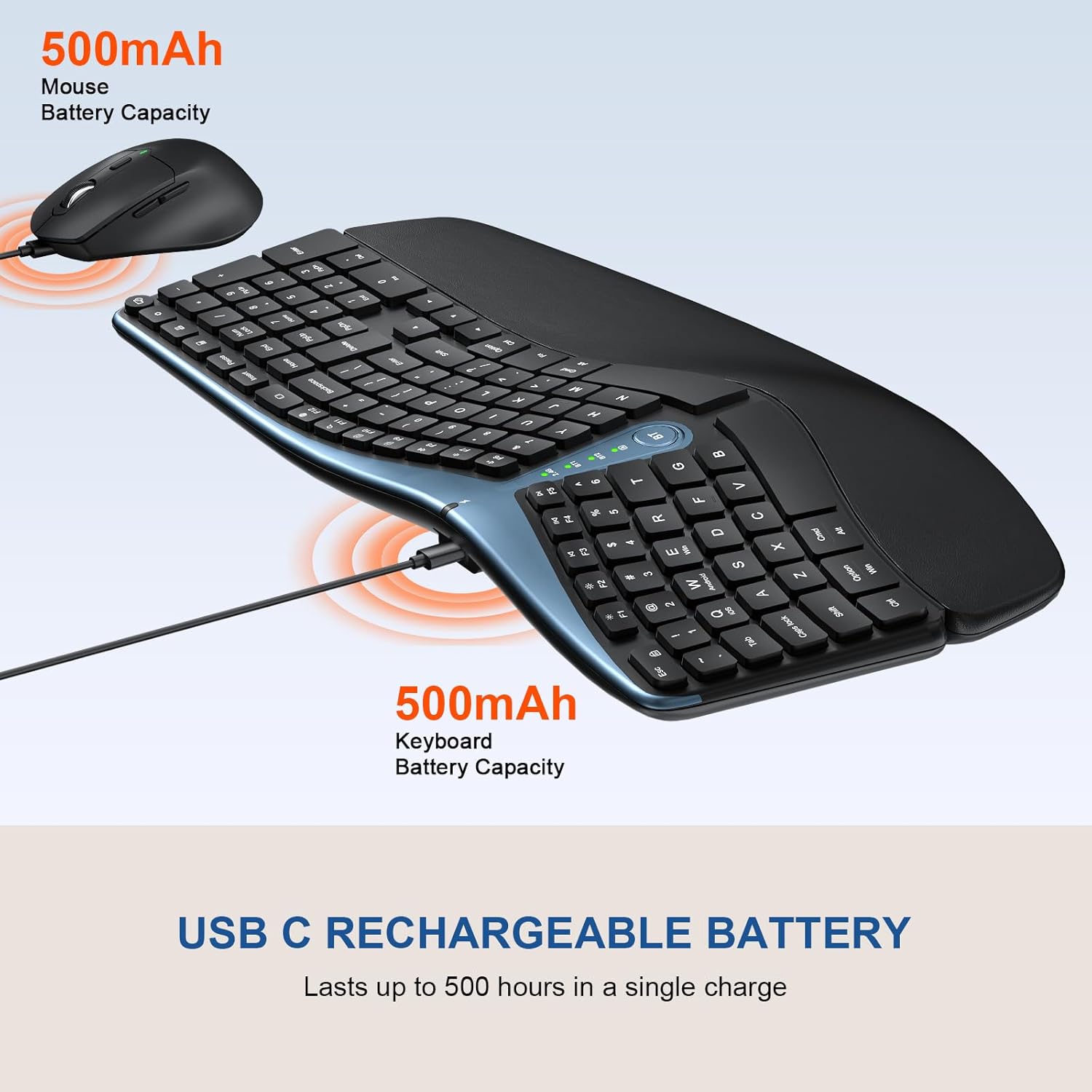
Visual representation of the keyboard and mouse being charged via USB-C, highlighting their 500mAh battery capacities.
Troubleshooting
Connectivity Issues:
- Device Not Connecting: Ensure both the keyboard and mouse are turned on and fully charged. Verify the correct connection mode (2.4G or Bluetooth) is selected. For Bluetooth, ensure your device's Bluetooth is enabled and the devices are in pairing mode.
- Lag or Disconnection: Move the devices closer to the USB receiver or Bluetooth-enabled device. Avoid interference from other wireless devices. Re-pair the devices if necessary.
Typing/Mouse Issues:
- Keys Not Responding: Check battery level. Ensure the keyboard is properly connected. Clean any debris around the keys.
- Mouse Cursor Erratic: Clean the mouse sensor. Ensure the mouse is on a clean, non-reflective surface. Adjust DPI settings if the cursor is too fast or slow.
Specifications
| Feature | Detail |
|---|---|
| Brand | EDJO |
| Model | MK835 Ergo |
| Connectivity Technology | Bluetooth, Wireless USB (2.4G) |
| Special Features | Ergonomic, Wrist Rest, Rechargeable, Multi-Device, Split Design |
| Keyboard Description | Ergonomic |
| Mouse DPI | 800/1200/1600 (Adjustable) |
| Battery Capacity (Keyboard) | 500mAh |
| Battery Capacity (Mouse) | 500mAh |
| Compatible Devices | Laptop, Macbook Pro, Macbook Air, iMac, Television, Personal Computer, Dell XPS 13/15, Inspiron, HP ENVY, Pavilion, Chromebook |
| Package Dimensions | 17.87 x 12.36 x 2.13 inches |
| Item Weight | 2.72 pounds |
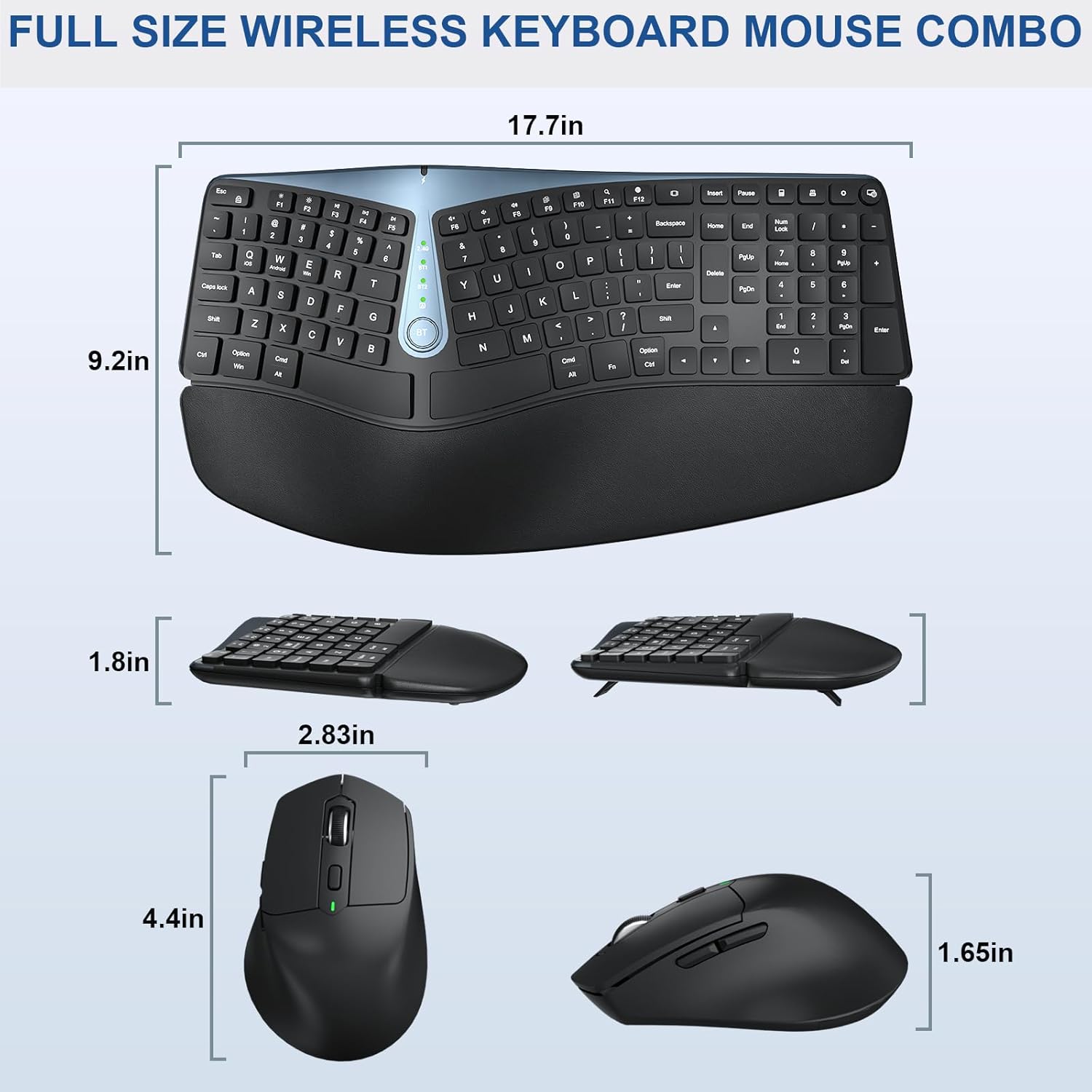
Detailed dimensions of the full-size wireless keyboard and mouse combo.
Warranty and Support
Your EDJO MK835 Ergo Wireless Keyboard and Mouse Combo comes with a 12-month warranty from the date of purchase. This warranty covers manufacturing defects and ensures a satisfactory solution if you encounter any issues.
For any questions, technical support, or warranty claims, please contact the seller, DY US, via the after-sales email provided with your purchase or through the Amazon platform. They are committed to providing prompt assistance and support.
Ask a question about this manual
Ask about setup, troubleshooting, compatibility, parts, safety, or missing instructions. Manuals+ will review the question and use this page’s manual context to help answer it.