
Introduction
The F FIWENE EMS Foot Massager with Heat and TENS is designed to provide relief from various foot and body discomforts. It combines Electrical Muscle Stimulation (EMS), Transcutaneous Electrical Nerve Stimulation (TENS), and soothing heat therapy to improve circulation, reduce swelling, alleviate fatigue, and target conditions like neuropathy and plantar fasciitis. This device offers a customizable experience with multiple modes and intensity levels, along with the convenience of external electrode pads for full-body application.
Important Safety Information
Before using this device, please read and understand all safety warnings. This product is not suitable for everyone. Consult your doctor before use if you have any pre-existing medical conditions.

Image: Safety warnings indicating groups for whom the device is not recommended.
Do not use this device if you have any of the following conditions:
- Heart Disease or Cardiac Pacemakers
- Metal Implants
- High Blood Pressure
- Pregnancy
- For use on Children
- On areas with Exposed Wounds
Always ensure the device is used on clean, dry skin. Avoid using near water or in excessively humid environments. Discontinue use if you experience any discomfort or adverse reactions.
Package Contents
Verify that all items are present in the package before initial use.

Image: All attached accessories included with the EMS Foot Massager.
- 1 x EMS Foot Massager Main Unit
- 1 x Remote Control
- 1 x Power Adapter
- 4 Pairs (8 pieces) x Reusable Electrode Pads
- 2 x Electrode Pad Connection Cables
- 1 x User Manual
Setup
Follow these steps to set up your F FIWENE EMS Foot Massager:
- Placement: Place the main unit on a flat, stable surface, such as the floor in front of a chair or sofa.
- Power Connection: Connect the power adapter to the DC input port on the side of the main unit, then plug the adapter into a standard electrical outlet.
- Foot Massage Preparation: For foot massage, ensure your feet are clean and dry. Place both bare feet directly onto the designated footpads on the main unit.
- Body Massage Preparation (Optional): If using the electrode pads for body massage, connect one end of the electrode pad cables to the output ports on the main unit. Attach the reusable electrode pads to the other end of the cables. Peel off the protective film from the pads and apply them to the desired clean, dry skin areas on your body. Ensure good contact.

Image: Setup showing feet on the device and electrode pads on the calves.
Operating Instructions
The device can be operated using the control panel on the unit or the included remote control.
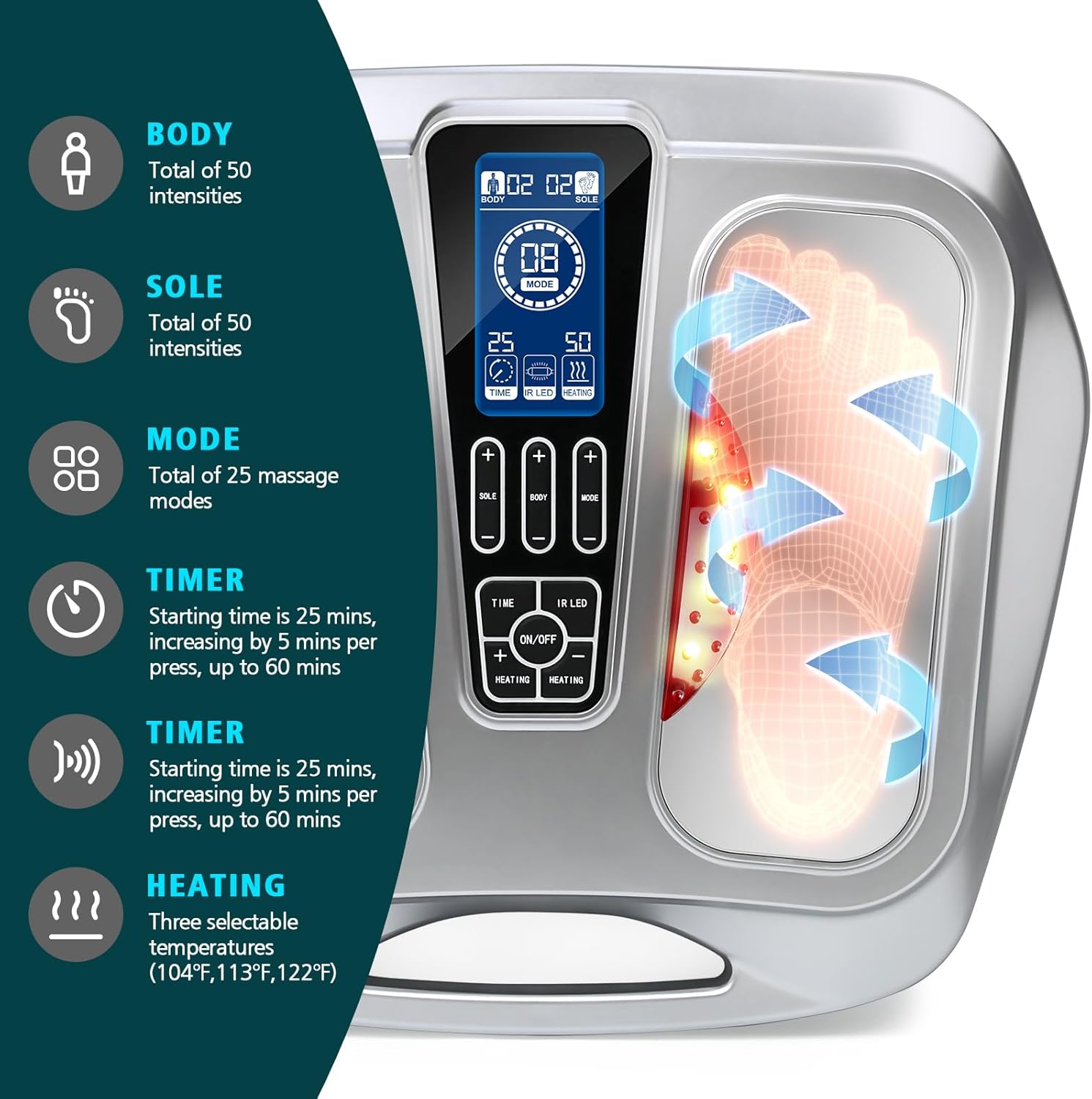
Image: Control panel and features overview.
- Power On/Off: Press the 'ON/OFF' button on the control panel or remote to turn the device on or off. The display will illuminate.
- Mode Selection: Press the 'MODE' button to cycle through the 25 available massage modes. Each mode offers a different stimulation pattern (e.g., acupuncture, kneading). The selected mode number will be displayed.
- Intensity Adjustment:
- For Sole (Foot) intensity, use the '+' and '-' buttons under 'SOLE' to adjust the intensity from 0 to 50 levels.
- For Body (Pads) intensity, use the '+' and '-' buttons under 'BODY' to adjust the intensity from 0 to 50 levels.
- Timer Setting: Press the 'TIME' button to set the session duration. The default starting time is 25 minutes. Each press increases the time by 5 minutes, up to a maximum of 60 minutes. The device will automatically shut off when the timer expires.
- Heating Function: Press the 'HEATING' button to activate the heat therapy. There are three selectable temperature levels: 104°F (40°C), 113°F (45°C), and 122°F (50°C). Press the button repeatedly to cycle through the heat levels or turn it off.
- IR LED Function: Press the 'IR LED' button to activate or deactivate the infrared LED lights.

Image: Independent operation of foot massage and body patch therapy.
Note: The foot massage and body patch therapy channels operate independently, allowing you to customize intensity and modes for each area simultaneously.
Video: An overview of the EMS Foot Circulation Stimulator, demonstrating its features and application for various body parts.
Maintenance
Proper maintenance ensures the longevity and optimal performance of your device.
- Cleaning the Main Unit: Disconnect the power adapter before cleaning. Wipe the surface of the main unit with a soft, slightly damp cloth. Do not use abrasive cleaners or immerse the unit in water.
- Electrode Pad Care: After each use, reattach the protective film to the electrode pads to preserve their adhesive quality. If the pads lose their stickiness, they may need to be replaced. Clean the skin area before applying pads to maximize adhesion and effectiveness.
- Storage: Store the device in a cool, dry place away from direct sunlight and extreme temperatures. Keep it out of reach of children.
Troubleshooting
If you encounter issues with your device, refer to the following common solutions:
- Device does not power on:
- Ensure the power adapter is securely connected to both the device and a working electrical outlet.
- Check if the power outlet is functional by plugging in another appliance.
- No sensation or weak sensation during use:
- Increase the intensity level gradually using the '+' button for either 'SOLE' or 'BODY'.
- Ensure your bare feet are making full contact with the footpads.
- If using electrode pads, ensure they are firmly attached to clean, dry skin and that the cables are properly connected. Replace pads if their adhesive is worn.
- Remote control is not working:
- Check and replace the battery in the remote control if necessary.
- Ensure there are no obstructions between the remote and the main unit.
- Heat function is not noticeable:
- Ensure the 'HEATING' function is activated and set to a desired temperature level.
- Allow a few minutes for the heating elements to reach the set temperature.
If the problem persists after trying these steps, please contact customer support.
Specifications
| Product Dimensions | 16.9 x 15.79 x 6.02 inches |
| Item Weight | 7.17 Pounds (3.25 Kilograms) |
| Material Type | Acrylonitrile Butadiene Styrene |
| Color | Silver |
| Power Source | Corded Electric (via included power adapter) |
| Special Features | EMS, TENS, Heat Therapy, Remote Control, 25 Massage Modes, 50 Intensity Levels |
| UPC | 764015776359 |
Warranty and Support
Specific warranty details and direct customer support contact information are not provided in the product data. Please refer to the product packaging, the manufacturer's official website, or your point of purchase for detailed warranty terms and customer service contacts.
For general inquiries or assistance, you may visit the F FIWENE store on Amazon: F FIWENE Amazon Store.