
altuco T13 Demon
T13 Demon Action Figure User Manual
Model: T13 Demon | Brand: altuco
Introduction
Thank you for choosing the altuco T13 Demon Action Figure. This multi-jointed, 3D printed figure is designed for display and posing, offering a wide range of articulation for dynamic scenes. This manual provides essential information for setting up, operating, maintaining, and troubleshooting your action figure.
Please note: The DUMMY 13 Printable Jointed Figure 2023 by Lucky 13 Toys is licensed under CC BY 4.0.
Product Contents
Before proceeding, please verify that all components listed below are included in your package:
- T13 Action Figure (1)
- Replaceable Hand Pairs (6 pairs)
- Weapons (4)
- Display Bracket (1)
- Wing Set (1)
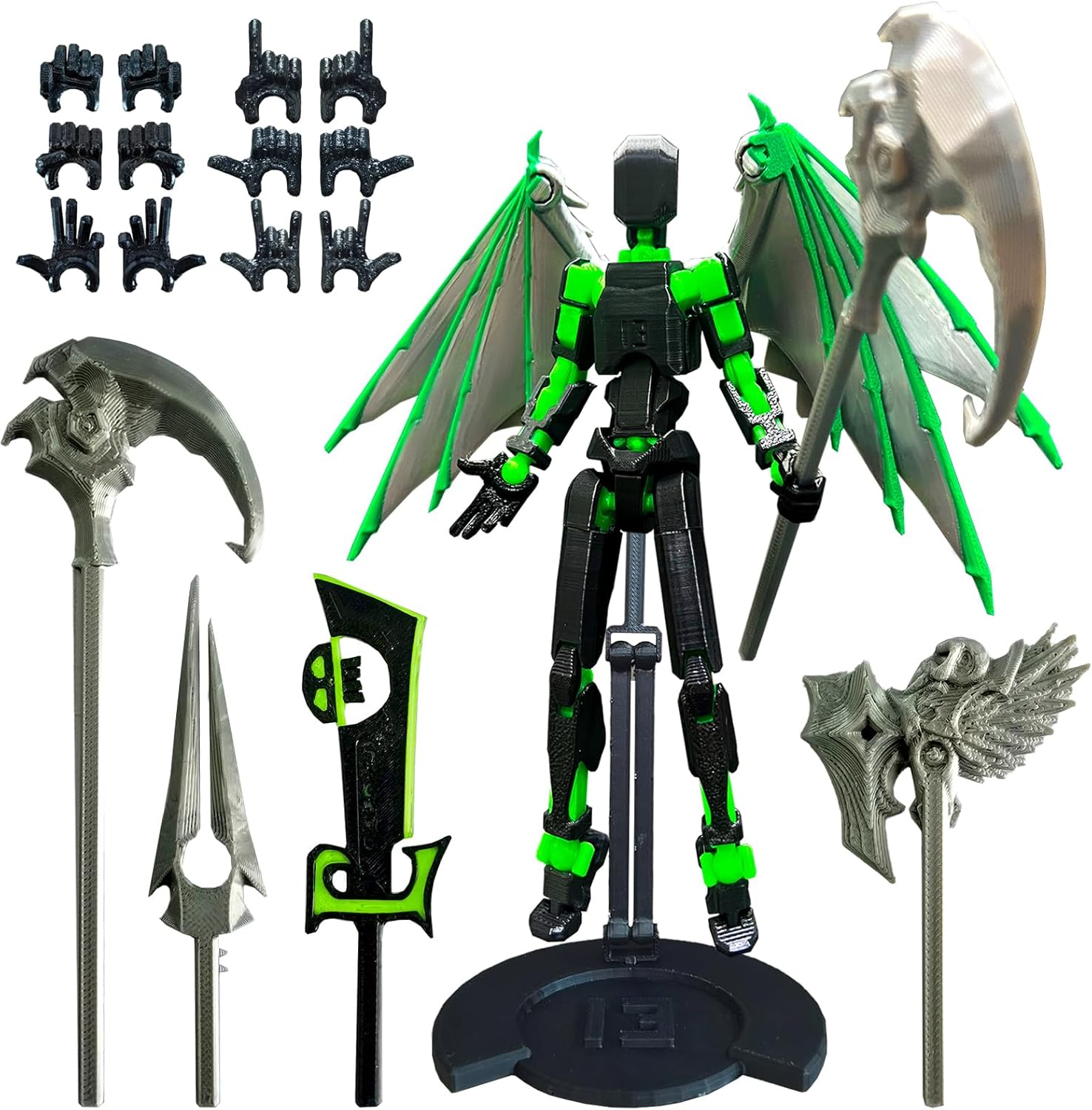
Image: All components of the T13 Demon Action Figure, including the main figure, multiple hand sets, various weapons, the display stand, and the wing set.
Setup
The T13 Demon Action Figure comes pre-assembled. Initial setup primarily involves attaching the wings, selecting and attaching desired hands, and equipping weapons.
- Attaching the Wings: Carefully align the pegs on the wing set with the corresponding slots on the figure's back. Gently push until they are securely in place. Ensure both wings are firmly attached to prevent accidental detachment during posing.
- Changing Hands: To replace hands, gently pull the existing hand from the wrist joint. Select a new hand pair and align the peg with the wrist socket. Push firmly but carefully until the hand is seated. There are six pairs of hands provided, allowing for various grip styles and open-hand poses.
- Equipping Weapons: The figure comes with four distinct weapons. Select a weapon and insert its handle into the grip of the chosen hand. Some hands are specifically designed to hold weapons more securely.
- Using the Display Bracket: The included bracket can be used to support the figure in standing or dynamic aerial poses. Insert the bracket's peg into the hole on the figure's back or between its legs, depending on the desired pose and stability.

Image: A visual guide illustrating the figure's components and examples of how accessories like wings and weapons can be attached and styled.
Operating the Figure (Posing)
The T13 Demon Action Figure features multiple points of articulation, allowing for a wide range of poses. Exercise care when manipulating joints to prevent damage.
- Joint Manipulation: Gently bend and rotate joints at the neck, shoulders, elbows, wrists, torso, hips, knees, and ankles to achieve desired poses. If a joint feels stiff, apply gentle, consistent pressure rather than forcing it.
- Stability: For standing poses, ensure the figure's feet are flat on the surface. Utilize the display bracket for more complex or dynamic poses, especially those involving flight or action.
- Accessory Integration: Experiment with different hand and weapon combinations to enhance your figure's display.

Image: The T13 Demon Action Figure in a dynamic pose, holding a large sword, demonstrating its articulation.

Image: The T13 Demon Action Figure in an action pose, wielding a scythe, showcasing its flexibility.
Maintenance
Proper care will ensure the longevity of your T13 Demon Action Figure.
- Cleaning: Use a soft, dry cloth to gently wipe away dust. For more stubborn dirt, a slightly damp cloth can be used, but avoid excessive moisture. Do not use harsh chemicals or abrasive cleaners.
- Storage: Store the figure away from direct sunlight, extreme temperatures, and high humidity, as these can affect the PETG material over time. Keep it in a clean, dry environment.
- Handling: Always handle the figure by its main body parts. Avoid gripping by small, delicate accessories or thin limbs when moving or posing.
Troubleshooting
If you encounter any issues with your T13 Demon Action Figure, refer to the following common solutions:
| Problem | Possible Cause / Solution |
|---|---|
| Joints are too stiff. | This is common with new figures. Gently work the joint back and forth to loosen it. Do not apply excessive force. |
| Joints are too loose. | If a joint becomes too loose, a small amount of clear nail polish or a specialized joint-tightening fluid can be applied to the joint peg and allowed to dry. Apply sparingly. |
| Accessories (hands, weapons) do not stay attached. | Ensure the accessory peg is fully inserted into the corresponding socket. If the fit is loose, a tiny piece of tissue paper or a very thin layer of clear adhesive tape wrapped around the peg can improve friction. |
| Figure falls over easily. | Adjust the figure's stance to ensure its center of gravity is balanced. For dynamic or unstable poses, always use the included display bracket. |
Specifications
| Feature | Detail |
|---|---|
| Product Size | 5.5 inches / 14 cm (height) |
| Product Dimensions | 9 x 5 x 0.75 inches (packaging/overall) |
| Item Weight | 2.39 ounces / 75g |
| Material | PETG (3D Printed) |
| Manufacturer | altuco |
| Recommended Age | 8 years and up |
Warranty and Support
altuco stands behind the quality of its products. While specific warranty details are not provided in this manual, for any questions, concerns, or support needs regarding your T13 Demon Action Figure, please contact the manufacturer directly through their official channels or the retailer from whom you purchased the product.
You can visit the altuco store for more information: altuco Store on Amazon
Related Documents - T13 Demon
 |
Smart Door Lock T13 User Manual Comprehensive user manual for the Smart Door Lock T13, covering installation, operation, user management, specifications, and troubleshooting FAQs. |
 |
Novusun T13 Series Frequency Converter User Manual Comprehensive user manual for the Novusun T13 series frequency converter. Covers safety precautions, display interface, key functions, parameter settings, V/F compensation, fault codes, and environmental usage for single-phase 220V input to three-phase motor control. |
 |
TELESIN T12 Remote Controller User Guide Comprehensive user guide for the TELESIN T12 Remote Controller, detailing its features, usage, pairing, camera settings, charging, and safety warnings for GoPro cameras. |
 |
Solar Tire Pressure Monitoring System Operating Instructions Operating instructions for the Solar Tire Pressure Monitoring System, covering installation, display functions, unit switching, battery replacement, and FCC compliance. |
 |
Infrared Heater Operating Instructions: Model T13-GR15VD/T13-GR15VDL - Safety, Installation, and Maintenance Guide Comprehensive operating instructions for the Infrared Heater, models T13-GR15VD and T13-GR15VDL. Learn about safety warnings, installation steps, product operation, and maintenance procedures to ensure efficient and safe use. |
 |
Demon Carburetion Road Demon Installation and Tuning Manual Comprehensive installation and tuning guide for Demon Carburetion Road Demon carburetors, covering baseline adjustments, linkage, fuel lines, vacuum, starting procedures, and component tuning. |