Introduction
Thank you for purchasing the S.M.S.L H400 Headphone Amplifier & Preamplifier. This manual provides essential information for the proper setup, operation, and maintenance of your device. Please read it thoroughly before use to ensure optimal performance and longevity.
What's in the Box
- S.M.S.L H400 Headphone Amplifier & Preamplifier x 1
- Remote Control x 1
- Power Cable x 1
- User Manual x 1
- Brand Card x 1
Product Overview
Front Panel
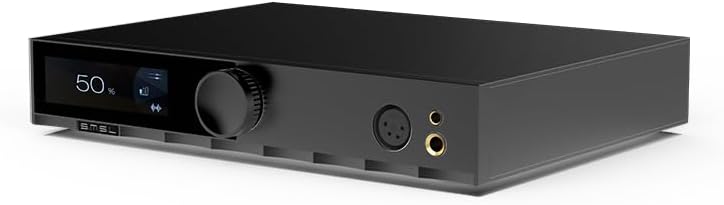
Image: Front view of the S.M.S.L H400 Headphone Amplifier. The front panel features a digital display on the left, a large rotary volume knob in the center, and two headphone output jacks (one 4-pin XLR balanced, one 6.35mm unbalanced) on the right.
- Display Screen: Shows current volume level, input source, and other operational information.
- Volume Knob: Controls the output volume. Can also be pressed to access menu options.
- Headphone Outputs: Includes a balanced 4-pin XLR output and an unbalanced 6.35mm (1/4 inch) output for connecting headphones.
Rear Panel

Image: Rear view of the S.M.S.L H400 Headphone Amplifier. From left to right, it features balanced XLR inputs, unbalanced RCA inputs, balanced XLR pre-outputs, unbalanced RCA pre-outputs, a USB-C update port, a ground switch (Floating/Grounded), and the AC power inlet with an integrated power switch.
- Balanced Inputs (XLR): For connecting balanced audio sources.
- Unbalanced Inputs (RCA): For connecting unbalanced audio sources.
- Balanced Pre-Outputs (XLR): For connecting to external power amplifiers or active speakers.
- Unbalanced Pre-Outputs (RCA): For connecting to external power amplifiers or active speakers.
- UPDATE Port (USB-C): For firmware updates.
- Ground Switch: Selects between Floating and Grounded modes to manage ground loops.
- AC Power Inlet: Connects the included power cable.
- Power Switch: Turns the unit on or off.
Setup
- Placement: Place the H400 on a stable, flat surface, ensuring adequate ventilation around the unit. Avoid placing it near heat sources or in direct sunlight.
- Connect Audio Sources:
- For balanced sources, connect XLR cables from your source to the H400's Balanced Inputs (XLR).
- For unbalanced sources, connect RCA cables from your source to the H400's Unbalanced Inputs (RCA).
- Connect Headphones: Plug your headphones into either the Balanced 4-pin XLR or Unbalanced 6.35mm headphone output on the front panel.
- Connect to Power Amplifier (Optional): If using the H400 as a preamplifier, connect the Balanced Pre-Outputs (XLR) or Unbalanced Pre-Outputs (RCA) to your power amplifier or active speakers.
- Power Connection: Connect the included power cable to the AC Power Inlet on the rear panel, then plug the other end into a suitable AC power outlet (100-240V).
- Power On: Flip the Power Switch on the rear panel to the 'ON' position. The unit will power on, and the display will illuminate.
Operating Instructions
Basic Operation
- Power On/Off: Use the rear panel switch for main power. The remote control can put the unit into standby.
- Volume Control: Rotate the Volume Knob on the front panel or use the volume buttons on the remote control to adjust the output level.
- Input Selection: Press the Volume Knob briefly to cycle through available input sources (Balanced, Unbalanced). Alternatively, use the input selection buttons on the remote.
- Gain Setting: The H400 offers High, Medium, and Low gain settings. These can be adjusted via the menu system, typically accessed by pressing and holding the volume knob or a dedicated button on the remote.
- Balanced Gain: Low (-5.8dB), Medium (6dB), High (20.4dB)
- Unbalanced Gain: Low (-11.8dB), Medium (0dB), High (14.4dB)
Remote Control
The included remote control provides convenient access to all functions, including power, volume, input selection, and menu navigation. Ensure the remote has fresh batteries and an unobstructed line of sight to the H400's front panel sensor.
Maintenance
- Cleaning: Use a soft, dry cloth to clean the exterior of the unit. Do not use liquid cleaners or solvents.
- Ventilation: Ensure the ventilation openings are not blocked to prevent overheating.
- Power Off: Always power off the unit using the rear switch when not in use for extended periods.
Troubleshooting
| Problem | Possible Cause | Solution |
|---|---|---|
| No power | Power cable not connected; Rear power switch off; Power outlet faulty. | Check power cable connection; Ensure rear power switch is ON; Try a different power outlet. |
| No sound output | Incorrect input selected; Volume too low; Headphones not connected properly; Source device not playing. | Select correct input; Increase volume; Reconnect headphones; Verify source device is playing audio. |
| Distorted sound | Input signal too high; Gain setting too high; Faulty cables. | Reduce source volume; Adjust H400 gain setting; Check and replace cables if necessary. |
| Remote control not working | Batteries depleted; Obstruction between remote and unit; Remote sensor blocked. | Replace batteries; Remove obstructions; Ensure clear line of sight to the unit's front panel. |
Specifications
| Parameter | Value |
|---|---|
| Preamp Output Method | Balanced, Unbalanced |
| Output Power (16Ω) | 15W x 2 |
| Output Power (32Ω) | 7.5W x 2 |
| Output Power (300Ω) | 1000mW x 2 |
| Output Power (600Ω) | 550mW x 2 |
| SNR | 133dB |
| Dynamic Range | 133dB |
| THD+N | -123dB, 0.00006% (1kHz, 32Ω) |
| Input Impedance | 47kΩ |
| Headphone Output Impedance | Approximately 0Ω |
| Preamp Output Impedance (Balanced) | 44Ω |
| Preamp Output Impedance (Unbalanced) | 22Ω |
| Frequency Response | 20Hz-100kHz (-0.5dB) |
| Gain (Balanced) | Low (-5.8dB), Medium (6dB), High (20.4dB) |
| Gain (Unbalanced) | Low (-11.8dB), Medium (0dB), High (14.4dB) |
| Consumption (EN60065) | <50W |
| Standby Power Consumption | <0.5W |
| Dimensions (WxHxD) | 254x46x189mm |
| Weight | 2.03kg / 4.47lbs |
Warranty and Support
For warranty information and technical support, please refer to the documentation provided with your purchase or visit the official S.M.S.L website. Keep your proof of purchase for warranty claims.


