
1. Introduction
This manual provides essential information for the safe and efficient use of your DOOGEE S200 Rugged Smartphone. Please read this guide thoroughly before operating the device to ensure proper functionality and to understand its features. Keep this manual for future reference.
2. Package Contents
Verify that all items are present in your product package:
- 1 x DOOGEE S200 5G Cellphone
- 1 x Type-C USB Cable
- 1 x 33W Charger
- 1 x Anti-explosion film (Screen Protector)
- 1 x User Manual (this document)

Image: Contents included in the DOOGEE S200 retail package.
3. Device Overview
The DOOGEE S200 features a robust design with a primary display on the front and a unique circular AMOLED display on the rear. Key physical components include:
- Main Display: 6.72-inch FHD+ screen with 120Hz refresh rate.
- Rear Display: 1.32-inch AMOLED circular screen for quick information access.
- Camera Module: Located on the rear, housing multiple lenses and an infrared flash lamp.
- Side Buttons: Power button (with integrated fingerprint sensor) and volume controls.
- SIM/TF Card Slot: Located on the side, protected by a cover.
- USB Type-C Port: Located at the bottom, protected by a waterproof plug, for charging and data transfer.
- Speakers: Integrated for audio output.

Image: Front and rear view of the DOOGEE S200 Rugged Smartphone, highlighting its robust construction and dual display.

Image: Detailed view of the DOOGEE S200's metal bezel, rear display, USB waterproof plug, and speaker placement.
4. Getting Started (Setup)
4.1 SIM Card and Storage Installation
- Locate the SIM/TF card slot on the side of the device.
- Carefully open the protective cover.
- Insert your 5G SIM card(s) and/or a microSD card (up to 2TB, sold separately) into the designated trays. Ensure correct orientation.
- Close the protective cover firmly to maintain water and dust resistance.
4.2 Powering On/Off
- To Power On: Press and hold the Power button until the DOOGEE logo appears.
- To Power Off: Press and hold the Power button, then select 'Power off' from the options on the screen.
4.3 Initial Setup Wizard
Upon first power-on, follow the on-screen instructions to complete the initial setup, including language selection, Wi-Fi connection, Google account login, and security settings.
5. Operating Instructions
5.1 Main Display Navigation
The 6.72-inch FHD+ 120Hz main display provides a smooth visual experience. Navigate using standard Android gestures: swipe, tap, pinch, and zoom. The 120Hz refresh rate enhances fluidity for scrolling and gaming.

Image: The 6.72-inch FHD+ main display of the DOOGEE S200, showcasing its 120Hz refresh rate for smooth visuals.
5.2 Using the Rear Display
The 1.32-inch AMOLED rear display offers quick access to information without activating the main screen. It can display time, notifications, music controls, and call information. Customization options for watch faces are available in the device settings.

Image: The 1.32-inch AMOLED rear display showing various functions like time, notifications, and music controls.
5.3 Security Features
- Fingerprint Recognition: The side-mounted fingerprint sensor allows for quick and secure unlocking. Register your fingerprints in the Security settings.
- Face Unlock: Configure face unlock in the Security settings for convenient access.
5.4 Digital Toolkit
The DOOGEE S200 includes a pre-installed Digital Toolkit application, offering various utility tools useful for outdoor activities and daily tasks.
6. Camera Features
The DOOGEE S200 is equipped with a versatile quad-camera system:
- 100MP AI Main Camera: Captures high-resolution images with enhanced detail and AI stabilization.
- 20MP Night Vision Camera: Utilizes infrared technology to capture clear monochrome images in low-light or complete darkness.
- 20MP Front Camera: For selfies and video calls.
- 2MP Macro Camera: Designed for close-up photography of small objects.

Image: Overview of the DOOGEE S200's rear camera module, detailing the 100MP main, 20MP night vision, and 2MP macro lenses, along with the infrared flash.
6.1 4K Video Recording
The device supports 4K video recording, allowing for the capture of high-quality video content with significant detail.
6.2 Underwater Photography
Leveraging its waterproof capabilities, the DOOGEE S200 can be used for underwater photography. Ensure all port covers are securely sealed before submerging the device. Use the physical buttons for camera control underwater.

Image: The DOOGEE S200 being used for underwater photography, demonstrating its water resistance.
7. Battery and Charging
7.1 Battery Capacity
The DOOGEE S200 is equipped with a 10100mAh battery, providing extended usage times for various activities, including up to 25 hours of video playback.

Image: Visual representation of the DOOGEE S200's 10100mAh battery capacity and estimated usage times.
7.2 Fast Charging
The device supports 33W fast charging, allowing for rapid replenishment of the battery. A compatible 33W charger and Type-C cable are included in the package.

Image: Illustration of the 33W fast charging capability of the DOOGEE S200.
7.3 OTG Reverse Charging
The DOOGEE S200 supports OTG (On-The-Go) reverse charging, enabling it to function as a power bank to charge other compatible devices using a suitable OTG cable (sold separately).

Image: The DOOGEE S200 demonstrating its OTG reverse charging feature, powering other devices.
8. Connectivity and Performance
The DOOGEE S200 is powered by a 6nm 5G MediaTek Dimensity 7050 octa-core processor, providing efficient performance for various applications.

Image: Diagram illustrating the 5G MediaTek Dimensity 7050 octa-core processor and its specifications.
8.1 Network and Wireless
- 5G Connectivity: Supports dual 5G SIM cards for high-speed mobile data.
- Wi-Fi 6: Provides faster and more stable wireless internet connections.
- Bluetooth: For connecting wireless accessories.
- NFC: Enables contactless payments and data exchange.
8.2 Navigation
The device supports multiple global navigation satellite systems (GNSS), including GPS, Glonass, Galileo, and Beidou, for accurate positioning and navigation.
8.3 Storage and RAM
The DOOGEE S200 features 256GB of internal storage, expandable up to 2TB via a microSD card. It includes 32GB of RAM (12GB physical + 20GB virtual) for efficient multitasking.
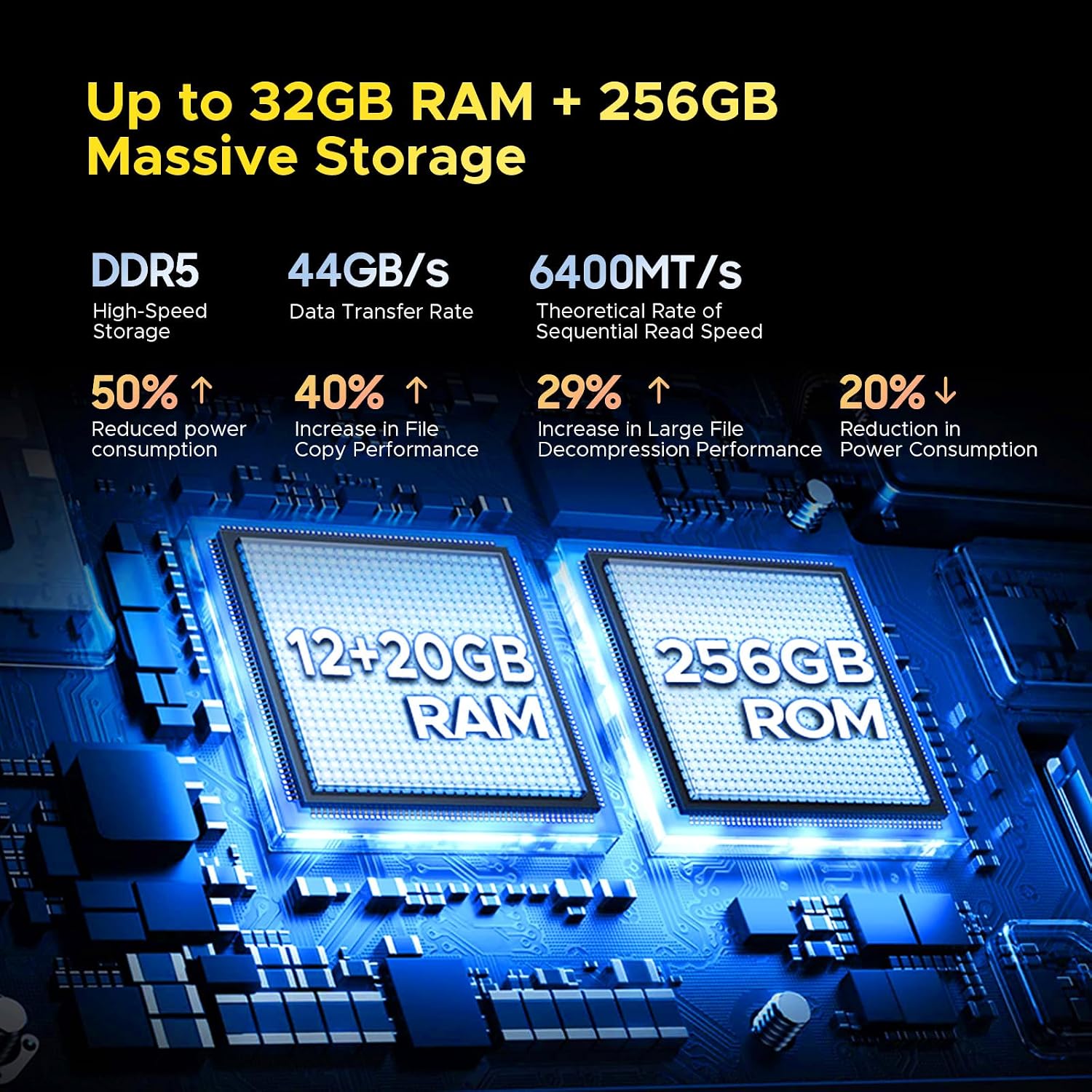
Image: Illustration of the DOOGEE S200's 32GB RAM (12GB physical + 20GB virtual) and 256GB internal storage, expandable to 2TB.
9. Durability Features
The DOOGEE S200 is engineered for resilience in challenging environments:
- IP68/IP69K Ratings: Certified for water and dust resistance, capable of withstanding immersion and high-pressure water jets.
- MIL-STD-810H Standard: Meets military-grade standards for drop resistance, protecting against impacts from falls.
- Mecha Design: Constructed with 80% metal material on the rear for enhanced structural integrity.

Image: The DOOGEE S200 showcasing its robust 'Mecha Design' with metal components, emphasizing its durability.

Image: Visuals demonstrating the DOOGEE S200's dust-proof and drop-proof capabilities, adhering to IP68/IP69K and MIL-STD-810H standards.
10. Maintenance
- Cleaning: Use a soft, damp cloth to clean the device. Avoid harsh chemicals or abrasive materials. Ensure all port covers are sealed before cleaning with water.
- Storage: Store the device in a cool, dry place away from direct sunlight and extreme temperatures.
- Port Covers: Always ensure the USB port and SIM/TF card slot covers are securely closed to maintain water and dust resistance.
- Screen Protection: While the screen is durable, applying the included anti-explosion film or a tempered glass protector can offer additional scratch resistance.
11. Troubleshooting
- Device Not Powering On: Ensure the battery is charged. Connect the device to the charger for at least 10 minutes before attempting to power on again.
- Network Connectivity Issues:
- Check if your SIM card is properly inserted and activated.
- Verify that your mobile carrier supports unlocked 5G devices and the specific bands used by the DOOGEE S200. Some carriers (e.g., Verizon in the US) may have specific compatibility requirements.
- Restart the device.
- Reset network settings in the phone's Settings menu.
- Slow Performance: Close unnecessary background applications. Clear cache data. Consider a factory reset if performance issues persist (back up your data first).
- Battery Draining Quickly: Reduce screen brightness, disable unused features like GPS or Bluetooth, and identify power-consuming apps in battery settings.
- Touchscreen Unresponsive: Restart the device. If the issue persists, contact support.
12. Specifications
| Feature | Specification |
|---|---|
| Model Name | DOOGEE S200 |
| Operating System | Android 14 |
| Processor | MediaTek Dimensity 7050 Octa-core (2.6 GHz) |
| Main Display Size | 6.72 Inches |
| Main Display Resolution | 2400 x 1080 (FHD+) |
| Main Display Refresh Rate | 120 Hz |
| Rear Display | 1.32" AMOLED |
| RAM | 32 GB (12GB physical + 20GB virtual) |
| Internal Storage | 256 GB |
| Expandable Storage | Up to 2 TB (microSD) |
| Main Camera | 100 MP AI |
| Night Vision Camera | 20 MP |
| Front Camera | 20 MP |
| Macro Camera | 2 MP |
| Battery Capacity | 10100 mAh |
| Charging | 33W Fast Charging, OTG Reverse Charging |
| Connectivity | 5G, Wi-Fi 6, Bluetooth, NFC, USB Type-C |
| Navigation | GPS, Glonass, Galileo, Beidou |
| Durability | IP68/IP69K Waterproof, MIL-STD-810H Drop Resistance |
| Dimensions | 7.07 x 3.25 x 0.63 inches |
| Weight | 12.8 ounces (364g) |
13. Warranty and Support
For warranty information, technical support, or service inquiries, please refer to the warranty card included in your package or visit the official DOOGEE website:
Please retain your proof of purchase for warranty claims.


