
Introduction
This manual provides comprehensive instructions for the proper setup, operation, and maintenance of your MIPRO ACT-32H UHF Handheld Transmitter. Please read this manual thoroughly before using the device to ensure optimal performance and longevity.
The MIPRO ACT-32H UHF Handheld Transmitter is designed for professional audio applications, offering reliable wireless performance and high-fidelity sound reproduction. Its robust construction and advanced features make it suitable for singers, presenters, and audio/video professionals.
Product Overview
The ACT-32H handheld transmitter features a durable housing, an integrated microphone capsule, and controls for power and frequency selection.
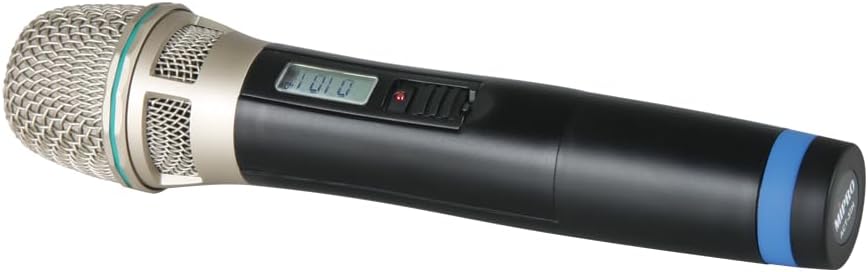
Figure 1: MIPRO ACT-32H UHF Handheld Transmitter. This image shows the black handheld microphone with a silver mesh grille at the top, a small display screen, and a power switch on the body. A blue band is visible near the bottom of the handle.
Key Components:
- Microphone Grille: Protects the microphone capsule and helps shape the sound.
- Capsule: High-quality condenser capsule for clear audio capture.
- LCD Display: Shows frequency, battery status, and other operational information.
- Power/Mute Switch: Controls power on/off and mutes the microphone output.
- Battery Compartment: Houses the batteries required for operation.
- Antenna: Integrated antenna for wireless signal transmission.
What's in the Box
Upon opening the package, please verify that all listed items are present and in good condition:
- MIPRO ACT-32H UHF Handheld Transmitter (Microphone)
- User Manual (this document)
- (Note: Batteries may or may not be included depending on the specific package. Please check packaging for details.)
Setup
1. Battery Installation:
- Unscrew the bottom cap of the handheld transmitter to access the battery compartment.
- Insert two fresh AA alkaline batteries, observing the correct polarity (+/-) as indicated inside the compartment.
- Securely screw the bottom cap back onto the transmitter.
2. Pairing with Receiver:
The ACT-32H transmitter must be paired with a compatible MIPRO wireless receiver (sold separately) to function. Refer to your receiver's user manual for specific pairing instructions. Generally, the process involves:
- Powering on both the transmitter and the receiver.
- Initiating the ACT (Automatic Channel Targeting) sync function on the receiver.
- Aligning the IR (Infrared) ports of the transmitter and receiver for data transfer.
- Confirming successful pairing on both devices' displays.
Important: Ensure the transmitter and receiver are set to the same frequency band (e.g., 904-925 MHz for this model) to avoid compatibility issues.
Operation
Powering On/Off:
- To power on, slide the power switch to the "ON" position. The LCD display will illuminate.
- To power off, slide the power switch to the "OFF" position.
Mute Function:
- While powered on, briefly slide the power switch to the "MUTE" position and release to mute the microphone. The LCD display may indicate "MUTE".
- Repeat the action to unmute the microphone.
Monitoring Battery Status:
The LCD display on the transmitter will show the current battery level. Replace batteries promptly when the low battery indicator appears to avoid interruption during use.
Optimal Usage:
- Hold the microphone approximately 2-6 inches from your mouth for best vocal pickup.
- Avoid covering the antenna area (typically at the bottom of the microphone) with your hand, as this can reduce wireless range and signal quality.
- Maintain a clear line of sight between the transmitter and the receiver whenever possible.
Maintenance
- Cleaning: Use a soft, dry cloth to clean the exterior of the transmitter. Do not use liquid cleaners or solvents.
- Battery Care: Remove batteries if the transmitter will not be used for an extended period to prevent leakage and damage.
- Storage: Store the transmitter in a cool, dry place, away from direct sunlight and extreme temperatures.
- Handling: While robust, avoid dropping or subjecting the transmitter to severe impacts.
Troubleshooting
| Problem | Possible Cause | Solution |
|---|---|---|
| No sound from microphone |
|
|
| Intermittent signal or static |
|
|
| Poor sound quality |
|
|
Specifications
| Feature | Detail |
|---|---|
| Model | ACT-32H |
| Brand | MIPRO |
| Frequency Response | 904-925 MHz (UHF) |
| Microphone Form Factor | Handheld |
| Polar Pattern | Unidirectional |
| Power Source | Battery Powered (AA) |
| Item Weight | 4 pounds |
| Special Features | Wireless, Lightweight |
| Compatible Devices | PA System |
Warranty and Support
MIPRO products are designed for durability and performance. For specific warranty information, please refer to the warranty card included with your product or visit the official MIPRO website. Keep your purchase receipt as proof of purchase for warranty claims.
For technical support, troubleshooting assistance beyond this manual, or service inquiries, please contact MIPRO customer support or your authorized dealer. Contact information can typically be found on the manufacturer's website.
Note: Protection plans may be available for purchase separately from third-party providers. These plans are distinct from the manufacturer's warranty.