
1. Introduction
Thank you for choosing the Ueadcm E1 Foldable Treadmill. This manual provides essential information for the safe assembly, operation, and maintenance of your new fitness equipment. Please read this manual thoroughly before using the treadmill to ensure proper function and to prevent injury.
The Ueadcm E1 Treadmill is designed for home use, offering a convenient and effective way to engage in running or walking exercises. Its foldable design allows for easy storage, making it suitable for various living spaces.

Image: The Ueadcm E1 Foldable Treadmill in an active use scenario, demonstrating its compact design and user interface.
2. Important Safety Information
Before operating the Ueadcm E1 Treadmill, please observe the following safety precautions:
- Consult a physician before starting any exercise program.
- Keep children and pets away from the treadmill during operation.
- Place the treadmill on a flat, stable surface with adequate clearance around it.
- Wear appropriate athletic footwear and clothing.
- Do not operate the treadmill if it is damaged or malfunctioning.
- Always attach the safety key clip to your clothing before beginning your workout.
- Do not exceed the maximum user weight capacity of 300 lbs (136 kg).
- Unplug the treadmill from the power source when not in use or before cleaning/maintenance.
- Ensure the running belt is properly aligned and tensioned before each use.

Image: A close-up of the treadmill's control panel, highlighting the safety key attachment point and the integrated pad holder for devices.
3. Package Contents
Verify that all components are present in the package:
- Ueadcm E1 Foldable Treadmill (Main Unit)
- Safety Key
- Tool Kit (for assembly and maintenance)
- User Manual (this document)
- Power Cord
4. Setup and Assembly
Follow these steps to set up your Ueadcm E1 Treadmill:
- Unpacking: Carefully remove all components from the packaging. Place the main treadmill unit on a clear, flat surface.
- Unfolding the Treadmill:
- Gently lift the console and uprights from the folded position.
- Secure the uprights into their locked position using the provided pins or knobs.
- Lower the running deck until it rests flat on the floor. Ensure it clicks into place securely.
- Connecting Power: Plug the power cord into the treadmill's power port, then into a grounded electrical outlet.
- Initial Inspection: Before first use, inspect all bolts and connections to ensure they are tight and secure.

Image: Illustration of the treadmill's folding mechanism, showing its compact folded dimensions (50.5" L x 25.5" W x 6.7" H) and the transportation wheels for easy movement.
5. Operating Instructions
5.1 Control Panel Overview
The control panel features an LED display and various buttons for controlling your workout.

Image: A detailed view of the multi-function control panel, displaying metrics such as Speed, Calories, Time, and Distance, along with buttons for operation and program selection. The treadmill offers 12 exercise programs.
- Display: Shows Speed, Distance, Time, and Calories burned.
- Start/Stop Button: Initiates or pauses the workout.
- Speed +/- Buttons: Adjust the running speed.
- Program (P) Button: Selects from 12 pre-set workout programs.
- Mode (M) Button: Cycles through display modes or sets target values.
5.2 Starting a Workout
- Ensure the treadmill is plugged in and the power switch (if present, usually near the power cord) is ON.
- Attach the safety key clip to your clothing and place the magnetic end onto the designated area on the control panel. The display will illuminate.
- Step onto the side rails of the treadmill.
- Press the Start button. The treadmill will begin with a low speed (e.g., 0.6 MPH) after a short countdown.
- Carefully step onto the running belt and gradually increase the speed using the Speed + button to your desired pace.
5.3 Using Workout Programs
The Ueadcm E1 Treadmill offers 12 pre-set workout programs:
- From standby mode, press the Program (P) button repeatedly to cycle through the available programs (P1-P12).
- Once you have selected your desired program, press the Start button to begin the workout. The treadmill will automatically adjust speed according to the program's profile.
5.4 Stopping a Workout
- To pause your workout, press the Stop button once. The belt will slow down and stop. Press Start to resume.
- To end your workout completely, press and hold the Stop button, or pull the safety key from the control panel. The treadmill will come to a complete stop.
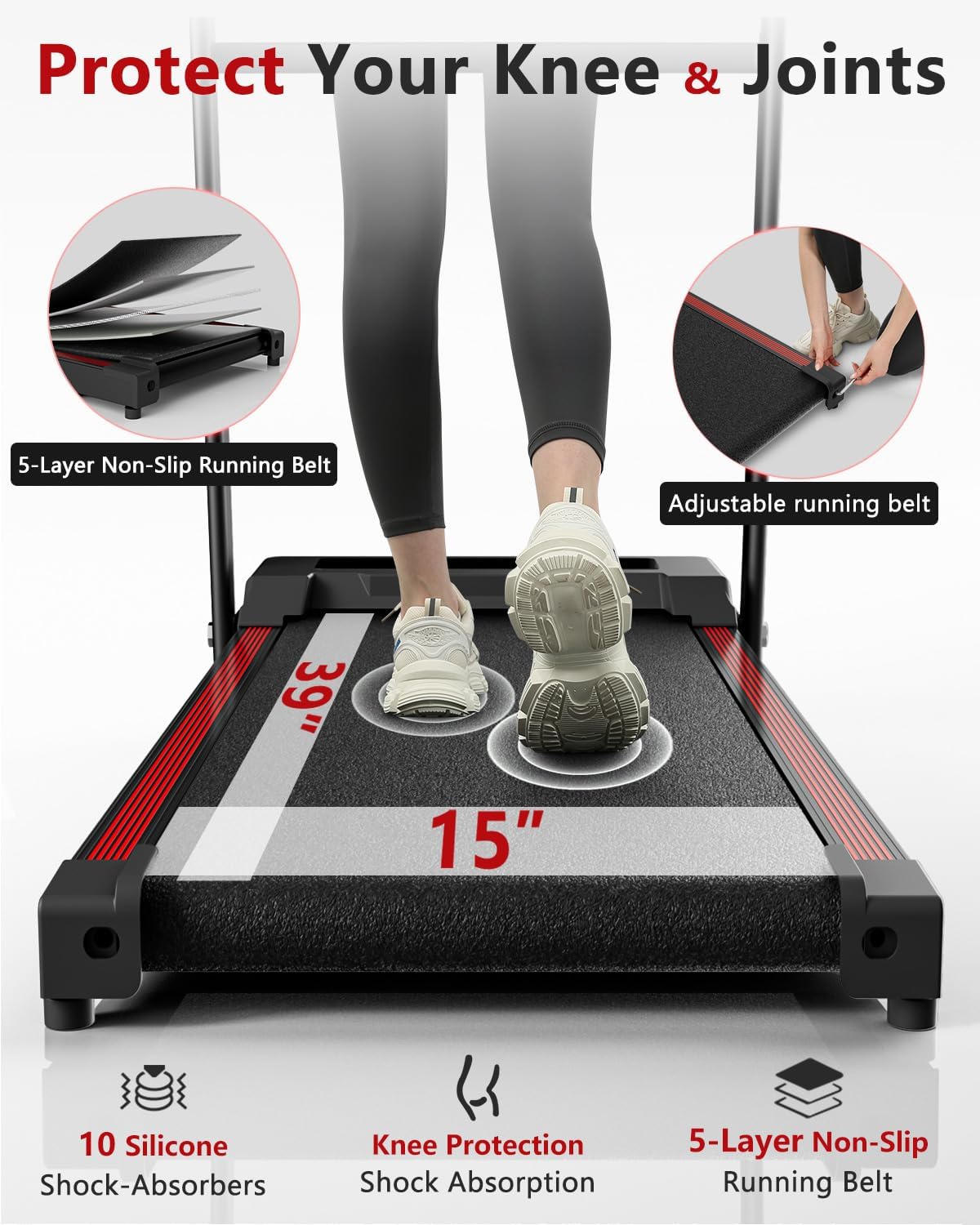
Image: A visual representation of the treadmill's running belt, highlighting its 5-layer non-slip construction and the 10 silicone shock-absorbers designed for knee and joint protection. The running surface measures 39 inches by 15 inches.
6. Maintenance
Regular maintenance ensures the longevity and optimal performance of your treadmill.
6.1 Cleaning
- Always unplug the treadmill before cleaning.
- Wipe down the console and exterior surfaces with a soft, damp cloth. Avoid abrasive cleaners or solvents.
- Periodically vacuum underneath the treadmill to remove dust and debris.
6.2 Running Belt Lubrication
The running belt requires periodic lubrication to reduce friction and extend its lifespan. Refer to the specific instructions provided with your lubrication kit (usually included in the tool kit).
- Frequency: Lubricate every 3-6 months, or after approximately 100 hours of use.
- Procedure:
- Unplug the treadmill.
- Loosen the rear roller bolts slightly to lift the belt.
- Apply a thin line of silicone lubricant evenly under the center of the running belt.
- Tighten the rear roller bolts.
- Plug in the treadmill and run it at a low speed (e.g., 2 MPH) for 5 minutes to distribute the lubricant.
6.3 Running Belt Adjustment
If the running belt slips or drifts to one side, it may need adjustment.
- Belt Centering: If the belt drifts to the left, turn the left rear roller bolt clockwise 1/4 turn. If it drifts to the right, turn the right rear roller bolt clockwise 1/4 turn. Run the treadmill for 2 minutes at 3 MPH and re-check. Repeat until centered.
- Belt Tension: If the belt slips during use, it may be too loose. Turn both rear roller bolts clockwise 1/4 turn simultaneously. Run the treadmill for 2 minutes at 3 MPH and re-check. Repeat until slipping stops. Do not overtighten.

Image: A visual demonstrating the concept of automatic calibration for the running belt, ensuring proper alignment and tension for consistent performance.
7. Troubleshooting
Refer to this section for common issues and their solutions.
| Problem | Possible Cause | Solution |
|---|---|---|
| Treadmill does not power on. | Power cord not plugged in; power switch off; safety key not in place. | Ensure power cord is securely plugged into both the treadmill and a working outlet. Turn on the power switch. Place the safety key on the console. |
| Running belt stops suddenly. | Safety key dislodged; motor overload. | Re-attach the safety key. If due to overload, reduce usage intensity or check for obstructions. |
| Running belt slips during use. | Belt tension too loose. | Adjust belt tension as described in Section 6.3. |
| Running belt drifts to one side. | Belt alignment incorrect. | Adjust belt alignment as described in Section 6.3. |
| Unusual noise from treadmill. | Loose components; lack of lubrication; foreign object. | Check all bolts and screws for tightness. Lubricate the running belt. Inspect for any foreign objects under the belt or motor cover. |
8. Product Specifications
| Feature | Detail |
|---|---|
| Brand | Ueadcm |
| Model | E1 |
| Motor Horsepower | 2.5 HP |
| Speed Range | 0.6 - 7.5 MPH |
| Maximum User Weight | 300 lbs (136 kg) |
| Running Surface Dimensions | 39" L x 15" W (99 cm x 38 cm) |
| Running Belt Layers | 5-Layer Non-Slip |
| Shock Absorption | 10 Silicone Shock-Absorbers |
| Display Type | LED |
| Display Metrics | Speed, Distance, Time, Calories |
| Workout Programs | 12 Pre-set Programs |
| Folded Dimensions (Approx.) | 50.5" L x 25.5" W x 6.7" H (128.3 cm x 64.8 cm x 17 cm) |
| Frame Material | Alloy Steel |
| Item Weight | 19.96 kg (44 lbs) |
| Power Source | Corded Electric |

Image: An illustration detailing the treadmill's powerful and quiet 2.5 HP motor, indicating a noise level below 45 dB, a speed range of 0.6-7.5 MPH, and a weight capacity of 300 lbs.
9. Warranty and Customer Support
Ueadcm provides a lifetime warranty for all products. Free replacement parts are offered under warranty. For any inquiries, technical assistance, or warranty claims, please contact Ueadcm customer support. All messages will be replied to within 24 hours.
Please refer to your purchase documentation or the official Ueadcm website for the most current contact information.