1. Introduction
The E-FAST TK800 is a versatile 3-in-1 device designed for automotive and motorcycle batteries. It functions as a battery charger, a battery tester, and a pulse repair maintainer. This manual provides detailed instructions for safe and effective use of your device.

Figure 1: E-FAST TK800 3-in-1 Car Battery Charger and Tester with clamps and power cord.

Figure 2: Overview of the E-FAST TK800's 3-in-1 capabilities including battery testing, charging, and repair modes.
2. Safety Information
Always observe the following safety precautions to prevent injury or damage to the device and battery:
- Ensure proper ventilation when charging batteries to prevent gas accumulation.
- Connect the positive (+) clamp (red) to the positive battery terminal and the negative (-) clamp (black) to the negative battery terminal. Reverse polarity connection will trigger a warning.
- Avoid sparks or flames near the battery during charging.
- Do not attempt to charge frozen or damaged batteries.
- Keep the device dry and away from moisture.
- The device features an 8-point protection system including overvoltage, short circuit, reverse connection, overcurrent, fire, electric shock, overheat, and low voltage protection. A child lock automatically engages during charging.

Figure 3: The 8 security protections integrated into the E-FAST TK800 charger for safe operation.
3. Setup and Connection
Before operating the device, ensure the battery type and parameters are compatible with the charger.
3.1 Connecting for Testing or Charging
- Attach the red clamp to the positive ("+") terminal of the battery.
- Attach the black clamp to the negative ("-") terminal of the battery.
- Connect the charger's power plug to a 110V household power supply. The screen will light up once connected.
If connected incorrectly, the charger will display "ERO" and sound an alarm (2Hz).

Figure 4: Step-by-step guide for connecting the E-FAST charger to a battery and power source.
4. Operating Instructions
4.1 Battery Testing
The E-FAST TK800 can test all 12V 40-999CCA batteries, including LiFePO4, AGM, EFB, and GEL batteries. For accurate testing, ensure the battery is at least 85% charged.
- After connecting the device (as per Section 3.1), use the UP and DOWN buttons on the intelligent tester charger to select the battery type (CAR, AGM, GEL, LiFePO4, MOTO).
- Press the ENTER button to proceed.
- For Car Mode: Use the UP and DOWN buttons to select the factory standard CCA (Cold Cranking Amps) marked on the battery. Then press ENTER for the test results. If the battery has no factory standard CCA, refer to the "Battery Capacity and CCA Comparison Table" (not provided in this manual, typically found in a separate reference).
- For Motorcycle Mode: Select the battery capacity in AH (Ampere-hours) using the UP and DOWN buttons. Then press ENTER and wait for the test results.
- When the test results display, use the UP and DOWN buttons to view battery data such as SOH (State of Health), VOLT (Voltage), and SOC (State of Charge), and the status of the battery (perfect, good, and bad). If the battery is discharged or has low power, the tester will display a prompt to recharge.

Figure 5: The LCD digital display provides real-time readouts of testing and charging parameters.

Figure 6: Visual guide for operating the battery tester function.
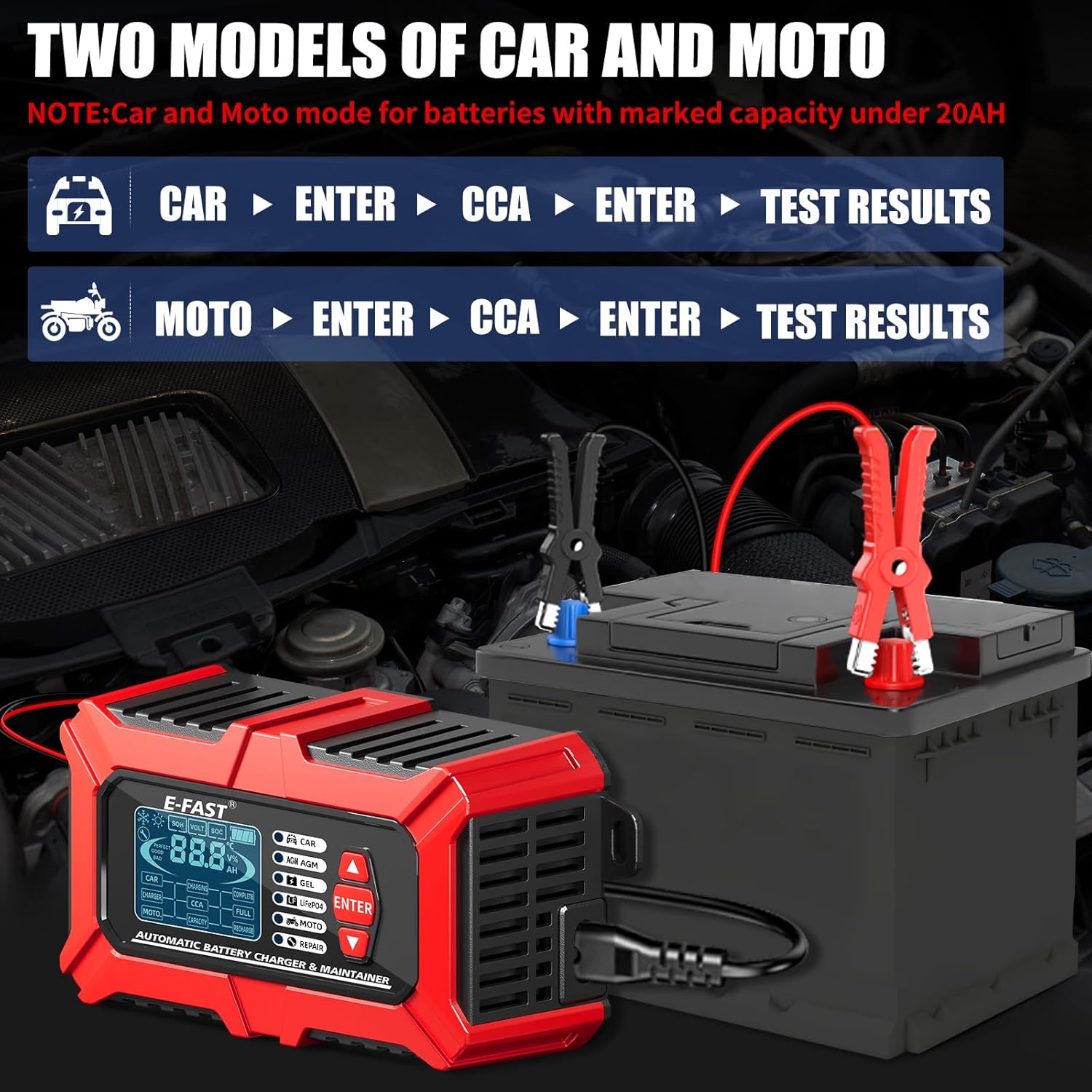
Figure 7: Specific instructions for Car and Moto battery testing modes. Note: Car and Moto mode for batteries with marked capacity under 20AH.
4.2 Battery Charging
Once connected to a power supply and battery, the charger will automatically detect the battery type and begin charging. The charger will display the charging mode and start charging (indicator light will flash).
- The device automatically stops charging when the battery is fully charged.
- The LCD screen will display full battery bars, and the indicator light will remain steady, indicating floating charge mode.
- After charging is complete, disconnect the charger and the battery is ready for use.
- The charger has a memory function, defaulting to the state mode used before the last power failure.

Figure 8: Illustration of the automatic charging process and display indicators.
Video 1: Demonstration of the E-FAST 0-25A Battery Charger in operation, showing its features and functionality.
Video 2: Official video showcasing the E-FAST 6A Battery Charger, highlighting its charging capabilities and user interface.
4.3 Pulse Repair Mode
The built-in battery reconditioning mode utilizes high-frequency and low-frequency pulse technology to help restore old or idle batteries and extend their lifespan. This mode is particularly useful if the charger initially fails to charge a battery.
- To activate, select the "REPAIR" mode on the device.
- Note: This mode cannot activate a completely dead battery or repair a physically damaged battery.

Figure 9: The pulse repair function helps to efficiently restore various types of underperforming batteries.
5. Maintenance
Proper maintenance ensures the longevity and optimal performance of your E-FAST TK800.
- Cleaning: Disconnect the device from power and battery before cleaning. Use a soft, dry cloth to wipe the casing. Do not use abrasive cleaners or solvents.
- Storage: Store the charger in a cool, dry place when not in use. Ensure clamps are clean and free of corrosion.
- Cable Care: Inspect power cords and battery clamps regularly for any signs of damage. Do not use the device if cables or clamps are damaged.
- Temperature Compensation: The device features seasonal temperature compensation to prevent undercharging in low temperatures (-5°F) and overcharging in high heat (105°F), slowing capacity decay and reducing temperature-related damage.

Figure 10: The charger's seasonal temperature compensation feature optimizes charging performance in varying climates.
6. Troubleshooting
If you encounter issues with your E-FAST TK800, refer to the following common problems and solutions:
| Problem | Possible Cause | Solution |
|---|---|---|
| Charger not turning on/displaying "ERO" | Incorrect battery connection (reverse polarity) or no power supply. | Ensure red clamp is on positive (+) and black clamp on negative (-). Verify power outlet is functional. |
| Battery not charging | Battery is severely discharged, damaged, or incompatible. | Try Pulse Repair mode for deeply discharged batteries (if not completely dead). Confirm battery type is supported. Inspect battery for physical damage. |
| Inconsistent test results | Battery not sufficiently charged for accurate testing (below 85% SOC) or poor clamp connection. | Ensure battery is charged to at least 85% before testing. Clean battery terminals and ensure clamps have a solid connection. |
| Device overheating | Poor ventilation or prolonged use in high ambient temperatures. | Ensure adequate airflow around the charger. Allow the device to cool down. The built-in overheat protection should activate if necessary. |
7. Specifications
| Feature | Detail |
|---|---|
| Model Number | TK800 |
| Input Voltage | 110-240V |
| Output Voltage | 12 Volts |
| Charging Current | 6A (Max) |
| Test Battery Range | 3-200Ah |
| Recharge Battery Range | 2AH-100Ah |
| Supported Battery Types | LiFePO4, Lead-Acid (AGM, EFB, GEL) |
| CCA Test Range | 40-999 CCA |
| Product Dimensions | 2.5 x 3 x 6.1 inches |
| Item Weight | 1.3 pounds |
| Color | Red/Black |
| Manufacturer | E-FAST |
| Country of Origin | China |
8. Warranty and Support
For warranty information and customer support, please refer to the product packaging or contact the seller directly. Keep your purchase receipt as proof of purchase.
Manufacturer: E-FAST


