
BAOFENG BF-888S
Contents
BAOFENG BF-888S Professional Handheld Two-Way Radio User Manual
Model: BF-888S
1. Introduction
This manual provides detailed instructions for the operation and maintenance of your BAOFENG BF-888S Professional Handheld Two-Way Radio. Please read this manual thoroughly before using the device to ensure proper function and safety.
The BAOFENG BF-888S is a 16-channel UHF two-way radio designed for reliable communication. It features a built-in flashlight, VOX function, CTCSS/DCS, scan, emergency alarm call, and battery save mode.
2. Package Contents
Verify that all items are present in your package:
- BF-888S Walkie Talkie (quantity as purchased, e.g., 4 units)
- Antenna
- Rechargeable 1500mAh Lithium-Ion Battery
- Charger (charging base and power adapter)
- Handstrap
- Belt Clip
- Earpieces
- User's Manual

Image: Contents of the BAOFENG BF-888S package, including walkie talkies, antennas, batteries, chargers, earpieces, handstraps, belt clips, and the user manual.
3. Product Overview
Familiarize yourself with the main components and controls of the BF-888S radio.
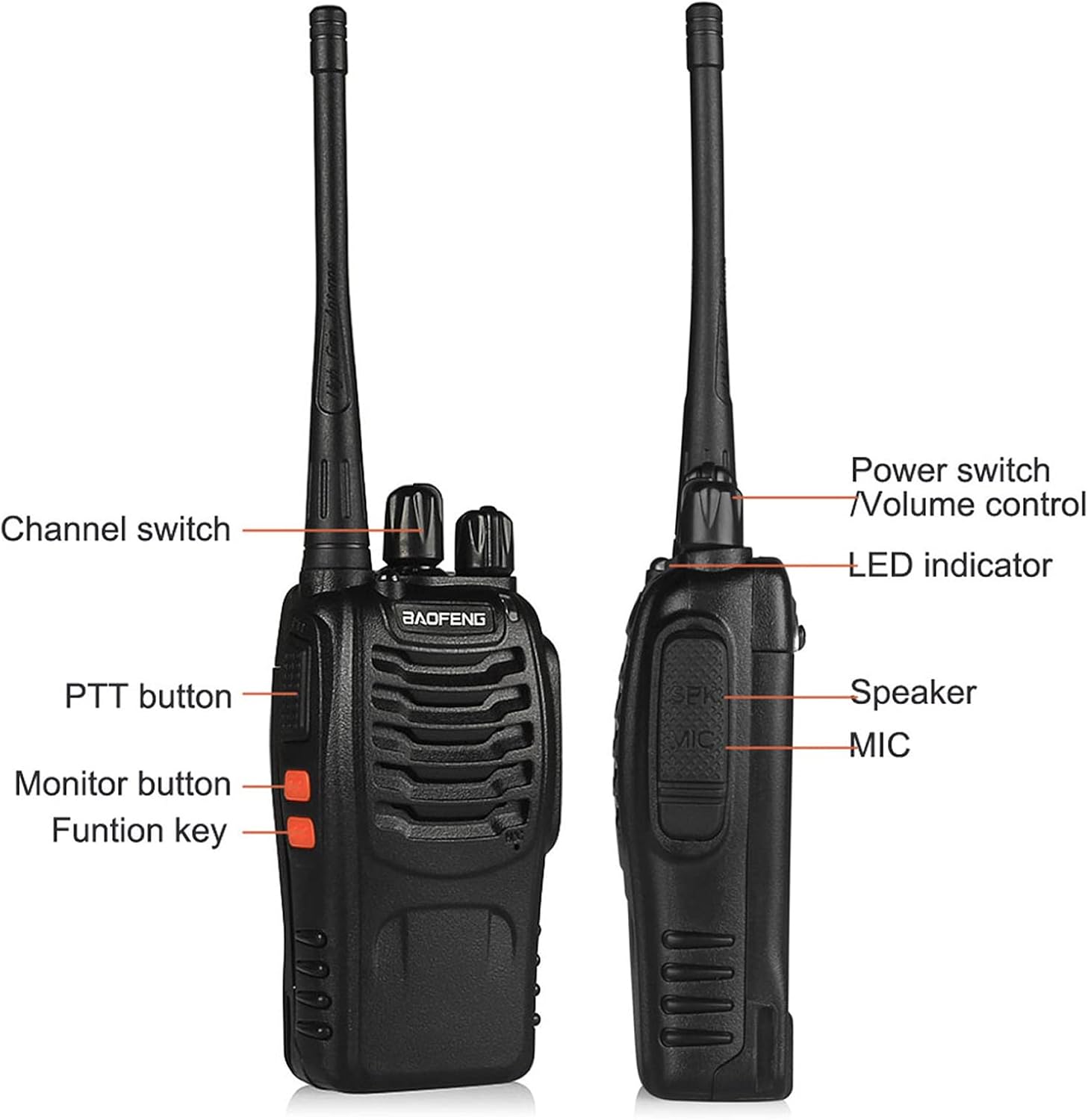
Image: Diagram illustrating the various parts of the BAOFENG BF-888S radio, including the Power switch/Volume control, LED indicator, Speaker, MIC, Channel switch, PTT button, Monitor button, and Function key.
- Power Switch/Volume Control: Rotate clockwise to turn on and increase volume; rotate counter-clockwise to decrease volume and turn off.
- Channel Switch: Rotate to select one of the 16 available channels.
- PTT (Push-To-Talk) Button: Press and hold to transmit, release to receive.
- Monitor Button: Press to temporarily disable squelch and listen to weak signals.
- Function Key: Can be programmed for various functions (e.g., flashlight, alarm).
- LED Indicator: Illuminates red during transmission, green during reception.
- Speaker/Microphone (MIC): For audio output and input.
4. Setup
4.1 Battery Installation and Charging
The BF-888S uses a rechargeable Lithium-Ion battery. Ensure the battery is fully charged before first use.
- Install Battery: Align the battery with the grooves on the back of the radio and slide it upwards until it clicks into place.
- Charge Battery:
- Insert the power adapter into an AC outlet.
- Place the radio (with battery installed) or the battery alone into the charging tray.
- The charging indicator light will turn red while charging and green when fully charged.
- Remove Battery: To remove, press the battery release latch and slide the battery downwards.

Image: A BAOFENG BF-888S walkie talkie placed in its charging base, illustrating the charging process.
4.2 Antenna Installation
Screw the antenna into the connector on the top of the radio clockwise until it is finger-tight. Do not overtighten.
4.3 Belt Clip and Handstrap Attachment
Attach the belt clip to the back of the radio using the provided screws. Thread the handstrap through the loop on the top side of the radio.
5. Operating Instructions
5.1 Power On/Off and Volume Adjustment
Rotate the Power Switch/Volume Control knob clockwise to turn on the radio. Continue rotating clockwise to increase the volume. Rotate counter-clockwise to decrease volume and turn off the radio.
5.2 Channel Selection
Rotate the Channel Switch knob to select one of the 16 available channels. Ensure all radios intended for communication are set to the same channel.
5.3 Transmitting and Receiving
- To transmit, press and hold the PTT (Push-To-Talk) button. Speak clearly into the microphone, holding the radio approximately 2-3 inches from your mouth. The LED indicator will glow red.
- Release the PTT button to stop transmitting and return to receive mode. The LED indicator will glow green when receiving a signal.
5.4 Monitor Function
Press and hold the Monitor button to temporarily open the squelch. This allows you to listen to very weak signals or to check if a channel is clear before transmitting. Release the button to re-engage squelch.
5.5 Flashlight Function
The BF-888S includes a built-in flashlight. The operation of the flashlight is typically assigned to the Function Key. Press the Function Key once to turn on the flashlight, and press it again to turn it off.

Image: Two BAOFENG BF-888S radios shown with their integrated flashlights illuminated, demonstrating the flashlight feature.
5.6 Advanced Features (Programming)
The BF-888S supports programming via CHIRP software or BAOFENG's proprietary software. This allows for customization of features such as:
- VOX (Voice Operated Transmit): Enables hands-free transmission when voice is detected.
- CTCSS/DCS Tones: Sub-audible tones that filter out unwanted conversations on the same channel.
- Scan: Scans through programmed channels for activity.
- Emergency Alarm Call: Activates an alarm sound.
- Battery Save: Reduces power consumption when no signal is being received and no operation is being performed.
- Squelch Level: Adjusts the threshold for opening the receiver.
- BCL (Busy Channel Lockout): Prevents transmission on an occupied channel.
- TOT (Time-Out Timer): Limits transmission duration to prevent accidental long transmissions.
- Voice Prompt: Audible confirmations for operations.
For detailed programming instructions, refer to the software documentation and online resources for CHIRP or BAOFENG programming tools. A programming cable (sold separately) is required.
6. Maintenance
- Cleaning: Wipe the radio with a soft, damp cloth. Do not use harsh chemicals or solvents.
- Battery Care:
- Do not short-circuit battery terminals.
- Do not expose the battery to fire or extreme heat.
- If the battery is not used for an extended period, charge it periodically to maintain its lifespan.
- Storage: Store the radio in a cool, dry place when not in use.
- Antenna: Ensure the antenna is securely attached. Avoid bending or stressing the antenna.
7. Troubleshooting
| Problem | Possible Cause | Solution |
|---|---|---|
| No power | Battery discharged or improperly installed. | Charge the battery. Ensure the battery is correctly installed. |
| Cannot transmit or receive | Incorrect channel selected. Out of range. Low battery. | Verify both radios are on the same channel. Move closer to the other radio. Charge the battery. |
| Poor audio quality | Low volume. Antenna loose. Out of range. Interference. | Adjust volume. Check antenna connection. Move closer. Check for sources of interference. |
| Radio continuously transmits (stuck PTT) | PTT button stuck or faulty. | Check PTT button for physical obstruction. If issue persists, contact support. |
8. Specifications
- Model: BF-888S
- Frequency Range: UHF
- Number of Channels: 16
- Battery: 1500mAh Lithium-Ion (included)
- Talking Range (Maximum): 3 Kilometers (approx. 1.86 miles)
- Special Features: Long Range, Flashlight, VOX, CTCSS/DCS, Scan, Emergency Alarm Call, Battery Save, Voice Prompt
- Water Resistance Level: Not Water Resistant
- Item Weight: Approximately 3.32 pounds (for 4-pack)
- Dimensions: 9.84 x 7.56 x 5.2 inches (package dimensions)
- FCC ID: 2AJGM-BF888S
9. Warranty and Support
For any questions or concerns regarding your BAOFENG BF-888S radio, please contact the manufacturer or seller via Amazon Message. The product comes with a warranty; details can be obtained by contacting customer support.
Manufacturer: Fujian Baofeng Electronics Co.,Ltd.
Documents and downloads
Ask a question about this manual
Ask about setup, troubleshooting, compatibility, parts, safety, or missing instructions. Manuals+ will review the question and use this page’s manual context to help answer it.