Introduction
This manual provides essential instructions for setting up, operating, and maintaining your MOONSTARS 10.1 Inch Android 14 Tablet (Model A523). Please read this manual thoroughly before using your device to ensure proper functionality and longevity.
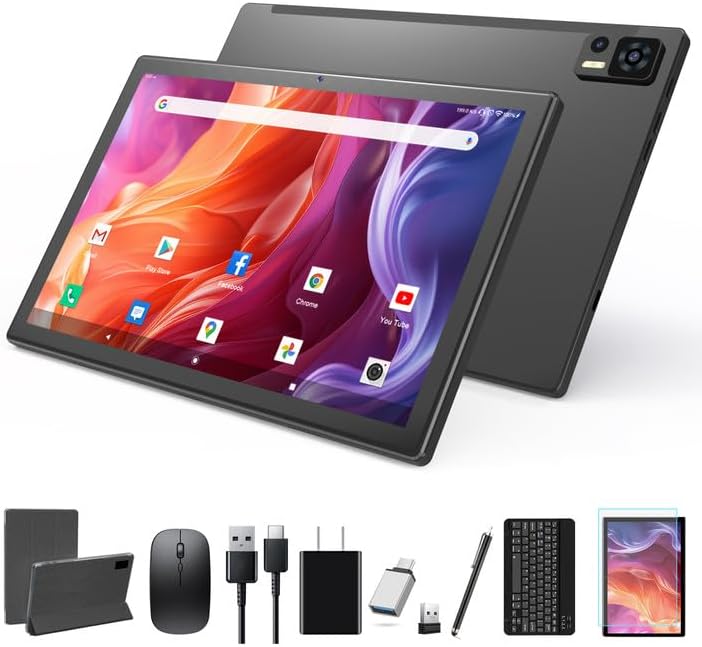
Figure 1: MOONSTARS 10.1 Inch Android 14 Tablet and Accessories
Setup
1. Unboxing and Initial Charge
Carefully remove all components from the packaging. Before first use, fully charge the tablet using the provided Type-C cable and charger.
- Tablet
- Tablet Case
- Bluetooth Keyboard
- Stylus
- Wireless Mouse
- Screen Protector
- Type-C Cable
- Charger
- SD Card Pin
- OTG Adapter
- User Manual (this document)
2. Power On and Initial Configuration
- Press and hold the power button until the MOONSTARS logo appears.
- Follow the on-screen prompts to select your language, connect to a Wi-Fi network, and set up your Google account.
3. Connecting the Bluetooth Keyboard

Figure 2: Bluetooth Keyboard Connection Steps
- Ensure the keyboard is charged.
- Turn on the keyboard using the ON/OFF switch.
- Press the "CONNECT" button on the keyboard; the Bluetooth indicator light will flash.
- On your tablet, go to Settings > Connected devices > Bluetooth and turn Bluetooth on.
- Select "Bluetooth 3.0 Keyboard" from the list of available devices to pair.
4. Connecting the Wireless Mouse

Figure 3: Wireless Mouse Connection Steps
- Install the required battery into the wireless mouse (battery not included).
- Turn on the mouse using its power switch.
- Connect the mouse receiver to the tablet using the provided OTG adapter.
- The tablet should automatically detect and connect to the mouse.
5. Inserting a MicroSD Card
To expand storage, insert a MicroSD card (up to 128GB) into the designated slot using the provided SIM/SD card pin. Ensure the tablet is powered off before inserting or removing the card.
Operating Instructions
1. Basic Navigation and Android 14 Features
Your tablet runs on Android 14, offering an intuitive user experience. Key features include:
- Five-Finger Pointing: Enhanced multi-touch gestures for smoother interaction.
- Split-Screen Function: Run two applications simultaneously for improved multitasking.
- Parental Controls: Manage app access and screen time for children.
- Privacy Protection: Advanced settings to control data access and permissions.

Figure 4: Android 14 Key Features
2. Connectivity
The tablet supports various connectivity options:
- Wi-Fi: Supports 2.4G and 5G dual-band Wi-Fi for fast internet access. To connect, go to Settings > Network & internet > Wi-Fi.
- Bluetooth 5.0: For connecting wireless accessories like headphones, speakers, keyboards, and mice. Go to Settings > Connected devices > Bluetooth.

Figure 5: Wireless Connectivity Options
3. Camera Usage
Capture photos and videos with the integrated cameras:
- Rear Camera: 13 Megapixels for high-resolution photos and videos.
- Front Camera: 5 Megapixels, ideal for video calls and selfies.
Access the camera application from the home screen or app drawer to start capturing moments.

Figure 6: Dual Camera Features
4. Storage Management
Your tablet comes with 64GB of internal storage (ROM) and 8GB of RAM (4GB physical + 4GB virtual). Storage can be expanded up to 128GB using a MicroSD card.
- To check storage usage, go to Settings > Storage.
- Regularly clear unnecessary files and cache to maintain optimal performance.

Figure 7: Storage and Memory Overview
5. Battery Management
The tablet is equipped with a 7000mAh lithium polymer battery. To maximize battery life:
- Adjust screen brightness.
- Close unused applications running in the background.
- Disable Wi-Fi or Bluetooth when not in use.
- Avoid extreme temperatures.
Expected battery life on a full charge:
- E-books: Up to 10 hours
- Web Browsing: Up to 10 hours
- Video Playback: Up to 8 hours
- Music Playback: Up to 10 hours
- Gaming: Up to 6 hours

Figure 8: Battery Life Estimates
Maintenance
- Screen Care: Use a soft, lint-free cloth to clean the screen. Avoid harsh chemicals. The included screen protector helps prevent scratches.
- General Cleaning: Wipe the tablet's body with a dry or slightly damp soft cloth. Do not use abrasive cleaners.
- Software Updates: Periodically check for system updates in Settings > System > System update to ensure optimal performance and security.
- Storage Management: Regularly delete unnecessary files and uninstall unused apps to free up storage space and improve performance.
Troubleshooting
1. Tablet Does Not Power On
- Ensure the tablet is fully charged. Connect it to the charger for at least 30 minutes before attempting to power on again.
- Press and hold the power button for 10-15 seconds to perform a forced restart.
2. Slow Performance or Apps Crashing
- Close unused applications running in the background.
- Clear the cache of frequently used apps (Settings > Apps > Select App > Storage & cache > Clear cache).
- Ensure sufficient storage space is available. Uninstall unused apps or move files to a MicroSD card.
- Restart the tablet.
3. Wi-Fi or Bluetooth Connectivity Issues
- Toggle Wi-Fi or Bluetooth off and on again in Settings.
- Restart your Wi-Fi router (for Wi-Fi issues).
- Ensure the device you are trying to connect to via Bluetooth is in pairing mode and within range.
- Forget the network/device and try reconnecting.
4. Screen Unresponsive or Touch Issues
- Restart the tablet.
- Ensure the screen is clean and free of debris or moisture.
- If a screen protector is installed, ensure it is properly applied and not interfering with touch sensitivity.
Specifications
| Feature | Detail |
|---|---|
| Brand | MOONSTARS |
| Model Number | A523 |
| Operating System | Android 14 |
| Screen Size | 10.1 Inches |
| Screen Resolution | 1280 x 800 Pixels (HD IPS) |
| Processor | Octa-Core (1.8 GHz Allwiner) |
| Graphics Coprocessor | ARMG57 MC01 |
| RAM | 8GB (4GB physical + 4GB virtual) |
| Internal Storage (ROM) | 64GB |
| Expandable Storage | Up to 128GB (MicroSD) |
| Rear Camera | 13MP |
| Front Camera | 5MP |
| Wireless Type | 802.11b/g/n (2.4G/5G Dual-band Wi-Fi) |
| Bluetooth | Bluetooth 5.0 |
| Battery Capacity | 7000mAh Lithium Ion |
| Average Battery Life | 8 Hours (general use) |
| Item Weight | 3.12 pounds |
| Product Dimensions | 10 x 7 x 0.3 inches |
| Color | Gray |
Warranty and Support
MOONSTARS is committed to providing high-quality products and customer satisfaction. For any questions or assistance, please contact our professional after-sales team.
- For support inquiries, please refer to the contact information provided with your purchase documentation or visit the official MOONSTARS website.
- Information regarding product warranty terms and conditions can be found on the MOONSTARS brand store page or by contacting customer service.
You can visit the MOONSTARS Store on Amazon for more product information and support resources.


