
1. Introduction
Thank you for choosing the SGNICS IAII15 Bluetooth 5.3 Earbuds. This manual provides detailed instructions for setting up, operating, and maintaining your new earbuds to ensure an optimal audio experience. Please read this manual thoroughly before use and retain it for future reference.
2. What's in the Box
Verify that all items are present in the package:
- SGNICS IAII15 Bluetooth Earbuds (Left and Right)
- Charging Case
- USB Charging Cable
- Ear Cushions (various sizes)
- User Manual
3. Product Overview
Key Features
- Bluetooth 5.3 Technology: Ensures a stable connection, lower latency, and reduced power consumption within a 10-meter range.
- 13mm Graphene Composite Drivers: Delivers crystal clear sound with deep bass resonance for an immersive audio experience.
- CVC 8.0 Noise Cancellation: Built-in dual microphones with CVC 8.0 noise cancellation enhance call clarity by reducing ambient noise.
- Dual LED Power Display: Provides real-time battery status for both earbuds and the charging case.
- Extended Playback: Up to 5 hours of playback on a single charge, with the charging case extending total listening time to 40 hours.
- Quick Charge Function: 10 minutes of charging provides up to 1 hour of playback.
- Smart Touch Control: Easily manage calls, music playback, and activate your voice assistant.
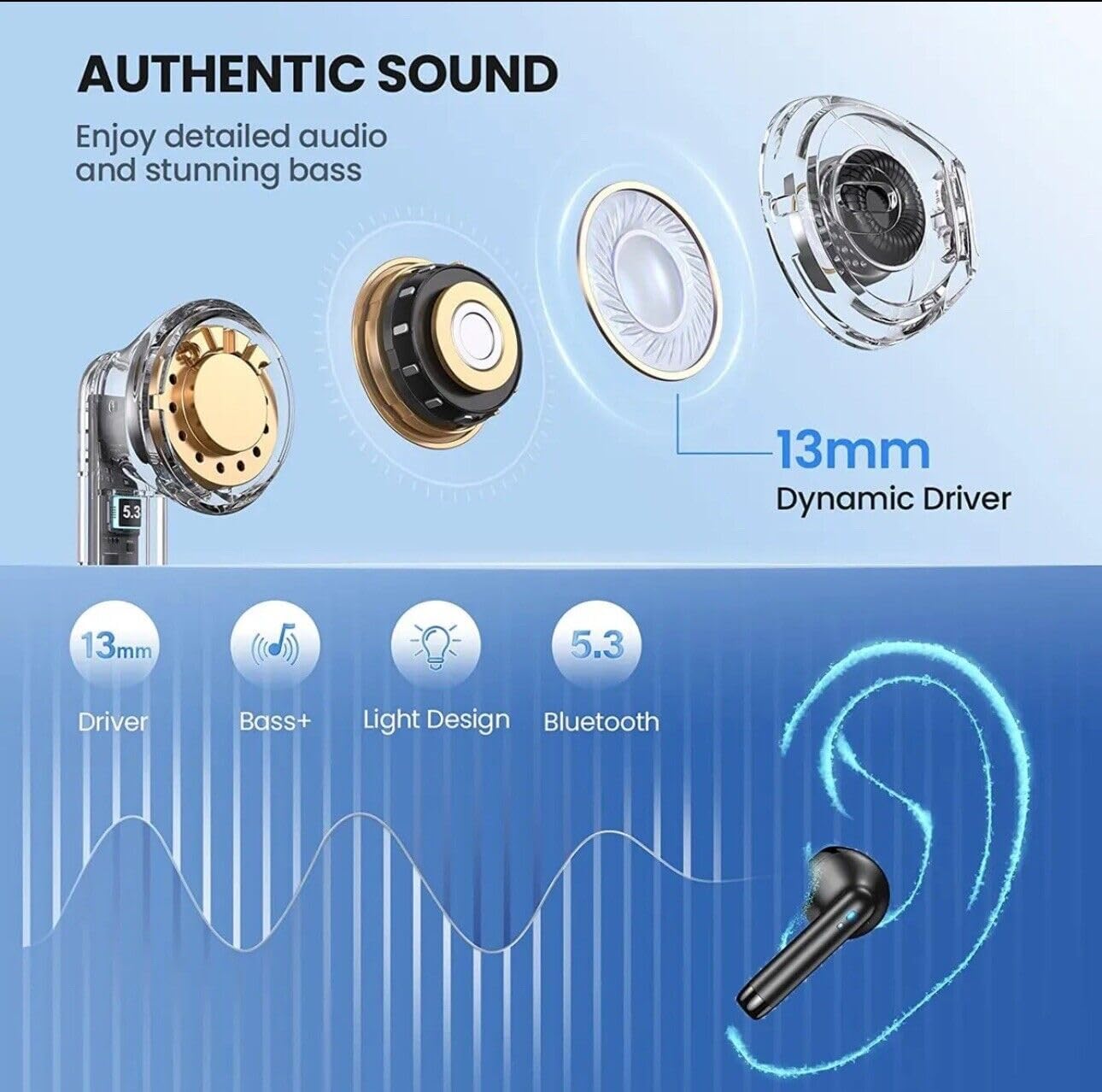
Image: This diagram illustrates the internal components, highlighting the 13mm dynamic drivers responsible for the earbuds' authentic sound quality, including enhanced bass.
Design & Durability
- IPX7 Waterproof: Both earbuds and the charging case are resistant to sweat, water, and rain, making them suitable for sports and outdoor activities.
- Mini-Comfortable Design: Each earbud weighs only 3.2 grams, offering an ultra-lightweight and ergonomic fit for extended wear without discomfort.
- Sleek Pocket-Sized Charging Case: Compact and easy to carry.

Image: The earbuds and charging case are shown with water droplets, emphasizing their IPX7 waterproof rating, which protects against sweat, water, and rain.

Image: This image demonstrates the compact size and lightweight nature of the earbuds and charging case, with a single earbud weighing only 3 grams.

Image: A user wearing an earbud, highlighting the ergonomic design that ensures a comfortable and secure fit for various ear shapes.
4. Setup
Initial Charging
- Before first use, place both earbuds into the charging case.
- Connect the USB charging cable to the Type-C port on the charging case and a power source.
- The LED display on the charging case will show the charging progress. Ensure the earbuds and case are fully charged.
Pairing with a Device
- Open the charging case. The earbuds will automatically power on and enter pairing mode.
- On your device (e.g., smartphone, tablet), go to Bluetooth settings.
- Search for available devices and select "IAII15 Earbuds" from the list.
- Once connected, you will hear a confirmation tone, and the earbuds will be ready for use.
- The earbuds will automatically reconnect to the last paired device when removed from the case.

Image: This graphic highlights the advantages of Bluetooth 5.3, including a more stable connection, lower power consumption, longer transmission range, and reduced latency for an improved wireless experience.
5. Operating Instructions
Touch Controls
The SGNICS IAII15 earbuds feature capacitive touch-sensing technology for easy control. The touch sensitive area is located on the outer surface of each earbud.
| Function | Action |
|---|---|
| Play/Pause Music | Single tap on either earbud |
| Next Track | Double tap on the Right earbud |
| Previous Track | Double tap on the Left earbud |
| Answer/End Call | Single tap on either earbud |
| Reject Call | Long press on either earbud for 2 seconds |
| Activate Voice Assistant (Siri, Google Assistant, etc.) | Triple tap on either earbud |
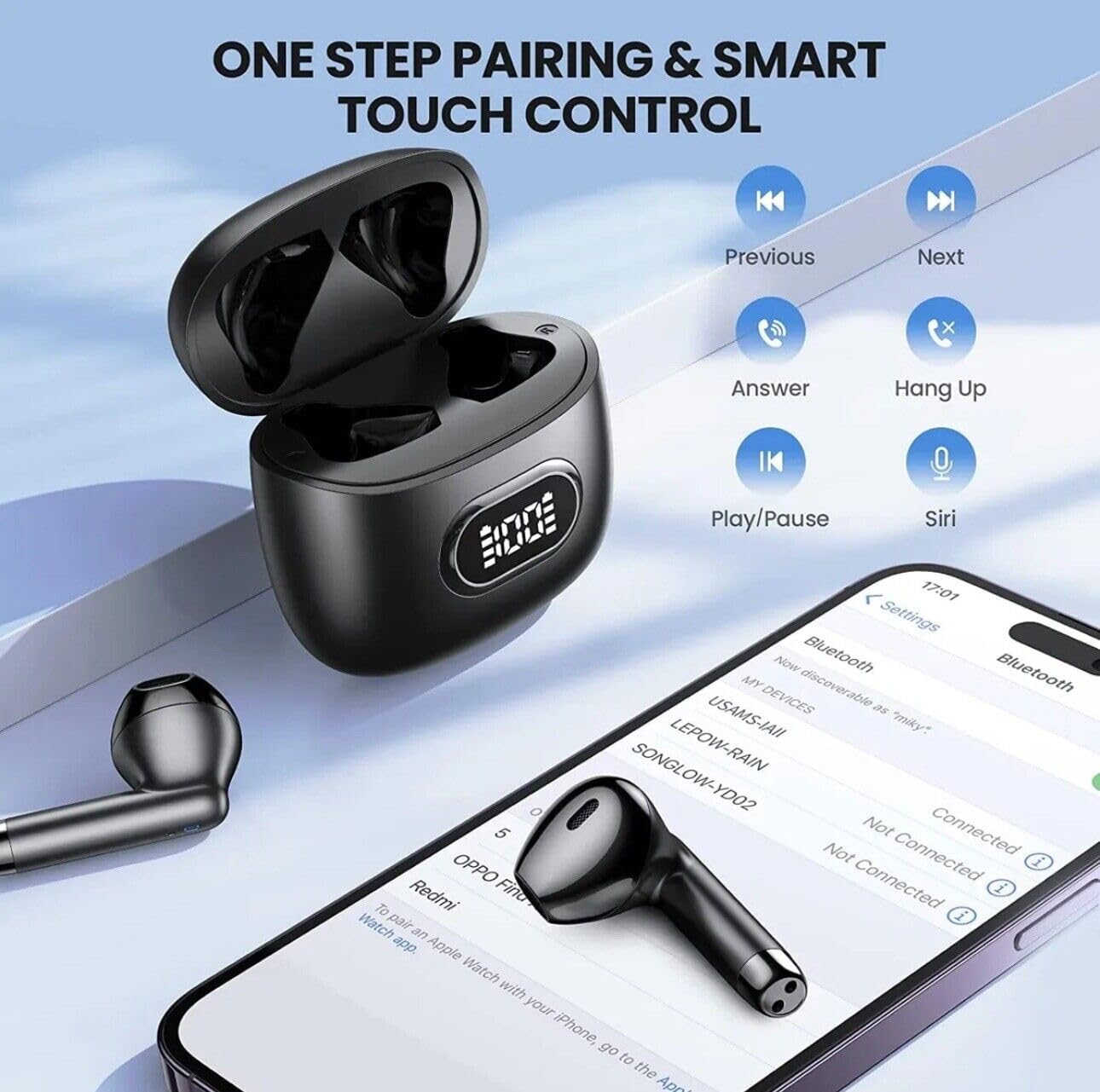
Image: This image displays a smartphone connected to the earbuds, alongside icons representing the various touch controls for music playback, call management, and voice assistant activation.
6. Battery and Charging
Battery Status
The charging case features a dual LED digital power display. This display shows the remaining battery percentage of the charging case and individual battery levels for the left and right earbuds when the case is opened or closed.
Charging the Earbuds and Case
- To charge the earbuds, place them into the charging case. They will begin charging automatically.
- To charge the case, connect it to a power source using the provided USB Type-C cable.
- A full charge provides approximately 5 hours of playback for the earbuds. The fully charged case can provide an additional 7 charges, extending total listening time up to 40 hours.
- For quick power, a 10-minute charge can provide up to 1 hour of playback.

Image: This image displays the LED digital power display on the charging case, indicating the battery life of the individual earbuds (L/R) and the overall charge level of the charging case itself.
7. Maintenance
- Cleaning: Regularly clean the earbuds and charging case with a soft, dry cloth. Avoid using abrasive materials or harsh chemicals.
- Storage: When not in use, store the earbuds in their charging case to protect them and keep them charged. Store in a cool, dry place away from extreme temperatures.
- Water Exposure: While IPX7 waterproof, avoid prolonged submersion in water. Ensure earbuds are dry before placing them back in the charging case to prevent damage to charging contacts.
- Ear Cushions: Replace ear cushions if they become worn or damaged to maintain optimal sound quality and comfort.
8. Troubleshooting
| Issue | Solution |
|---|---|
| Earbuds not pairing | Ensure earbuds are charged. Turn off and on your device's Bluetooth. Forget the device in Bluetooth settings and re-pair. |
| Only one earbud working | Place both earbuds back in the charging case, close the lid, then open it again. Ensure both earbuds are charged. |
| Low volume or poor sound quality | Adjust volume on your device. Ensure ear cushions fit properly. Clean any debris from earbud speakers. |
| Charging case not charging | Check the USB cable and power adapter. Ensure the Type-C cable is fully inserted. |
| Touch controls unresponsive | Ensure your fingers are clean and dry. Restart the earbuds by placing them in the case and taking them out. |
9. Specifications
| Feature | Detail |
|---|---|
| Model Name | IAII15 Earbuds |
| Brand | SGNICS |
| Connectivity Technology | Wireless (Bluetooth 5.3) |
| Ear Placement | In Ear |
| Form Factor | In Ear |
| Noise Control | Active Noise Cancellation (CVC 8.0) |
| Driver Size | 13mm Graphene Composite Drivers |
| Water Resistance Level | IPX7 Waterproof |
| Control Method | Touch, Voice |
| Playback Time (Single Charge) | Up to 5 hours |
| Total Playback Time (with Charging Case) | Up to 40 hours |
| Quick Charge | 10 minutes charge for 1 hour playback |
| Earbud Weight | 3.2 grams (each) |
| Material | ABS+PC |
| Compatible Devices | iOS 9.0/Android 4.4 or above (various iPhone and Android models) |
| Included Components | Cable, Charging Case, Ear Cushions, User Manual |
| Manufacturer | Shenzhen USAMS Technology Co., Ltd. |
10. Warranty and Support
For warranty information and customer support, please refer to the documentation provided with your purchase or contact SGNICS customer service through the retailer where the product was purchased. Keep your proof of purchase for warranty claims.