
1. Introduction
This manual provides detailed instructions for the installation and operation of the autoabc Wireless CarPlay/Android Car Modification Module. This module integrates advanced smartphone connectivity, including Wireless CarPlay and Android Auto, into compatible BMW NBT systems, while retaining original vehicle functionalities. It supports Mirrorlink and enhances your driving experience with modern infotainment features.
The autoabc module allows you to access navigation, phone contacts, email, notifications, music, and more through an intelligent voice assistant, ensuring safe driving operation by keeping your hands free.
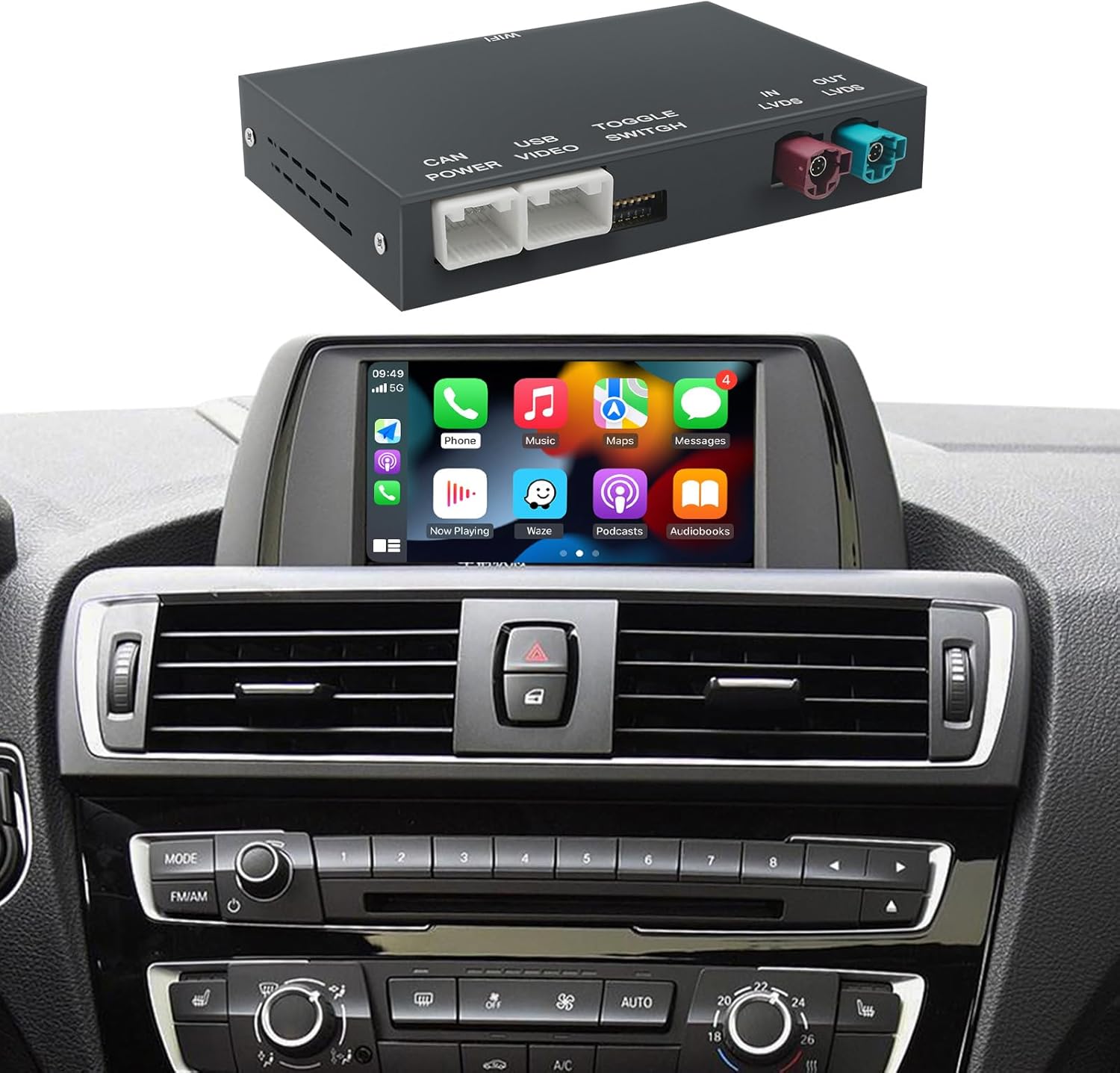
Image 1.1: The autoabc Wireless CarPlay/Android Auto Module shown with a BMW dashboard displaying the CarPlay interface.
2. Compatibility
This module is designed for specific BMW models equipped with the NBT System. Please confirm your vehicle's compatibility before purchase.
2.1 Compatible BMW Models (NBT System 2012-2016):
- BMW 3 Series: F30/F31/F34/F80 (2012-2015)
- BMW 4 Series: F32/F33/F36 (2013-2015)
- BMW 5 Series: F07 (2012-2017), F10/F11/F18 (2012-2016)
- BMW 6 Series: F06/F12/F13 (2013-2016)
- BMW 7 Series: F01/F02/F03 (2012-2015)
- BMW X1: F48 (2015-2018)
- BMW X3: F25 (2013-2016)
- BMW X4: F26 (2013-2016)
- BMW X5: F15/F85 (2014-2016)
- BMW X6: F16/F86 (2014-2016)
2.2 NBT System Identification:
This product specifically supports the NBT system with a 6-pin LVDS plug. It is not compatible with CIC (4-pin LVDS) or CCC (10-pin LVDS) systems.

Image 2.1: Visual guide to identify the correct 6-pin NBT System LVDS plug, distinguishing it from incompatible 4-pin CIC and 10-pin CCC systems.
3. Features
- Wireless CarPlay & Android Auto: Seamlessly integrate your smartphone for navigation, music, calls, and messaging.
- Retains OEM Functions: All original vehicle control unit software and features, such as OEM reverse camera and parking radar, remain fully functional.
- Mirrorlink Support: Project your phone screen to the car display for content like videos and maps.
- Voice Assistant Integration: Utilize intelligent voice assistants (Siri, Google Assistant) for hands-free operation.
- Camera Support: Compatible with OEM reverse cameras, aftermarket reverse cameras, 360-degree cameras, and front view camera DVR (CVBS).
- USB Playback: Supports media playback from USB flash drives.

Image 3.1: Examples of CarPlay, Android Auto, AirPlay, and Autolink interfaces displayed on a BMW screen.

Image 3.2: Demonstrations of key product functions such as navigation, Siri voice control, screen mirroring, phone call management, online music playback, and USB media playback.

Image 3.3: The module supports rearview video input, displaying the camera feed on the car's screen.
4. Package Contents
The package includes the following components:
- Wireless CarPlay/Android Auto Module
- Power Cable
- LVDS Cable
- RCA/USB Cable
- WiFi Antenna

Image 4.1: Overview of the main module and its accompanying cables and antenna.
5. Installation Guide
Installation of this module requires technical knowledge and familiarity with automotive electronics. Professional installation is recommended.
5.1 General Installation Steps:
- Preparation: Ensure the vehicle is turned off and the battery is disconnected before beginning installation. Gather necessary tools.
- Access Head Unit: Carefully remove trim panels and the original head unit to access the wiring.
- Connect Power Cable: Connect the provided power cable to the vehicle's wiring harness.
- Connect LVDS Cable: Disconnect the original LVDS cable from the head unit and connect it to the module. Then, connect the module's LVDS output to the head unit. Ensure the 6-pin NBT LVDS plug is correctly identified (refer to Image 2.1).
- Connect RCA/USB Cable: Connect the RCA/USB cable for additional inputs (e.g., aftermarket camera, USB media).
- Connect WiFi Antenna: Attach the WiFi antenna to the module for wireless connectivity.
- Module Placement: Securely place the module in a suitable location behind the dashboard, ensuring it does not interfere with other components.
- Reassembly: Carefully reassemble the head unit and trim panels.
- Testing: Reconnect the battery and test all functions of the module and original vehicle systems.
Warning: Incorrect installation can damage your vehicle's electrical system or the module. If you are unsure, seek professional assistance.
6. Operation Instructions
After successful installation, the module integrates with your BMW's NBT system, allowing you to switch between the original interface and the CarPlay/Android Auto interface.
6.1 Switching Between Systems:
Typically, a long press on a specific button (e.g., MENU or BACK button on the iDrive controller) will switch between the original BMW NBT interface and the module's CarPlay/Android Auto interface. Refer to the specific instructions provided with your module for the exact button combination.
6.2 Wireless CarPlay/Android Auto Connection:
- Ensure your phone's Bluetooth and Wi-Fi are enabled.
- On the module's interface, navigate to the CarPlay or Android Auto section.
- Pair your phone via Bluetooth with the module (the module's Bluetooth name will be displayed on the screen).
- Once Bluetooth is paired, the system will automatically establish a Wi-Fi connection for CarPlay or Android Auto.
6.3 Using Features:
- Navigation: Use your preferred navigation apps (e.g., Apple Maps, Google Maps, Waze) directly on the car screen.
- Music & Media: Stream music from apps like Spotify, Apple Music, or play media from a connected USB drive.
- Phone Calls: Make and receive calls hands-free using the integrated microphone and car speakers.
- Voice Control: Activate Siri or Google Assistant for voice commands.
- Screen Mirroring: Access the Mirrorlink function to display your phone's screen content.
7. Troubleshooting
If you encounter issues, please refer to the following common solutions:
| Problem | Possible Cause | Solution |
|---|---|---|
| No display after installation | Incorrect LVDS cable connection; Power cable not connected; Incompatible NBT system. | Check all cable connections, especially the LVDS cable. Ensure the power cable is securely connected. Verify your BMW has the correct NBT system (6-pin LVDS). |
| CarPlay/Android Auto not connecting wirelessly | Bluetooth not paired; Wi-Fi disabled on phone; Module's Wi-Fi antenna not connected. | Ensure Bluetooth is paired and Wi-Fi is enabled on your phone. Check the Wi-Fi antenna connection on the module. Restart both phone and car system. |
| Audio issues (no sound, distorted sound) | Incorrect audio input selection; Volume settings. | Ensure the car's audio input is set to AUX or the correct source for the module. Adjust volume levels on both the car and your phone. |
| Original OEM functions not working | Incorrect wiring; Module malfunction. | Double-check all wiring connections. If the issue persists, contact technical support. |
| Lag or slow response | Phone performance; Network interference. | Ensure your phone's operating system is up to date. Close unnecessary apps on your phone. Try restarting the module and phone. |
For further assistance, please contact autoabc technical support.
8. Specifications
| Feature | Detail |
|---|---|
| Product Dimensions | 140mm x 103mm x 25mm (approx. 5.5 x 4.0 x 1.0 inches) |
| Item Weight | 0.93 Kilograms (approx. 2.05 pounds) |
| Compatible Car OS System | Original car's built-in Wired & Wireless CarPlay (NBT System) |
| Compatible Phone OS System | iOS & Android |
| Connectivity Technology | Bluetooth, Wi-Fi |
| Audio Output Mode | Stereo |
| Voice Command | Microphone (integrated with car's system) |
| Included Components | USB cable, Power cable, LVDS cable, WiFi Antenna |
9. Warranty and Support
autoabc provides a One-Year global warranty for this product. Additionally, LIFETIME Technical Service Support is available.
9.1 Warranty Coverage:
The one-year warranty covers manufacturing defects and malfunctions under normal use. It does not cover damage caused by improper installation, misuse, accidents, or unauthorized modifications.
9.2 Technical Support:
For any questions, installation assistance, or troubleshooting issues, please contact autoabc technical support via Amazon Email. Our team is available to provide reliable online technical support.
Contact: support@autoabc.com (Example email, please refer to your purchase platform for actual contact details).


