Download PDFFree PDF. The Save button below keeps a bookmark and private notes in your account.
Marsail TZESD26W-US Standing Desk User Manual
Model: TZESD26W-US
1. Introduction
Thank you for choosing the Marsail TZESD26W-US Standing Desk. This electric adjustable desk is designed to enhance your workspace with its ergonomic features, robust construction, and convenient storage solutions. It offers a wide height adjustment range, allowing you to easily switch between sitting and standing positions to promote better posture and reduce fatigue. This manual provides essential information for assembly, operation, maintenance, and troubleshooting to ensure safe and efficient use of your new desk.
2. Safety Information
Always follow the assembly instructions carefully to ensure stability and proper function of the desk.
Keep fingers and other body parts away from the lifting mechanism while the desk is in motion to prevent injury.
Do not exceed the maximum weight recommendation of 176 lbs (80 kg) on the desk surface to maintain stability and safety.
Ensure all cables are properly managed and do not interfere with the desk's movement.
Do not allow children to operate the desk without adult supervision.
Avoid placing liquids directly on the control panel or motor components.
3. Setup and Assembly
The Marsail TZESD26W-US standing desk requires assembly. It is recommended that one person performs the assembly, which typically takes between 45 to 90 minutes. A drill is recommended for assembly, but all necessary tools are not included. Please refer to the separate assembly guide provided in the packaging for detailed, step-by-step instructions.
Ensure you have ample space for assembly and that all components are present before you begin. The desk features a reinforced steel frame and T-shaped legs for stability once assembled.
Image: Desk dimensions showing a depth of 28 inches, width of 48 inches, and height range from 27.5 to 46.7 inches. A side storage pocket is also visible.
3.1 Key Components
Desktop (CARB Certified)
Leg Columns with Motor
Feet/Base
Control Panel
Power Adapter and Cable
Side Storage Pocket
Headphone Hook
4. Operating Instructions
4.1 Height Adjustment
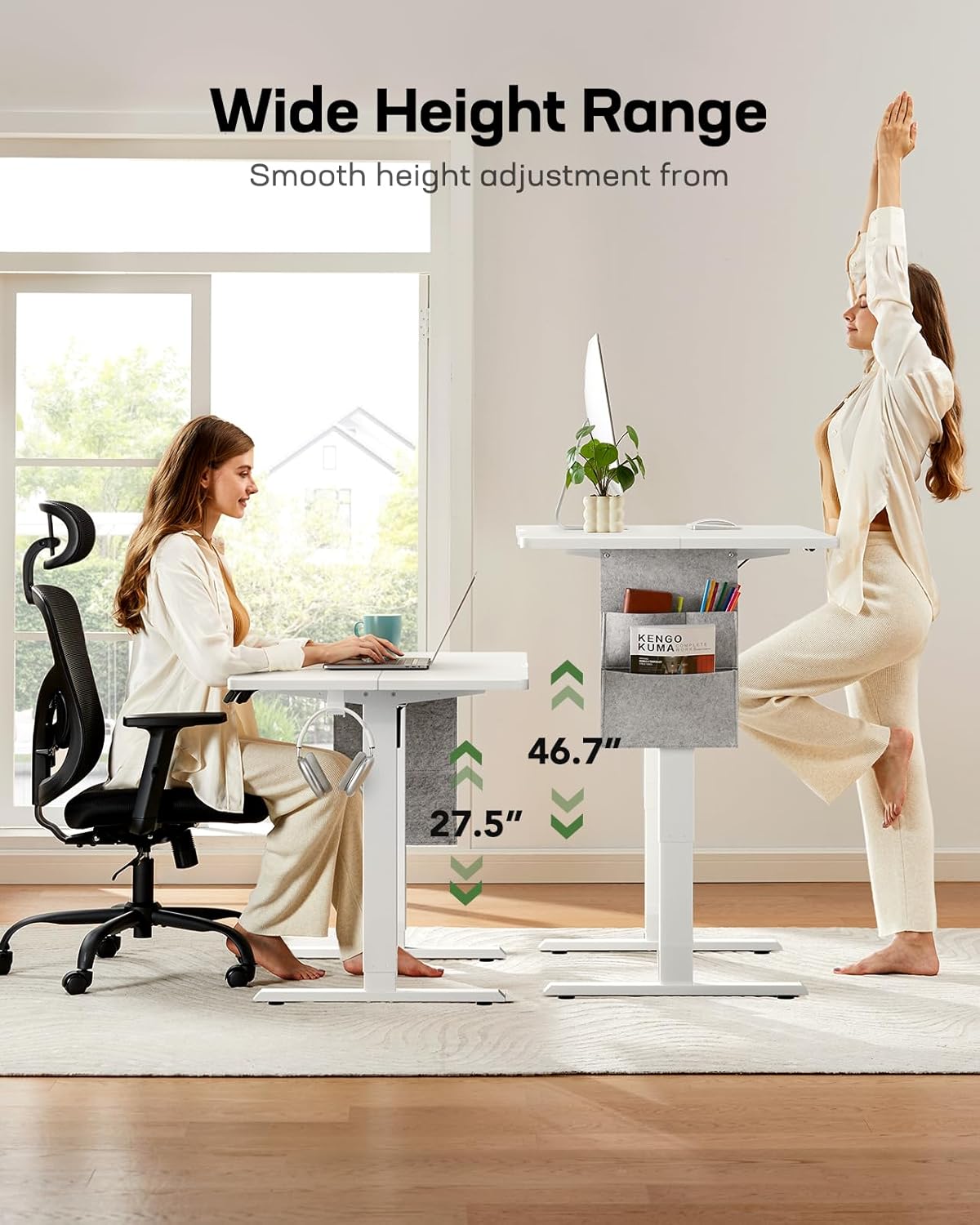
The desk features an electric lifting mechanism with a height range of 27.5 inches (minimum) to 46.7 inches (maximum). The motor operates quietly, under 50 dB, and moves smoothly at approximately 3 inches per second.
To Adjust Height: Use the up and down arrow buttons on the control panel to raise or lower the desk to your desired height.
One-Touch Adjustment: The control panel allows you to save up to four custom height presets. To save a height, adjust the desk to the desired level, then press and hold one of the memory preset buttons (e.g., '1', '2', '3', '4') until you hear a beep or see a confirmation on the display. To recall a saved height, simply press the corresponding memory preset button.
Image: A person sitting at the desk at its lowest height (27.5 inches) and another person standing at the desk at its highest height (46.7 inches), demonstrating the wide height adjustment range.
4.2 Using the Side Storage Pocket
The desk includes a multifunctional, double-layered side storage pocket. This pocket is designed to keep your workspace organized by storing folders, notebooks, and office supplies, providing easy access without occupying desktop space.
Image: Close-up view of the side storage pocket attached to the desk, holding a notebook, pens, and other small items.
5. Maintenance
Cleaning: Wipe the desk surface and frame with a damp cloth. Avoid using harsh chemicals or abrasive cleaners that could damage the finish.
Inspection: Periodically check all screws and fasteners to ensure they are tight. Retighten if necessary to maintain stability.
Cable Management: Ensure power cables and other cords are not pinched or tangled, especially during height adjustments.
6. Troubleshooting
6.1 Common Issues and Solutions
Desk Not Moving:
Check if the power cable is securely plugged into both the desk and the wall outlet.
Ensure there are no obstructions preventing the desk from moving up or down.
If the control panel display shows an error code, refer to the specific error code section in the full assembly manual (if available) or contact customer support.
Uneven Movement:
Verify that the desk is placed on a level surface.
Check that all assembly screws are tightened evenly.
Noise During Operation:
A slight motor hum is normal. If the noise is excessive or unusual, check for any loose components or obstructions.
If you encounter issues not covered here, please refer to the comprehensive troubleshooting guide in your assembly manual or contact Marsail customer support.
7. Specifications
Image: The Marsail TZESD26W-US standing desk in a modern home office, showcasing its design and functionality with a laptop and accessories.
Model Number
TZESD26W-US
Brand
Marsail
Desk Design
Standing Desk
Product Dimensions (D x W x H)
61D x 121.9W x 118.6H Centimetres (24D x 48W x 46.7H Inches)
Minimum Height
27.5 Inches
Maximum Height
46.7 Inches
Tabletop Thickness
0.6 Inches
Maximum Weight Recommendation
176 lbs (80 kg)
Material
Alloy Steel, Wood (CARB Certified Desktop)
Motor Noise Level
Under 50 dB
Lifting Mechanism
Electric
Number of Height Positions
4 (Programmable Presets)
Assembly Required
Yes
Certifications
CARB Certified Desktop, FCC Authentication
Image: A person resting their head on the desk, with logos indicating CARB certification, SGS certification, and FCC authentication, highlighting the desk's quality and safety standards.
8. Warranty
The Marsail TZESD26W-US Standing Desk is backed by a limited 5-year warranty. This warranty covers manufacturing defects and ensures the product meets quality standards. Please retain your proof of purchase for warranty claims. For detailed terms and conditions, refer to the warranty information included with your product packaging.
9. Customer Support
For any questions, assistance with assembly, troubleshooting, or warranty inquiries, please contact Marsail customer support. Refer to the contact information provided in your product packaging or visit the official Marsail website for support resources.
Ask about setup, troubleshooting, compatibility, parts, safety, or missing instructions. Manuals+ will review the question and use this page’s manual context to help answer it.