
Introduction
Thank you for choosing the Onforu G50BL 50W RGBW LED Flood Light. This product is designed to provide versatile and vibrant lighting for various outdoor and indoor applications. Featuring Bluetooth Mesh control, 16 million color options, 22 dynamic modes, music synchronization, and an IP66 waterproof rating, these flood lights offer advanced functionality and durability. This manual provides essential information for safe installation, operation, and maintenance of your new flood lights.
Important Safety Instructions
- Read all instructions carefully before installation and operation.
- Ensure the power supply is disconnected before any installation, maintenance, or cleaning.
- This product is designed for outdoor use with an IP66 rating, but ensure all connections are secure and protected from water ingress.
- Do not attempt to disassemble or modify the product. This will void the warranty and may cause damage or injury.
- Keep the product away from flammable materials.
- If the external flexible cable or cord of this luminaire is damaged, it shall be exclusively replaced by the manufacturer or his service agent or a similar qualified person in order to avoid a hazard.
Package Contents
- 2 x Onforu G50BL 50W RGBW LED Flood Lights
- 1 x User Manual
Product Specifications
| Feature | Specification |
|---|---|
| Model | G50BL |
| Wattage | 50W |
| Brightness | 4000 Lumens |
| Color Temperature | 2700K Warm White + RGB |
| Control Method | Bluetooth App |
| Connectivity Protocol | Bluetooth Mesh |
| Water Resistance Level | IP66 Waterproof |
| Material | Aluminum |
| Product Dimensions | 8.18"L x 5"W x 1.45"H |
| Voltage | 120 Volts |
| Number of Light Sources | 140 |
Setup Guide
1. Physical Installation
The Onforu G50BL flood lights can be installed using either wall mount or floor mount methods. Ensure the mounting surface is stable and can support the weight of the fixture. Use appropriate screws and anchors for your specific installation type. The adjustable bracket allows for directing the light beam as needed.

Image: An Onforu G50BL flood light operating in the rain, demonstrating its IP66 waterproof rating. The light emits a purple hue, illuminating the wet foliage below.
2. App Installation
To control your Onforu G50BL flood lights, download the 'Onforu Home' application on your smartphone. The app is available for both iOS and Android devices.

Image: Two Onforu G50BL flood lights showcasing a vibrant rainbow color gradient. A smartphone screen in the upper right corner displays the Onforu Home app, illustrating its color wheel and control options.
3. Bluetooth Pairing
- Ensure your flood lights are powered on.
- Open the 'Onforu Home' app on your smartphone.
- The app should automatically detect nearby Onforu devices. Follow the on-screen prompts to add your flood lights.
- If connection fails, turn the light off and on three times. This resets the Bluetooth module and facilitates connection when the lights are flickering.
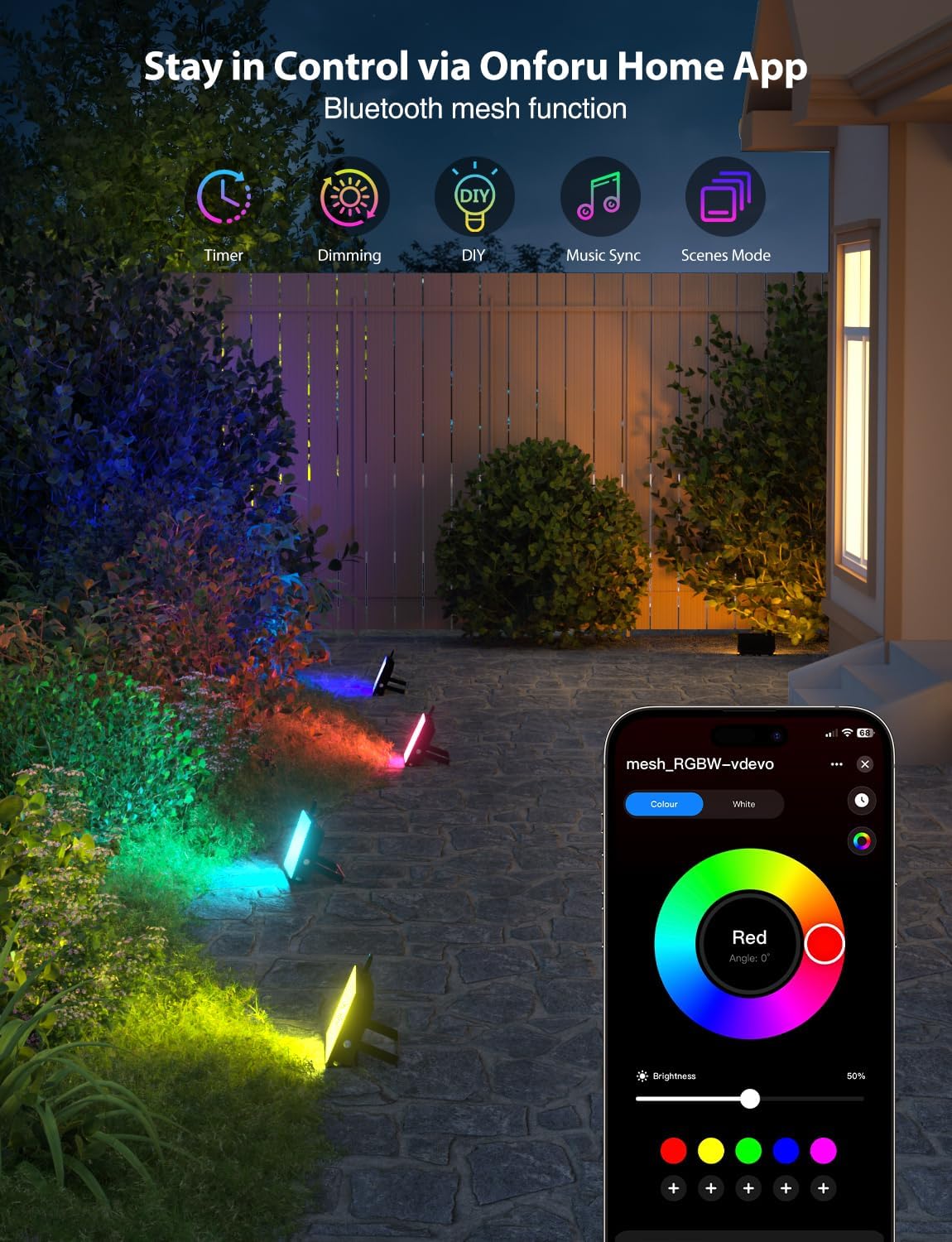
Image: An outdoor garden scene at dusk, illuminated by several Onforu G50BL flood lights casting colorful light on plants. A smartphone in the foreground displays the Onforu Home app, showing a color selection interface.
Operating Your Onforu G50BL Flood Lights
Basic Control (On/Off, Brightness)
Within the Onforu Home app, you can easily turn your lights on or off and adjust their brightness using the dedicated controls. The app provides a slider for precise brightness adjustments.
Color Selection
Choose from 16 million vibrant colors to customize your lighting. The app features a color wheel for precise color selection. Additionally, a dedicated 2700K warm white light option is available for traditional illumination.

Image: A split image illustrating the versatility of the Onforu G50BL flood lights. The left side shows a house and garden lit with a warm white light, while the right side displays the same scene with dynamic, colorful RGB lighting.
Lighting Modes
The flood lights offer 22 pre-programmed dynamic modes, including strobing, jumping, and pulsating effects. These modes can be selected and customized through the app to create various atmospheres for events or daily use.

Image: An indoor gaming setup featuring a desk, computer monitor, and gaming chair, all bathed in colorful light from strategically placed Onforu G50BL flood lights, enhancing the room's ambiance.
Music Synchronization
Activate the music sync feature in the Onforu Home app to make your lights react to the rhythm of music. You can either download music to the app or use your phone's microphone to pick up ambient sounds. This feature is ideal for parties and events.

Image: An outdoor patio at night, where a person plays a piano. The surrounding area is illuminated by multiple Onforu G50BL flood lights displaying various colors, synchronized with music and controlled via a smartphone app.
Timer Function
Set schedules for your lights to turn on and off automatically at specific times. The timer function allows for daily or weekly recurring schedules, providing convenience and energy efficiency.

Image: A bedroom interior with soft, warm ambient lighting provided by an Onforu G50BL flood light. A smartphone in the foreground shows the Onforu Home app interface, specifically highlighting the timer scheduling options.
Memory Function
The flood lights are equipped with a memory function, meaning they will automatically recall the last color, mode, brightness, and speed settings when powered on again. This eliminates the need to reconfigure your preferred settings each time.
Bluetooth Mesh Control
Utilize the advanced Bluetooth Mesh function to create a stable and fast connection with up to 300 lights. This allows for simultaneous control of multiple Onforu flood lights, enabling synchronized lighting effects across large areas.
Care and Maintenance
- Cleaning: Ensure the light is off and cool before cleaning. Wipe the surface with a soft, damp cloth. Do not use abrasive cleaners or solvents.
- Storage: If storing the lights for an extended period, keep them in a dry, cool place, away from direct sunlight and extreme temperatures.
- Inspection: Periodically check the power cord and housing for any signs of damage. If damage is found, discontinue use and contact customer support.
Troubleshooting Guide
| Issue | Possible Cause | Solution |
|---|---|---|
| Light does not turn on. | No power, loose connection, faulty outlet. | Check power supply, ensure connections are secure, test with a different outlet. |
| Bluetooth connection fails or is unstable. | Out of range, interference, app issue, light needs reset. | Ensure device is within Bluetooth range. Close and reopen the app. Power cycle the light three times (turn off/on rapidly) to reset its Bluetooth module, then attempt to reconnect. |
| Colors are not accurate or light appears dim. | Incorrect app settings, specific LED limitations. | Verify color and brightness settings in the Onforu Home app. Note that the RGB LEDs are distinct from the warm white LEDs; selecting pure colors will utilize the RGB elements, while selecting white will use the dedicated white LEDs. |
| Light becomes hot during operation. | Normal operation, poor ventilation. | It is normal for LED flood lights to generate some heat. Ensure adequate airflow around the fixture. If overheating is excessive or causes damage, discontinue use. |
Warranty and Customer Support
Onforu products come with a standard warranty against defects in materials and workmanship. For specific warranty details, please refer to the warranty card included with your product or visit the official Onforu website. If you encounter any issues or have questions regarding your Onforu G50BL LED Flood Lights, please contact Onforu customer support through their official website or the contact information provided in your product packaging.
For further assistance, please visit: Onforu Official Store


