
Anern Anern-2000W
Anern 2000W 12V Off-Grid Solar Hybrid Inverter User Manual
Model: Anern-2000W
1. Introduction
This manual provides essential information for the safe and efficient operation of your Anern 2000W Off-Grid Solar Hybrid Inverter. This device integrates an inverter, solar charger, and battery charger into a single unit, designed to provide uninterrupted power support. It features a pure sine wave output and an 80A MPPT solar charge controller, compatible with both 12V lead-acid and lithium batteries. The inverter supports operation even without a connected battery.
2. Safety Instructions
- Read all instructions carefully before installation and operation.
- Installation must be performed by qualified personnel in accordance with local electrical codes.
- Ensure proper grounding of the inverter.
- Do not disassemble the unit; refer servicing to authorized personnel.
- Avoid exposing the inverter to rain, snow, spray, or any liquids.
- Ensure adequate ventilation around the inverter to prevent overheating.
- This inverter outputs 220-230V AC. It is not suitable for 110/120V AC appliances without an appropriate step-down converter (not included).
3. Product Overview
The Anern 2000W Hybrid Solar Inverter is a compact, all-in-one solution for off-grid power systems. It combines the functionality of a power inverter, an 80A MPPT solar charge controller, and a 60A AC battery charger.

Figure 3.1: Front view of the Anern 2000W Hybrid Solar Inverter, showcasing its deep purple casing and central display panel.

Figure 3.2: The 'All-In-One' concept of the Anern hybrid inverter, illustrating its integrated MPPT solar charge controller, AC charger, and power inverter capabilities.
4. Setup and Installation
Proper installation is crucial for the safe and efficient operation of your inverter. This section outlines the general connection points.
4.1 Connection Points
The inverter features clearly labeled terminals for AC input/output, PV input, and battery input. Refer to the diagram below for their locations.

Figure 4.1: Front panel of the inverter, highlighting the MPPT voltage range (30-400VDC) and the user interface display.
4.2 Battery Connection
The inverter is compatible with 12V lead-acid (GEL, FLD, AGM) and lithium-ion batteries. Ensure correct polarity when connecting the battery bank to the inverter's battery terminals.

Figure 4.2: Illustration of the inverter's compatibility with different 12V battery types, including GEL, FLD, Li-on, and AGM.
4.3 PV Array Connection
Connect your solar panels to the PV input terminals. The inverter features an 80A MPPT solar charge controller with a maximum PV array open circuit voltage of 400Vdc and a maximum PV array power of 2000W. The MPPT voltage range is 30-400Vdc.
4.4 AC Input/Output Connection
Connect the utility grid or a generator to the AC input. Connect your household loads to the AC output. The inverter provides a single-phase output of 230VAC.
4.5 Visual Guide to Connections
Video 4.1: This video demonstrates the physical layout and connection points for the Anern Hybrid Solar Inverter (3200W model shown, but connections are similar for the 2000W model). It provides a visual guide for connecting AC input/output, PV input, and battery terminals.
5. Operating Modes
The Anern Hybrid Solar Inverter offers flexible operating modes to suit various power requirements.
5.1 Charging Modes
There are four selectable charging modes:
- Solar Priority: Solar power is prioritized for charging the battery.
- Utility Priority: Utility power is prioritized for charging the battery.
- Solar and Utility: Both solar and utility power are used to charge the battery.
- Solar Only: Only solar power is used for charging.
5.2 Output Modes
The inverter supports three output modes:
- Solar Priority: Solar power is prioritized to supply loads.
- Utility Priority: Utility power is prioritized to supply loads.
- SBU Mode (Solar-Battery-Utility): Solar power is prioritized, then battery power, and finally utility power.

Figure 5.1: Overview of the available charging and output modes, demonstrating how the inverter manages power flow from solar, utility, and battery sources to connected loads.
5.3 Diversified Uses
The inverter can power various household and office loads, including refrigerators, lamps, televisions, fans, and air conditioning units. It supports both on-grid and off-grid working modes, allowing for energy storage or reduction of electricity bills.

Figure 5.2: An illustration of the inverter's application in a home setting, demonstrating how it powers various appliances using solar energy and battery storage.
6. Maintenance
Regular maintenance ensures the longevity and optimal performance of your inverter.
- Cleaning: Periodically clean the exterior of the inverter and ensure ventilation openings are free from dust and debris. The intelligent variable speed fan helps dissipate heat efficiently.
- Inspection: Regularly check all cable connections for tightness and signs of wear or damage.
- Environment: Ensure the inverter is installed in a dry, well-ventilated area, away from direct sunlight and corrosive substances.
7. Troubleshooting
The Anern inverter is equipped with multiple protection features to ensure safe operation. If an issue occurs, the inverter will display a fault indicator.
7.1 Protection Features
The inverter includes:
- Overload Protection
- Over Temperature Protection
- Short Circuit Protection
- Low Voltage Protection
- Overcurrent Protection
The inverter also features an automatic restart function when AC power is restored after an interruption.

Figure 7.1: Visual representation of the inverter's comprehensive protection mechanisms and smart charging capabilities, highlighting the 80A MPPT controller.
7.2 Common Issues and Solutions
- No Power Output: Check battery connections, PV input, and AC input. Ensure the inverter is switched on.
- Overload Warning: Reduce the connected load. The inverter will automatically attempt to restart once the load is within limits.
- Over Temperature Warning: Ensure adequate ventilation. Clean any dust from the fan and vents.
- Battery Not Charging: Verify PV panel connections and sunlight availability. Check battery health and settings.
8. Specifications
| Feature | Specification |
|---|---|
| Model Number | Anern-2000W |
| Wattage | 2000 watts |
| Input DC Voltage | 12V DC |
| Output AC Voltage | 220-230V AC |
| Waveform | Pure Sine Wave |
| MPPT Solar Charge Controller | 80A |
| Max. PV Array Open Circuit Voltage | 400Vdc |
| Max. PV Array Power | 2000W |
| Maximum PV Charging Current | 80Amp |
| Rated Output Current | 44.3Amp |
| Battery Capacity (Controller) | 80 Amp Hours |
| Product Dimensions | 14.37 x 7.48 x 18.11 inches |
| Item Weight | 13.72 pounds |
9. Warranty and Support
Anern provides a one-year maintenance service for this inverter. If you encounter any malfunctions, please contact our professional after-sales team. To assist with diagnosis, you may be asked to provide pictures or videos of the issue.
For further assistance or to explore other Anern products, please visit the Anern Store.
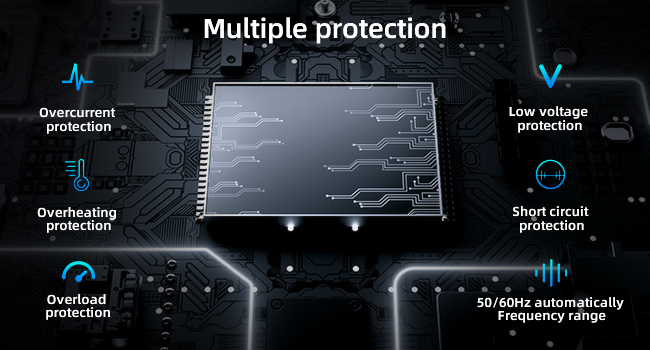
Figure 9.1: The Anern hybrid inverter packaged with its user manual.
Related documentsAnern-2000W


Ask a question about this manual
Ask about setup, troubleshooting, compatibility, parts, safety, or missing instructions. Manuals+ will review the question and use this page’s manual context to help answer it.