
1. Product Overview
The TOKIT U1 Mineral Under Sink Water Filter System provides advanced reverse osmosis filtration, designed for convenience and efficiency. It effectively reduces various contaminants while enhancing water taste through remineralization.
- Tested for Safety: Certified by SGS, NSF/ANSI 58 & 42, and FCC. Reduces TDS, chlorine, bad tastes, and odors.
- Advanced RO Filtration: Removes up to 99.99% of harmful pollutants including PFAS, fluoride, lead, chromium, iron, nitrate, chloride, and radioactive substances.
- Enhanced Taste with Remineralization: Equipped with a strontium-rich mineral filter to improve water taste and provide added health benefits.
- Space-Saving Tankless Design: Frees up 75% more under-sink space and prevents secondary pollutant risks.
- User-Friendly & Convenient: Features a built-in filter life reminder, 2-second twist-and-pull filter replacement, and auto-flush technology.

Image: Overview of the TOKIT U1 Reverse Osmosis System highlighting its key features.
2. Setup and Installation
Follow these steps for proper installation of your TOKIT U1 water filter system. Ensure all water supplies are turned off before beginning.
2.1 Prepare for Installation
- Gather necessary tools: wrench, screwdriver, drill, utility knife, towel, and flashlight.
- Locate the cold water supply line under your sink.
- Turn off the main water supply to your kitchen sink.
- Open the existing kitchen faucet to release any remaining water pressure.
2.2 Install Feed Water Adapter
Disconnect the cold water supply line from the angle valve. Attach the provided feed water adapter to the angle valve, ensuring the O-ring is properly seated. Then, reconnect your original cold water hose to the adapter. Tighten all connections securely with a wrench to prevent leaks.
2.3 Install Drain Clamp
Identify a suitable location on the drain pipe (above the P-trap). Use the provided sticker as a guide to drill a single hole. Insert the red drain tube into the drain clamp, ensuring it extends approximately 0.6 inches into the clamp. Secure the drain clamp to the pipe with screws and add the blue clip to secure the tube.
2.4 Install Faucet
If your sink has a pre-drilled hole, insert the dedicated faucet. If not, carefully drill a hole of appropriate size (typically 0.47 to 1.5 inches in diameter). Attach the water line to the faucet body, ensuring it's fully inserted. From underneath the sink, place the rubber gasket and tighten the fixing nut securely to stabilize the faucet.
2.5 Connect Water Lines to Main Unit
Remove all dust plugs from the main unit's ports. Connect the color-coded water lines to their respective ports on the main unit (Input Water, Pure Water, Drain Water). Tug gently on each line to confirm it is secure, then insert the blue clips to lock them in place. Connect the faucet data cable to the 'Faucet Data' port on the main unit.

Image: Diagram showing the TOKIT U1 system components and their connections under the sink.
2.6 Power On and First Flush
Plug the power supply into an electrical outlet. The main unit indicator lights should illuminate. Slowly open the water supply valve. Check all connections for leaks. If any leaks are detected, shut off the valve, check the connection, and re-tighten. If dry, open the dedicated faucet and let the water run for 30 minutes to flush the system and filters. Do not drink this water during the first flush.
Video: Installation guide for a similar RO system (Ecoviva RO800G/RO1000G). Refer to your TOKIT U1 manual for specific details.
Video: Installation overview for an under-sink water filter (Frizzlife GX99). Note that this is a different model and brand; refer to your TOKIT U1 manual for specific instructions.
3. Operating Instructions
Once installed and flushed, your TOKIT U1 system is ready for use. Simply open the dedicated faucet to dispense purified water. The system operates on demand, providing fresh water whenever needed.
- Fast Water Flow: The 400GPD capacity ensures a quick fill rate, capable of filling an 8 oz cup in approximately 9 seconds.
- Fresh Water Technology: The tankless design ensures that water is filtered directly before consumption, preventing stagnation and secondary contamination.

Image: Demonstrates the fast water flow rate of the TOKIT U1 system.
4. Maintenance
Regular maintenance ensures optimal performance and water quality from your TOKIT U1 system.
4.1 Filter Replacement
The TOKIT U1 features a convenient twist-and-pull design for filter replacement, which can be done in just 2 seconds.
- Filter Lifespan: The PCT filter is recommended for replacement every 12 months, and the RO filter every 24 months.
- Indicator Lights: The system includes indicator lights to monitor the lifespan of both the PCT and RO filter elements. Replace filters when indicated.
- Auto Flush Technology: This feature automatically flushes the system to extend filter lifespan and maintain water purity.
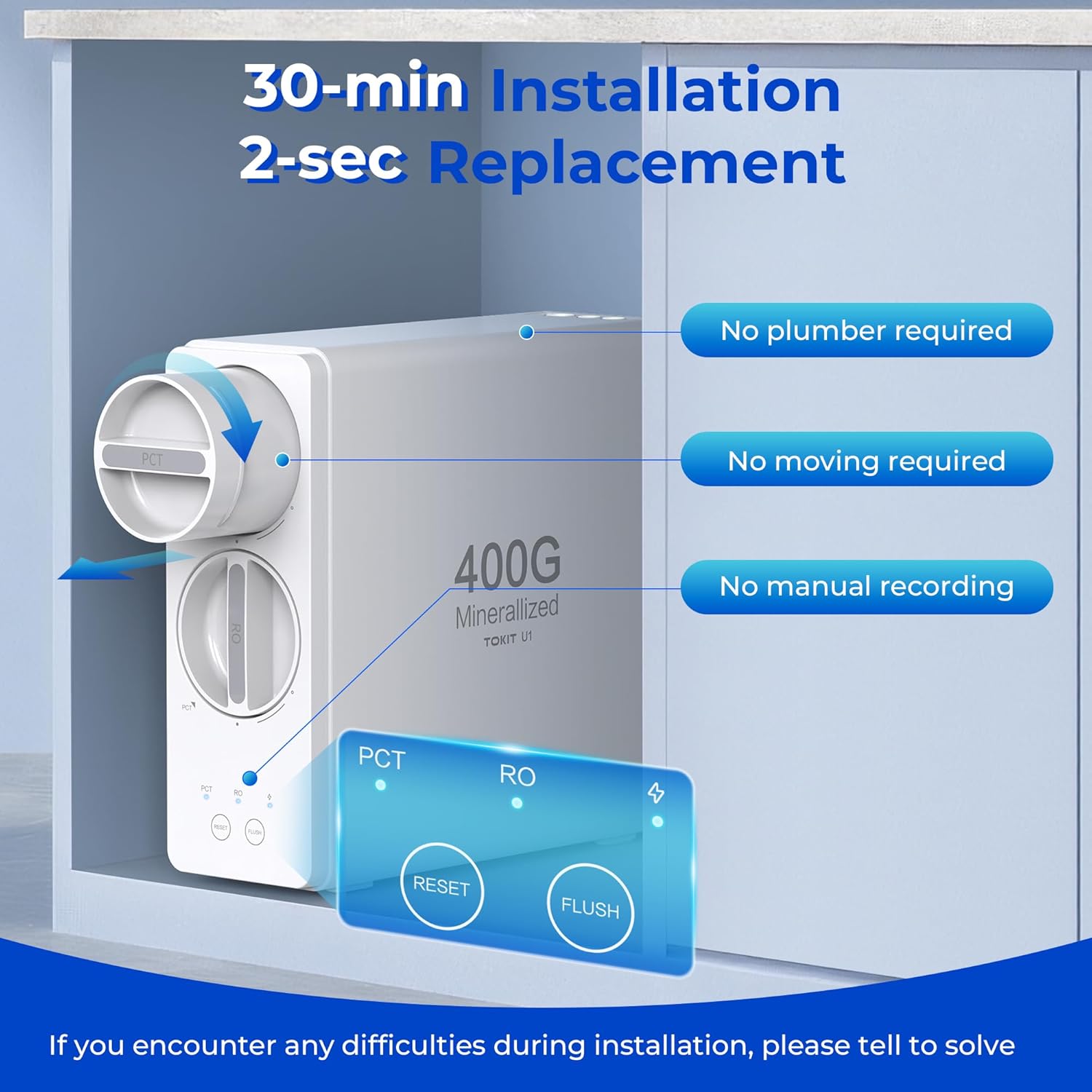
Image: Illustration of the easy 2-second twist-and-pull filter replacement process.

Image: Close-up of the indicator lights for monitoring filter life on the TOKIT U1 system.
5. Troubleshooting
If you encounter any issues with your TOKIT U1 system, please refer to the following common troubleshooting tips:
- No Water Flow: Ensure the main water supply valve is fully open. Check all tubing connections for kinks or blockages. Verify the power supply is connected and the unit is receiving power.
- Leaks: Immediately shut off the water supply. Inspect all connections, especially those tightened during installation, and re-tighten as necessary. Ensure all blue clips are properly installed.
- Unusual Taste/Odor: Perform an additional system flush for 15-30 minutes. If the issue persists, check the filter life indicators and replace any expired filters.
- Filter Indicator Light On (Red/Yellow): This indicates that a filter needs replacement. Follow the filter replacement instructions in Section 4.1.
For persistent issues or further assistance, please contact customer support.
6. Specifications
| Feature | Specification |
|---|---|
| Product Dimensions | 41L x 20W x 48H Centimetres |
| Capacity | 400 Gallons Per Day (GPD) |
| Purification Method | Activated Carbon, Reverse Osmosis |
| Installation Type | Under Sink |
| Material | BPA-Free Food Grade Plastics |
| Maximum Flow Rate | 1 Liters Per Minute |
| Supported Water TDS Level Maximum | 500 PPM |
| Certifications | NSF/ANSI 58 & 42, FCC, SGS Tested |
| Special Features | 24 Months Long-Lasting Filters, Strontium-rich Mineralized Filter, Hassle-free Installation, Multifunctional Faucet, Space-Saving Tankless Design |
7. Warranty and Support
TOKIT is committed to providing exceptional service and support for your water filtration system.
- For any questions, technical assistance, or warranty claims, please refer to the contact information provided with your product packaging.
- Ensure you register your product to activate your warranty and receive important updates.

Image: A customer service representative ready to assist with inquiries.