
Alpicool DC30
Alpicool Car Refrigerator 25L - User Manual
Model: DC30
Brand: Alpicool
Introduction
Thank you for choosing the Alpicool DC30 Portable Car Refrigerator. This manual provides essential information for the safe and efficient operation, maintenance, and troubleshooting of your new appliance. Please read it thoroughly before use and retain it for future reference.
Safety Information
To ensure safe operation, please observe the following precautions:
- Do not operate the appliance if it is visibly damaged.
- Ensure proper ventilation around the unit. Do not block air vents.
- Avoid placing the refrigerator in direct sunlight or near heat sources.
- Use only the provided power cords and adapters.
- Keep the appliance away from water and moisture.
- Do not attempt to repair or modify the unit yourself. Contact qualified service personnel.
- Always disconnect power before cleaning or maintenance.
- This appliance is not intended for use by persons (including children) with reduced physical, sensory or mental capabilities, or lack of experience and knowledge, unless they have been given supervision or instruction concerning use of the appliance by a person responsible for their safety.
Package Contents
Verify that all items are present in the package:
- 1 x Alpicool DC30 Portable Refrigerator
- 1 x 110V-240V AC Adapter and Power Cord
- 1 x 12V / 24V DC Power Cord
- 1 x User Manual (this document)

Image: The product packaging box, indicating the model DC30 and 25L capacity.
Product Overview
The Alpicool DC30 is a versatile 25L portable refrigerator and freezer designed for various applications, including car, RV, camping, and home use. It features a powerful compressor for rapid cooling and dual-zone functionality.

Image: The Alpicool DC30 portable refrigerator with its lids open, showing fresh fruits and canned beverages stored inside.
Key Features:
- 25L Capacity: Capable of holding up to 36 cans (355ml) or 23 bottles (500ml).
- Dual Zone Temperature Control: Main compartment for freezing (-20°C to 0°C) and a smaller compartment for refrigeration (0°C to 10°C).
- Rapid Cooling: Cools from 25°C to 0°C in 15 minutes and to -20°C within an hour.
- Low Noise Operation: Operates at approximately 45 dB.
- Battery Protection: Three levels (H/M/L) to prevent vehicle battery drain.
- Dual Power Supply: Supports 12V/24V DC (car) and 100-240V AC (home).
- Portability: Equipped with an extensible handle and sturdy wheels for easy transport.
- Convenience Features: Built-in bottle opener and two cup holders.

Image: Diagram illustrating the 25L storage capacity, showing it can hold 36 cans or 23 bottles, along with external dimensions.

Image: Visual representation of the dual temperature zones, indicating freezing capability (-20°C to 0°C) for meat, fish, and ice cream, and fresh cooling (0°C to 10°C) for fruits, vegetables, and beverages.
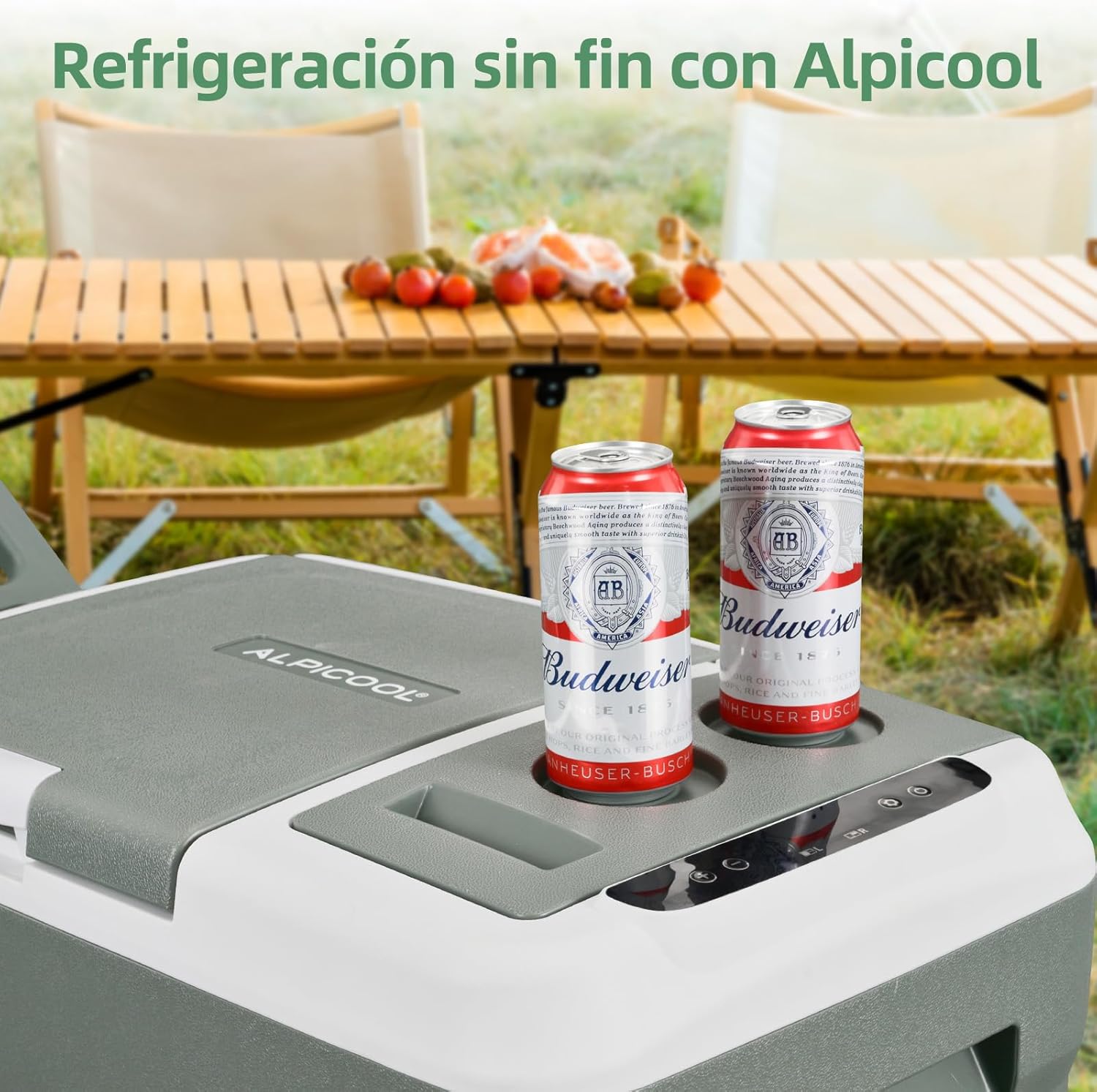
Image: Top view of the Alpicool DC30 showing the control panel and integrated cup holders, with two beverage cans placed in them.
Setup
Unpacking:
- Carefully remove the refrigerator from its packaging.
- Inspect the unit for any signs of damage. If damaged, do not use and contact customer support.
- Remove all packing materials, including any internal protective inserts.
Placement:
- Place the refrigerator on a flat, stable surface.
- Ensure adequate ventilation around the unit. Maintain at least 10 cm of space from walls or other objects.
- Avoid placing the unit in direct sunlight or near heat-emitting appliances.
Power Connection:
The Alpicool DC30 supports two power input methods:
- DC Power (12V/24V): For use in vehicles. Connect the provided DC power cord to the refrigerator's DC input port and then to your vehicle's cigarette lighter socket.
- AC Power (100-240V): For home or standard outlet use. Connect the provided AC adapter to the refrigerator's AC input port, then plug the adapter into a wall outlet.

Image: Illustration showing the two power supply methods: 12V/24V DC for car use and 110V/240V AC for wall outlet use.
Battery Protection Setting:
The unit features a 3-level battery protection system to prevent your vehicle's battery from draining. Adjust this setting based on your vehicle's battery condition and usage:
- H (High): Highest protection, unit will cut off power at a higher voltage. Recommended for starting batteries.
- M (Medium): Moderate protection.
- L (Low): Lowest protection, unit will operate longer before cutting off. Recommended for deep cycle batteries.
Refer to the control panel section for instructions on how to change this setting.

Image: The portable refrigerator placed in a car trunk, with icons indicating High, Medium, and Low battery protection levels.
Operating Instructions
Control Panel:
The control panel is located on the top of the unit. It typically includes a display, power button, and temperature adjustment buttons.
Turning On/Off:
- Press the Power button to turn the unit on. The display will light up and show the current internal temperature.
- Press and hold the Power button for a few seconds to turn the unit off.
Temperature Adjustment:
- Press the SET button to enter temperature setting mode.
- Use the + and - buttons to adjust the desired temperature. The temperature range is -20°C to 20°C.
- The setting will automatically save after a few seconds of inactivity.
Operating Modes (MAX/ECO):
The refrigerator offers two operating modes:
- MAX Mode (60W): Provides rapid cooling. Use this mode when you need to quickly reach the desired temperature.
- ECO Mode (45W): Energy-saving mode. Once the desired temperature is reached, switch to ECO mode for efficient power consumption.
To switch between modes, press the SET button repeatedly until the desired mode (MAX or ECO) is displayed or indicated.

Image: Chart demonstrating rapid cooling: 15 minutes to reach 0°C from 25°C, and 60 minutes to reach -20°C from 25°C.
Noise Level:
The Alpicool DC30 operates quietly, with a noise level of approximately 45 dB, ensuring minimal disturbance during use.

Image: A child sleeping peacefully in a car seat, with the refrigerator in the background, illustrating its low noise operation at 45 dB compared to other common sounds.
Portability Features:
Utilize the extensible handle and sturdy wheels for easy transportation of the unit, even when fully loaded.

Image: A person pulling the portable refrigerator using its extensible handle and sturdy wheels, demonstrating its ease of transport.
Maintenance
Cleaning:
- Always disconnect the power supply before cleaning.
- Clean the interior and exterior surfaces with a damp cloth and mild detergent.
- Do not use abrasive cleaners or harsh chemicals.
- Ensure the unit is completely dry before reconnecting power.
- Regularly clean the ventilation grilles to ensure proper airflow.
Storage:
- If storing for an extended period, ensure the unit is clean and dry.
- Leave the lid slightly ajar to prevent odors and mold growth.
- Store in a dry, well-ventilated area, away from direct sunlight and extreme temperatures.
Troubleshooting
| Problem | Possible Cause | Solution |
|---|---|---|
| Unit does not turn on. | No power supply; loose connection; vehicle battery low; fuse blown. | Check power cord connection; ensure power source is active; check vehicle battery voltage; replace fuse if necessary. |
| Cooling performance is poor. | Vents blocked; ambient temperature too high; door not sealed properly; too much content. | Clear ventilation areas; move unit to a cooler location; ensure lid is closed tightly; do not overfill. |
| Display shows error code. | Specific internal issue. | Refer to the detailed error code list in the full user manual (if available) or contact customer support. |
| Unit is noisy. | Unit not level; fan obstruction. | Ensure unit is on a flat surface; check for any obstructions around the fan. |
If the problem persists after attempting these solutions, please contact Alpicool customer support.
Specifications
| Feature | Detail |
|---|---|
| Brand | Alpicool |
| Model | DC30 |
| Capacity | 24.8 Litres (approx. 25L) |
| Temperature Range | -20°C to 20°C |
| Power Input | DC 12V/24V, AC 100-240V |
| Rated Power (MAX/ECO) | 60W / 45W |
| Noise Level | ≤45 dB |
| Product Dimensions (LxWxH) | 67.5 x 40 x 35.6 cm |
| Item Weight | 12.9 kg |
| Energy Efficiency Rating | D (as per EU energy label) |

Image: The EU Energy Label for the Alpicool DC30, showing its energy efficiency class D, 24L capacity, and 45dB noise level.
For more detailed information, refer to the EPREL database.

Image: A close-up of the product packaging showing detailed technical specifications for the DC30 model, including dimensions, power, and noise level.
Warranty and Support
Alpicool products are designed for durability and performance. This product typically comes with a warranty. Please refer to your purchase documentation for specific warranty terms and conditions.
- Warranty Service: Up to 3-year warranty.
- Customer Service: E-mail assistance within 24 hours.
- Return Policy: 30-day free return.
For technical support, warranty claims, or any other inquiries, please contact Alpicool customer service through the retailer where you purchased the product or visit the official Alpicool website.
Manufacturer: Alpicool
Contact information may also be found on the product packaging or included documentation.

Image: The back of the product packaging box, displaying manufacturer information, certifications, and contact details.
Related documentsDC30


Ask a question about this manual
Ask about setup, troubleshooting, compatibility, parts, safety, or missing instructions. Manuals+ will review the question and use this page’s manual context to help answer it.