
Saker B0D6V76JW9
Saker Woodworking Scriber Marking Line Ruler (Model B0D6V76JW9) Instruction Manual
Product Overview
The Saker Woodworking Scriber Marking Line Ruler is a versatile tool designed for precision marking in woodworking. Crafted from durable aluminum alloy, it integrates a ruler and protractor to facilitate easy measurement of lengths and angles. Its adjustable sliding T-square design and laser-engraved scales ensure clear, accurate lines for various tasks, from setting bevels to drawing radial lines. This tool is suitable for engineering, angle measurement, drawing, architectural design, length measurement, and is a valuable aid for craftsmen, designers, artists, and engineers.

Image: The Saker Woodworking Scriber Marking Line Ruler, shown with its included mechanical pencil and product packaging.
What's in the Box
- Saker Woodworking Scriber Marking Line Ruler
- Red Mechanical Pencil
- 8 Pencil Refills (4 black, 4 red)
Setup
The Saker Woodworking Scriber Marking Line Ruler comes pre-assembled. Before first use, ensure all components are securely fastened. The mechanical pencil is pre-loaded with lead. Additional lead refills are provided.
Inserting Pencil Lead:
- Unscrew the cap at the end of the mechanical pencil.
- Insert a new lead refill into the opening.
- Replace the cap.
- To advance the lead, press the button at the top of the pencil.

Image: Detailed view of the T-bevel design, highlighting key adjustable components and scales.
Operating Instructions
1. Adjusting Angles:
The ruler features a multi-angle adjustable head. To set a specific angle:
- Loosen the black adjusting screw on the T-head.
- Rotate the T-head to align with the desired angle (e.g., 15°, 30°, 45°, 60°, 75°, 90°) indicated on the scale.
- Tighten the adjusting screw to secure the angle. The internal limit balls ensure precise locking at standard angles.

Image: Demonstrating the adjustable angle feature of the ruler for precise angle setting.
2. Marking Straight Lines (Scribing):
The ruler can be used for both vertical and horizontal scribing.
- Set Measurement: Loosen the parallel positioning knob (silver knob) on the main ruler body. Slide it to the desired measurement (in cm or inches) from the edge of your workpiece. Tighten the knob to secure.
- Insert Pencil: Place the tip of the mechanical pencil into the small hole on the parallel positioning knob.
- Scribe Line: Hold the ruler firmly against the edge of your workpiece. Slide the ruler along the edge while applying gentle pressure to the pencil, creating a precise, parallel line.

Image: Vertical scribing demonstration using the ruler and mechanical pencil.

Image: Horizontal scribing demonstration using the ruler and mechanical pencil.
3. Drawing Arcs/Circles:
The ruler can also function as a compass for drawing arcs or circles.
- Set Radius: Loosen the parallel positioning knob and slide it to the desired radius measurement. Tighten the knob.
- Anchor Point: Use one of the circular holes on the T-head as an anchor point. Place a pin or nail through this hole into your workpiece.
- Draw Arc: Insert the mechanical pencil into the parallel positioning knob's hole. Rotate the ruler around the anchor point, keeping the pencil in contact with the surface, to draw an arc or full circle.
Official Product Videos:
Video: "T Square Ruler" - A brief demonstration of the Saker T-Square Ruler's basic functions, including angle adjustment and line marking.
Video: "Saker Woodworking Marking Line Ruler" - This video provides an overview of the Saker ruler, showcasing its features and how it can be used for various woodworking marking tasks.
Maintenance
- Cleaning: Wipe the ruler with a soft, dry cloth after each use to remove dust and debris. Avoid abrasive cleaners or solvents that could damage the finish or laser engravings.
- Storage: Store the ruler in a dry place, away from extreme temperatures and humidity, to prevent corrosion or damage. The foldable design allows for compact storage.
- Pencil Care: Ensure the mechanical pencil lead is retracted when not in use to prevent breakage. The pencil includes a built-in sharpener in the end cap for maintaining a fine point.
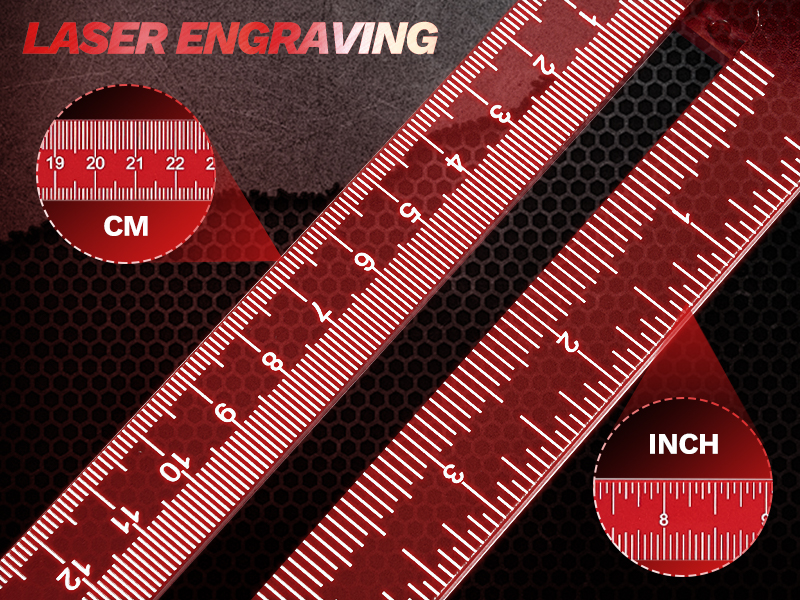
Image: The ruler's foldable design for convenient storage in a toolbox.
Troubleshooting
- Inaccurate Markings:
- Ensure the adjusting screw and parallel positioning knob are fully tightened before marking.
- Verify the ruler is held firmly against the workpiece edge without any gaps or movement.
- Check that the pencil lead is sharp and not wobbly within the holder.
- Difficulty Sliding:
- Ensure the parallel positioning knob is sufficiently loosened.
- Clean the sliding channels on the ruler to remove any accumulated dust or debris.
- Pencil Lead Breakage:
- Avoid applying excessive pressure while marking.
- Ensure the lead is not extended too far from the pencil tip.
Specifications
| Product Dimensions | 18.89"L x 7.87"W (48cm x 20cm) |
| Weight | 15.87 ounces |
| Material | Aluminum Alloy |
| Color | Red |
| Measurement Units | Metric (cm) and Imperial (inches) |
| Adjustable Angles | 15°, 30°, 45°, 60°, 75°, 90° |
Warranty and Support
Saker products are designed for durability and precision. For any questions regarding product operation, maintenance, or potential issues, please refer to the manufacturer's official support channels. While specific warranty details are not provided in this manual, Saker is committed to product quality. Please retain your purchase receipt for any potential claims.
For further assistance, visit the Saker Store on Amazon.
Ask a question about this manual
Ask about setup, troubleshooting, compatibility, parts, safety, or missing instructions. Manuals+ will review the question and use this page’s manual context to help answer it.