
1. Introduction
Thank you for choosing the JBL LIVE BUDS 3 Smart Touch Display Wireless Earbuds. These earbuds offer a premium audio experience with advanced features such as Hi-Res Audio Wireless support, LDAC compatibility, and advanced noise-canceling technology. The innovative smart touch display on the charging case provides intuitive control over various functions.
This manual provides detailed instructions on how to set up, operate, and maintain your JBL LIVE BUDS 3 earbuds to ensure optimal performance and longevity.
2. What's in the Box
- JBL LIVE BUDS 3 Earbuds (Left and Right)
- Smart Charging Case with Touch Display
- USB-C Charging Cable
- Multiple Sizes of Ear Tips (XS, S, M, L - M size pre-installed)
- Instruction Manual (this document)
- Safety Sheet
- Warranty Card

Image: JBL LIVE BUDS 3 earbuds and their smart charging case.
3. Setup
3.1 Initial Pairing
- Open the charging case. The earbuds will automatically enter pairing mode.
- On your device (smartphone, tablet, etc.), enable Bluetooth.
- Select "JBL LIVE BUDS 3" from the list of available devices.
- Once connected, the earbuds will indicate successful pairing.
3.2 Installing the JBL Headphones App
For full customization and access to all features, download the JBL Headphones app from your device's app store. The app allows you to:
- Customize touch controls.
- Adjust equalizer settings.
- Control noise canceling and ambient sound modes.
- Perform a fit check for optimal sound and comfort.
- Update firmware.

Image: Screenshot of the JBL Headphones app showing equalizer settings.
3.3 Fitting the Earbuds
Proper fit is crucial for sound quality and noise cancellation. Follow these steps:
- Choose the correct ear tip size: Experiment with the included ear tips (XS, S, M, L) to find the size that provides a snug and comfortable seal in your ear canal. The M size is pre-installed.
- Hold the earbud securely: Grasp both sides of the earbud body.
- Insert and twist: Gently push the earbud into your ear and twist it towards the back of your head until it fits securely.
- Check fit with the app: Use the "Fit Check" feature in the JBL Headphones app to confirm optimal fit and ensure there is no sound leakage.

Image: Visual guide on selecting ear tips and correctly fitting the earbuds.

Image: Screenshot of the JBL Headphones app demonstrating the fit check feature.
4. Operating
4.1 Smart Charging Case Display Functions
The 1.45-inch smart touch display on the charging case allows for direct control without needing your phone. Functions include:
- Volume control.
- Noise Cancelling ON/OFF.
- Equalizer (EQ) switching.
- "Find My Earbuds" function.
- Customizing the lock screen wallpaper with your own photos.
- Strap hole for enhanced portability.

Image: The smart charging case display interface, demonstrating controls for volume, noise cancellation, EQ, and other settings.

Image: The "Find My Earbuds" feature in the JBL Headphones app, showing how to locate misplaced earbuds.
4.2 Earbud Touch Controls
The touch controls on each earbud can be customized via the JBL Headphones app. You can assign functions such as playback control, volume adjustment, ambient sound modes, and voice assistant activation to single tap, double tap, triple tap, and tap & hold gestures.
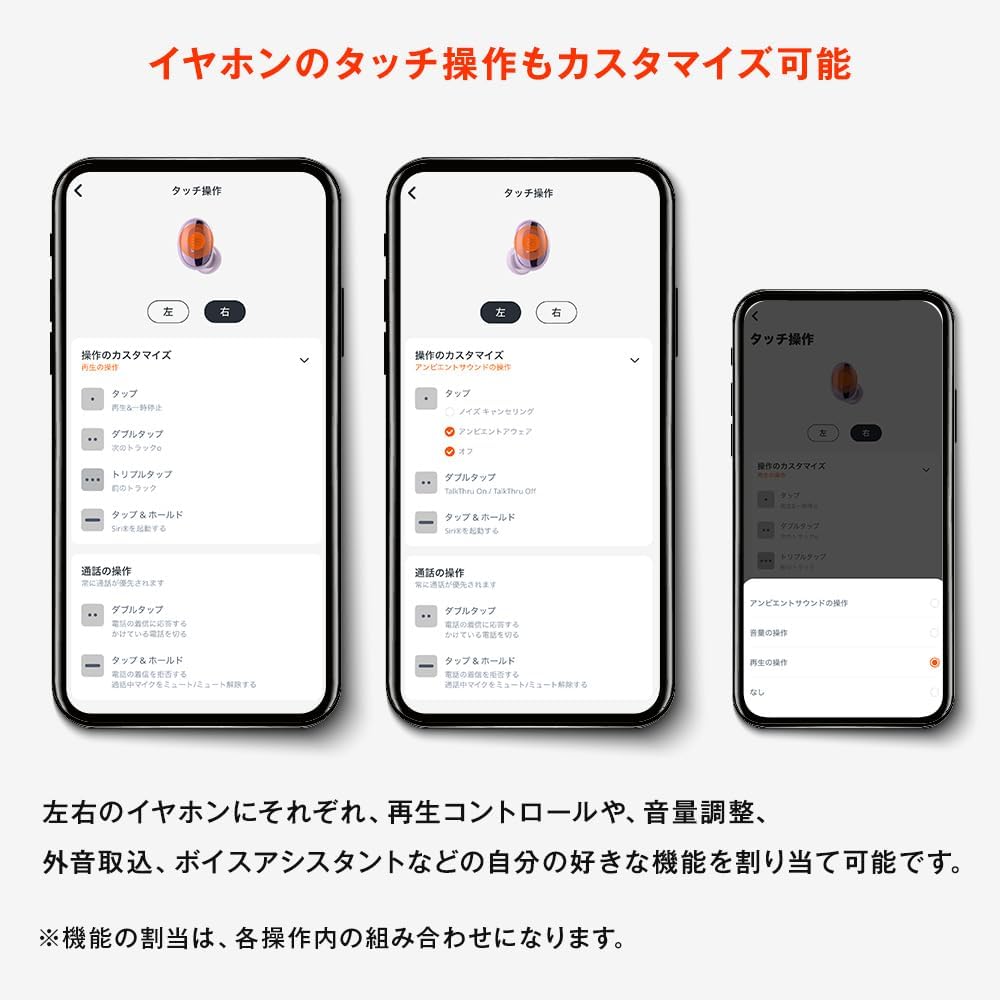
Image: Screenshots from the JBL Headphones app illustrating the customization options for earbud touch controls.
4.3 Noise Cancelling and Ambient Sound Modes
The JBL LIVE BUDS 3 feature Hybrid Noise Cancelling with real-time correction, which monitors ambient noise and adjusts noise cancellation across various frequency bands. This results in up to 15dB improvement in mid-range noise cancellation compared to previous models.
You can switch between Noise Cancelling, Ambient Aware, and TalkThru modes using the smart charging case or the JBL Headphones app:
- Noise Cancelling: Blocks out ambient noise for an immersive listening experience.
- Ambient Aware: Allows you to hear your surroundings while still enjoying your audio.
- TalkThru: Lowers music volume and amplifies speech, allowing you to converse without removing your earbuds.

Image: A graph demonstrating the effectiveness of noise cancellation across various noise frequencies, from low (vehicle noise) to high (human voices, street noise).

Image: Screenshot of the JBL Headphones app displaying options for Ambient Aware, TalkThru, and Voice Aware modes.
4.4 Multipoint Connection
The JBL LIVE BUDS 3 support multipoint connection, allowing you to seamlessly switch between two Bluetooth devices simultaneously. For example, you can listen to music on your tablet and instantly answer a call on your smartphone.
- Remote Work: Participate in a remote meeting on your PC while staying ready to receive calls on your smartphone.
- Work & Private: Connect to two smartphones for separate use.
- Entertainment: Automatically switch from listening to music on your smartphone to watching a movie on your tablet.

Image: Illustration of multipoint connectivity, showing earbuds connected to a laptop and a smartphone, and two smartphones, or a smartphone and a tablet.
4.5 Charging
To charge the earbuds, place them back into the charging case. The case itself can be charged via the included USB-C cable or wirelessly using a Qi-compatible wireless charger.
- The smart display on the case will show the battery levels of both the earbuds and the case.
- A full charge provides up to 40 hours of combined playback time (earbuds + charging case).
5. Maintenance
To ensure the longevity and optimal performance of your JBL LIVE BUDS 3, follow these maintenance guidelines:
- Cleaning Earbuds: Regularly clean the ear tips and the mesh grilles of the earbuds with a dry, soft cotton swab to remove earwax and debris. Do not use liquids directly on the earbuds.
- Cleaning Charging Case: Wipe the charging case with a soft, dry cloth. Avoid using abrasive materials or harsh chemicals.
- Storage: When not in use, store the earbuds in their charging case to protect them from dust and damage.
- Avoid Extreme Conditions: Do not expose the earbuds or case to extreme temperatures, humidity, or direct sunlight.
- Water Resistance: The earbuds are water-resistant (IP55 rated), meaning they can withstand splashes and sweat. However, they are not designed for submersion in water. Ensure they are dry before placing them back in the charging case.
6. Troubleshooting
If you encounter any issues with your JBL LIVE BUDS 3, refer to the following common troubleshooting steps:
- No Sound / Intermittent Sound:
- Ensure earbuds are charged.
- Check Bluetooth connection on your device. Try re-pairing.
- Ensure the earbuds are clean and free of debris.
- Try resetting the earbuds (refer to the JBL Headphones app or JBL support website for specific instructions).
- Earbuds Not Charging:
- Ensure the charging case is charged.
- Verify the earbuds are correctly seated in the charging case.
- Check the USB-C cable and power adapter for damage.
- Clean the charging contacts on both the earbuds and the case.
- Poor Noise Cancelling Performance:
- Ensure a proper seal by trying different ear tip sizes. Use the "Fit Check" feature in the app.
- Make sure Noise Cancelling mode is activated.
- Smart Case Display Not Responding:
- Ensure the case has sufficient battery.
- Try restarting the case by closing and reopening it, or connecting it to a power source.
7. Specifications
| Feature | Detail |
|---|---|
| Brand | JBL |
| Model Number | JBLLIVEBUDS3 |
| Color | Black |
| Ear Placement | In-Ear |
| Headphone Style | True Wireless |
| Impedance | 16 Ohms |
| Battery Average Life | 40 Hours (earbuds + charging case) |
| Noise Control | Hybrid Noise Cancelling with Real-time Correction |
| Sensitivity | 100 dB |
| Audio Driver Type | Dynamic Driver |
| Audio Driver Size | 10 mm |
| Compatible Devices | Smartphones, Tablets, Laptops |
| Waterproof Type | Water Resistant (IP55 rated) |
| Wireless Type | Bluetooth |
| Bluetooth Version | 5.3 |
| Product Weight | 82.2 grams |
| Additional Features | Qi charging compatible, Smart Touch Display charging case, Ambient sound capture, Hi-Res Wireless (LDAC), Built-in microphone, Multipoint, Single-ear use possible, Customizable EQ via app. |
8. Warranty & Support
8.1 Warranty Information
Your JBL LIVE BUDS 3 come with a 1-year warranty from the date of purchase for new products bought from authorized domestic retailers. Proof of purchase (receipt or invoice) is required for warranty claims.
Please note the following conditions:
- The warranty is valid only for products used within the country of purchase.
- For used or resale items, repairs are subject to a fee.
- Battery degradation over time is normal and not covered under warranty.
8.2 Customer Support
For further assistance, technical support, or warranty claims, please contact JBL customer service through their official website or the contact information provided on your warranty card.
You can also visit the official JBL website for FAQs, updated manuals, and software downloads: www.jbl.com


