
Introduction
Thank you for choosing PATONA AA USB-C rechargeable batteries. These high-quality lithium-ion batteries are designed for convenience and performance, offering a reliable power source for a wide range of electronic devices. This manual provides essential information for the safe and efficient use of your batteries.
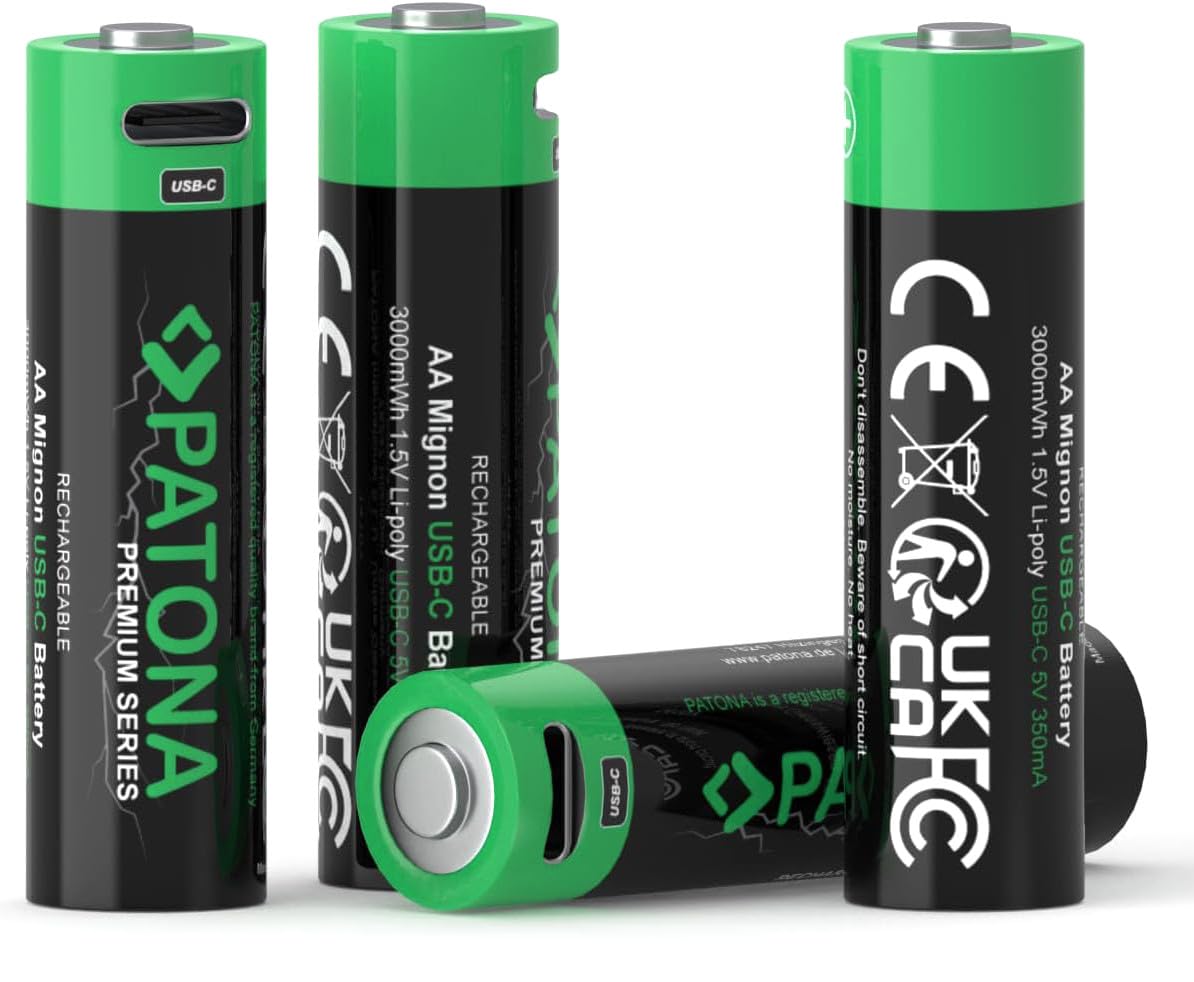
Image: PATONA AA USB-C Rechargeable Batteries (4x) with included charging cable.
Key Features:
- Voltage/Power: 1.5V / 3000 mWh / 2000mAh
- Charging: Direct via 5V USB-C port (350mA)
- Safety: Integrated protection circuit prevents overcharge and total discharge.
- Convenience: Rechargeable on the go with a power bank or any USB power source.
- Contents: 4x AA rechargeable batteries and 1x USB-C to USB-C charging cable with 2 connections (1 to 2).
Setup and First Use
Before using your PATONA AA USB-C rechargeable batteries for the first time, it is recommended to fully charge them.
Charging Instructions:
- Locate the USB-C charging port on each battery.
- Connect the included USB-C charging cable to the battery's USB-C port. The cable provided allows charging two batteries simultaneously.
- Connect the other end of the USB-C cable to a compatible 5V USB power source (e.g., USB wall adapter, computer USB port, power bank).
- A green LED indicator on the battery's USB-C input will flash during the charging process. Once fully charged, the LED will remain constantly green.
- Important: These batteries cannot be charged with standard Mignon AA battery chargers. Only use the integrated USB-C port for charging.

Image: Included USB-C charging cable for PATONA batteries.

Image: Back of packaging illustrating the USB-C port and LED indicator. Flashing green: charging; Constant green: charged.
Operating Instructions
Once charged, your PATONA AA USB-C batteries are ready for use in compatible devices.
Inserting Batteries:
- Ensure the device is turned off before inserting or removing batteries.
- Open the battery compartment of your device.
- Insert the PATONA AA batteries according to the polarity (+ and -) markings inside the compartment. Incorrect insertion can damage the device or batteries.
- Close the battery compartment securely.
Recommended Applications:
These batteries are suitable for a wide range of devices requiring AA batteries, including:
- Toys, remote controls (TV, game consoles), joysticks
- MP3 players, electric shavers, electric toothbrushes
- Wireless microphones, blood pressure monitors, VR glasses
- Computer mice, alarm clocks, cameras, electronic flashes
- Flashlights and other lighting sources
Maintenance and Safety
Proper care and maintenance will ensure the longevity and safe operation of your PATONA batteries.
General Care:
- Storage: Store batteries in a cool, dry place, away from direct sunlight and extreme temperatures.
- Cleaning: If battery terminals become dirty, clean them with a dry cloth.
- Disposal: Do not dispose of batteries in household waste. Follow local regulations for proper battery recycling.
Safety Precautions:
- Do Not Disassemble: Never attempt to open or disassemble the batteries. This can cause damage, leakage, or injury.
- Avoid Moisture: Keep batteries away from water and high humidity.
- Temperature: Protect batteries from heat above 60°C (140°F). Do not expose them to fire.
- Short Circuit: Avoid short-circuiting the battery terminals.
- Polarity: Always observe correct polarity (+/-) when inserting batteries into devices.
- Children: Keep batteries out of reach of small children. If swallowed, seek immediate medical attention.

Image: PATONA battery protection features.
Troubleshooting
If you encounter issues with your PATONA AA USB-C batteries, refer to the following common solutions:
| Problem | Possible Cause | Solution |
|---|---|---|
| Battery not charging | Loose cable connection, faulty USB power source, battery not inserted correctly into cable. | Ensure the USB-C cable is securely connected to both the battery and the power source. Try a different USB port or power adapter. Check if the green LED indicator is flashing. |
| Device not powering on | Batteries not charged, incorrect polarity, device malfunction. | Ensure batteries are fully charged (constant green LED). Verify correct polarity (+/-) when inserting batteries. Test batteries in another device if possible. |
| Short battery life | High power consumption device, battery aging, incomplete charging. | Ensure batteries are fully charged until the LED is constant green. For high-drain devices, battery life will naturally be shorter. Consider replacing older batteries if performance significantly degrades. |
Specifications
Detailed technical specifications for your PATONA AA USB-C rechargeable batteries:
- Battery Type: AA Mignon
- Battery Composition: Lithium-ion (Li-Po technology)
- Nominal Voltage: 1.5 Volts
- Capacity: 3000 mWh / 2000 mAh
- Charging Input: 5V USB-C, 350 mA
- Reusability: Rechargeable (up to 1000 cycles)
- Number of Batteries: 4 (included)
- Weight per Battery: Approximately 84 Grams
- Item Dimensions (L x W x H): 5.6 x 5 x 1.4 centimeters (for the package, individual battery dimensions are standard AA)
- Manufacturer: PATONA
- Country of Origin: China

Image: PATONA battery features including low self-discharge and USB-C charging.
Warranty Information
Your PATONA AA USB-C rechargeable batteries are covered by a manufacturer's warranty.
- Warranty Period: 2 years from the date of purchase.
- This warranty covers defects in materials and workmanship under normal use.
- The warranty does not cover damage caused by misuse, accident, unauthorized modification, or failure to follow the instructions in this manual.
Customer Support
For further assistance, technical support, or warranty claims, please contact PATONA customer service.
- Refer to the packaging for specific contact details or visit the official PATONA website.
- You can also download the digital manual by scanning the QR code found on the product packaging or by visiting manual.patona.de/1410.pdf.
- When contacting support, please have your product model (4x AA) and purchase information readily available.


