
1. Safety Information
Please read all instructions carefully before using the Homtronics Electric Spin Scrubber. Retain this manual for future reference.
- The product is IPX7 waterproof for the brush head only. Do not submerge the main unit or charging port in water.
- Keep the device out of reach of children and pets.
- Use only the provided USB charging cable.
- Do not operate the scrubber if it appears damaged or is not functioning correctly.
- When using cleaning agents, follow their safety instructions and avoid contact with eyes and skin.
- Ensure the charging port cover is securely closed before using the scrubber near water.
2. Package Contents
Verify that all items listed below are included in your package:
- 1 x Electric Cleaning Brush Main Unit
- 1 x USB Charging Cable (Type-C)
- 1 x Brush Holder
- 2 x Handle Sections (for extension)
- 9 x Various Brush Heads
- 1 x Product Manual (this document)
- 1 x Storage Mesh Bag

3. Product Overview
The Homtronics Electric Spin Scrubber is designed to simplify your cleaning tasks with powerful performance and versatile features.
- Powerful Motor: Delivers up to 50KG of torque for effective cleaning.
- Dual Speed Modes: Choose between 350 RPM (low speed) and 450 RPM (high speed) for different cleaning needs.
- Adjustable Angles: Four adjustable angles (90°, 120°, 150°, 180°) allow for flexible cleaning in hard-to-reach areas.
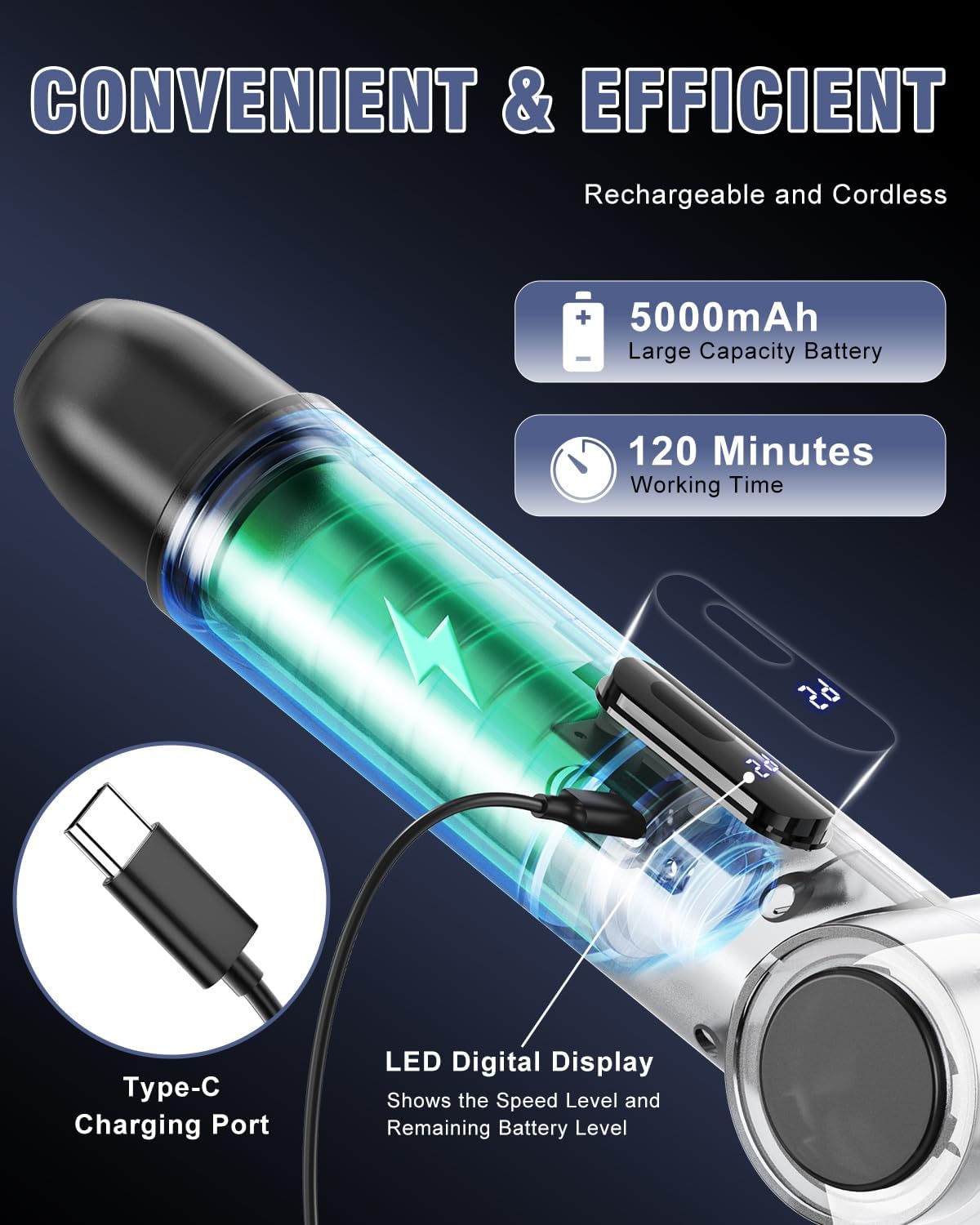
- Long Battery Life: Equipped with a 5000mAh high-capacity battery, providing up to 120 minutes of continuous working time.
- LED Digital Display: Clearly shows the current operating speed mode and remaining battery power.
- IPX7 Waterproof: The brush head is designed to be safely used in wet conditions.


4. Setup
4.1 Assembly
- Determine the desired length of the scrubber. Attach one or both handle sections to the main unit by twisting them clockwise until secure.
- Select the appropriate brush head for your cleaning task. Align the brush head with the rotating base and twist clockwise until it clicks firmly into place.
4.2 Charging
- Locate the Type-C charging port on the main unit.
- Connect the provided USB charging cable to the scrubber and a compatible USB power adapter (not included).
- The LED display will show the charging status. A full charge typically takes approximately 2.5 hours.
- Once fully charged, disconnect the cable and ensure the charging port cover is securely closed before use, especially when cleaning wet areas.
5. Operating Instructions
5.1 Power On/Off and Speed Adjustment
- Press the power button once to turn on the scrubber. It will start in the low-speed mode (350 RPM).
- Press the power button a second time to switch to high-speed mode (450 RPM).
- Press the power button a third time to turn off the scrubber.
5.2 Adjusting Cleaning Angle
- Press the angle adjustment button located near the brush head joint.
- While holding the button, adjust the angle of the brush head to one of the four preset positions (90°, 120°, 150°, 180°).
- Release the button to lock the angle in place.
5.3 Changing Brush Heads
- To remove a brush head, twist it counter-clockwise until it detaches from the rotating base.
- To attach a new brush head, align it with the rotating base and twist clockwise until it clicks firmly into place.
5.4 Brush Head Guide
The Homtronics Electric Spin Scrubber comes with 9 versatile brush heads to meet various cleaning needs:
- Flat Brush: Ideal for large flat surfaces such as tiles, walls, and pool areas.
- Small Flat Brush: Best for smaller flat surfaces like kitchen counters, stovetops, and sinks.
- Curved Brush: Designed for curved surfaces such as bathtubs, toilets, and curved sink areas.
- Pointed Brush: Excellent for cleaning corners, grout lines, and intricate areas like wheel hubs.
- Large Sponge Brush: Suitable for gentle cleaning of car surfaces and kitchenware.
- Absorbent Cloth Brush: Perfect for cleaning windows and wood floors without scratching.
- Fiber Brush: Effective for tougher grime on stoves and gas cookers.
- Imitation Wool Brush: Provides gentle cleaning for furniture, car seats, and leather surfaces.
6. Maintenance
6.1 Cleaning the Scrubber
- After each use, remove the brush head and rinse it thoroughly under running water to remove any debris or cleaning solution residue.
- Wipe the main unit and handle with a damp cloth. Do not submerge the main unit in water.
- Ensure the charging port area is completely dry before recharging the device.
6.2 Battery Care
- For optimal battery life, fully charge the scrubber before long-term storage.
- If the device is not used for an extended period, recharge it every 3 months to maintain battery health.
6.3 Storage
- Use the included brush holder or hook to hang the scrubber for convenient and organized storage.
- Store the device in a cool, dry place away from direct sunlight and extreme temperatures.

7. Troubleshooting
- Scrubber does not turn on:
Check the battery level on the LED display. If low, recharge the device fully. Ensure the power button is pressed firmly. - Brush head stops spinning or spins slowly:
Verify the battery level and recharge if necessary. Ensure the brush head is securely attached. Avoid applying excessive pressure, as this can slow down the motor. - Excessive water splashing:
For surfaces prone to splashing, use the lower speed mode. Ensure the correct brush head is selected for the task. - Unusual noise during operation:
A low operating noise is normal for an electric motor. If the noise is excessive, grinding, or unusual, discontinue use and contact customer support.
8. Specifications
| Brand | Homtronics |
| Model Number | USHHS4HB |
| Dimensions | 1.2"L x 1.5"W x 5"H (compact) / Up to 50" (extended) |
| Item Weight | 3.16 pounds |
| Material | Acrylonitrile Butadiene Styrene (ABS), Stainless Steel |
| Battery Capacity | 5000mAh |
| Charging Time | Approx. 2.5 hours |
| Working Time | Up to 120 minutes |
| Speed Modes | Low: 350 RPM, High: 450 RPM |
| Torque | Up to 50KG |
| Waterproof Rating | IPX7 (brush head only) |
| Included Components | Electric cleaning brush, USB Charging Cable, Brush Holder, 2 handles, 9 brush heads, product manual, mesh bag |
9. Warranty and Support
Homtronics stands behind the quality of its products. The Electric Spin Scrubber comes with a 2-year warranty from the date of purchase.
If you encounter any issues with your product or require assistance, please contact Homtronics customer service. Our team is committed to providing reliable support and will respond to inquiries within 48 hours.
For further assistance, please refer to the contact information provided on the product packaging or the official Homtronics website.