
1. Important Safety Instructions
Please read all instructions carefully before using this appliance and retain them for future reference. Failure to follow these instructions may result in electric shock, fire, or serious personal injury.
- Ensure the voltage indicated on the rating label corresponds to your mains voltage.
- Do not immerse the fan, plug, or cord in water or other liquids.
- Unplug the fan from the power outlet when not in use, when moving it, and before cleaning.
- Keep the fan out of reach of children and pets.
- Do not operate the fan with a damaged cord or plug, or after the appliance malfunctions or has been damaged in any manner.
- Avoid placing fingers or other objects through the fan guards when the fan is operating.
- Do not use the fan near windows, as rain may create an electrical hazard.
- Place the fan on a stable, flat surface to prevent it from tipping over.
- This appliance is for indoor use only.
2. Product Overview
The MISTRAL MHV840R-G is an 8-inch DC High Velocity Fan designed for efficient air circulation with advanced features. It includes a remote control for convenient operation, multiple speed settings, a timer, motion sensor, and auto-oscillation capabilities.
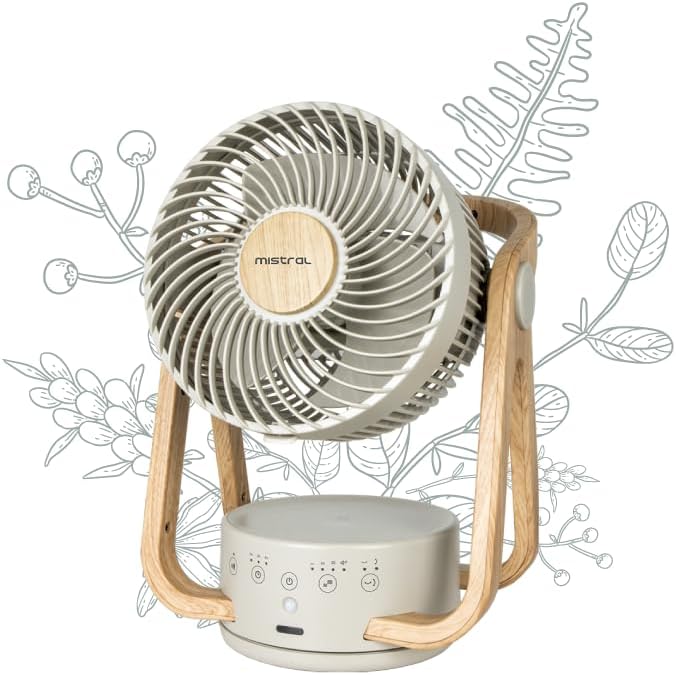
Figure 1: Front view of the fan, highlighting the fan head, control panel, and stable base.

Figure 2: Back view of the fan, illustrating the rear grille and the fan's overall structure.
Components:
- Fan Head: Contains the 5 ABS blades and protective grilles.
- Base Unit: Houses the electronic controls, LED display, and motion sensor.
- Stand: Wooden-style frame supporting the fan head, allowing for vertical angle adjustment.
- Control Panel: Soft-touch buttons on the base for manual operation.
- Remote Control: For convenient wireless operation.
- Power Cord: For connecting to an electrical outlet.
3. Setup
Follow these steps to set up your MISTRAL MHV840R-G fan:
- Unpacking: Carefully remove the fan and all accessories from the packaging. Retain packaging for storage or if return is necessary.
- Placement: Place the fan on a firm, level surface in the desired location. Ensure there is adequate space around the fan for optimal airflow and oscillation.
- Power Connection: Plug the power cord into a standard 240V AC electrical outlet.
- Remote Control Battery: Insert the required batteries into the remote control (batteries not included). Ensure correct polarity.
4. Operating Instructions
The fan can be operated using the soft-touch control panel on the base or the included remote control.
4.1 Control Panel Functions:
- Power Button (O/I): Press to turn the fan ON or OFF.
- Speed Button (+/-): Press to cycle through the 4 speed settings: Low, Mid, Hi, Turbo.
- Mode Button (M): Selects different fan modes (e.g., Normal, Natural, Sleep). Refer to the LED display for current mode.
- Timer Button (T): Sets the operating timer up to 4 hours. Each press increases the timer setting.
- Oscillation Button (OSC): Activates or deactivates horizontal (60° Left-Right) and vertical (90° Up-Down) auto-oscillation.
- Motion Sensor Button (PIR): Activates or deactivates the motion sensor function. When active, the fan will adjust operation based on detected movement.
- LED Light Button (Light): Turns the LED light on or off.
- Buzzer Button (Buzzer): Toggles the audible buzzer sound for button presses on or off.
4.2 Remote Control:
The remote control duplicates all functions available on the control panel for convenient operation from a distance. Point the remote control towards the fan's base unit for optimal response.
4.3 Auto-Oscillation:
The fan features both horizontal (60° left-right) and vertical (90° up-down) auto-oscillation. Press the OSC button to activate or deactivate this feature, distributing airflow across a wider area.
4.4 Motion Sensor (PIR):
When the motion sensor is activated, the fan can detect movement in its vicinity. It may adjust its speed or turn off/on based on the presence of a user, optimizing energy consumption. Refer to the LED display for the motion sensor status.
5. Maintenance
Regular cleaning will help maintain the fan's performance and extend its lifespan.
- Always unplug the fan from the power outlet before cleaning.
- Exterior Cleaning: Wipe the exterior surfaces of the fan with a soft, damp cloth. Do not use abrasive cleaners or solvents, as these may damage the finish.
- Grille and Blades: Use a vacuum cleaner with a brush attachment or a soft brush to remove dust from the front and rear grilles and the fan blades. For thorough cleaning, the front grille may be removable (refer to specific disassembly instructions if provided in a separate service manual).
- Storage: If storing the fan for an extended period, clean it thoroughly and store it in its original packaging or a dust-free environment.
6. Troubleshooting
If you encounter issues with your fan, please refer to the following common problems and solutions:
| Problem | Possible Cause | Solution |
|---|---|---|
| Fan does not turn on. | No power supply. Power button not pressed. | Check if the power cord is securely plugged into a working outlet. Press the Power button on the control panel or remote. |
| Weak or no airflow. | Fan speed set too low. Air inlet/outlet blocked. Dust accumulation on blades. | Increase the fan speed. Ensure nothing is obstructing the fan grilles. Clean the fan blades and grilles as per maintenance instructions. |
| Oscillation not working. | Oscillation function deactivated. | Press the OSC button to activate oscillation. |
| Remote control not working. | Batteries are dead or incorrectly inserted. Obstruction between remote and fan. | Replace batteries, ensuring correct polarity. Remove any obstructions and point the remote directly at the fan's base. |
| Buzzer sound is off. | Buzzer function deactivated. | Press the Buzzer button to activate the sound. |
If the problem persists after trying these solutions, please contact customer support.
7. Specifications
| Feature | Specification |
|---|---|
| Brand | MISTRAL |
| Model Number | MHV840R-G |
| Type | 8" DC High Velocity Fan |
| Power Source | Corded Electric |
| Wattage | 21 watts |
| Voltage | 240 Volts |
| Number of Speeds | 4 (Turbo / Hi / Mid / Low) |
| Timer | Up to 4 hours |
| Oscillation | 60° Left-Right, 90° Up-Down Auto-Oscillation |
| Special Features | Motion Sensor, Remote Controlled, LED Light, Soft Touch Electronic Control, Buzzer cancellable |
| Product Dimensions (D x W x H) | 26D x 26.5W x 36H centimetres |
| Item Weight | 2.05 Kilograms |
| Material | Plastic, Acrylonitrile Butadiene Styrene (ABS) blades |
| Color | Off White |
8. Warranty and Support
For warranty information or technical support, please refer to the warranty card included with your product or contact MISTRAL customer service. Keep your purchase receipt as proof of purchase.
MISTRAL Customer Service: Please visit the official MISTRAL website or refer to your product packaging for contact details.


