
1. Product Overview
The KENRONE KR-BX3033 is a versatile fingerprint biometric drawer safe designed for secure storage of handguns, cash, and other valuables. It offers multiple unlocking methods and smart features for enhanced security and convenience. Constructed from durable carbon steel, this safe is suitable for various placements including bedside, drawers, or cabinets.
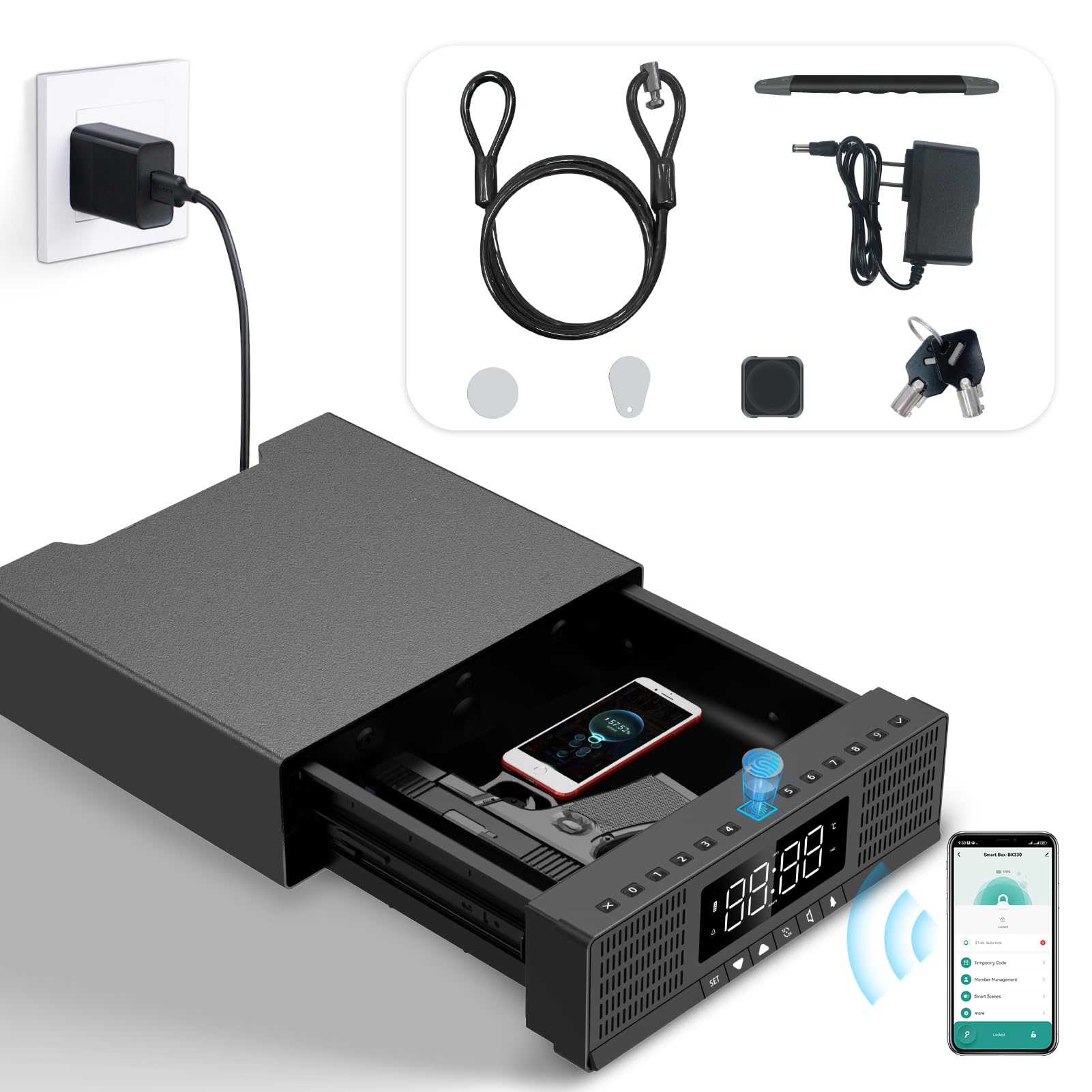
Image 1: KENRONE KR-BX3033 Fingerprint Biometric Drawer Safe.
2. Key Features
- Fingerprint Biometric Access: Ultra-fast and accurate fingerprint recognition, supporting up to 100 fingerprints.
- Multiple Unlocking Methods: Offers 5 ways to unlock: fingerprint, password, Tuya App, smart card, and mechanical key.
- Durable Construction: Made of sturdy carbon steel for enhanced protection.
- Spacious Interior: Designed to store two handguns or multiple valuable items. Internal dimensions: 10.39"D × 7.87"W × 2.83"H.
- Power Options: Can be powered by a 9V power adapter or 4 AAA batteries (not included).
- Smart App Integration: Tuya App allows checking usage records, remote unlocking (with gateway), and location tracking.
- Integrated Display: Features a digital display for time, date, temperature, and alarm settings.
- Silent Mode: Option to set the safe to silent mode for discreet access.
- Anti-theft Security: Includes a securing steel cable to prevent unauthorized removal.
3. Included Components
Please verify that all the following components are included in your package:
- Safe Box (1)
- Mechanical Key (2)
- 9V Power Adapter (1)
- Steel Cable (1)
- Smart Card (3)
- USB-C Power Cord (1)
- User Manual (1)

Image 2: Overview of included accessories.
4. Setup Instructions
4.1 Powering On
The safe can be powered in two ways:
- AAA Batteries: Insert 4 AAA batteries (not included) into the battery compartment located inside the safe drawer. The display will turn off automatically after 40 seconds of inactivity to conserve power.
- 9V Power Adapter: Connect the provided 9V power adapter to the designated port on the safe. This can be used as the primary power source or as an emergency power supply if the batteries are depleted.

Image 3: Safe powered by 4 AAA batteries.

Image 4: Safe connected to external power.
4.2 Initial Configuration (via Tuya App)
The full functionality of the safe, including setting up fingerprints and passcodes, requires the Tuya App. Download the Tuya App on your smartphone and follow the in-app instructions to connect to your safe. The app allows registration of up to 100 fingerprints and passcodes.

Image 5: Safe connected and managed via Tuya App.
5. Operating Instructions
5.1 Unlocking Methods
The KENRONE KR-BX3033 safe offers five distinct ways to unlock:
- Fingerprint: Place your registered finger on the biometric sensor. The safe will unlock rapidly upon successful recognition.
- Passcode: Enter your programmed numerical passcode using the keypad on the safe.
- Tuya App: Use the Tuya App on your smartphone to remotely unlock the safe. (Note: Remote unlocking requires a Tuya gateway, sold separately).
- Smart Card: Swipe a registered smart card over the designated sensor area to unlock.
- Mechanical Key: In case of power failure or forgotten codes, use one of the provided mechanical keys to manually unlock the safe. The keyhole is discreetly located.
Video 1: Demonstrates fingerprint quick entry and other unlocking methods for the safe.
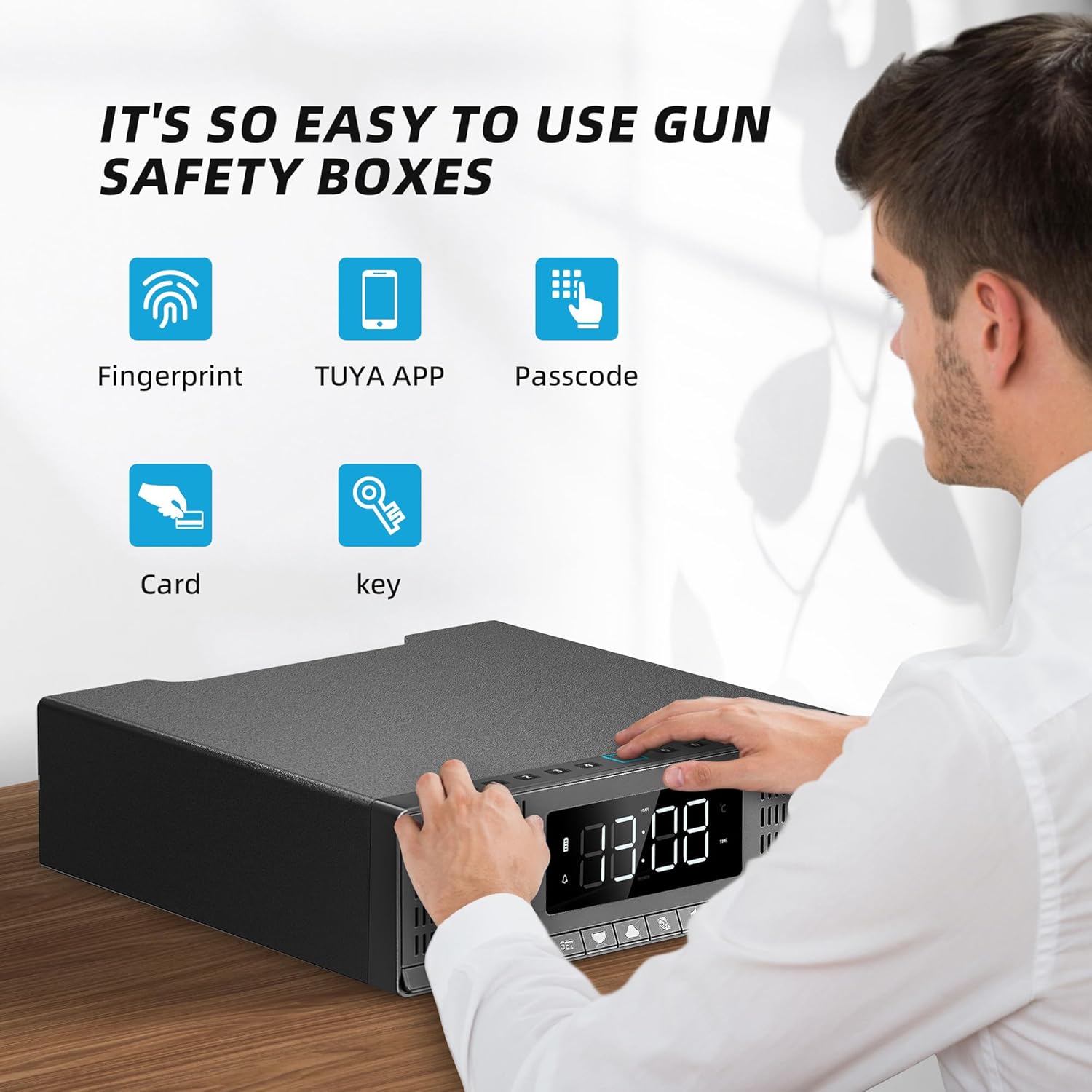
Image 6: Fingerprint sensor and keypad for access.
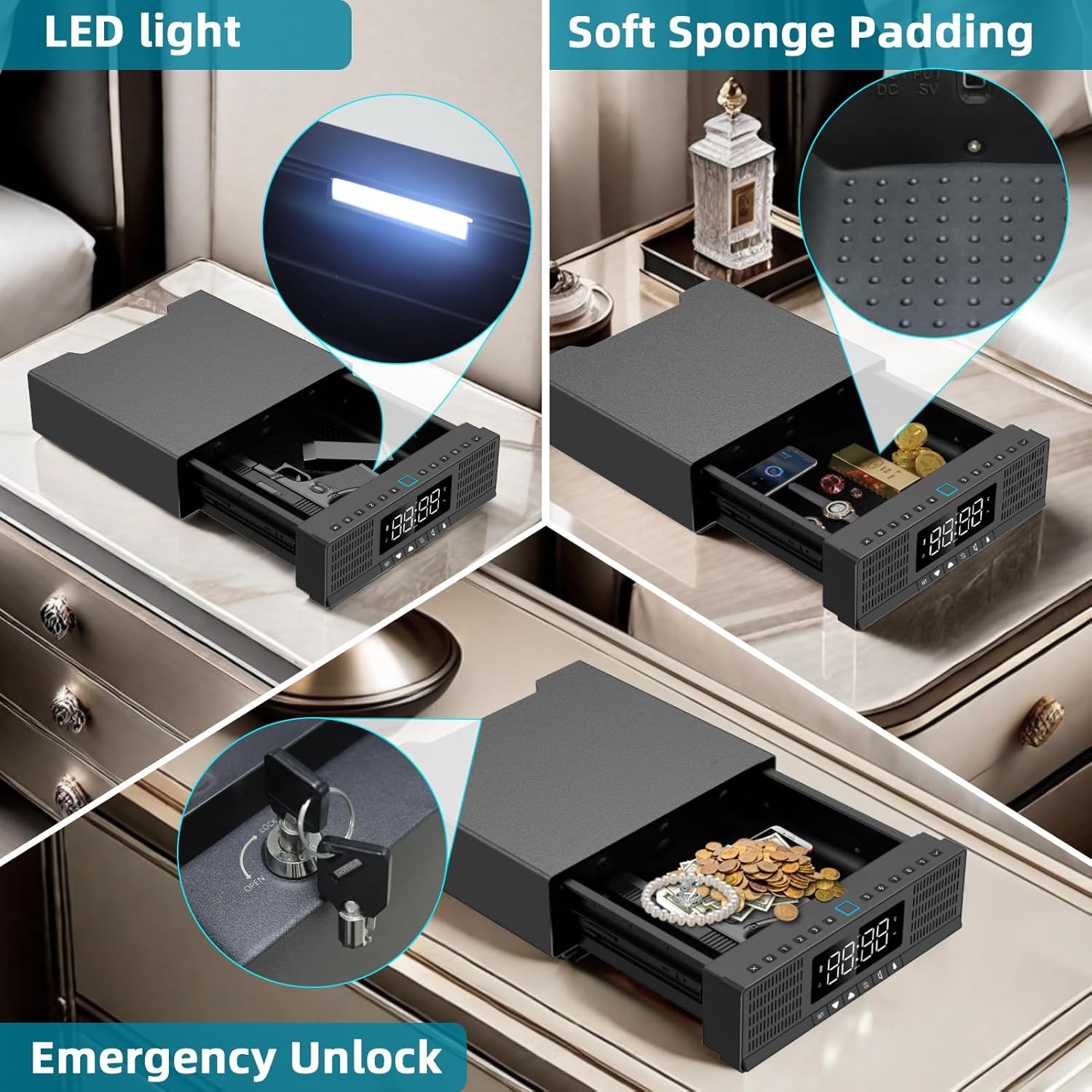
Image 7: Emergency key access point.
6. Advanced Features
6.1 Tuya App Functionality
Beyond unlocking, the Tuya App provides several advanced features:
- Usage Record: View a log of all access attempts, including successful and unsuccessful entries, with timestamps.
- Location Tracking: If the safe is moved or stolen, the app can help track its location.
- Remote Unlocking: With a separate Tuya gateway, you can unlock the safe remotely from anywhere.
- Alarm Clock & Time Display: The safe features an integrated alarm clock and time display, which can be set and managed via the app or directly on the unit.

Image 8: Remote unlocking via Tuya App (gateway required).
6.2 Digital Display Controls
The front panel features a digital display and control buttons for various functions:
- Time Display (12/24-hour format)
- Month & Day Cursor
- Year Cursor
- Hour & Minute Cursor
- Alarm Cursor & Setting Button
- Temperature Cursor
- Low Voltage Cursor
- Buzzer Enable/Disable Button
- Up/Down Buttons for settings
- SET Button for time setting
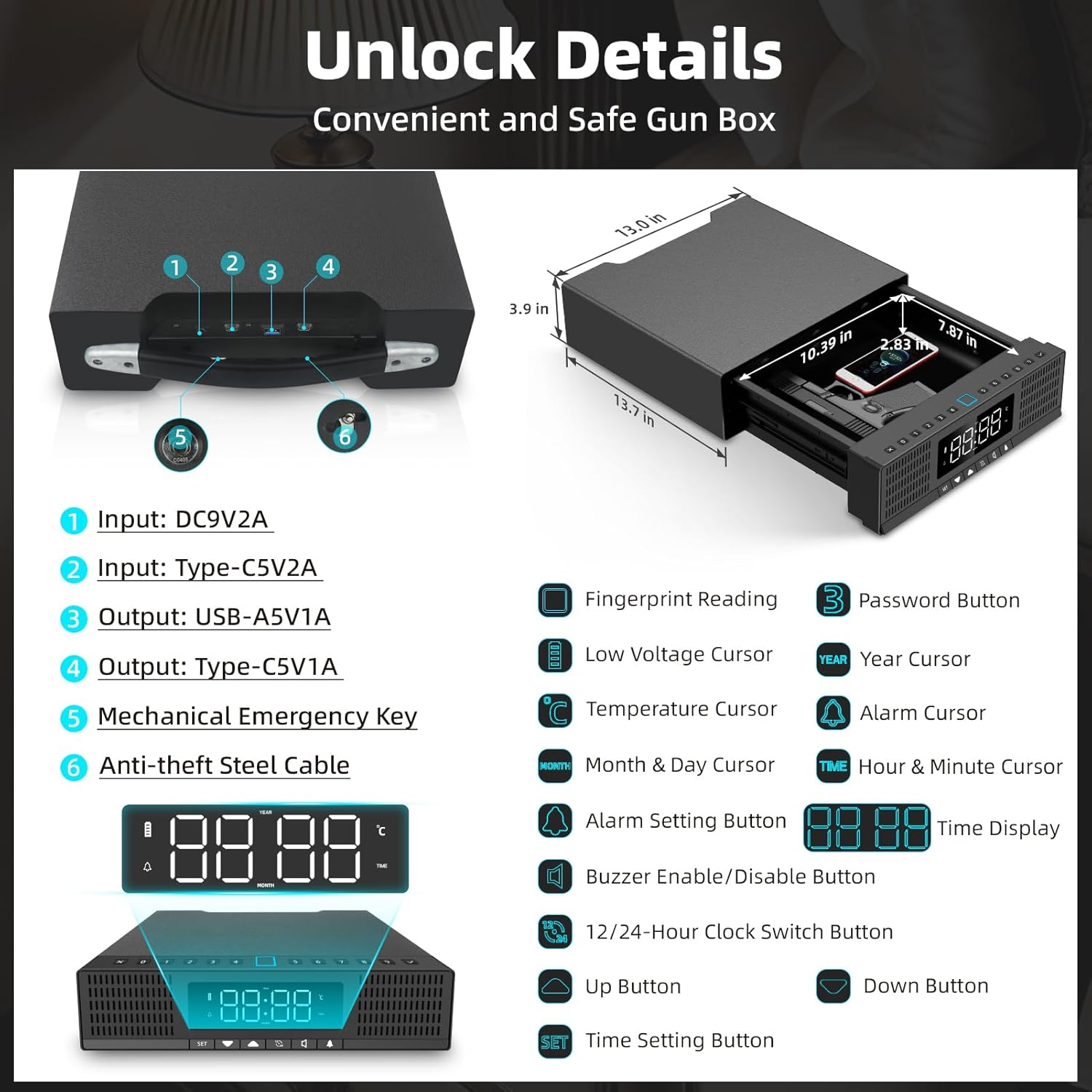
Image 9: Digital display controls and dimensions.
7. Safety and Placement
7.1 Secure Placement
The safe can be placed in various locations such as a drawer, desk, nightstand, or even in a car. For added security, utilize the provided steel cable to anchor the safe to a fixed object, preventing unauthorized removal.

Image 10: Safe placed on a nightstand.
Image 11: Safe secured with the anti-theft steel cable.
7.2 Temperature Considerations
The safe is designed to operate within a specific temperature range. Extreme temperatures (below 40°C or above 70°C) may affect its functionality. Ensure the safe is placed in an environment with stable temperatures to maintain optimal performance.
8. Maintenance
8.1 Battery Replacement
When the low voltage indicator appears on the digital display, it is time to replace the 4 AAA batteries. Ensure the safe is powered off or connected to the 9V adapter before replacing batteries.
8.2 Cleaning
Wipe the exterior of the safe with a soft, damp cloth. Avoid using abrasive cleaners or solvents that could damage the finish or electronic components.
9. Troubleshooting
- Safe not opening: Ensure batteries are charged or connect the 9V power adapter. Verify correct fingerprint placement or passcode entry. Use the mechanical key as an emergency override.
- App connectivity issues: Check your smartphone's Bluetooth and Wi-Fi connection. Ensure the safe is within range of your smartphone or Tuya gateway.
- Digital display not working: Check power source (batteries or adapter). If using batteries, ensure they are correctly inserted and charged.
- Alarm sounding unexpectedly: Check the app's log for unauthorized access attempts or review alarm settings on the safe's digital display.
10. Specifications
| Feature | Detail |
|---|---|
| Brand | KENRONE |
| Model Number | KR-BX3033 |
| Product Dimensions | 12.99"D x 12.99"W x 3.89"H |
| Internal Dimensions (Chamber) | 10.39"D x 7.87"W x 2.83"H |
| Item Weight | 19 Pounds |
| Material | Carbon steel + PC&ABS |
| Lock Type | Biometric Fingerprint, Electronic Combination Lock, Key and Card, Tuya App |
| Power Source | 9V Power Adapter, 4x AAA Batteries (not included) |
| Special Features | Fingerprint+Password+APP+Card+Key Unlocking, Silent Mode, Temperature/Humidity Display, Alarm Clock |
| Control Type | Biometric |
| Water Resistance Level | Not Water Resistant |
11. Warranty and Support
For warranty information and customer support, please refer to the contact details provided in your product packaging or visit the official KENRONE website. Keep your purchase receipt for warranty claims.


