
Introduction
Thank you for choosing the Zobirez 420W 10-Port USB C Fast Charger Station. This manual provides essential information for the safe and efficient operation of your new charging station. Please read it thoroughly before use and retain it for future reference.
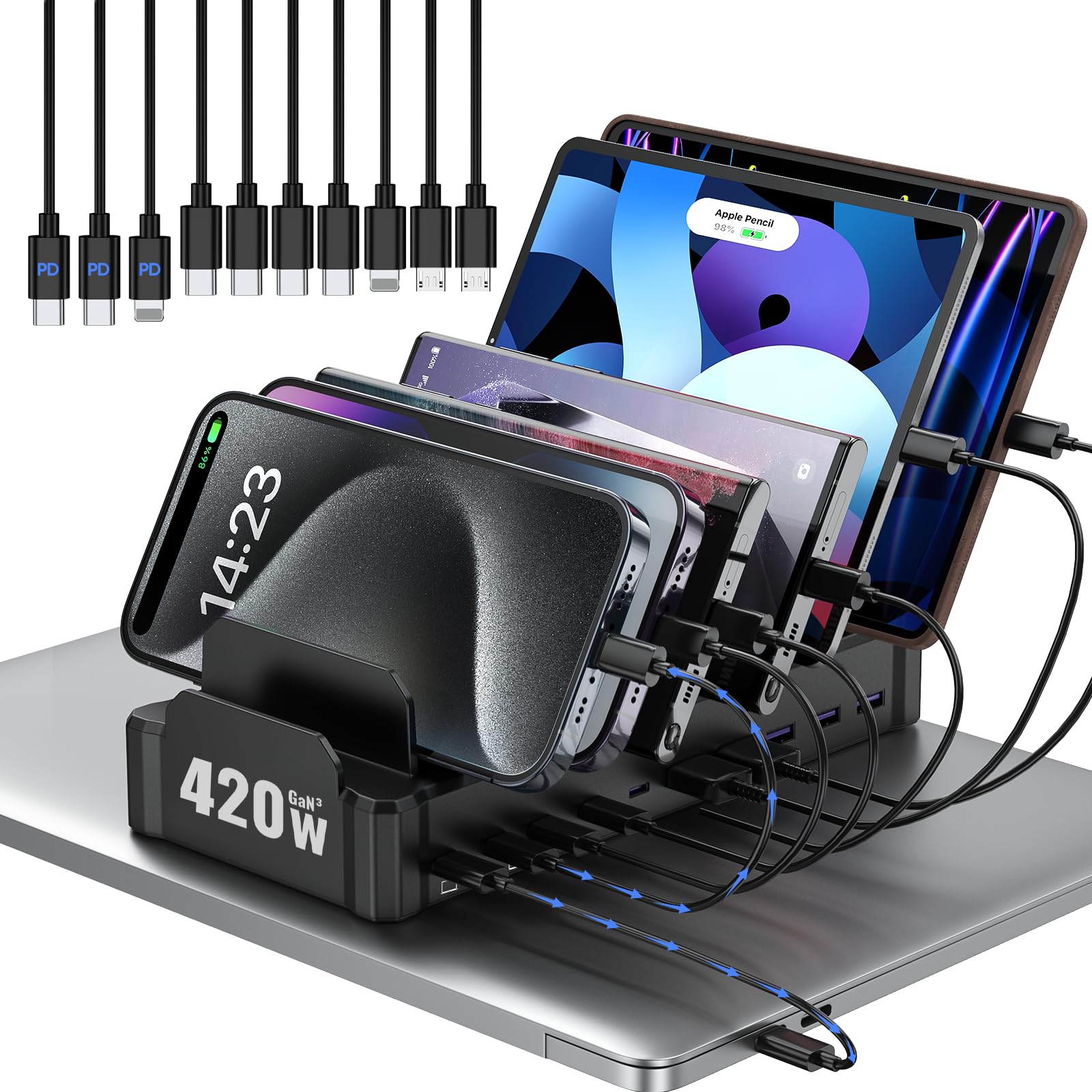
Image: Zobirez 420W 10-Port USB C Fast Charger Station, showcasing its compact design and multiple slots.
Package Contents
Upon unboxing, please ensure all items listed below are present:
- 1 x Zobirez Charging Station (Model M10)
- 1 x Power Cord
- 10-Pack of Short Mixed Charging Cables:
- 2 x iPhone & iPad (Lightning) cables
- 2 x USB-C to USB-C cables
- 2 x USB-A to USB-C cables
- 4 x Micro USB cables

Image: A visual representation of the short mixed charging cables included with the station.
Setup Instructions
- Connect Power: Plug the provided power cord into the charging station's power input port, then connect the other end to a standard 110V AC wall outlet.
- Insert Cables: Select the appropriate short charging cables for your devices and plug them into the corresponding USB-C or USB-A ports on the back of the station.
- Organize Devices: Place your devices into the sturdy, one-piece slots. The station features two extra-wider and taller slots (1.57" wide, 1.77" high) in the middle, ideal for laptops or tablets with protective cases. Smaller slots are suitable for phones and other compact devices.
- Secure Placement: The Zobirez USB C charging station features 4 non-slip rubber pads on the bottom to protect your desktop and keep the station securely in place.
Video: A user demonstrating the setup of the charging station, including connecting cables and placing various devices. Note: This video features the white variant of the charging station.
Video: A user demonstrating how the charging station can accommodate multiple devices simultaneously, including tablets and phones. Note: This video features the white variant of the charging station.
Operating Instructions
The Zobirez 420W 10-Port USB C Fast Charger Station is designed for simple plug-and-play operation. Once connected to power and your devices, it will automatically begin charging.
- Simultaneous Charging: The station can store and charge up to 10 devices concurrently, eliminating the need for multiple wall chargers.
- Fast Charging: The top two USB-C ports (C1 and C2) deliver up to 65W each, suitable for fast charging laptops like MacBooks. Three additional USB-C ports provide 45W, and five USB-A ports offer 30W, perfect for iPhones, Galaxy S23/Ultra, headphones, Kindles, iWatches, Switches, and more.
- Intelligent Power Delivery: The station automatically adjusts power output to provide the optimal charging speed for each connected device.

Image: Various electronic devices, including phones and tablets, neatly organized and charging on the station.

Image: A laptop and several smartphones and tablets charging simultaneously on the Zobirez station, highlighting its 65W fast charging capability for laptops.
Video: A user demonstrating the charging of various devices, including a laptop, on the Zobirez station, emphasizing its multi-device capability.
Video: A user reviewing the 10-port charging station, highlighting its convenience and ability to charge multiple devices efficiently.
Safety Information
The Zobirez Charging Station is equipped with advanced protection features to ensure the safety of your devices and household:
- Flame Retardant: Constructed from high-quality, flame-retardant ABS material.
- Over-Current Protection: Prevents damage from excessive current flow.
- Over-Voltage Protection: Safeguards against voltage spikes.
- Overcharge Protection: Protects device batteries from overcharging.
- Overload Protection: Prevents damage from exceeding the station's power capacity.
- Overheat Protection: Monitors temperature to prevent overheating.
- Short Circuit Protection: Automatically cuts power in case of a short circuit.

Image: Graphic illustrating key safety features including integrated separator, reliable cable, high-quality flame-retardant ABS, and device-friendly design.

Image: Visual representation of superior charging safety features such as over-temperature, short-circuit, flame retardant ABS, battery, over-charging, and over-voltage protection.
Specifications
| Brand | Zobirez |
| Model Number | M10 |
| Item Weight | 1.55 pounds |
| Product Dimensions | 1.77 x 1.57 x 1.77 inches |
| Color | Black |
| Manufacturer | Shenzhen Kuanbang Technology Co., Ltd |
| Total USB Ports | 10 |
| Wattage | 420W |
| Input Voltage | 110 Volts (AC) |
| Compatible Devices | MacBook Pro 14'', MacBook Pro 13'', MacBook Pro, MacBook Air; iPhone 17, 17Plus, 17Pro, 17Pro Max, 16, 16Plus, 16Pro, 16Pro Max, 15, 15Plus, 15Pro, 15Pro Max, 14, 14Plus, 14Pro, 14Pro Max, iPhone 13, iPhone 13 Pro, iPhone 13 Pro Max, iPhone 13 mini, iPhone SE, iPhone 12, iPhone 12 Pro Max, iPhone 12 Pro, iPhone 12 mini, iPhone 11, iPhone 11 Pro Max, iPhone 11 Pro, iPhone XR, iPhone XS, iPhone XS Max, iPhone X, iPhone 8, iPhone 8 Plus, iPhone 7, iPhone 7 Plus, iPhone 6, iPhone 6 Plus, iPhone 6s, iPhone 6s Plus; iPad Pro 12.9"/11"/10.5"/9.7", iPad Air 1/2/3/4, iPad mini 1/2/3/4/5, iPad 5/6/7/8/9; Samsung Galaxy S22, S21 Ultra, S21, S20 Ultra, S20, S20 FE, S10, S10e, S9, S8, Samsung Note 21, Note 20, Note 10, Note 9, Note 8, Note 7; Xiaomi Note 10, Note 9, Mi 9, Mi 9T, Mi 8, Mi 8 SE, Mi 8 Pro, Mi 8 Lite, Mi6, Mix, Mix 2 , Mix 2S, Mix 3; Redmi Note 10; Google Pixel, Google Nexus, LG, Sony Xperia, HTC One, Smartphones, Headphones, Tablet. |
Maintenance
To ensure the longevity and optimal performance of your Zobirez Charging Station, follow these simple maintenance guidelines:
- Cleaning: Disconnect the power cord before cleaning. Use a soft, dry cloth to wipe the exterior of the station. Avoid using liquid cleaners or abrasive materials.
- Storage: When not in use for extended periods, store the charging station in a cool, dry place away from direct sunlight and extreme temperatures.
- Cable Care: Avoid bending or twisting the charging cables excessively to prevent damage. Replace any frayed or damaged cables immediately.
Troubleshooting
If you encounter any issues with your Zobirez Charging Station, please refer to the following common troubleshooting steps:
- Device Not Charging: Ensure the power cord is securely plugged into both the station and the wall outlet. Verify that the charging cable is properly connected to both the station and your device. Try a different port or cable to rule out a faulty connection.
- Slow Charging: Check if your device supports fast charging and if you are using a compatible port (e.g., 65W USB-C ports for laptops). Ensure the total wattage of all connected devices does not exceed the station's maximum output.
- Overheating: If the station feels excessively hot, disconnect all devices and the power cord immediately. Allow it to cool down in a well-ventilated area. Ensure proper airflow around the station and avoid placing it in enclosed spaces.
If the problem persists after attempting these steps, please contact customer support for further assistance.
Warranty and Support
Zobirez is committed to providing high-quality products and excellent customer service. Your charging station comes with:
- Friendly customer service.
- Option for charging cable replacement for a better experience.
- 30-day free trial.
- 90-day return/exchange policy.
For any after-sales issues or inquiries, please contact Zobirez customer service. You can typically find contact information on the product packaging or through the retailer where you purchased the item.

Image: Graphic detailing customer support options including 12-hour immediate shipping, 24-hour support, 30-day free trial, and 90-day return/exchange.