
1. Introduction
This manual provides essential information for the safe and efficient operation of your OUBOTEK 2000W Pure Sine Wave Inverter. This device converts 24V DC battery power into 120V AC household power, suitable for various applications including trucks, boats, camping, outdoor activities, and solar systems. Please read this manual thoroughly before installation and use.
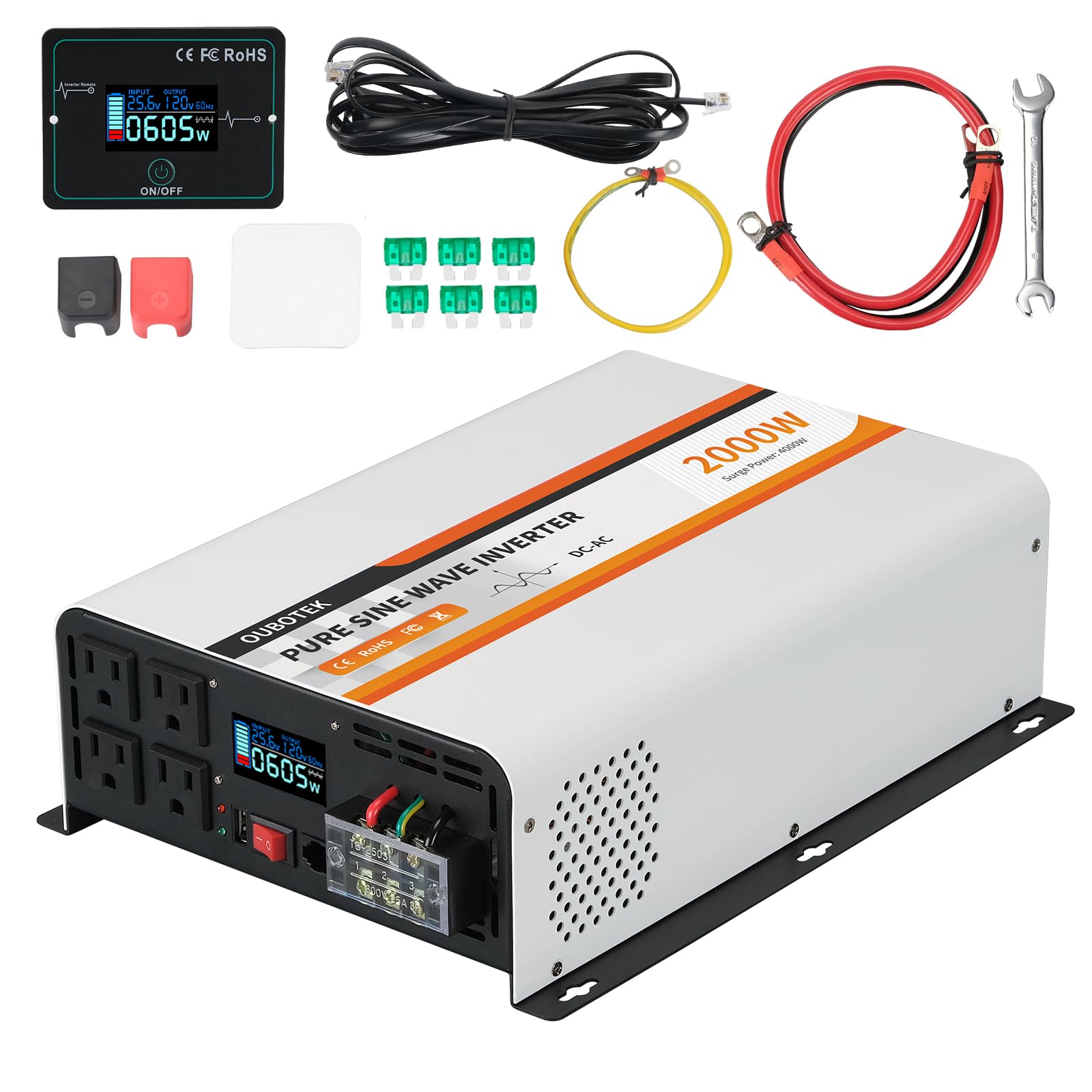
Figure 1: OUBOTEK 2000W Pure Sine Wave Inverter
2. Safety Instructions
Always observe the following safety precautions to prevent injury or damage to the inverter and connected devices:
- Ensure proper ventilation around the inverter to prevent overheating.
- Do not expose the inverter to water, rain, or excessive moisture.
- Avoid operating the inverter near flammable materials or in explosive atmospheres.
- Connect the inverter only to a 24V DC power source. Incorrect voltage can cause damage.
- Always connect the battery cables with correct polarity (red to positive, black to negative).
- Do not overload the inverter. The continuous power output is 2000W, with a peak power of 4000W.
- Disconnect the inverter from the battery before performing any maintenance or cleaning.
- Keep children away from the inverter and its connections.

Figure 2: Inverter's Multiple Protection Functions
The inverter features multiple protection functions including low/high voltage, overload, short circuit, and over temperature protection to ensure device safety.
3. Package Contents
Verify that all items are present in the package:
- 1x OUBOTEK 2000W Pure Sine Wave Inverter
- 1x Wired Remote Control with 9.8 ft (3 m) cable
- 1x 1.64 ft 8AWG Battery Cables (Red & Black)
- 6x 30A Spare Fuses
- 1x Wrench
- 1x Adhesive Pad for Remote Controller
- 1x User Manual

Figure 3: Inverter and Included Accessories
4. Product Features
- Powerful 2000W Pure Sine Wave Output: Provides 2000W continuous and 4000W peak power, converting 24V DC to 120V AC. Delivers clean, efficient power suitable for sensitive electronics.
- Wired Remote Control: Includes a wired remote with a 9.8 ft (3 m) cable and external display for convenient control and monitoring without needing to access the inverter directly.
- Professional LCD Display: The integrated LCD shows real-time data such as battery voltage, output voltage, frequency, output waveform, loading appliance power, and protection code indications.
- Advanced Safety Protection: Features comprehensive protection against low/high voltage, overload, short circuit, and over temperature.
- Versatile Application: Equipped with 4 AC outlets (15A each), 1 AC terminal block (25A), and 1 USB port, making it suitable for powering a wide range of appliances.
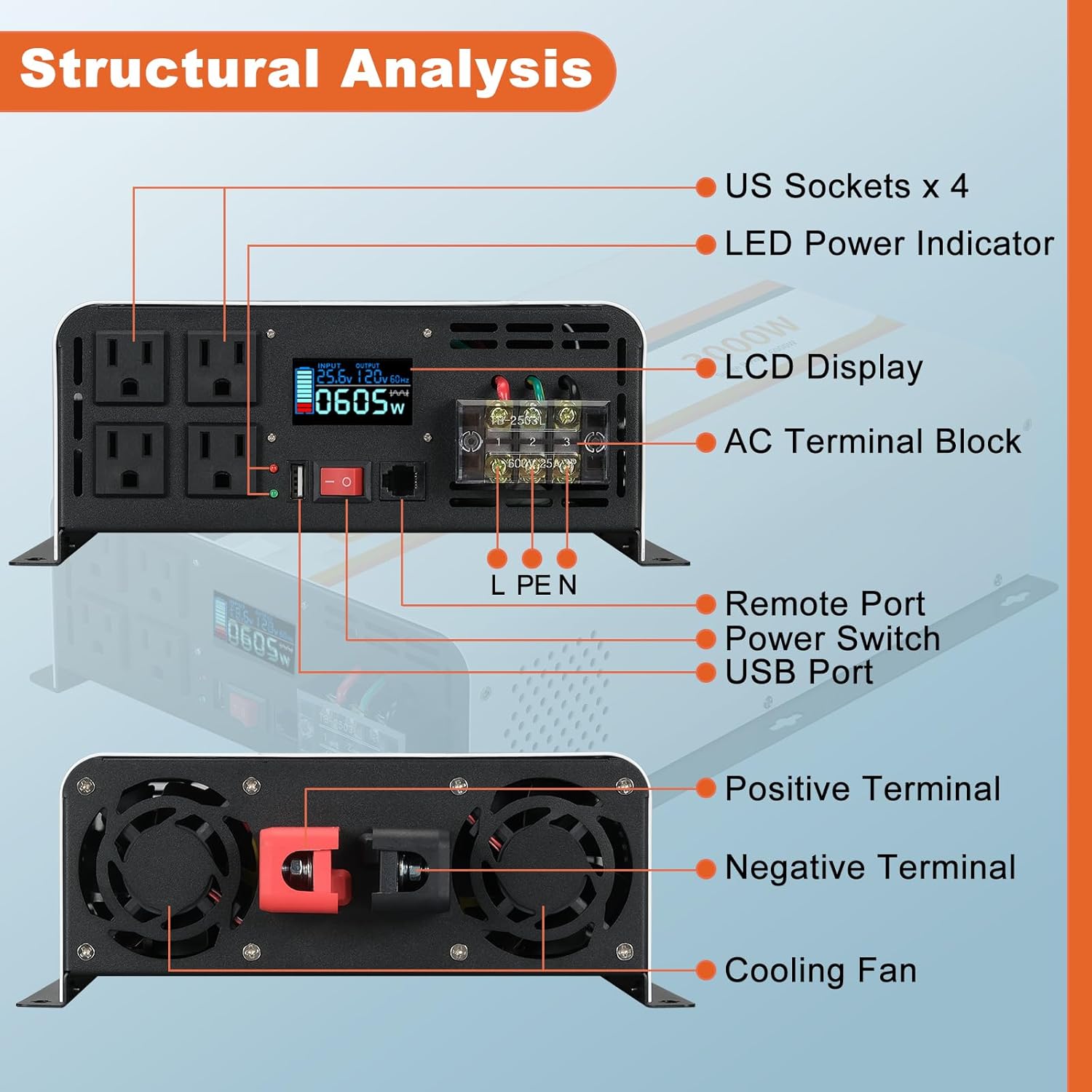
Figure 4: Inverter Structural Analysis (Front and Rear Views)
5. Setup
5.1 Connecting to a 24V DC Battery
- Ensure the inverter is turned off before making any connections.
- Unscrew the terminal nuts on the inverter's DC input terminals (red for positive, black for negative).
- Connect the red battery cable to the positive (+) terminal of the 24V battery and the red terminal of the inverter.
- Connect the black battery cable to the negative (-) terminal of the 24V battery and the black terminal of the inverter.
- Tighten the terminal nuts securely. Ensure connections are firm to prevent arcing or overheating.
5.2 Connecting the Wired Remote Control
Plug one end of the provided remote control cable into the 'Remote' port on the inverter and the other end into the remote control unit. The remote control allows for convenient power management and monitoring.

Figure 5: Wired Remote Controller Connection
6. Operating Instructions
6.1 Powering On/Off
After connecting the inverter to the battery, press the red ON/OFF switch on the inverter's front panel or the ON/OFF button on the wired remote control to power on the unit. The 'Power' indicator (green LED) will illuminate, and the LCD display will activate.
6.2 Understanding the LCD Display
The professional LCD display provides real-time operational status:
- Battery Voltage: Shows the current DC input voltage from the battery.
- Output Voltage: Displays the AC output voltage (120V).
- Frequency: Indicates the AC output frequency (60Hz).
- Output Waveform: Confirms pure sine wave output.
- Loading Appliance Power: Shows the current power consumption of connected devices in watts.
- Protection Code Indication: Displays error codes if a protection feature is activated (e.g., OV for over voltage, OL for overload).
6.3 Connecting AC Appliances
Plug your 120V AC appliances into the 4 AC outlets or connect to the AC terminal block. Ensure the total wattage of all connected appliances does not exceed the inverter's continuous power rating of 2000W. For appliances with high startup current (e.g., motors, refrigerators), consider their surge power requirements, which should not exceed 4000W.
6.4 Using the USB Port
The inverter includes a USB port for charging compatible devices. Connect your USB device to the port for charging.
Video 1: OUBOTEK 24V 2000 Watts Pure Sine Wave Inverter in operation, demonstrating its features and capabilities.
7. Maintenance
7.1 General Care
- Keep the inverter clean and free from dust and debris. Use a dry cloth for cleaning.
- Ensure ventilation openings are not blocked.
- Regularly check battery connections for tightness and corrosion.
7.2 Fuse Replacement
The inverter is equipped with internal fuses for protection. If the inverter stops functioning and the 'Fault' indicator is lit, it may indicate a blown fuse. Refer to the included spare 30A fuses for replacement. Consult a qualified technician if you are unsure about replacing fuses.
8. Troubleshooting
If the inverter is not operating correctly, refer to the LCD display for protection codes and consider the following:
- No Power Output: Check battery connections, ensure the inverter is switched on, and verify battery voltage is within the operating range (24V).
- Overload Indication: Reduce the total wattage of connected appliances. Disconnect some devices and restart the inverter.
- Low/High Voltage Protection: Check the battery voltage. Recharge or replace the battery if voltage is too low, or disconnect if too high.
- Over Temperature Protection: Ensure adequate ventilation. Allow the inverter to cool down. Reduce load if operating in high ambient temperatures.
- Short Circuit Protection: Disconnect all appliances and check for any short circuits in the wiring or appliances.
If issues persist, contact customer support.
9. Specifications
| Feature | Specification |
|---|---|
| Model Name | TP2000W |
| Wattage | 2000 watts (Continuous), 4000 watts (Peak) |
| Input Voltage | 24V DC |
| Output Voltage | 120V AC |
| Output Waveform | Pure Sine Wave |
| Product Dimensions | 14.37 x 9.72 x 3.74 inches |
| Item Weight | 9.65 pounds |
| Manufacturer | OUBOTEK |

Figure 6: Product Dimensions

Figure 7: Versatile Applications of the Inverter
10. Warranty and Support
For warranty information, technical support, or service inquiries, please refer to the contact details provided with your purchase documentation or visit the official OUBOTEK website. Keep your purchase receipt as proof of purchase for warranty claims.


